
Formovie X5
دليل مستخدم جهاز عرض التلفزيون الليزري Formovie X5 4K
Model: X5 | Brand: Formovie
مقدمة
The Formovie X5 4K Laser TV Projector is a portable mini smart projector designed to deliver a cinematic experience in your home. Featuring ALDP Laser Display Technology, 2450 lumens brightness, and built-in Denon speakers, it offers stunning 4K resolution and immersive audio. This manual provides essential information for setting up, operating, and maintaining your projector.
المنتج انتهىview
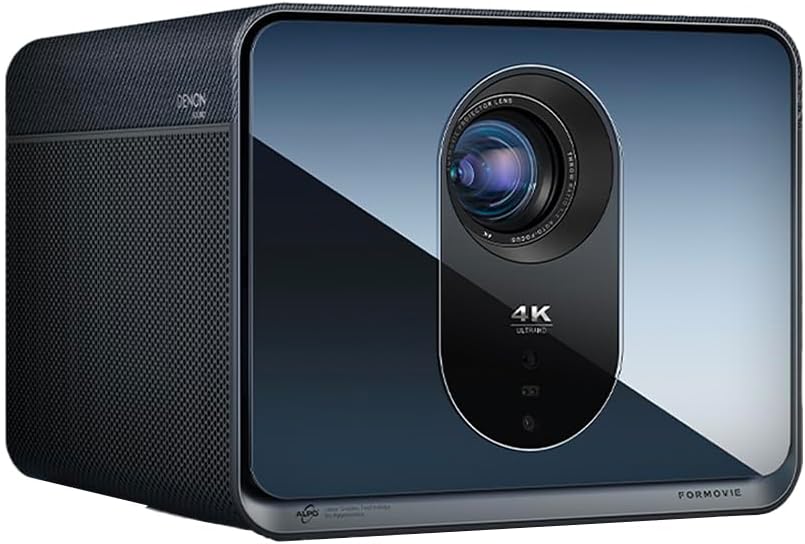
أمام view of the Formovie X5 projector, showcasinبفضل تصميمه الأنيق وعدسته البارزة.
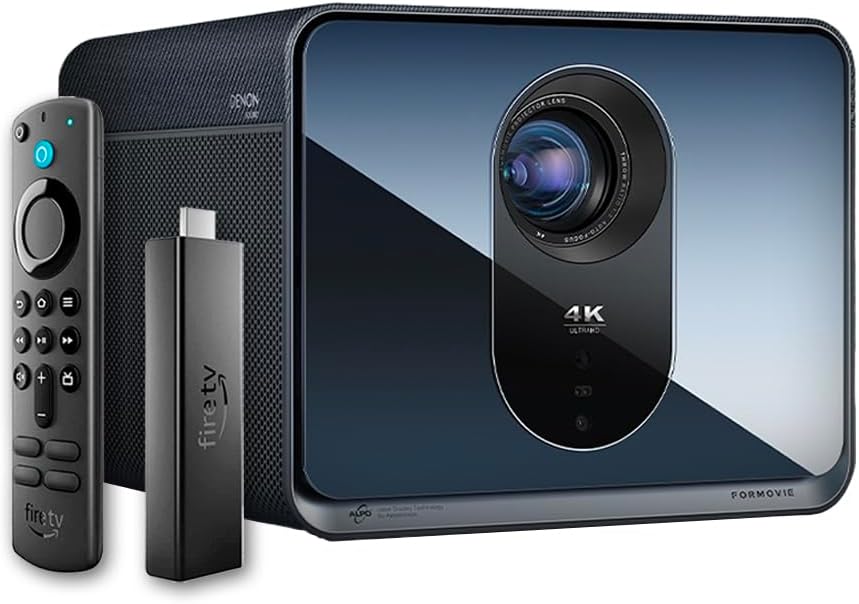
The Formovie X5 projector shown alongside its included Amazon Fire TV Stick 4K Max and remote control.

مؤخرة view of the Formovie X5 projector, displaying various connectivity ports including LAN, USB, HDMI, and S/PDIF.
دليل الإعداد
1. فك الصندوق ووضعه في مكانه
- قم بإزالة جهاز العرض وجميع الملحقات من العبوة بعناية.
- Place the projector on a stable, flat surface. Ensure adequate ventilation around the unit.
- Position the projector directly in front of your desired projection surface (wall or screen) for optimal image geometry. While the projector has auto-correction, a direct alignment is recommended for the best experience.
2. توصيل الطاقة
- قم بتوصيل محول الطاقة بمنفذ إدخال الطاقة الخاص بالجهاز العرض.
- قم بتوصيل محول الطاقة بمأخذ كهربائي مناسب.
3. Initial Power On and Auto-Focus
- اضغط على زر الطاقة الموجود على جهاز العرض أو جهاز التحكم عن بعد لتشغيل الجهاز.
- The projector will automatically initiate its auto-focus and omnidirectional auto-correction features. Allow a few moments for the image to stabilize and sharpen.
4. Connecting the Fire TV Stick 4K Max
- Insert the Amazon Fire TV Stick 4K Max into an available HDMI port on the projector.
- Connect the Fire TV Stick to its power source.
- Select the corresponding HDMI input on the projector's menu.
تعليمات التشغيل
وظائف التحكم عن بعد
The included remote control allows full navigation and control of the projector and the connected Fire TV Stick.
- زر الطاقة: يقوم بتشغيل/إيقاف تشغيل جهاز العرض.
- لوحة التنقل: يتم استخدامه للتنقل بين القوائم وتحديد الخيارات.
- زر الرجوع: العودة إلى الشاشة السابقة.
- زر الصفحة الرئيسة: يعود إلى القائمة الرئيسية.
- أزرار التحكم في الصوت: ضبط مستوى الصوت.
- زر التحكم الصوتي: Activates voice commands for the Fire TV Stick.
ضبط إعدادات الصورة
The Formovie X5 features advanced automatic adjustment tools. For manual adjustments:
- التركيز اليدوي: If auto-focus is not satisfactory, access the projector settings to manually adjust focus.
- تصحيح الانحراف: While omnidirectional auto-correction is standard, manual keystone adjustment is available in the settings for fine-tuning image shape.
- التكيف مع الإضاءة المحيطة: The projector automatically adjusts brightness based on ambient light conditions. This can be toggled or fine-tuned in the display settings.
الميزات الرئيسية
- 4K ALDP Laser Display Technology: Experience breathtaking visuals with true 4K resolution and a wide color gamut, ensuring crystal-clear and vibrant images.
- Cinema-Like Projection Size: Project images from 60 inches up to a massive 1,000 inches, providing an immersive viewing experience for movies, sports, and gaming.
- Powerful Adjustment Tools: Equipped with omnidirectional auto-correction, ambient light adaptive technology, laser autofocus, and automatic curtain alignment for hassle-free setup and optimal picture quality.
- Built-In Three-Way Denon Speakers: The X5 is the first projector to feature integrated three-way speakers powered by Denon, delivering rich, immersive audio without the need for external sound systems.
- Integrated Amazon Fire TV: Stream directly from your favorite apps like Netflix, Prime Video, Disney+, and more, with the convenience of the included Fire TV Stick 4K Max.
صيانة
- تنظيف العدسات: امسح عدسة جهاز العرض برفق بقطعة قماش ناعمة وخالية من الوبر، مُخصصة للأسطح البصرية. لا تستخدم منظفات كاشطة أو قوة مفرطة.
- تهوية: Ensure the projector's ventilation ports are clear of dust and obstructions to prevent overheating. Regularly clean the vents with a soft brush or compressed air.
- تخزين: عند عدم استخدام جهاز العرض لفترات طويلة، قم بتخزينه في مكان بارد وجاف، بعيدًا عن أشعة الشمس المباشرة ودرجات الحرارة القصوى.
استكشاف الأخطاء وإصلاحها
| مشكلة | السبب المحتمل | حل |
|---|---|---|
| لم يتم عرض أي صورة | Power cable disconnected, incorrect input source, projector in standby mode. | Check power connection, select correct HDMI input, press power button to wake. |
| الصورة ضبابية | Out of focus, lens dirty. | Allow auto-focus to complete or manually adjust focus. Clean the lens. |
| الصورة مشوهة (شكل شبه منحرف) | Projector not perpendicular to screen, auto-correction issue. | Reposition projector directly in front of the screen. Use manual keystone correction if needed. |
| لا يوجد صوت | Volume too low, mute activated, external audio device not connected properly. | Increase volume, check mute status, ensure external audio (if used) is correctly connected. |
| تحذير من ارتفاع درجة الحرارة | انسداد التهوية، والاستخدام المطول في بيئة حارة. | Ensure vents are clear. Turn off projector and allow it to cool down. Operate in a well-ventilated area. |
تحديد
| ميزة | التفاصيل |
|---|---|
| ماركة | فورموفي |
| رقم الموديل | X5 |
| دقة العرض | 3840 × 2160 (4K) |
| تكنولوجيا مصدر الضوء | ALDP Laser |
| السطوع (لومن ANSI) | 2450 لومن |
| تكنولوجيا الاتصال | HDMI، USB، LAN |
| المميزات الخاصة | Portable, Omnidirectional Auto-Correction, Ambient Light Adaptive, Laser Autofocus, Automatic Curtain Alignment, Built-In Denon Three-Way Speakers, Integrated Amazon Fire TV |
| وزن العنصر | 15.14 رطل |
| أبعاد المنتج | 8.27 × 8.54 × 6.57 بوصة |
الضمان والدعم
For warranty information, please refer to the documentation included with your product or visit the official Formovie website. For technical support, troubleshooting assistance, or to access additional resources, please contact Formovie customer service.
- دليل المستخدم (PDF): تحميل
- دليل المستخدم (PDF): تحميل
- Visit the Formovie Store: Formovie Store
Ask a question about this manual
Ask about setup, troubleshooting, compatibility, parts, safety, or missing instructions. Manuals+ will review the question and use this page’s manual context to help answer it.