
1. المقدمة
This manual provides comprehensive instructions for the installation, operation, and maintenance of your Raymarine Axiom 2 Pro 16 RVM Chartplotter/Fishfinder. The Axiom 2 Pro series offers enhanced performance with an ultra-fast 6-core processor, HybridTouch control, and advanced RealVision MAX sonar capabilities. Its HydroTough display ensures reliable operation in challenging marine environments. This device integrates seamlessly with other marine electronics through the LightHouse 4 operating system.
يرجى قراءة هذا الدليل جيداً قبل استخدام المنتج لضمان التشغيل الآمن والفعال.
2. معلومات السلامة
تعليمات السلامة الهامة:
- Always ensure proper installation by qualified personnel to prevent damage or injury.
- افصل الطاقة قبل القيام بأي إجراءات صيانة أو تركيب.
- Do not expose the unit to extreme temperatures or direct sunlight for prolonged periods when not in use.
- Use only Raymarine approved accessories and parts.
- Observe all local and international maritime regulations when operating this device.
3. محتويات العبوة
تأكد من وجود جميع العناصر المدرجة أدناه في عبوة المنتج الخاص بك:
- 1 x Raymarine Axiom 2 Pro 16 RVM Monitor
- أدوات التثبيت (براغي، حشيات، إلخ).
- كابل الطاقة
- Documentation Pack (including this manual)
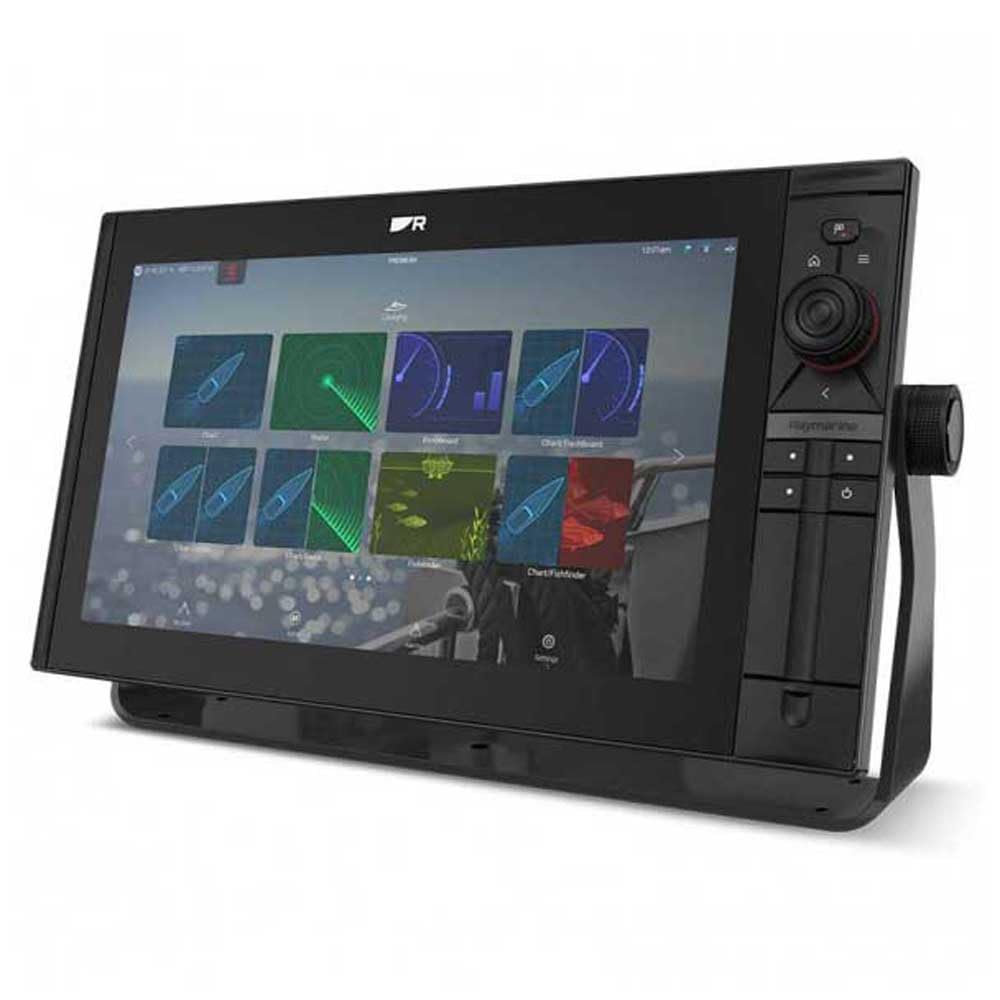
Image 1: Raymarine Axiom 2 Pro 16 RVM Chartplotter/Fishfinder unit. This image shows the main display unit, which is the primary component of the package.
4. الإعداد والتثبيت
The Axiom 2 Pro 16 RVM is designed for panel mount installation. Ensure you have adequate space and access for wiring before beginning.
4.1 تركيب الشاشة
- Choose a suitable location on your boat's dashboard or panel, ensuring clear visibility and access.
- Use the provided template (if applicable) to cut the mounting hole.
- Secure the display unit into the panel using the supplied mounting hardware.
عدد 4.2 توصيلات كهربائية
- Connect the power cable to a suitable 12V DC power source on your vessel. Ensure proper polarity.
- Connect any external sensors or transducers (sold separately) according to their respective manuals.
- For network integration, connect Ethernet cables to other compatible Raymarine devices.
- The unit supports HDMI connectivity for remote displays.
5. تعليمات التشغيل
5.1 تشغيل/إيقاف التشغيل
- Press and hold the Power button to turn the unit on or off.
- The automatic display brightness sensor adjusts screen illumination based on ambient light conditions.
5.2 HybridTouch Control
The Axiom 2 Pro features HybridTouch, allowing control via the fluid touchscreen or reliable keypad. Use the touchscreen for quick navigation and planning, and the keypad for precise control in rough seas. An interchangeable keypad field offers options for autopilot controls or user-programmable soft keys.
5.3 LightHouse 4 Operating System
Navigate seamlessly through chartplotter, sonar, radar, autopilot, and video functions using the intuitive LightHouse 4 OS. Customize your display with multiple Axiom displays and advanced video options, including HDMI output.
5.4 RealVision MAX Sonar
RealVision MAX optimizes DownVision, SideVision, and 3D sonar for greater range, improved resolution, and sharper target identification. This feature enhances fishfinding capabilities.
5.5 وظائف جهاز رسم المخططات
The unit supports Navionics/C-Map cartography. Plan and create your course directly on the display. Utilize GPS for accurate positioning and navigation.
6. الصيانة
6.1 تنظيف الشاشة
The HydroTough display features nanocoating technology that repels water, ensuring reliable touchscreen operation and vibrant colors. Clean the screen with a soft, damp القماش. لا تستخدم المنظفات أو المذيبات الكاشطة.
6.2 تحديثات البرامج
Periodically check the Raymarine webموقع لتحديثات البرامج لضمان الأداء الأمثل والوصول إلى الميزات الجديدة.
7. استكشاف الأخطاء وإصلاحها
| مشكلة | السبب المحتمل | حل |
|---|---|---|
| الوحدة لا تعمل بالطاقة. | انقطاع التيار الكهربائي؛ توصيلات كهربائية خاطئة؛ احتراق الفيوز. | Check power connections; verify fuse; ensure battery is charged. |
| No sonar data. | Transducer not connected; transducer faulty; incorrect settings. | Ensure transducer is properly connected; check transducer for damage; verify sonar settings. |
| شاشة اللمس لا تستجيب. | الشاشة متسخة؛ خلل مؤقت في البرنامج. | Clean screen with a soft cloth; restart the unit. |
8. المواصفات
| ميزة | التفاصيل |
|---|---|
| ماركة | راي مارين |
| اسم الموديل | Axiom 2 Pro |
| حجم الشاشة | 16 بوصة |
| نوع العرض | Touch Screen (HydroTough) |
| طريقة التحكم | Touchscreen, Keypad (HybridTouch) |
| ميزة خاصة | RealVision MAX |
| تكنولوجيا الاتصال | HDMI، إيثرنت |
| نوع الخريطة | Nautical (Navionics/C-Map) |
| نوع التركيب | لوحة جبل |
| نظام الملاحة عبر الأقمار الصناعية المدعوم | نظام تحديد المواقع العالمي (جي بي اس) |
| المكونات المضمنة | شنومكس x مراقبة |
| رمز المنتج الموحد | 723193843567 |
| ASIN | B0CFWVQBVC |
9. الضمان والدعم
For detailed warranty information, please refer to the warranty card included with your product or visit the official Raymarine website. Raymarine offers technical support and service for its products.
معلومات الاتصال:
- Visit the Raymarine official webموقع لموارد الدعم والأسئلة الشائعة ومعلومات الاتصال.
- For service inquiries, please contact your authorized Raymarine dealer.