
مقدمة
This manual provides detailed instructions for the installation, operation, and maintenance of your Cooler Master MasterLiquid Atmos 360 Black CPU Liquid Cooler. This all-in-one (AIO) water cooling system is designed to deliver efficient thermal performance for your CPU, featuring a dual-chamber pump, pre-installed SickleFlow 120 Edge fans, and Addressable Gen 2 RGB lighting.
The MasterLiquid Atmos 360 is compatible with a wide range of Intel LGA (1700/1200/1151/1150/1155/1156) and AMD (AM5/AM4) sockets.

Image: The Cooler Master MasterLiquid Atmos 360 Black CPU Liquid Cooler, showcasing its radiator, three RGB fans, and illuminated pump head.
محتويات الحزمة
قبل البدء بالتثبيت، يرجى التأكد من وجود جميع المكونات في العبوة:
- 360mm Radiator with pre-installed SickleFlow 120 Edge Fans
- CPU Water Block/Pump Unit
- Mounting Hardware for Intel LGA 1700/1200/115x sockets
- Mounting Hardware for AMD AM5/AM4 sockets
- المعجون الحراري
- ARGB Gen 2 Controller (if included)
- Various Cables (PWM fan cables, ARGB cables)
- دليل المستخدم

الصورة: شاملة view of all included components for the MasterLiquid Atmos 360, including the radiator, fans, pump, mounting brackets, and accessories.
الإعداد والتثبيت
Follow these steps carefully to install your liquid cooler. Refer to your motherboard and PC case manuals for specific guidance on component placement and cable routing.
1. تجهيز مقبس وحدة المعالجة المركزية
- Identify your CPU socket type (Intel LGA or AMD AM).
- Install the appropriate backplate (for Intel) or retention clips (for AMD) as per the included hardware guide.
- Clean the CPU surface with isopropyl alcohol to remove any residue.
2. ضع المعجون الحراري
- Apply a small, pea-sized amount of the included thermal paste to the center of your CPU's integrated heat spreader (IHS).
- Do not spread the paste manually; the pressure from the cold plate will distribute it evenly.
3. قم بتثبيت المبرد والمراوح
- Determine the optimal mounting location for the 360mm radiator in your PC case (typically top or front).
- Secure the radiator to the case using the provided screws. The SickleFlow Edge fans are pre-installed on the radiator for convenience.
4. تركيب المضخة/لوحة التبريد
- Attach the correct mounting brackets to the pump unit for your CPU socket.
- ضع مجموعة المضخة/اللوحة الباردة بعناية على وحدة المعالجة المركزية، مع محاذاة فتحات التثبيت.
- Secure the pump unit with the appropriate screws, tightening them in a diagonal pattern until snug. Do not overtighten.
5. قم بتوصيل الكابلات
- قم بتوصيل كابل الطاقة ذي الثلاثة دبابيس الخاص بالمضخة بموصل CPU_FAN أو AIO_PUMP المتاح على اللوحة الأم.
- Connect the PWM fan cables from the SickleFlow Edge fans to the CPU_FAN or other available fan headers on your motherboard. It is recommended to connect them to a single header using a splitter if necessary, to ensure synchronized fan speed control.
- Connect the ARGB cables from the pump and fans to an Addressable Gen 2 RGB header on your motherboard (5V-D-G) or to the included ARGB controller.

Image: The assembled MasterLiquid Atmos 360, showing the radiator, fans, and pump unit connected by tubing.
تعليمات التشغيل
التشغيل الأولي
After installation, power on your system. The pump and fans should begin operating. Monitor your CPU temperatures using system monitoring software to ensure proper function.
رغب التحكم في الإضاءة
The MasterLiquid Atmos 360 features Addressable Gen 2 RGB lighting on both the pump and fans. You can control the lighting effects through several methods:
- مزامنة اللوحة الأم: If connected to a compatible ARGB motherboard header, use your motherboard's RGB software (e.g., ASUS Aura Sync, MSI Mystic Light, Gigabyte RGB Fusion, ASRock Polychrome Sync) to customize lighting.
- وحدة تحكم ARGB المرفقة: If an ARGB controller is included, use its physical buttons to cycle through pre-set lighting modes and colors.
- Cooler Master MasterCTRL/MasterPlus Software: Download and install Cooler Master's MasterCTRL or MasterPlus software for advanced customization of lighting effects and device performance.
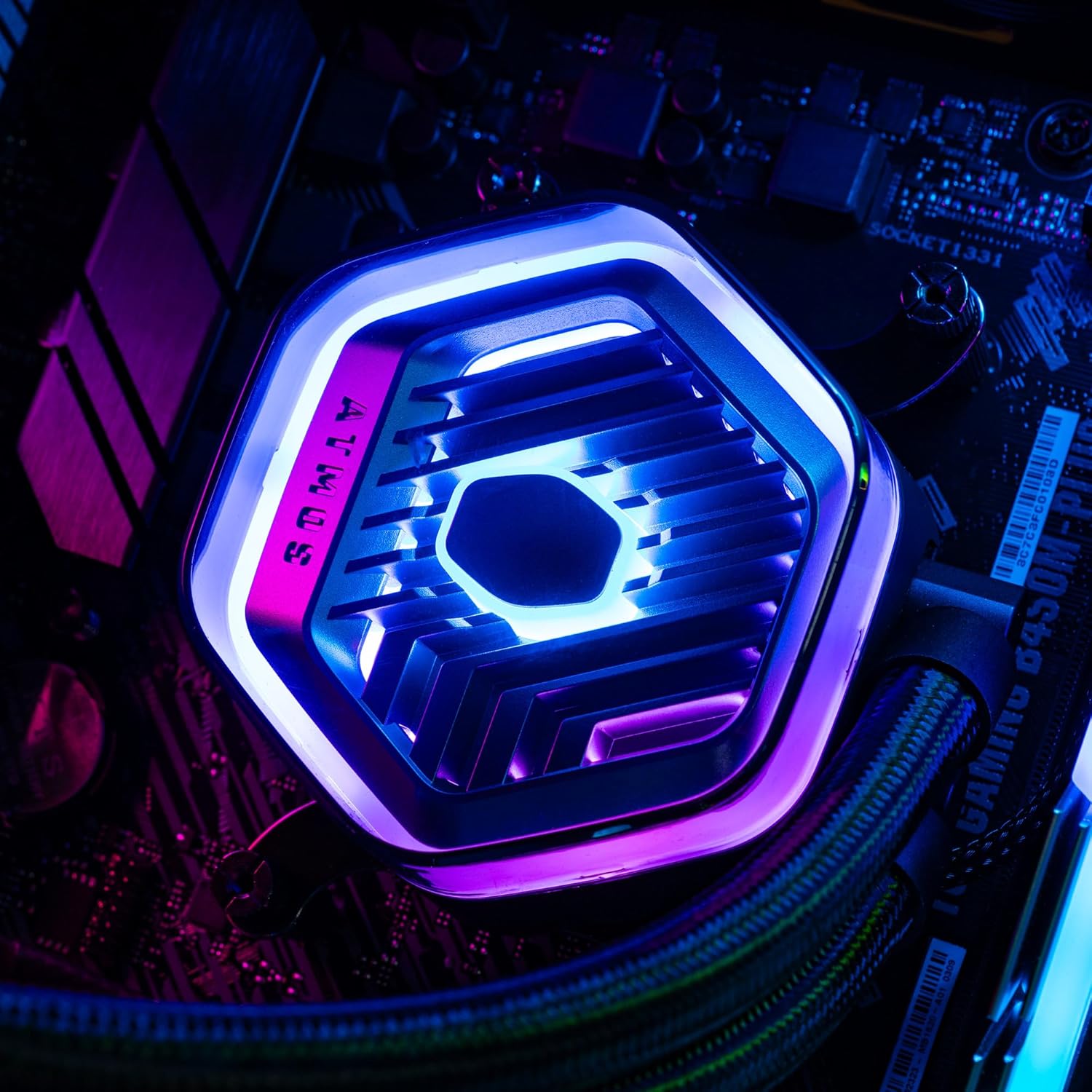
الصورة: تفصيلية view of the MasterLiquid Atmos pump head, showcasing its unique design and customizable RGB illumination.
التحكم في سرعة المروحة
The SickleFlow Edge fans are PWM (Pulse Width Modulation) controlled. Their speed can be managed via your motherboard's BIOS/UEFI settings or through motherboard-specific software. Adjust fan curves to balance cooling performance and noise levels according to your preferences.
صيانة
تساعد الصيانة الدورية على ضمان الأداء الأمثل وطول عمر مبرد السوائل الخاص بك.
- تنظيف الغبار: Periodically clean dust from the radiator fins and fan blades using compressed air or a soft brush. Ensure the system is powered off before cleaning.
- التفتيش البصري: Occasionally inspect the tubing and connections for any signs of leaks or damage. While AIO coolers are sealed systems, a quick visual check can prevent potential issues.
- تحديثات البرامج: Keep your Cooler Master MasterCTRL/MasterPlus software and motherboard BIOS/UEFI updated to ensure compatibility and access to the latest features and performance optimizations.
استكشاف الأخطاء وإصلاحها
If you encounter issues with your MasterLiquid Atmos 360, refer to the following common troubleshooting steps:
درجات حرارة وحدة المعالجة المركزية عالية
- التحقق من توصيل المضخة: Ensure the pump's power cable is securely connected to the correct motherboard header (CPU_FAN or AIO_PUMP) and receiving power.
- التحقق من تشغيل المروحة: Confirm that all radiator fans are spinning. Check their connections to the motherboard or fan controller.
- المعجون الحراري: Ensure thermal paste was applied correctly and the cold plate has good contact with the CPU. Re-apply if necessary.
- تدفق الهواء: Check your PC case's overall airflow. Ensure radiator fans are oriented correctly for intake or exhaust as desired.
إضاءة RGB لا تعمل
- اتصال ARGB: Verify that the ARGB cables are correctly connected to a 5V-D-G header on your motherboard or the ARGB controller. Ensure it is not connected to a 12V RGB header, which can damage the LEDs.
- برمجة: Check your motherboard's RGB software or Cooler Master's MasterCTRL/MasterPlus software for lighting settings. Ensure the lighting is enabled and configured.
- قوة وحدة التحكم: If using an external ARGB controller, ensure it is receiving power (usually via SATA power connector).
Unusual Pump Noise
- فقاعات الهواء: New AIOs may have some air bubbles that can cause gurgling noises initially. These usually dissipate within a few hours of operation. Gently tilt your PC case to help move air bubbles to the radiator.
- التركيب: تأكد من تثبيت المضخة بشكل آمن وعدم اهتزازها عند ملامستها للمكونات الأخرى.
If problems persist, please contact Cooler Master customer support.
تحديد
| ميزة | مواصفة |
|---|---|
| رقم الموديل | MLX-D36M-A25PZ-R1 |
| أبعاد المنتج (الطول × العرض × الارتفاع) | 15.51 بوصة × 4.71 بوصة × 1.07 بوصة (394 × 119.6 × 27.2 مم) |
| طريقة التبريد | سائل (متكامل) |
| الأجهزة المتوافقة | سطح المكتب، الخادم |
| المقابس المتوافقة | Intel LGA 1700/1200/1151/1150/1155/1156, AMD AM5/AM4 |
| مستوى الضوضاء | 27.2 ديسيبل (مروحة) |
| Maximum Rotational Speed (Fan) | 2500 دورة في الدقيقة |
| Air Flow Capacity (Fan) | 70.7 قدم مكعب في الدقيقة |
| مادة | الألومنيوم (المبرد) |
| نوع موصل الطاقة | 3-Pin (مضخة)، 4-Pin PWM (مراوح) |
| المجلدtage | 12 فولت |
| واتtage | 3.6 واط |
| وزن العنصر | 1.42 كيلوغرام |
معلومات الضمان
The Cooler Master MasterLiquid Atmos 360 Black CPU Liquid Cooler comes with a ضمان لمدة سنتين من تاريخ الشراء. يغطي هذا الضمان عيوب المواد والصناعة في ظل الاستخدام العادي.
For warranty claims or detailed terms and conditions, please retain your proof of purchase and visit the official Cooler Master webالموقع أو الاتصال بخدمة دعم العملاء الخاصة بهم.
يدعم
For further assistance, technical support, or to download the latest software and drivers, please visit the official Cooler Master webموقع:
You may also find helpful resources, FAQs, and community forums on their support pages.