
DinoFire X17
DinoFire Rechargeable Presentation Clicker X17 User Manual
نموذج: X17
مقدمة
Thank you for choosing the DinoFire Rechargeable Presentation Clicker, Model X17. This device is designed to enhance your presentations with its wireless control, integrated laser pointer, and user-friendly features. This manual provides detailed instructions for setup, operation, maintenance, and troubleshooting to ensure optimal performance.
محتويات الحزمة
يرجى التأكد من وجود جميع العناصر في الحزمة الخاصة بك:
- DinoFire Rechargeable Presentation Clicker (X17)
- USB Receiver (stored inside the clicker)
- كابل شحن ميكرو يو اس بي
- دليل المستخدم (هذا المستند)
المنتج انتهىview
The DinoFire X17 Presentation Clicker features an ergonomic design with intuitive controls for seamless presentation delivery. Familiarize yourself with the device's components and button functions.
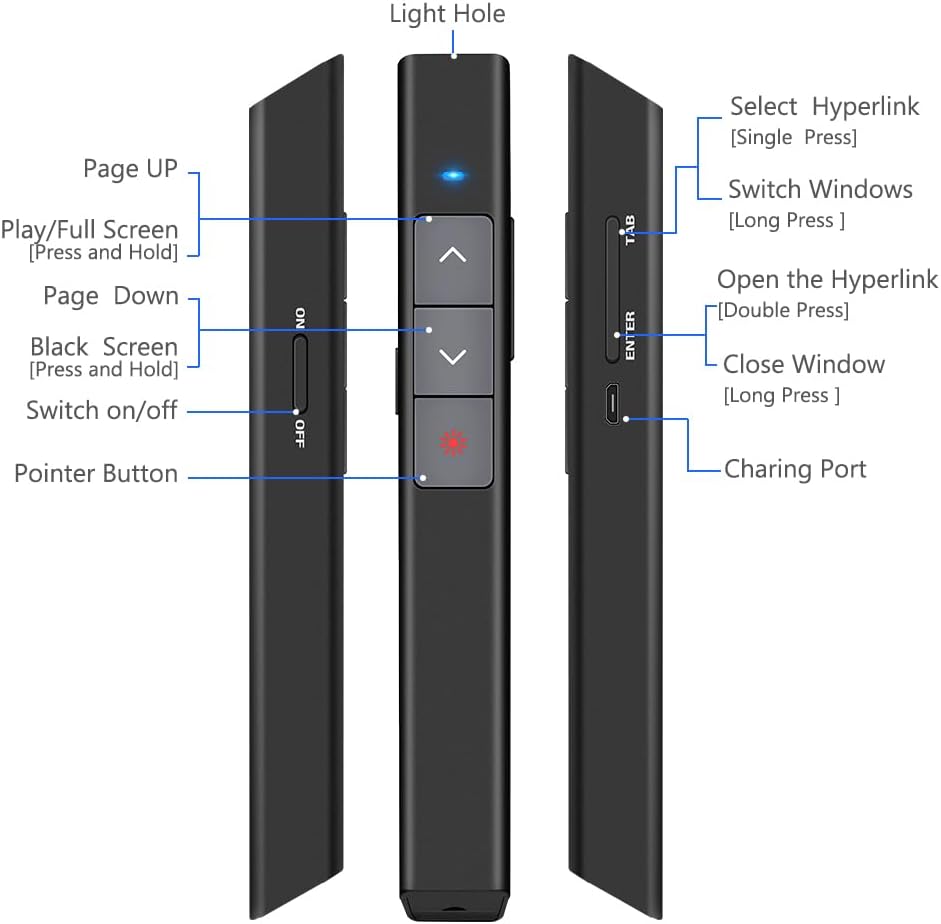
الشكل 1: مفصل view of the DinoFire X17 Presentation Clicker showing button functions and port locations.
وظائف الأزرار:
- Page Up (▲): Advances to the previous slide.
- Page Down (▼): Advances to the next slide.
- Pointer Button: Activates the red laser pointer.
- Play/Full Screen (Press and Hold): Initiates or exits full-screen presentation mode.
- Black Screen (Press and Hold): Toggles a black screen during presentation.
- تشغيل/إيقاف: مفتاح تشغيل الجهاز.
- Select Hyperlink (Single Press): Selects a hyperlink on the slide.
- Open the Hyperlink (Double Press): Opens the selected hyperlink.
- Switch Windows (Long Press): Cycles through open application windows.
- Close Window (Long Press): Closes the active window.
- منفذ الشحن: Micro USB port for recharging the device.
- Light Hole: Location of the laser emitter.
دليل الإعداد
1. Charging the Presenter
Before initial use, fully charge the presentation clicker. A full charge typically takes approximately one hour and provides power for over one week of use.
- Connect the provided Micro USB charging cable to the charging port on the side of the presenter.
- قم بتوصيل الطرف الآخر من الكابل بمصدر طاقة USB (على سبيل المثال، منفذ USB في الكمبيوتر، أو محول حائط USB).
- The charging indicator light will illuminate (refer to "Low Power Indicator" section for details).
- بمجرد شحنه بالكامل، افصل الكابل.

الشكل 2: The presentation clicker being charged via its Micro USB port, connected to a laptop.
2. توصيل جهاز الاستقبال USB
The USB receiver is stored magnetically within the presentation clicker for convenience and to prevent loss.
- Gently pull out the USB receiver from the bottom end of the presentation clicker.
- أدخل جهاز استقبال USB في منفذ USB متاح على جهاز الكمبيوتر الخاص بك (كمبيوتر محمول أو كمبيوتر مكتبي).
- سيقوم النظام تلقائيًا بالكشف عن برامج التشغيل اللازمة وتثبيتها. لا حاجة لتثبيت برامج التشغيل يدويًا.

الشكل 3: The magnetic storage for the USB receiver, demonstrating its removal and insertion into a computer's USB port.
3. تشغيل / إيقاف التشغيل
- Locate the "Switch on/off" button on the side of the clicker.
- حرك المفتاح إلى وضع "التشغيل" لتشغيل الجهاز.
- حرك المفتاح إلى وضع "إيقاف التشغيل" عند عدم الاستخدام للحفاظ على عمر البطارية.
4. System and Software Compatibility
The DinoFire X17 is widely compatible with various operating systems and presentation software.
- الأنظمة المدعومة: Windows 2003, XP, Windows Vista, Windows 7, 8, 10, Linux, Android, Mac OS.
- البرامج المدعومة: Keynote, Prezi, MS Word, Excel, PowerPoint, ACD See, website browsers, iWork, Google Slides, etc.
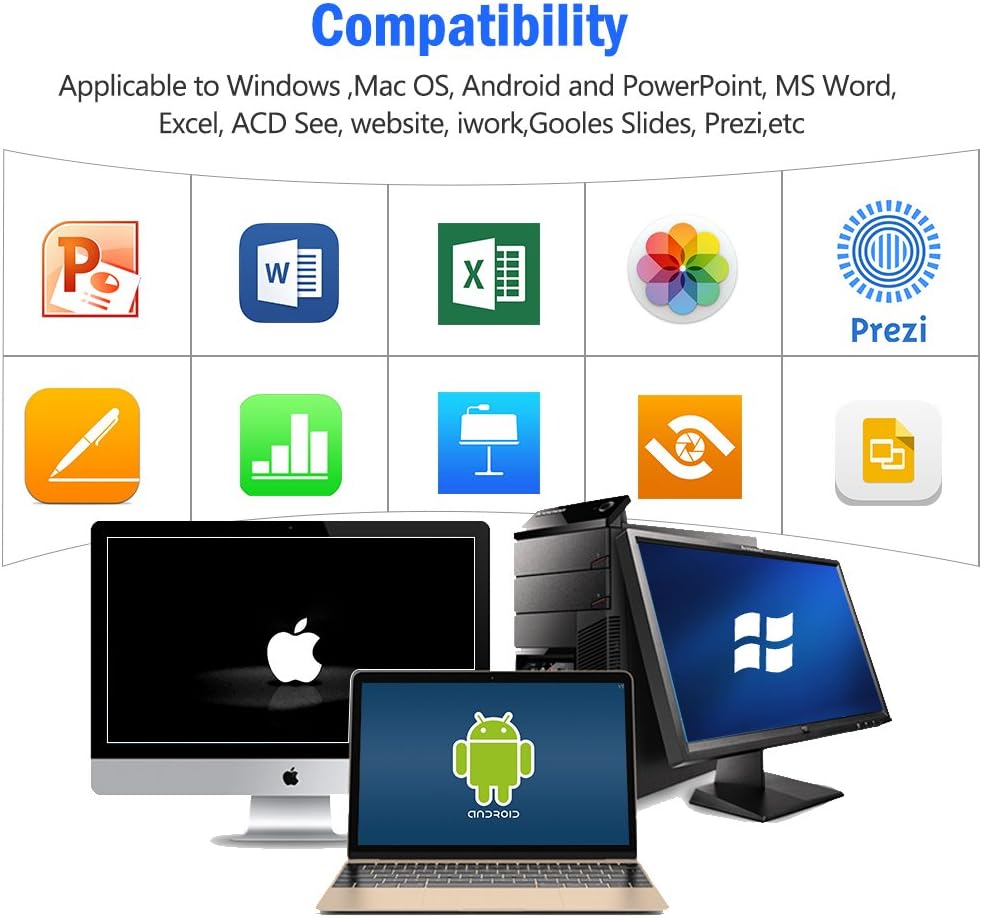
الشكل 4: Visual representation of the broad compatibility of the presentation clicker with different operating systems and presentation applications.
تعليمات التشغيل
Basic Presentation Control
- الشريحة التالية: Press the "Page Down" (▼) button.
- الشريحة السابقة: Press the "Page Up" (▲) button.
- Start/Exit Full Screen: Press and hold the "Page Up" (▲) button.
- شاشة سوداء: Press and hold the "Page Down" (▼) button to toggle a black screen.
استخدام مؤشر الليزر
The integrated red laser pointer allows you to highlight specific content on your screen or projection.
- Press and hold the "Pointer Button" (red dot icon) to activate the laser.
- Release the button to turn off the laser.
- The laser has a range of up to 300 feet (91 meters).
- حذر: Do not point the laser directly at people's eyes or at highly reflective surfaces.

الشكل 5: The red laser pointer in operation, highlighting its visibility and including a safety warning.
وظائف متقدمة
- Select Hyperlink: Single press the "ENTER" button.
- Open Hyperlink: Double press the "ENTER" button.
- تبديل النوافذ: Long press the "TAB" button to cycle through open applications.
- Close Window: Long press the "ENTER" button to close the active window.
نطاق التحكم اللاسلكي
The DinoFire X17 offers a wireless control range of up to 100 feet (30 meters), allowing you freedom of movement during your presentation.

الشكل 6: Illustration of the presentation clicker's effective long control range in a presentation setting.
صيانة
إرشادات الشحن
- Charge the device when the low power indicator flashes continuously.
- Avoid overcharging by disconnecting the cable once fully charged.
- Use the provided Micro USB cable or a certified equivalent for charging.
تخزين مستقبل USB
Always store the USB receiver inside the magnetic compartment of the clicker when not in use to prevent loss and damage.
تنظيف
امسح الجهاز بقطعة قماش ناعمة وجافة. لا تستخدم المنظفات السائلة أو المواد الكاشطة.
استكشاف الأخطاء وإصلاحها
| مشكلة | السبب المحتمل | حل |
|---|---|---|
| الجهاز لا يستجيب. | Low battery; USB receiver not connected; Device is off. | Charge the device; Ensure USB receiver is securely plugged in; Turn on the device. |
| مؤشر الليزر لا يعمل. | Low battery; Laser button not pressed correctly. | Charge the device; Press and hold the laser button firmly. |
| نطاق تحكم قصير. | Obstructions; Interference; Low battery. | Ensure clear line of sight to the receiver; Move away from sources of interference; Charge the device. |
| Hyperlink function not working. | Software specific issue; Hyperlink not properly selected. | Ensure the hyperlink is active and selected (single press ENTER) before attempting to open (double press ENTER). Check software settings. |
مؤشر الطاقة المنخفضة
The device features a low power indicator to alert you when charging is needed. When the indicator flashes continuously, please charge the device. The device will enter auto-sleep mode after approximately 5 minutes of inactivity to save energy.

الشكل 7: Explanation of the indicator light states for working, charging, and fully charged conditions.
تحديد
- نموذج: إكس 17
- ماركة: دينو فاير
- التكنولوجيا اللاسلكية: RF 2.4GHz
- نطاق التحكم: حتى 100 قدم (30 أمتار)
- نوع الليزر: الليزر الأحمر
- نطاق الليزر: حتى 300 قدم (91 أمتار)
- نوع البطارية: 1 بطارية ليثيوم بوليمر (متضمنة)
- وقت الشحن: حوالي ساعة واحدة
- وقت الاستخدام: Over one week (on a single charge)
- أبعاد: 6.42 × 1.61 × 1.14 بوصة (16.3 × 4.1 × 2.9 سم)
- وزن السلعة: 1.6 أونصة (45 جرام)
- الأنظمة المتوافقة: Windows 2003/XP/Vista/7/8/10, Linux, Android, Mac OS
- البرامج المتوافقة: Keynote, Prezi, MS Word, Excel, PowerPoint, ACD See, web browsers, iWork, Google Slides
الضمان والدعم
معلومات الضمان
The DinoFire Rechargeable Presentation Clicker X17 typically comes with a 3-year warranty. Please refer to your purchase documentation or the manufacturer's official webالموقع لمعرفة شروط وأحكام الضمان المحددة.
دعم العملاء
For technical assistance, troubleshooting beyond this manual, or warranty claims, please contact DinoFire customer support through their official website or the retailer where the product was purchased. Keep your purchase receipt or order number handy for faster service.
Ask a question about this manual
Ask about setup, troubleshooting, compatibility, parts, safety, or missing instructions. Manuals+ will review the question and use this page’s manual context to help answer it.