
مقدمة
The Annadue 7260AC Pro is a high-performance PCIe WiFi and Bluetooth card designed to enhance your desktop computer's wireless capabilities. It offers dual-band 1200Mbps Wi-Fi connectivity (300Mbps on 2.4GHz and 867Mbps on 5GHz) using advanced 802.11ac technology, ensuring stable and fast internet access for streaming, gaming, and large file transfers. Additionally, it features integrated Bluetooth 4.0, allowing seamless connection to various Bluetooth peripherals such as keyboards, mice, headsets, and speakers without requiring extra adapters. This card is compatible with Windows 7, 8, 10, and 11 (32/64-bit) and supports advanced wireless security protocols like WPA/WPA2 and MU-MIMO for protected and efficient network performance.
الإعداد والتثبيت
Follow these steps to properly install your Annadue 7260AC Pro PCIe WiFi Bluetooth Card into your desktop computer.
1. التثبيت المادي
- انقطاع التيار الكهربائي وقطع الاتصال: Before starting, ensure your computer is completely powered off and unplugged from the power outlet.
- افتح علبة الكمبيوتر: Carefully open your computer's side panel to access the motherboard.
- تحديد فتحة PCIe: Identify an available PCIe x1, x4, x8, or x16 slot on your motherboard. The card is designed for PCIe x1 but is compatible with larger slots.
- قم بإزالة غطاء الفتحة: Remove the metal slot cover corresponding to the chosen PCIe slot from the back of your computer case.
- أدخل بطاقة الواي فاي: Align the Annadue 7260AC Pro card with the chosen PCIe slot and gently press it down until it is firmly seated. Ensure the bracket is secured to the case with a screw.
- قم بتوصيل كابل USB بتقنية البلوتوث: Locate the small USB cable included with the card. Connect one end to the 4-pin header on the WiFi card and the other end to an available USB 2.0 header on your motherboard. This connection is essential for Bluetooth functionality.
- إرفاق الهوائيات: Screw the two included antennas onto the connectors at the back of the WiFi card. Adjust their orientation for optimal signal reception.

Image: The Annadue 7260AC Pro card showing the main board, two antennas, and the essential USB cable for Bluetooth connectivity.
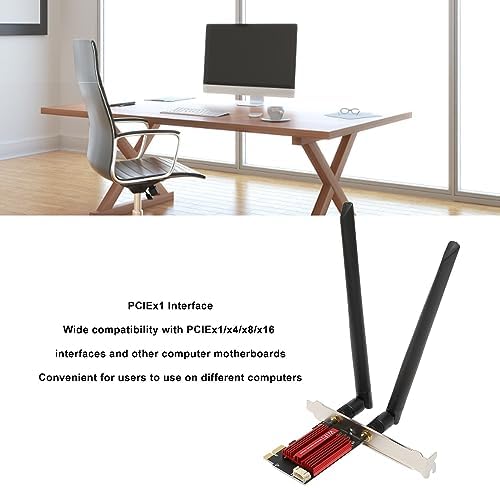
Image: The Annadue 7260AC Pro card illustrating its PCIeX1 interface and compatibility with various PCIe slots on computer motherboards.
2. تثبيت برنامج التشغيل
While the card may offer plug-and-play functionality for basic Wi-Fi on some Windows versions, it is highly recommended to install the latest drivers for optimal performance and full Bluetooth functionality. The card uses an Intel AC 7260 chipset.
- إغلاق علبة الكمبيوتر: Once the card and antennas are installed, close your computer case and reconnect the power.
- تشغيل الطاقة: قم بتشغيل جهاز الكمبيوتر الخاص بك.
- تنزيل برامج التشغيل:
- For Windows 10/11: The system may automatically detect and install basic drivers. However, for the best experience, visit the official Intel support website and search for "Intel Wireless-AC 7260" and "Intel Bluetooth for Wireless-AC 7260" drivers. Download the latest versions compatible with your Windows operating system (32-bit or 64-bit).
- For Windows 7/8: Manual driver installation is typically required. Download the appropriate drivers from the Intel support webموقع.
- تثبيت برامج التشغيل: Run the downloaded driver executables and follow the on-screen instructions. You may need to restart your computer after installation.
- التحقق من التثبيت: After restarting, check Device Manager (right-click Start, select Device Manager) under "Network adapters" and "Bluetooth" to ensure the Intel Wireless-AC 7260 and Intel Bluetooth devices are recognized and functioning correctly.
تعليمات التشغيل
1. الاتصال بشبكة Wi-Fi
- إعدادات شبكة الوصول: In Windows, click the Wi-Fi icon in the system tray (usually bottom-right corner).
- اختر شبكة: ستظهر قائمة بشبكات الواي فاي المتاحة. اختر الشبكة التي تريدها (SSID).
- أدخل كلمة المرور: If prompted, enter the network security key (password) and click "Connect".
- تحقق من الاتصال: Once connected, the Wi-Fi icon will indicate an active connection, and you should have internet access.

Image: The Annadue 7260AC Pro card, emphasizing its dual-band functionality for 2.4GHz and 5GHz networks, providing stable and extended wireless coverage.
2. Connecting to Bluetooth Devices
- تمكين البلوتوث: In Windows, go to "Settings" > "Devices" > "Bluetooth & other devices" and ensure Bluetooth is turned "On".
- إقران الجهاز: ضع جهاز البلوتوث الخاص بك (مثل سماعات الرأس أو الماوس) في وضع الاقتران.
- إضافة جهاز: On your computer, click "Add Bluetooth or other device" and select "Bluetooth".
- اختر وقم بالاتصال: حدد جهازك من القائمة واتبع أي مطالبات تظهر على الشاشة لإكمال عملية الاقتران.
صيانة
- حافظ على تحديث السائقين: التحقق من دعم Intel بشكل منتظم website for updated Wi-Fi and Bluetooth drivers for the AC 7260 chipset to ensure optimal performance and security.
- تنظيف الغبار: Periodically open your computer case and gently clean any dust accumulation on the WiFi card and surrounding components using compressed air. Ensure the computer is powered off and unplugged before cleaning.
- وضع الهوائي: Ensure the antennas are positioned optimally for the best signal strength. Avoid placing them directly against metal surfaces or other electronic devices that might cause interference.
- تحديثات البرامج: Keep your operating system updated to benefit from the latest network and Bluetooth stack improvements.
استكشاف الأخطاء وإصلاحها
1. Wi-Fi Not Detected or Poor Performance
- التحقق من التثبيت المادي: Ensure the card is securely seated in the PCIe slot and the antennas are properly attached.
- مشاكل السائق: Verify that the correct Wi-Fi drivers for the Intel AC 7260 are installed. If issues persist, try uninstalling and reinstalling the drivers. Avoid using generic Windows drivers if specific Intel drivers are available.
- اتجاه الهوائي: Adjust the angle and position of the antennas to improve signal reception.
- مسافة جهاز التوجيه/التداخل: Ensure your computer is within range of your Wi-Fi router. Reduce interference from other electronic devices.
- إعدادات جهاز التوجيه: Check your router's settings to ensure it's broadcasting on 2.4GHz and 5GHz bands and that the network name (SSID) is visible.
2. البلوتوث لا يعمل
- اتصال كابل USB: The most common issue for Bluetooth not working is the USB cable not being connected or connected incorrectly. Ensure the small 4-pin USB cable is securely connected between the WiFi card and an available USB 2.0 header on your motherboard.
- برامج تشغيل البلوتوث: Confirm that the correct Bluetooth drivers for the Intel AC 7260 are installed. As with Wi-Fi, specific Intel drivers are crucial.
- Windows Bluetooth Service: Ensure the Bluetooth Support Service is running in Windows Services.
- إقران الجهاز: Make sure the Bluetooth device you are trying to connect is in pairing mode and within range.
3. Slow Speeds or Disconnections
- تحديث برنامج التشغيل: Always ensure you have the latest drivers from Intel.
- تداخل القناة: Use a Wi-Fi analyzer tool to check for crowded Wi-Fi channels in your area and adjust your router's channel settings if necessary.
- ازدحام الشبكة: If many devices are using your network, consider upgrading your router or optimizing its settings.
- تحديث البرامج الثابتة: Check if your router has a firmware update available.
المواصفات الفنية
| ماركة | أنادو |
| رقم الموديل | 7260AC Pro |
| واجهة الأجهزة | PCIe x1 (compatible with x4, x8, x16 slots), Bluetooth 4.0 |
| بروتوكول ربط البيانات | بلوتوث، واي فاي 802.11ac |
| معدل نقل البيانات | تصل السرعة إلى 1200 ميجابت في الثانية (300 ميجابت في الثانية بتردد 2.4 جيجاهرتز، و867 ميجابت في الثانية بتردد 5 جيجاهرتز) |
| الأجهزة المتوافقة | أجهزة الكمبيوتر المكتبية |
| توافق نظام التشغيل | Windows 7, 8, 10, 11 (32/64-bit) |
| وزن | 140 جرام |
| بروتوكولات الأمن | WPA/WPA2, MU-MIMO |
معلومات الضمان
Please refer to the retailer or your purchase documentation for specific warranty terms and conditions. Annadue products typically come with a standard manufacturer's warranty covering defects in materials and workmanship. Keep your proof of purchase for any warranty claims.
دعم العملاء
For technical assistance, driver downloads, or further inquiries, please visit the Annadue official website or contact their customer support. You may also find helpful resources and community forums related to the Intel Wireless-AC 7260 chipset online.
- الموارد المتاحة على الإنترنت: بحث عن "Intel Wireless-AC 7260 drivers" or "Annadue support" for the latest information.
- دعم التاجر: For purchase-related issues, contact the retailer where you bought the product.