
مقدمة
This manual provides detailed instructions for the installation, operation, and maintenance of your ANJIELO SMART 10-inch Video Doorbell System. This system features a 1080P camera, infrared night vision, 160° wide-angle lens, PIR motion detection, and a 10-inch touch screen monitor for enhanced home security and communication. Please read this manual thoroughly before use to ensure proper functionality and safety.
محتويات الحزمة
- 1 x 10-inch TFT-LCD Touch Screen Indoor Monitor
- 1 x Outdoor Doorbell Camera (2MP 1080P)
- محول طاقة واحد (تيار مستمر 12 فولت، 2 أمبير)
- براغي التثبيت والمراسي
- 4-wire Connection Cable
- شنومكس x شنومكسب بطاقة مايكرو سد
- دليل المستخدم (هذا المستند)
معلومات السلامة
- تأكد من فصل جميع مصادر الطاقة قبل التركيب أو الصيانة.
- لا تعرض الشاشة الداخلية للرطوبة أو درجات الحرارة القصوى.
- استخدم فقط محول الطاقة المقدم.
- احفظ المنتج بعيدًا عن متناول الأطفال.
- Refer to a qualified electrician for complex wiring if unsure.
الإعداد والتثبيت
1. Outdoor Doorbell Camera Installation
The outdoor doorbell camera is designed for surface or flush mounting. Choose a location near your entrance that provides a clear view of visitors and is protected from direct heavy rain. The unit has an IP66 waterproof rating.
- قم بتحديد نقاط الحفر على الحائط باستخدام دعامة التثبيت كقالب.
- قم بحفر ثقوب وإدخال مسامير التثبيت في الحائط إذا لزم الأمر.
- قم بتأمين دعامة التثبيت على الحائط باستخدام البراغي.
- Connect the 4-wire cable from the doorbell to the designated wiring in your wall. Ensure correct polarity.
- Attach the doorbell camera to the mounting bracket.
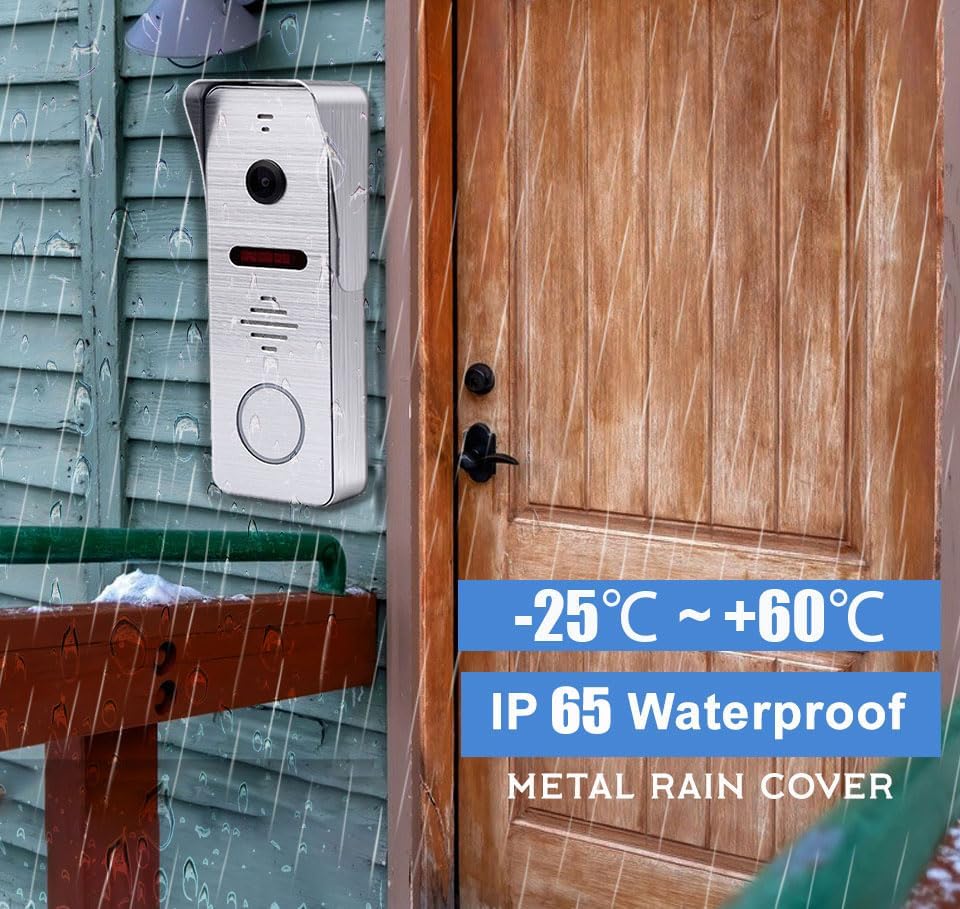
الشكل 1: The outdoor doorbell camera is designed for outdoor use with an IP65 waterproof rating, capable of withstanding temperatures from -25°C to +60°C. It is shown mounted on a wooden wall next to a door.
2. تركيب شاشة داخلية
The indoor monitor is designed for surface mounting. Select a central location within your home where the monitor is easily accessible and visible.
- Mark and drill holes for the monitor's mounting bracket.
- قم بتثبيت كتيفة التثبيت على الحائط.
- Connect the 4-wire cable from the outdoor doorbell to the indoor monitor.
- قم بتوصيل محول الطاقة DC 12V بالشاشة وقم بتوصيله بمأخذ الطاقة.
- Mount the indoor monitor onto its bracket.

الشكل 2: The indoor monitor displays the visitor, while the outdoor doorbell is ready for interaction. A smartphone app allows for remote control, including unlocking.
3. App Configuration (Tuya Solution)
The indoor monitor supports Wi-Fi connectivity and integrates with the Tuya Smart app for remote monitoring and control.
- قم بتنزيل تطبيق "Tuya Smart" من متجر تطبيقات هاتفك الذكي (iOS أو Android).
- قم بالتسجيل أو تسجيل الدخول إلى حسابك في Tuya Smart.
- On the indoor monitor, navigate to the Wi-Fi settings and connect to your home Wi-Fi network.
- Follow the in-app instructions to add your video doorbell system. This typically involves scanning a QR code displayed on the monitor or entering a device ID.
- Once connected, you can receive calls, view يعيش فوtage, and control the system remotely via the app.
تعليمات التشغيل
1. Visitor Interaction
- جرس الباب: When a visitor presses the outdoor doorbell button, the indoor monitor will ring, and the Tuya Smart app on your smartphone will receive an immediate call notification.
- الاتصال في الاتجاهين: Answer the call from the indoor monitor or your smartphone app to see, hear, and speak to the visitor.
- المراقبة عن بعد: استخدم التطبيق لـ view live video from the doorbell camera at any time.

الشكل 3: The system enables seamless two-way communication, allowing you to see, speak to, and hear visitors directly from your indoor monitor or smartphone.
2. كشف الحركة والتسجيل
- كشف الحركة PIR: The doorbell features PIR motion detection combined with radar detection to accurately identify human movement near your entrance.
- تنبيه فوري: Upon detecting motion, the system will send an alert to your smartphone app and record the event. Recorded videos can be reviewed on the indoor monitor.
- التسجيل التلقائي: All captured moments are saved to the included 32GB Micro SD card in the local monitor.

الشكل 4: Motion sensors provide notifications when movement is detected, with event logs accessible via the smartphone app.
3. أوضاع التشغيل
The indoor monitor offers three selectable operating modes:
- Residence Mode: Standard operation with full alerts and ringing.
- Non-residence Mode: When you are away, the doorbell camera will automatically record visitor calls and motion events, notifying you via the app without ringing the indoor monitor.
- وضع الصمت: The doorbell and monitor will not produce sound, providing a quiet environment. App notifications for calls and motion detection will still be active.
4. زاوية واسعة View والرؤية الليلية
- 160 درجة عريضة جدًا Viewزاوية جي: The camera provides a 160° horizontal field of view and a 100° vertical field of view, ensuring comprehensive coverage of your entrance area.
- الرؤية الليلية بالأشعة تحت الحمراء: Equipped with 8 enhanced infrared lights, the doorbell camera provides clear 1080P HD images even in low-light conditions or complete darkness, without color deviation.

الشكل 5: The 160° wide-angle lens and infrared night vision ensure clear visibility day and night, capturing a broad area around your door.
5. Call Forwarding
If a visitor presses the call button and the primary indoor monitor is not answered, the call can be forwarded to another indoor monitor within the system, allowing other users to interact with the visitor.

الشكل 6: The call forwarding feature allows a visitor's call to be transferred to another indoor monitor if the initial one is not answered.
صيانة
- تنظيف: استخدمي قطعة قماش ناعمةamp cloth to clean the indoor monitor screen and the outdoor doorbell camera lens. Avoid abrasive cleaners or solvents.
- حماية الطقس: While the outdoor unit is IP66 waterproof, regularly check for any debris or obstructions around the camera lens and microphone/speaker.
- تحديثات البرامج الثابتة: Check the Tuya Smart app periodically for any available firmware updates for your system to ensure optimal performance and security.
- إدارة بطاقة SD: إعادة بشكل دوريview and manage recordings on the 32GB Micro SD card. Format the card if necessary to free up space or resolve recording issues.
استكشاف الأخطاء وإصلاحها
- لا يوجد مصدر طاقة للمراقبة:
- Ensure the power adapter is securely plugged into both the monitor and a working electrical outlet.
- تحقق من منفذ الطاقة باستخدام جهاز آخر.
- لا يوجد فيديو/صوت من جرس الباب:
- Verify that the 4-wire connection between the outdoor doorbell and indoor monitor is secure and correctly wired.
- Restart both the outdoor doorbell (by temporarily disconnecting power) and the indoor monitor.
- App Not Receiving Notifications:
- Ensure the indoor monitor is connected to Wi-Fi.
- Check your smartphone's notification settings for the Tuya Smart app.
- Verify that the app is running in the background or has necessary permissions.
- Ensure the monitor is not in "Silence Mode" if you expect audible alerts from the monitor.
- كشف الحركة لا يعمل:
- Check motion detection settings in the indoor monitor and Tuya Smart app.
- Ensure the sensor area is clear of obstructions.
- Adjust sensitivity settings if false alarms or missed detections occur.
- جودة الرؤية الليلية رديئة:
- Ensure the camera lens is clean and free from dirt or smudges.
- Check for any reflective surfaces close to the doorbell that might interfere with the infrared lights.
تحديد
| ميزة | التفاصيل |
|---|---|
| شاشة | 10 inch TFT-LCD Touch Screen |
| دقة | 1024 × 680 |
| خواتم | نغمات لحنية من سبعة أوتار |
| اتصال | 4-wires, WIFI (Tuya solution) |
| مادة اللوحة | غطاء من الأكريليك/ABS |
| تثبيت | التركيب السطحي |
| حجم الإدخالtage | تيار متردد 100-240 فولت 50/60 هرتز |
| العمل المجلدtage | DC 12V، 2A |
| أبعاد | 198 × 130 × 21 ملم (7.8 × 5.1 × 0.8 بوصة) |
| ميزة | التفاصيل |
|---|---|
| الدقة الأفقية | 2 ميجا بكسل 1080 بكسل |
| مستشعر الصورة | CCD/Colorful CMOS sensor |
| حجم المستشعر | 1/3 بوصة |
| زاوية الرؤية | 160 degrees (140° horizontal, 100° vertical) |
| الرؤية الليلية | IR Cut, B/W Night Vision (8 enhanced IR lights) |
| مادة اللوحة | معدن |
| تثبيت | التركيب السطحي/المستوي |
| أبعاد | 135 × 47 × 33 ملم (5.7 × 3.6 × 1.5 بوصة) |
| درجة حرارة التشغيل | -40 درجة مئوية إلى 50 درجة مئوية (-40 درجة فهرنهايت إلى 122 درجة فهرنهايت) |
| تصنيف IP | IP66 مقاوم للماء |
المواصفات الأخرى:
- بروتوكول الاتصال: Wi-Fi, Wired (4-wire connection)
- الأجهزة المتوافقة: Smartphone (iOS/Android), Tablet
- تخزين: 32GB Micro SD card (included)
- طريقة التحكم: Touch (monitor), App
- رقم الموديل: AHD7+94206
- ASIN: B0CF1VS7D1
الضمان والدعم
For warranty information and technical support, please refer to the documentation provided with your purchase or contact ANJIELO SMART customer service directly.
الشركة المصنعة: أنجيلو سمارت
تاريخ التوفر الأول: 8 أغسطس 2023