
1. المقدمة
The CALEX Smart Home Indoor Ambiance Aroma Diffuser 590100500 is designed to enhance your indoor environment by improving air quality, diffusing pleasant aromas, and providing ambient lighting. This smart device integrates seamlessly into your smart home ecosystem, offering control through the Calex app, voice commands, and programmable features.
تتضمن الميزات الرئيسية ما يلي:
- Aroma diffusion with essential oils.
- Realistic flame effect for ambiance.
- Adjustable ambient lighting with 16 million color options.
- Smart control via Calex app (timers, programmable scenarios).
- Voice control compatibility with Google Assistant, Siri, and Amazon Alexa.
- 300ml water tank capacity with automatic shut-off.
2. معلومات السلامة
يرجى قراءة جميع تعليمات السلامة قبل استخدام الجهاز لتجنب الإصابة أو التلف.
- Always place the diffuser on a stable, flat surface away from direct sunlight, heat sources, and electronic devices.
- Do not exceed the maximum water fill line (300ml) to prevent overflow.
- استخدم فقط ماء الصنبور النظيف أو الماء المقطر. لا تستخدم الماء الساخن.
- Only use 100% pure, water-soluble essential oils. Other oils or corrosive liquids may damage the device.
- احتفظ بالجهاز بعيدًا عن متناول الأطفال والحيوانات الأليفة.
- Do not cover the mist outlet during operation.
- Unplug the device from the power outlet before cleaning or refilling.
- The device features an automatic shut-off function when the water tank is empty, and sends a notification to your phone.
- A built-in safety configuration will cause the diffuser to flash if the remaining water in the tank needs to cool down after a maximum of 72 hours of continuous operation.
- لا تحاول إصلاح الجهاز أو تعديله بنفسك. تواصل مع خدمة دعم العملاء للحصول على المساعدة.
3. محتويات العبوة
تأكد من وجود جميع العناصر في العبوة:
- CALEX Smart Home Indoor Ambiance Aroma Diffuser (Model 5901000500)
- محول الطاقة
- دليل المستخدم
4. انتهى المنتجview
Familiarize yourself with the components of your aroma diffuser.
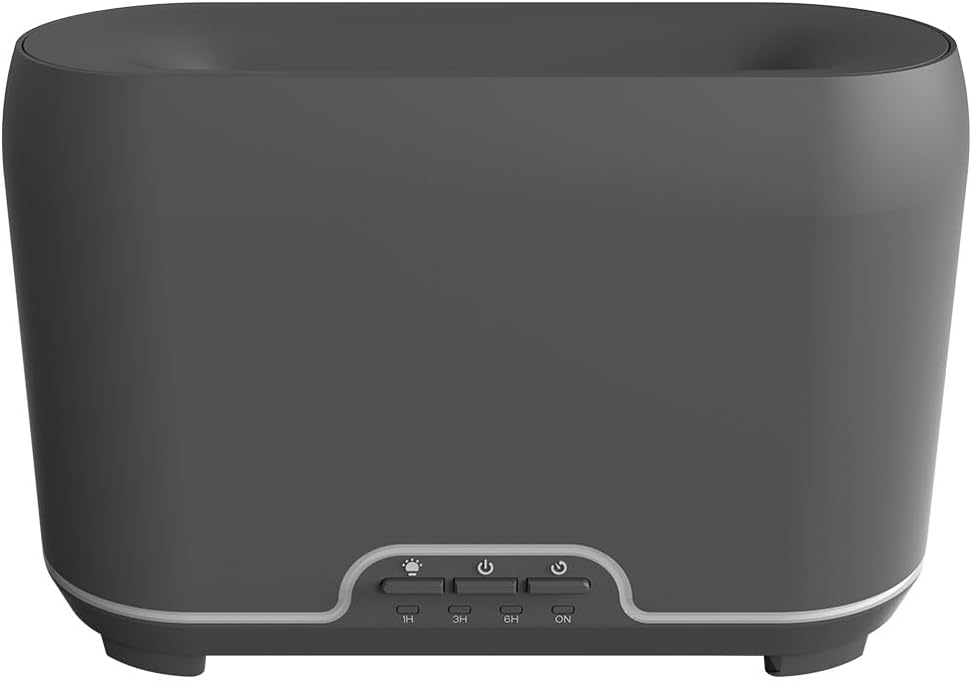
الصورة: الجبهة view of the CALEX Smart Home Aroma Diffuser, showing the control panel with buttons for light, power, and timer settings (1H, 3H, 6H, ON).

Image: The CALEX Smart Home Aroma Diffuser operating on a wooden table, displaying its ambient flame effect and mist output.
The diffuser typically consists of a water tank, an ultrasonic plate, a mist outlet, and a control panel with buttons for power, light, and timer functions. The power input port is usually located at the back or bottom of the device.
5. الإعداد
اتبع هذه الخطوات للإعداد الأولي:
- الموقع: ضع الناشر على سطح مستو وثابت.
- غطاء مفتوح: قم بإزالة الغطاء العلوي للناشر بلطف.
- ملء خزان المياه: Fill the water tank with clean water up to the 300ml maximum fill line. Do not overfill.
- أضف الزيت العطري: Add a few drops of your preferred essential oil directly into the water tank.
- إغلاق الغطاء: أعد تركيب الغطاء العلوي بشكل آمن.
- توصيل الطاقة: Plug the power adapter into the diffuser's power input port, then plug the adapter into a wall outlet.
- قم بتنزيل تطبيق Calex: Download the free Calex Smart app from your smartphone's app store (available for iOS and Android).
- الاتصال بشبكة WiFi: Follow the in-app instructions to connect your diffuser to your home WiFi network. Ensure your WiFi is 2.4GHz.
6. تعليمات التشغيل
The CALEX Smart Home Aroma Diffuser can be operated via the Calex app or its integrated control buttons.
6.1 Using the Calex Smart App
The Calex app provides full control over your diffuser's functions:
- تشغيل/إيقاف التشغيل: Turn the diffuser on or off remotely.
- مكافحة الضباب: Adjust the mist output level.
- التحكم في الضوء: Change the ambient light color from over 16 million options, adjust brightness, and select lighting modes.
- تأثير اللهب: Activate or deactivate the flame effect.
- المؤقتات: Set schedules for the diffuser to turn on or off automatically.
- Programmable Scenarios: Create custom scenarios based on time, weather, or other smart home triggers.
- إشعارات: Receive alerts when the water tank is empty.
6.2 التحكم الصوتي
Integrate your diffuser with voice assistants for hands-free control:
- مساعد جوجل: Link your Calex account in the Google Home app. Use commands like "Hey Google, turn on the diffuser."
- سيري: Create custom shortcuts in the Apple Home app or through the Calex app for Siri commands.
- أمازون اليكسا: Enable the Calex skill in the Alexa app. Use commands like "Alexa, set diffuser light to blue."
6.3 Manual Control Buttons
The control panel on the diffuser allows for basic operation:
- زر الطاقة: Press once to turn on/off the mist and flame effect.
- زر الضوء: Press to cycle through light colors or turn the light on/off.
- Timer Buttons (1H, 3H, 6H, ON): Select a desired operating duration. The diffuser will automatically shut off after the selected time. 'ON' typically means continuous operation until water runs out or manually turned off.
7. الصيانة
يضمن التنظيف المنتظم الأداء الأمثل ويطيل عمر جهاز التوزيع الخاص بك.
- التنظيف اليومي: بعد كل استخدام، قم بتفريغ أي ماء متبقٍ من الخزان. امسح الجزء الداخلي من الخزان بقطعة قماش نظيفة وناعمة.
- التنظيف الأسبوعي: For a more thorough clean, unplug the device. Add a small amount of white vinegar (about 10ml) to the water tank and let it sit for 10-15 minutes to dissolve mineral buildup. Gently wipe the ultrasonic plate with a cotton swab or soft brush. Rinse the tank thoroughly with clean water, avoiding the air outlet.
- التنظيف الخارجي: امسح الجزء الخارجي من الموزع بقطعة قماش ناعمة.amp القماش. لا تستخدم المنظفات أو المذيبات الكاشطة.
- Ensure the device is completely dry before refilling or storing.
8. استكشاف الأخطاء وإصلاحها
إذا واجهت أي مشكلات، راجع المشكلات والحلول الشائعة التالية:
| مشكلة | السبب المحتمل | حل |
|---|---|---|
| لا يوجد ضباب أو ضباب ضعيف | مستوى الماء منخفض لوحة الموجات فوق الصوتية متسخة مخرج الضباب مسدود | Refill water to the appropriate level. قم بتنظيف لوحة الموجات فوق الصوتية وفقًا لتعليمات الصيانة. تأكد من أن منفذ الرذاذ خالٍ من العوائق. |
| الجهاز لا يعمل | لا يوجد طاقة خزان المياه فارغ عطل في الجهاز | تحقق من توصيل الطاقة ومقبس الحائط. إعادة ملء خزان المياه. اتصل بدعم العملاء إذا استمرت المشكلة. |
| مشاكل اتصال التطبيق | كلمة مرور WiFi غير صحيحة جهاز التوجيه بعيد جدًا 2.4GHz vs 5GHz WiFi | تحقق من كلمة مرور الواي فاي. Move diffuser closer to the router. Ensure your router is broadcasting a 2.4GHz network and connect to it. |
| تأثير اللهب لا يعمل | Feature deactivated in app عطل في الجهاز | Check app settings to ensure flame effect is enabled. اتصل بدعم العملاء. |
9. المواصفات
| ميزة | مواصفة |
|---|---|
| رقم الموديل | 5901000500 |
| ماركة | كاليكس |
| سعة | 300 مليلتر |
| مادة | بلاستيك |
| إيقاف التشغيل التلقائي | نعم |
| الاتصال | WiFi (2.4 جيجا هرتز) |
| طرق التحكم | Calex Smart App, Voice Control (Google Assistant, Siri, Amazon Alexa), Manual Buttons |
| خيارات الضوء | 16 مليون لون |
| منطقة الاستخدام الموصى بها | Medium space |
| رمز المنتج الدولي (EAN/UPC) | 08712879157090 |
10. الضمان والدعم
للحصول على معلومات الضمان أو الدعم الفني، يُرجى مراجعة الوثائق المرفقة مع عملية الشراء أو التواصل مباشرةً مع البائع/الشركة المصنعة. احتفظ بإيصال الشراء لتقديم مطالبات الضمان.