
مقدمة
This manual provides comprehensive instructions for the installation, operation, and maintenance of your RTX DTS1419 Three-Phase DIN Rail Energy Meter with WiFi connectivity. Please read this manual thoroughly before installation and use to ensure proper function and safety.
مميزات المنتج
The RTX DTS1419 is an intelligent three-phase energy meter designed for DIN rail mounting. It offers advanced energy monitoring and control capabilities through WiFi connectivity and the Tuya Smart Life application.
تتضمن الميزات الرئيسية ما يلي:
- مراقبة الحجم في الوقت الحقيقيtage (V), current (A), and power (kW) for each phase.
- Remote control for switching power on or off.
- Clear LCD display for sequential data viewعمل.
- Integrated status indicator lights.
- Prepayment function with notifications for exceeding set energy limits.
- Detailed energy consumption statistics for each phase.
- Easy installation on a standard DIN rail.
- الحد الأقصى للسعة الحالية 80A.
- Continuous current rating of 10A per phase.
- Voice control compatibility with Google Home and Amazon Alexa.
- 2.4 GHz WiFi communication for direct router connection (no gateway required).
- Automated scenarios based on predefined measurement values (e.g., automatic shutdown if voltage exceeds limit).
- Archiving function for historical energy data.
معلومات السلامة
احتياطات السلامة
تحذير: Installation and maintenance should only be performed by qualified electricians. Disconnect power before installation or servicing to prevent electric shock.
- Ensure all local electrical codes and regulations are followed during installation.
- لا تقم بتشغيل الجهاز إذا كان يبدو تالفًا.
- احفظ الجهاز بعيدًا عن الماء والرطوبة العالية.
- لا تتجاوز الحد الأقصى للتيار وهو 80 أمبير.
- تأكد من التأريض المناسب.
يثبت
1. التثبيت
The RTX DTS1419 is designed for DIN rail mounting within an electrical panel.
- التركيب: Securely attach the energy meter to a standard 35mm DIN rail. Ensure the clip at the bottom locks into place.
- التوصيلات الكهربائية: Refer to the wiring diagram below for correct connection of the three phases (L1, L2, L3) and neutral (N). Ensure all connections are tight and secure.

وصف الصورة: A detailed wiring diagram showing the connection points for the three phases (L1, L2, L3) and neutral (N) on the RTX DTS1419 energy meter. Input terminals are on the left, output terminals on the right. Each phase is clearly labeled with corresponding wire colors (brown, black, grey for phases, blue for neutral) and arrows indicating current flow.
- تشغيل الطاقة: After verifying all connections, restore power to the circuit. The LCD display on the meter should illuminate.
2. App Connection (Tuya Smart Life)
- تحميل التطبيق: Download the "Tuya Smart Life" app from your smartphone's app store (iOS or Android).
- التسجيل/تسجيل الدخول: افتح التطبيق وقم بتسجيل حساب جديد أو قم بتسجيل الدخول إلى حساب موجود.
- إضافة جهاز: In the app, tap the "+" icon to add a new device. Select "Electrical" > "Energy Meter (Wi-Fi)".
- وضع الإقتران: On the RTX DTS1419 meter, press and hold the "SET" button until the network indicator light (blue LED) starts blinking rapidly. This indicates pairing mode.
- الاتصال بشبكة Wi-Fi: Follow the on-screen instructions in the app to connect the device to your 2.4 GHz Wi-Fi network. Ensure your phone is also connected to the same 2.4 GHz network.
- الجهاز المضاف: Once successfully paired, the network indicator light will become solid, and the device will appear in your Tuya Smart Life app.
وصف الصورة: The RTX DTS1419 energy meter displayed next to a smartphone showing the Tuya Smart Life application interface. The app displays real-time energy data such as current, active power, and voltage, indicating successful connection and monitoring.
تعليمات التشغيل
1. المراقبة في الوقت الحقيقي
Once connected to the Tuya Smart Life app, you can monitor various electrical parameters:
- Current Electrical Consumption (I): View the current draw in Ampإريس (أ).
- Current Power Consumption (P): View the active power in Kilowatts (kW).
- Current Supply Voltagه (الخامس): View المجلدtagه لكل مرحلة.
- Current Energy Consumption (kW.h): Track accumulated energy usage in kilowatt-hours.
The meter's LCD display also cycles through these values directly on the device.

وصف الصورة: لقطة أمامية مقرّبة view of the RTX DTS1419 Three-Phase DIN Rail Energy Meter. The LCD screen clearly displays "U 235.0", indicating a voltage reading of 235.0 Volts. Status indicator lights for Relay, Alert, Active, and Network are visible on the right side, along with the RTX and Tuya logos.
2. جهاز التحكم عن بعد
The Tuya Smart Life app allows you to remotely switch the power on or off for the connected circuit. This function activates the integrated relay within the meter.
- Open the device interface in the Tuya Smart Life app.
- Locate the "On/Off" toggle or button to control the power supply.
3. Energy Statistics and Archiving
The app provides independent energy consumption statistics for each phase and an archiving function for historical data. You can review daily, weekly, or monthly consumption trends.

وصف الصورة: A screenshot of the Tuya Smart Life app interface, highlighting sections for "totalEle(kWh)" (total energy consumption) and "Gross generation(kWh)". This illustrates the app's capability to display both consumed and potentially generated energy data.
4. Prepayment Function
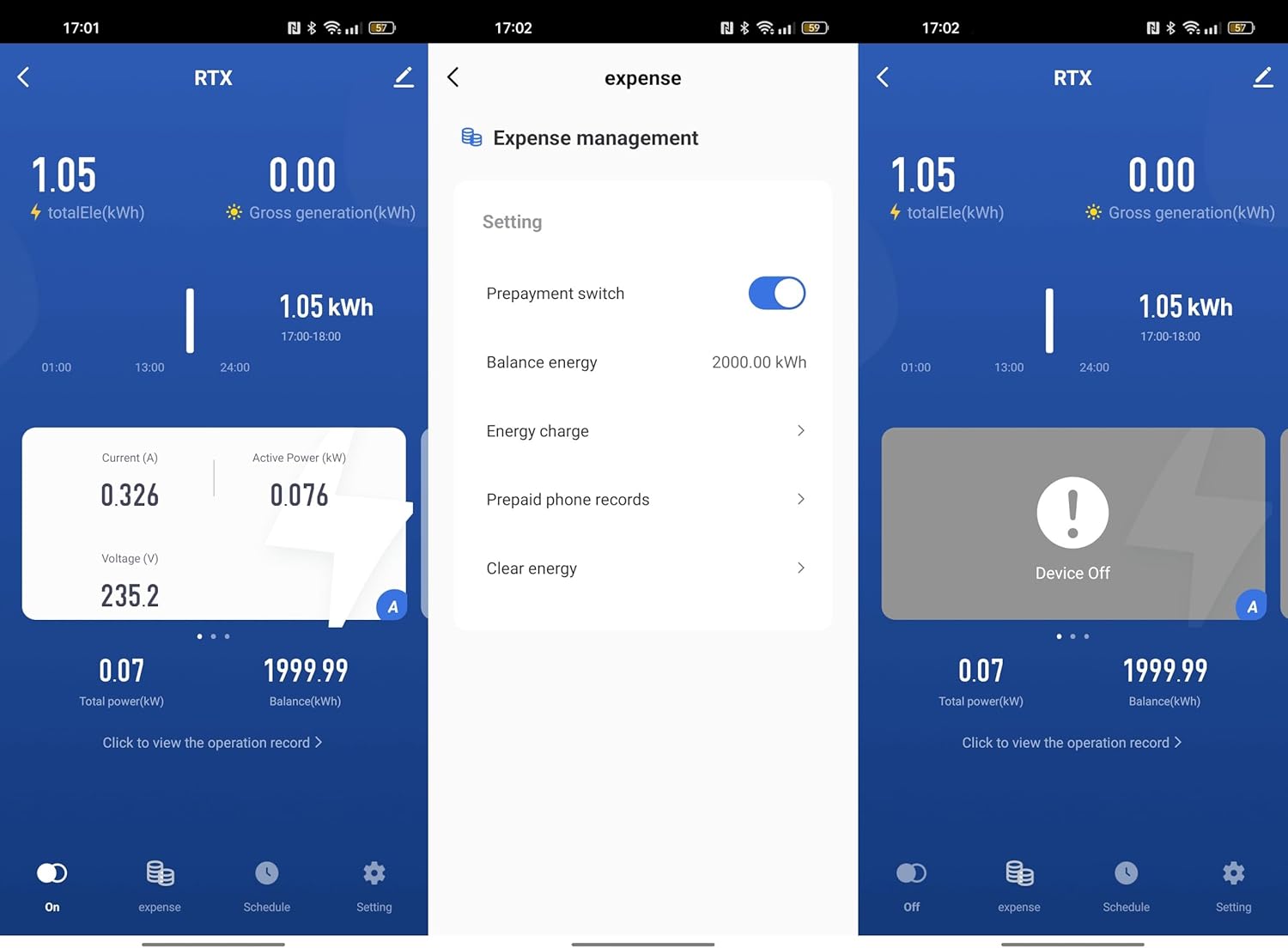
Set an energy limit within the Tuya Smart Life app. The device will notify you if this limit is exceeded, allowing for better energy budget management.

وصف الصورة: A series of three screenshots from the Tuya Smart Life app. The first shows the main device interface. The second shows the "Expense management" screen with options for "Prepayment switch", "Balance energy", "Energy charge", and "Prepaid phone records". The third shows the device in an "Off" state, indicating remote control functionality.
5. التحكم الصوتي
Integrate the RTX DTS1419 with Google Home or Amazon Alexa for voice-activated control. Follow the instructions provided by Google Home or Alexa for connecting Tuya Smart Life devices.
- Enable the "Tuya Smart Life" skill/action in your voice assistant app.
- Link your Tuya account.
- اكتشف الأجهزة.
- Use voice commands such as "Alexa, turn off the main power" or "Hey Google, what is the energy consumption of the meter?" (Specific commands may vary based on setup).
6. Automatic Scenarios
Configure automated actions within the Tuya Smart Life app based on predefined measurement values. For example, you can set the device to automatically shut off if the voltage exceeds a safe limit.
- Navigate to the "Smart" or "Automation" section in the Tuya Smart Life app.
- أنشئ عملية أتمتة جديدة.
- Set conditions based on voltage, current, or power readings from the DTS1419.
- Define actions, such as turning off the meter or sending a notification.
صيانة
- تنظيف: امسح الجهاز بقطعة قماش جافة وناعمة. لا تستخدم منظفات أو مذيبات كاشطة.
- تحديثات البرامج الثابتة: Periodically check the Tuya Smart Life app for available firmware updates for the device to ensure optimal performance and security.
- فحص الاتصال: Regularly inspect wiring connections for tightness and signs of wear.
استكشاف الأخطاء وإصلاحها
| مشكلة | السبب المحتمل | حل |
|---|---|---|
| الجهاز لا يعمل. | لا يوجد مصدر للطاقة، الأسلاك غير صحيحة. | Check circuit breaker. Verify wiring connections according to the diagram. |
| لا يمكن الاتصال بشبكة Wi-Fi. | Incorrect Wi-Fi password; 5GHz network; device not in pairing mode; weak signal. | Ensure correct 2.4 GHz Wi-Fi password. Put device in pairing mode (blinking blue LED). Move router closer or use a Wi-Fi extender. |
| قراءات غير دقيقة. | Loose wiring connections; faulty device. | Check all wiring connections for tightness. If problem persists, contact support. |
| جهاز التحكم عن بعد لا يعمل. | No internet connection; app issue; device offline. | Check your home internet connection. Ensure the device is online in the Tuya app. Restart the app. |
تحديد
- نموذج: DTS1419
- ماركة: ار تي اكس
- يكتب: Three-Phase DIN Rail Energy Meter
- الاتصال: شبكة Wi-Fi (2.4 GHz)
- الحد الأقصى للتيار: 80 أمبير
- التيار المستمر: 10 أ لكل مرحلة
- المجلدtage: 3x230/400V 50Hz
- Pulse Constant: 800imp / كيلوواط ساعة
- فئة الدقة: 1
- التوافق: Tuya Smart Life App, Google Home, Amazon Alexa
- التركيب: 35 ملم DIN السكك الحديدية
- ASIN: B0CDVLZV9B
الضمان والدعم
For warranty information, please refer to the documentation provided with your purchase or contact your retailer. For technical support, please visit the RTX webالموقع أو الاتصال بقسم خدمة العملاء.
الشركة المصنعة: ار تي اكس