
BMC G3 A20
دليل مستخدم جهاز BMC G3 A20 المضاد للشخير
Model: G3 A20 | Brand: BMC
مقدمة
This user manual provides comprehensive instructions for the safe and effective operation, setup, and maintenance of your BMC G3 A20 Anti-Snoring Device. Please read this manual thoroughly before using the device and keep it for future reference.
معلومات هامة حول السلامة
تحذير: Consult a healthcare professional before using this device. Do not use if you have difficulty breathing or are unable to remove the device yourself. Keep out of reach of children. Discontinue use if you experience discomfort or adverse reactions.
Always ensure the device is placed on a stable, flat surface during operation. Do not block the air inlet or outlet. Use only accessories and parts recommended by the manufacturer.
المنتج انتهىview والمكونات
The BMC G3 A20 is an advanced anti-snoring device designed for comfortable and effective use. It features intelligent temperature control, automatic start/stop functions, and a low noise level for a peaceful sleep environment.

الشكل 1: BMC G3 A20 device with its complete set of accessories, including the carrying case, air hose, power adapter, SD card for data storage, and replacement filters.

الشكل 2: The BMC G3 A20 device with its integrated humidifier chamber opened, revealing the water reservoir for humidification.
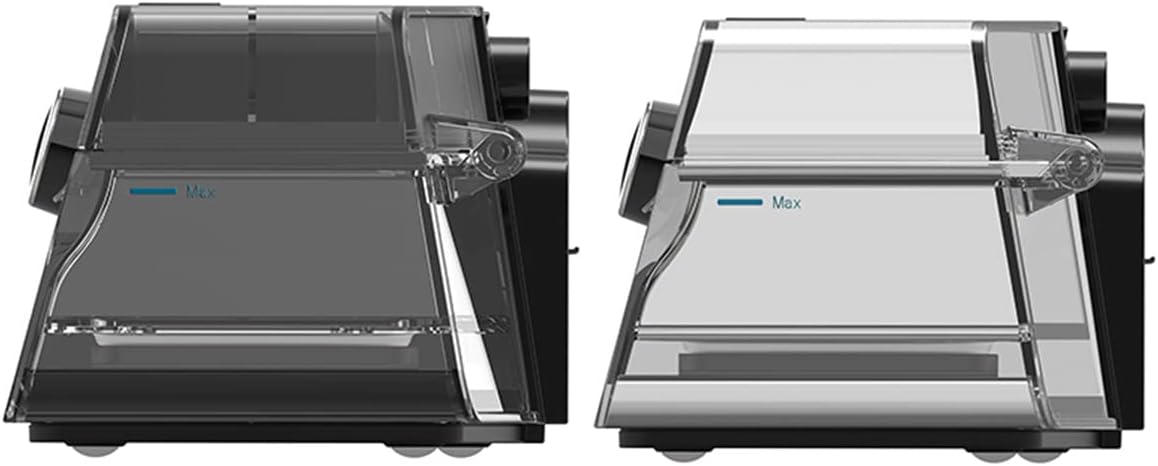
الشكل 3: جانب view comparison of two humidifier chambers, illustrating the 'Max' fill line for proper water level.

الشكل 4: Hands demonstrating the process of opening and removing the humidifier chamber from the BMC G3 A20 device for cleaning or refilling.

الشكل 5: All individual components of the BMC G3 A20 system laid out, including the main device, carrying bag, air hose, power adapter, mask, and filters.
تعليمات الإعداد
- فك الجهاز: Carefully remove the BMC G3 A20 device and all accessories from the packaging.
- توصيل الطاقة: قم بتوصيل محول الطاقة بالجهاز وقم بتوصيله بمأخذ كهربائي مناسب.
- Humidifier Setup (Optional):
- Open the humidifier chamber as shown in Figure 2 and Figure 4.
- Fill the humidifier with distilled water up to the 'Max' line (refer to Figure 3). Do not overfill.
- Close the humidifier chamber securely.
- وصلة خرطوم المياه: Connect the air hose to the device's air outlet.
- Mask Connection: Attach your compatible mask to the other end of the air hose.
- الإعدادات الأولية: Ensure the device is set to the default pressure range of 4-20 cm H2O. Adjust other settings as recommended by your healthcare professional.
تشغيل الجهاز
- تشغيل الطاقة: Turn on the device. The BMC G3 A20 features an automatic start function.
- Apply Mask: Place the mask comfortably and securely on your face, ensuring a proper seal.
- إعدادات الشاشة: Use the 3.5-inch color LCD screen to monitor important parameters in real-time, such as pressure, humidification status, and treatment data.
- وظائف تلقائية: The device will automatically adjust pressure and humidification based on its intelligent control system. It also features automatic stop when the mask is removed or the session ends.
- الوصول إلى البيانات: For detailed treatment data, scan the QR code displayed on the device screen with your smartphone. This allows you to view data in iCode.
The device is designed for low energy consumption, maximizing humidification effect while reducing power usage through eco-intelligent heating technology.
الصيانة والتنظيف
Regular cleaning and maintenance are crucial for the optimal performance and longevity of your BMC G3 A20 device.
- التنظيف اليومي:
- After each use, empty any remaining water from the humidifier chamber and rinse it with distilled water. Allow it to air dry completely.
- امسح الجزء الخارجي من الجهاز بقطعة قماش ناعمة، دamp قطعة قماش. لا تغمر الجهاز في الماء.
- التنظيف الأسبوعي:
- Wash the humidifier chamber, air hose, and mask components with mild soap and warm water. Rinse thoroughly and allow to air dry away from direct sunlight.
- Inspect the air filter for dust and debris. Replace if visibly dirty or as recommended by your healthcare professional.
- استبدال الفلتر: Replace the air filter regularly, typically every 1-3 months, or more frequently in dusty environments.
- تخزين: When not in use for an extended period, ensure the device and all components are clean and dry. Store them in the provided carrying case in a cool, dry place.
تعليمات العناية: Hand wash components as needed. Do not use harsh chemicals or abrasive cleaners.
استكشاف الأخطاء وإصلاحها
| مشكلة | السبب المحتمل | حل |
|---|---|---|
| الجهاز لا يعمل | كابل الطاقة غير موصول؛ مشكلة في مأخذ الطاقة | تحقق من توصيلات الطاقة؛ جرب منفذًا كهربائيًا مختلفًا |
| لا يوجد تدفق للهواء أو ضغط منخفض | Hose kinked or disconnected; Mask leak; Air filter blocked | Check hose for kinks and connections; Adjust mask for proper seal; Clean or replace air filter |
| جهاز الترطيب لا ينتج رطوبة | Water reservoir empty; Humidifier chamber not properly closed | Refill water reservoir; Ensure humidifier chamber is securely closed |
| ضوضاء مفرطة | Air filter dirty; Device not on a stable surface | Clean or replace air filter; Place device on a firm, flat surface |
If the problem persists after attempting these solutions, please contact customer support or your healthcare provider.
المواصفات الفنية
- نموذج: BMC G3 A20
- مستوى الضوضاء: <30 ديسيبل
- الأبعاد (الطول × العرض × الارتفاع): 17 سم × 19 سم × 11.7 سم
- وزن: حوالي 3.3 كجم
- Default Pressure Setting: 4-20 سم H2O
- الترطيب: Integrated, Eco-intelligent heating technology
- Breathing Relief: نعم
- Altitude Compensation: Automatic, up to 1000 meters
- بدء التشغيل/الإيقاف التلقائي: نعم
- عرض: شاشة LCD ملونة مقاس 3.5 بوصة
- تخزين البيانات: Via SD card, accessible via QR code (iCode)
- مادة: Synthetic fabric (for mask/strap, if applicable), other components as per device construction.
- لون: أسود
الضمان والدعم
The BMC G3 A20 device comes with a ضمان الشركة المصنعة لمدة عامين من تاريخ الشراء. يغطي هذا الضمان عيوب المواد والصناعة في ظل الاستخدام العادي.
For warranty claims, technical support, or any questions regarding your device, please contact your authorized BMC dealer or the customer support provided by the seller.
يرجى الاحتفاظ بإثبات الشراء لأغراض الضمان.
Ask a question about this manual
Ask about setup, troubleshooting, compatibility, parts, safety, or missing instructions. Manuals+ will review the question and use this page’s manual context to help answer it.