
1. المقدمة
This manual provides detailed instructions for the installation, operation, and maintenance of your CP PLUS 4MP Wi-Fi Floodlight Camera, model CP-F42A. Please read this manual thoroughly before using the product to ensure proper functionality and safety. This camera combines high-resolution video surveillance with integrated floodlighting for enhanced security.
2. معلومات السلامة
- تأكد من أن مصدر الطاقة يتوافق مع متطلبات الكاميرا.
- لا تحاول تفكيك الكاميرا أو تعديلها.
- Install the camera in a location where it is protected from extreme weather conditions, although it has an IP54 rating, direct exposure to heavy rain or prolonged submersion is not recommended.
- Keep the camera away from heat sources and direct sunlight.
- تعامل مع الكاميرا بعناية لتجنب حدوث أضرار مادية.
- Consult a qualified electrician for installation if you are unsure about electrical wiring.
3. محتويات العبوة
تأكد من وجود جميع العناصر في العبوة:
- CP PLUS 4MP Wi-Fi Floodlight Camera (CP-F42A)
- محول الطاقة
- مسامير التثبيت ومقابس الحائط
- دليل البدء السريع (غير مدرج في هذا الدليل)
4. انتهى المنتجview
The CP-F42A is an outdoor Wi-Fi floodlight camera designed for surveillance and illumination. It features a 4MP sensor for clear video, H.265 video compression for efficient storage, and a 110° viewing angle. The integrated floodlight provides illumination, and the PIR sensor detects motion up to 12 meters.
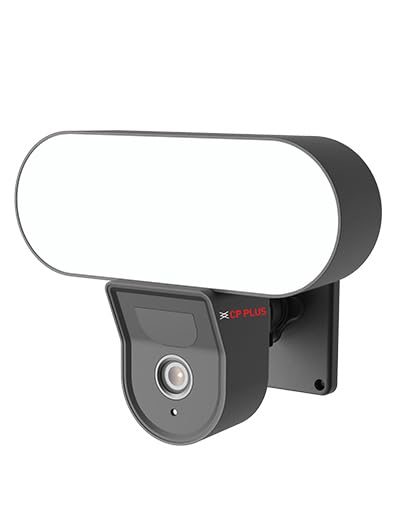
الصورة: الجبهة view of the CP PLUS 4MP Wi-Fi Floodlight Camera CP-F42A, showing the camera lens and the integrated floodlight panel.
المكونات الرئيسية:
- عدسة الكاميرا: Captures 4MP video.
- Floodlight Panel: يوفر الإضاءة.
- مستشعر PIR: يكتشف الحركة.
- ميكروفون: لإدخال الصوت.
- المتحدث: لإخراج الصوت ثنائي الاتجاه.
- شريحة متزايدة: لضمان التثبيت الآمن.
5. الإعداد
5.1 التثبيت المادي
- اختر الموقع: حدد موقعًا خارجيًا واضحًا view of the area you wish to monitor and within Wi-Fi range. Ensure the mounting surface is sturdy.
- حدد نقاط الحفر: استخدم دعامة التثبيت كقالب لتحديد أماكن ثقوب البراغي على الحائط.
- ثقوب الحفر: قم بثقب ثقوب توجيهية في النقاط المحددة. أدخل مثبتات الحائط إذا كنت تقوم بالتركيب على جدار مبني من الطوب أو الحجر.
- تركيب الكاميرا: Secure the mounting bracket to the wall using the provided screws. Attach the camera to the bracket.
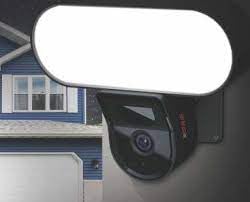
Image: The CP PLUS Floodlight Camera mounted on the exterior of a house, illustrating a typical installation scenario during the day.
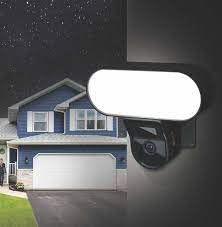
Image: The CP PLUS Floodlight Camera mounted on the exterior of a house at night, with the floodlight illuminated, demonstrating its night-time functionality.
5.2 توصيل الطاقة
Connect the provided power adapter to the camera's power input port and then plug it into a suitable electrical outlet. Ensure the connection is secure and protected from moisture.
5.3 Wi-Fi Connection and App Pairing
- تنزيل التطبيق: بحث عن the "ezyKam+" app (or the recommended CP PLUS app) on your smartphone's app store (iOS or Android) and install it.
- إنشاء حساب: افتح التطبيق وقم بالتسجيل للحصول على حساب جديد أو قم بتسجيل الدخول إذا كان لديك حساب بالفعل.
- إضافة جهاز: Follow the in-app instructions to add a new device. Select "Floodlight Camera" or a similar option.
- الاتصال بشبكة Wi-Fi: The app will guide you through connecting the camera to your home Wi-Fi network. This usually involves scanning a QR code on the camera or entering your Wi-Fi credentials.
- الإعداد الكامل: بمجرد الاتصال، يمكنك تسمية الكاميرا وضبط الإعدادات الأولية.
Image: Branding for CP PLUS ezyKam+ Wi-Fi Floodlight Full Color Camera, indicating compatibility with Alexa and Google Home, relevant for app pairing and smart home integration.
6. تعليمات التشغيل
Access all camera functions through the dedicated mobile application.
6.1 مباشر View
افتح التطبيق وحدد الكاميرا من قائمة الأجهزة لـ view the live video feed. You can pinch to zoom and pan across the image.
6.2 التسجيل والتشغيل
- التسجيل اليدوي: اضغط على زر التسجيل في البث المباشر view لبدء/إيقاف التسجيل اليدوي.
- تسجيل الحدث: The camera automatically records when motion is detected. These recordings are stored on the installed microSD card (if any) or cloud storage (subscription may be required).
- التشغيل: الوصول إلى foo المسجلtage من خلال قسم "التشغيل" أو "السجل" في التطبيق.
6.3 اكتشاف الحركة والتنبيهات
Configure motion detection sensitivity and areas within the app settings. When motion is detected, the camera can send push notifications to your phone and trigger recording. The PIR sensor has a detection range of 6-12 meters.
6.4 التحكم في الأضواء الكاشفة
The floodlight can be controlled manually via the app or set to activate automatically upon motion detection during specific times or low-light conditions. Adjust brightness and duration settings in the app.
6.5 الصوت ثنائي الاتجاه
Use the microphone and speaker icons in the live view to communicate with visitors or deter intruders. Press and hold the microphone icon to speak, and release to listen.
6.6 الرؤية الليلية
The camera features infrared (IR) night vision for clear black-and-white video in low-light conditions and can also utilize the floodlight for full-color night vision when activated. The night vision range is up to 12 meters.
7. الصيانة
7.1 التنظيف
Wipe the camera lens and floodlight panel with a soft, damp استخدم قطعة قماش لإزالة الغبار والأوساخ. لا تستخدم مواد كيميائية قاسية أو منظفات كاشطة.
7.2 تحديثات البرامج الثابتة
Periodically check the app for available firmware updates. Keeping your camera's firmware up-to-date ensures optimal performance and security features.
7.3 إدارة التخزين
If using a microSD card, regularly check its status in the app. Format the card periodically to maintain performance. Back up important recordings before formatting.
8. استكشاف الأخطاء وإصلاحها
| مشكلة | الحل المحتمل |
|---|---|
| الكاميرا لا تعمل. | Check power adapter connection and ensure the outlet is functional. |
| غير قادر على الاتصال بشبكة Wi-Fi. | Ensure the camera is within Wi-Fi range. Verify Wi-Fi password. Try resetting the camera and router. |
| جودة الفيديو سيئة. | Check Wi-Fi signal strength. Clean the camera lens. Ensure sufficient lighting. |
| كشف الحركة لا يعمل. | Adjust motion detection sensitivity and area settings in the app. Ensure there are no obstructions. |
| Floodlight not activating. | Check floodlight settings in the app. Ensure it's set to activate on motion or during low light. |
9. المواصفات
| ميزة | التفاصيل |
|---|---|
| رقم الموديل | CP-F42A |
| دقة | 4MP (Effective Still Resolution: 4 MP) |
| ضغط الفيديو | H.265, MPEG |
| Viewزاوية جي | 110 درجة |
| مسافة PIR | 6 ~ 12 متر |
| التكنولوجيا اللاسلكية | واي فاي |
| نطاق الرؤية الليلية | 12 Meters (Infrared, Night Color) |
| معدل الإطارات | 20 إطارًا في الثانية |
| التكبير البصري | 3x |
| تصنيف الحماية الدولية | IP54 |
| نوع التنبيه | الحركة فقط |
| مصدر الطاقة | كهرباء سلكية |
| المكونات المضمنة | محول |
| الأبعاد (الطول × العرض × الارتفاع) | 20 × 12 × 10 سنتيمتر |
| وزن العنصر | 630 جرام |
| الاستخدام الداخلي والخارجي | في الهواء الطلق |
| تقنية مستشعر الصور | سيموس |
| الاستخدامات الموصى بها | Home Security, Night Vision |
10. الضمان والدعم
For warranty information and technical support, please refer to the official CP PLUS webالموقع أو تواصل مع خدمة العملاء. احتفظ بإيصال الشراء كإثبات للشراء في حال وجود أي مطالبات بالضمان.
CP PLUS Official Webموقع: www.cpplusworld.com