
مقدمة
This manual provides detailed instructions for the safe and efficient operation of your CAIWEI X99+ 4K Smart Projector. Please read this manual thoroughly before using the projector and retain it for future reference.
معلومات السلامة
لضمان التشغيل الآمن ومنع الضرر، اتبع الاحتياطات التالية:
- Do not place the projector in boxes or cabinets with poor ventilation properties. Ensure adequate airflow around the device to prevent overheating.
- Avoid direct exposure of the projector lens to sunlight.
- لا تسد فتحات التهوية.
- استخدم فقط محول الطاقة المرفق مع جهاز العرض.
- احتفظ بالجهاز بعيدًا عن الماء أو السوائل الأخرى.
- لا تحاول تفكيك جهاز العرض أو إصلاحه بنفسك. اتصل بفنيي الصيانة المؤهلين للحصول على المساعدة.
محتويات الحزمة
تأكد من وجود جميع العناصر في العبوة:
- CAIWEI X99+ Smart Projector
- جهاز التحكم عن بعد
- كابل HDMI
- Power Cable (UK-plug)
- كبل AV
- حقيبة جهاز العرض
- دليل المستخدم (هذا المستند)
المنتج انتهىview
The CAIWEI X99+ is a smart projector designed for versatile entertainment and presentation needs. It features a native 1080P resolution with 4K support, 800 ANSI lumens brightness, and an integrated Android 9.0 operating system.

Figure 1: CAIWEI X99+ Smart Projector front view، عرضasinيتميز بتصميمه المدمج وميزاته الرئيسية.
المميزات الرئيسية:
- تكنولوجيا العرض: Native 1920x1080P resolution, 4K support, 800 ANSI lumens, 15500:1 contrast ratio.
- نظام التشغيل الذكي: Android 9.0 with access to over 6000 authorized apps (Netflix, YouTube, Prime Video, etc.).
- ذاكرة: ذاكرة وصول عشوائي 2 جيجابايت + ذاكرة تخزين داخلية 16 جيجابايت.
- الربط اللاسلكي: Dual 2.4G/5G WiFi, Airplay/DLNA/Miracast support, Bluetooth 5.0.
- صوتي: Integrated 10W high-power stereo speakers, Dolby Audio support, 3.5mm audio output.
- تحسين الصورة: HDR10 processing, MEMC technology for smoother motion.
- التعديلات: 4D and ±50° vertical/horizontal electronic keystone correction, 40% digital image zoom.
- متانة: Fully sealed optical engine for dust protection and extended lifespan.

Figure 2: Visual representation of the projector's color accuracy, brightness, and image quality in various lighting conditions.
يثبت
1. تحديد مستوى
Position the projector on a stable, flat surface or mount it to the ceiling using the four screw holes. Ensure the projector is placed at an appropriate distance from the projection surface to achieve the desired screen size. Maintain adequate ventilation around the unit.
2. توصيل الطاقة
- قم بتوصيل كابل الطاقة بمنفذ إدخال الطاقة الخاص بجهاز العرض.
- قم بتوصيل الطرف الآخر من كابل الطاقة بمأخذ كهربائي مناسب.
- اضغط على زر الطاقة الموجود على جهاز العرض أو جهاز التحكم عن بعد لتشغيل الجهاز.
3. Initial Focus and Keystone Adjustment
Upon initial power-on, the projected image may appear blurry or distorted. Adjust these settings for optimal clarity:
- ركز: قم بتدوير حلقة التركيز الموجودة على عدسة جهاز العرض حتى تصبح الصورة حادة وواضحة.
- تصحيح الانحراف: Use the remote control to access the keystone correction settings. The projector supports 4D keystone correction and ±50° vertical/horizontal electronic correction to square the image if the projector is not perfectly perpendicular to the screen.
- التكبير الرقمي: Adjust the image size without moving the projector using the digital zoom function (40% zoom out/in).
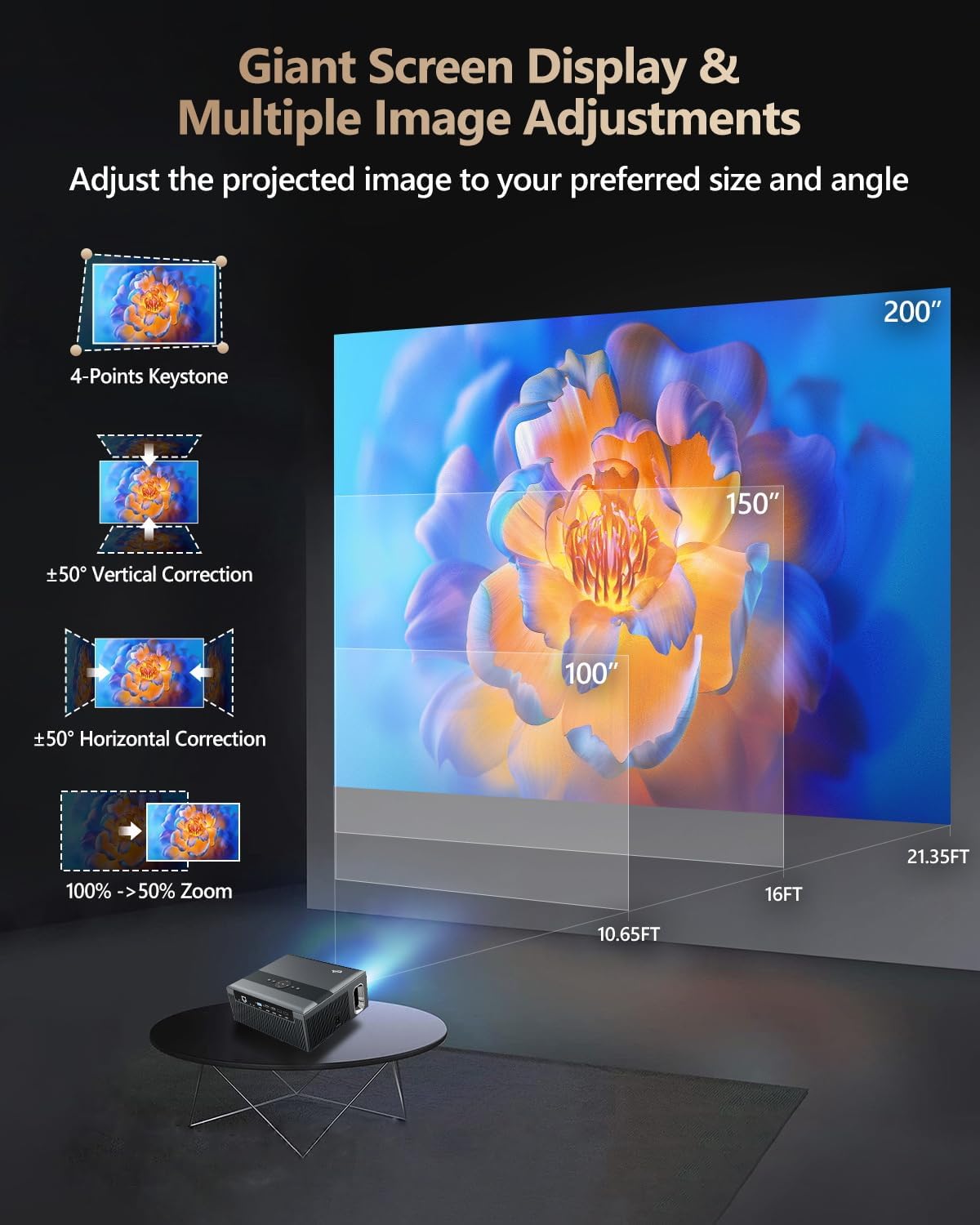
Figure 3: Image adjustment options including keystone correction and digital zoom.
4. اتصال الشبكة
Connect the projector to the internet for access to streaming apps and online content.
- واي فاي: Navigate to the network settings in the Android OS. Select your desired 2.4G or 5G Wi-Fi network and enter the password.
- شبكة LAN (إيثرنت): Connect an Ethernet cable from your router to the RJ45 port on the projector for a wired internet connection.
5. اقتران بلوتوث
Pair Bluetooth devices such as external speakers, headphones, mice, keyboards, or gamepads.
- تأكد من أن جهاز Bluetooth في وضع الإقران.
- On the projector, go to Bluetooth settings within the Android OS.
- Select the desired device from the list and confirm pairing.

Figure 4: Wireless connectivity for streaming and audio.
تعليمات التشغيل
1. Android TV OS Navigation
Use the remote control to navigate the Android 9.0 interface. The home screen provides access to installed applications, settings, and input sources.

Figure 5: Android TV 9.0 interface with pre-installed and accessible applications.
2. App Installation and Usage
The projector comes with pre-installed apps like Netflix, YouTube, and Prime Video. You can download additional authorized applications from the app store within the Android OS.
- Select an app icon from the home screen to launch it.
- Follow on-screen prompts for login or content selection.
3. Screen Mirroring (Airplay/DLNA/Miracast)
Synchronize your smartphone, tablet, or laptop screen wirelessly to the projector.
- تأكد من أن جهازك وجهاز العرض متصلان بنفس شبكة الواي فاي.
- Select the appropriate mirroring function (Airplay for iOS, Miracast for Android/Windows, DLNA for compatible devices) on the projector's interface.
- Initiate screen mirroring from your source device.
4. توصيل الأجهزة الخارجية
The projector offers multiple ports for connecting various external devices.

Figure 6: Available input and output ports for external devices.
- HDMI: Connect Blu-ray/DVD players, TV sticks, game consoles (PS5), PCs, or laptops using an HDMI cable. Select the corresponding HDMI input from the projector's source menu.
- USB: Insert USB flash drives or hard drives into the USB ports to play media fileس مباشرة.
- VGA: قم بتوصيل أجهزة الكمبيوتر أو أجهزة الكمبيوتر المحمولة القديمة باستخدام كابل VGA.
- من: Use the AV cable to connect devices with composite video and stereo audio outputs.
5. مخرج الصوت
The projector features built-in 10W stereo speakers. For alternative audio experiences:
- بلوتوث: Pair with external Bluetooth speakers or headphones as described in the Setup section.
- مخرج صوت 3.5 ملم: قم بتوصيل سماعات الرأس السلكية أو مكبرات الصوت الخارجية باستخدام كابل صوت 3.5 ملم.

Figure 7: Projector's integrated audio system.
صيانة
1. التنظيف
- عدسة: استخدم قطعة قماش ناعمة وخالية من الوبر، مُخصصة للعدسات البصرية. لا تستخدم منظفات كاشطة.
- الخارج: امسح الجزء الخارجي لجهاز العرض بقطعة قماش ناعمة وجافة. لإزالة البقع الصعبة، امسحه برفق بقطعة قماش جافة.ampفي القماش مع الماء.
- فتحات التهوية: Periodically check and gently clean the ventilation openings to ensure unobstructed airflow.
2. حماية من الغبار
The CAIWEI X99+ features a fully sealed optical engine and an air purifier filter, which significantly reduces dust accumulation and light decay, contributing to a longer service life.

Figure 8: Dust-proof design of the CAIWEI X99+ projector.
3. التخزين
When not in use for extended periods, store the projector in a cool, dry place, preferably in its original packaging or the provided projector bag, to protect it from dust and physical damage.
استكشاف الأخطاء وإصلاحها
إذا واجهت مشكلات مع جهاز العرض الخاص بك، فراجع المشكلات والحلول الشائعة التالية:
| مشكلة | السبب المحتمل | حل |
|---|---|---|
| لا توجد صورة أو رسالة "لا توجد إشارة" | Incorrect input source selected; loose cable connection; device not powered on. |
|
| صورة ضبابية | لم يتم ضبط التركيز؛ يلزم إجراء تصحيح الانحراف. |
|
| لا يوجد صوت | Volume too low; incorrect audio output selected; external device audio issue. |
|
| مشاكل اتصال Wi-Fi | كلمة مرور غير صحيحة؛ خارج النطاق؛ مشاكل في جهاز التوجيه. |
|
| جهاز التحكم عن بعد لا يعمل | بطاريات فارغة؛ عائق؛ مشكلة في الاقتران. |
|
تحديد
| ماركة | كايوي |
| نموذج | إكس 99+ |
| دقة العرض | دقة أصلية 1920 × 1080 (تدعم دقة 4K) |
| سطوع | 800 ANSI Lumens (12000 LED Lumens) |
| نسبة التباين | 15500:1 |
| نظام التشغيل | أندرويد 9.0 |
| ذاكرة | 2 جيجا بايت رام + 16 جيجا بايت روم |
| تكنولوجيا الاتصال | Bluetooth 5.0, Dual-band Wi-Fi (2.4G/5G), USB, HDMI, VGA, AV, LAN (RJ45) |
| المميزات الخاصة | Built-In Wi-Fi, Portable, Wireless, HDR10, MEMC, Dolby Audio, Sealed Optical Engine, 4D Keystone Correction, Digital Zoom |
| صوتي | 10W High Power Stereo Speakers, 3.5mm Audio Output |
| أبعاد المنتج | 10.55 × 9.25 × 4.92 بوصة |
| وزن العنصر | 7.48 رطل |
الضمان والدعم
For warranty information and technical support, please refer to the warranty card included with your product or visit the official CAIWEI webالموقع. اتصل بخدمة العملاء للحصول على المساعدة في أي مشاكل غير مشمولة في هذا الدليل.
الشركة المصنعة: كايوي
Webموقع: CAIWEI Official Store on Amazon