1. المقدمة
This document provides essential information for the use and care of your Generic replacement infrared remote control. This remote is designed to function with specific projector models, including Toumei Cocar C800S, C800W, C800A, C800, C900, and Missyee C900. It operates using infrared (IR) technology and requires two AAA batteries (not included).
Please note that this is a replacement remote control and may not offer all the functionalities or an identical user experience as the original remote. It is crucial to verify your projector's model number against the listed compatible models before use.
2. الإعداد: تركيب البطارية
The remote control requires two AAA batteries for operation. Batteries are not included with this product.
- حدد موقع حجرة البطارية في الجزء الخلفي من جهاز التحكم عن بعد.
- قم بتحريك غطاء حجرة البطارية للأسفل أو في الاتجاه المشار إليه بالسهم لفتحه.
- Insert two AAA batteries, ensuring the positive (+) and negative (-) terminals align correctly with the markings inside the compartment. Incorrect insertion can prevent the remote from functioning.
- أعد تركيب غطاء حجرة البطارية عن طريق تحريكه إلى مكانه حتى تسمع صوت طقطقة يثبت بإحكام.

الصورة: الخلفية view of the remote control with the battery cover removed, revealing the slots for two AAA batteries. Ensure correct polarity when inserting batteries.
3. تعليمات التشغيل
Point the remote control directly at the projector's IR receiver for optimal performance. Obstructions between the remote and the projector may interfere with the signal.
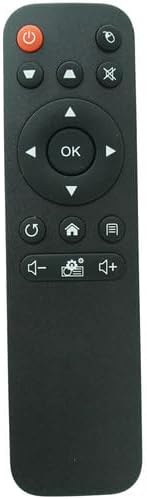
الصورة: الجبهة view من جهاز التحكم عن بعد، يعرض تخطيط أزراره.
وظائف الأزرار:
- زر الطاقة (⏻): Turns the projector on or off.
- زر المصدر/الإدخال (⌖): Selects the input source (e.g., HDMI, USB).
- زر كتم الصوت (🔇): Mutes or unmutes the audio output.
- لوحة الاتجاهات (أعلى، أسفل، يسار، يمين): يتنقل بين القوائم والخيارات.
- زر موافق: Confirms selections or enters menus.
- زر العودة/الرجوع (↺): Returns to the previous menu or screen.
- زر الصفحة الرئيسية (⌂): Accesses the projector's main home screen.
- زر القائمة/الإعدادات (☰): Opens the projector's settings or options menu.
- زر خفض الصوت (🔉): Decreases the audio volume.
- زر رفع الصوت (🔊): Increases the audio volume.
- Settings/Gear Button (⚙): Likely provides quick access to specific settings or modes.
4. الصيانة
- تنظيف: امسح جهاز التحكم عن بُعد بقطعة قماش ناعمة وجافة. لا تستخدم منظفات سائلة أو مواد كاشطة، فقد تُتلف سطحه أو مكوناته الداخلية.
- استبدال البطارية: Replace batteries when the remote's response becomes sluggish or stops working. Always replace both batteries simultaneously with new AAA batteries.
- تخزين: If the remote control will not be used for an extended period, remove the batteries to prevent leakage and potential damage to the device. Store in a cool, dry place.
- تجنب التعرض: Keep the remote away from direct sunlight, extreme temperatures, and moisture.
5. استكشاف الأخطاء وإصلاحها
- جهاز التحكم عن بعد لا يستجيب:
- تأكد من إدخال البطاريات بشكل صحيح مع مراعاة القطبية الصحيحة.
- استبدال البطاريات القديمة ببطاريات AAA جديدة.
- Check for any obstructions between the remote control and the projector's IR receiver.
- Ensure you are within the effective range and pointing the remote directly at the projector.
- بعض الوظائف لا تعمل:
- This is a replacement remote; some advanced or specific functions of your original projector remote may not be supported.
- Verify that your projector model is listed as compatible.
6. المواصفات
| ماركة | نوعي |
| الأجهزة المتوافقة | Toumei Cocar C800S, C800W, C800A, C800, C900 & Missyee C900 Projectors |
| تكنولوجيا الاتصال | الأشعة تحت الحمراء (IR) |
| نوع وحدة التحكم | التحكم بالأزرار |
| البطاريات المطلوبة | شنومكس x آا (غير مدرجة) |
7. ملاحظات مهمة
- This remote control is a replacement unit and is specifically designed for the listed projector models. It may not be compatible with other devices.
- No batteries or additional instructions are included with the product. Please refer to this manual for setup and operation.
- The functionality of this replacement remote may differ slightly from the original remote control that came with your projector.
- قبل الشراءasing or using, ensure your projector's model number is explicitly mentioned in the compatibility list to avoid issues.