
1. انتهى المنتجview
The Xoopar Octopus Gamma is a versatile 4-in-1 multi-connector USB hub with an integrated 3000mAh power bank. Designed for convenience and portability, it allows you to charge various devices simultaneously and provides a power boost when an external power source is unavailable. This product is made from recycled plastic and features a compact, lightweight design.

Image 1.1: The Xoopar Octopus Gamma with its four distinct connectors: Lightning, USB-C, Micro USB, and USB-A.

Image 1.2: Key features of the Octopus Gamma, including recycled plastic construction, readiness for use, dual charging capability, and its 4-in-1 multi-adapter functionality.
2. الإعداد
The Xoopar Octopus Gamma is designed for immediate use. No complex setup is required. Simply identify the appropriate connector for your device.
2.1 تحديد الموصلات
The device features four types of connectors:
- البرق: For Apple devices (iPhone, iPad, AirPods).
- يو اس بي سي: For modern Android phones, tablets, and other USB-C compatible devices.
- ميكرو يو إس بي: For older Android phones, power banks, and various accessories.
- يو اس بي-ايه: The standard USB connector for connecting to power adapters, computers, or other USB-A ports.
الصورة 2.1: تفصيلية view of the Octopus Gamma's connectors, clearly indicating Lightning, USB-C, Micro USB, and USB-A ports.
3. تعليمات التشغيل
3.1 شحن أجهزتك
- Identify the correct connector for your device (Lightning, USB-C, or Micro USB).
- Plug the appropriate connector into your device's charging port.
- Connect the USB-A end of the Octopus Gamma to a power source. This can be a wall adapter, computer USB port, or car charger.
- Your device will begin charging. The Octopus Gamma can charge up to two devices simultaneously if connected to a sufficient power source.

Image 3.1: The Octopus Gamma actively charging a smartphone, illustrating its function as a portable power source.
3.2 Using the Integrated Power Bank
The Octopus Gamma includes a 3000mAh internal battery for portable charging when no external power source is available.
- Ensure the internal power bank is charged (see Section 3.3).
- Plug the appropriate connector (Lightning, USB-C, or Micro USB) into your device.
- The Octopus Gamma will automatically begin supplying power from its internal battery to your device.
- The power bank can provide a significant boost to your smartphone's battery, helping to prevent power loss during travel or emergencies.
3.3 Recharging the Octopus Gamma Power Bank
The internal power bank of the Octopus Gamma recharges automatically when the USB-A connector is plugged into an external power source and you are simultaneously charging another device. This ensures the power bank is always ready for use.
- Connect the USB-A end of the Octopus Gamma to a wall adapter, computer, or other USB-A power source.
- Connect one of the output connectors (Lightning, USB-C, or Micro USB) to a device you wish to charge.
- The Octopus Gamma will charge your device and its internal power bank simultaneously.
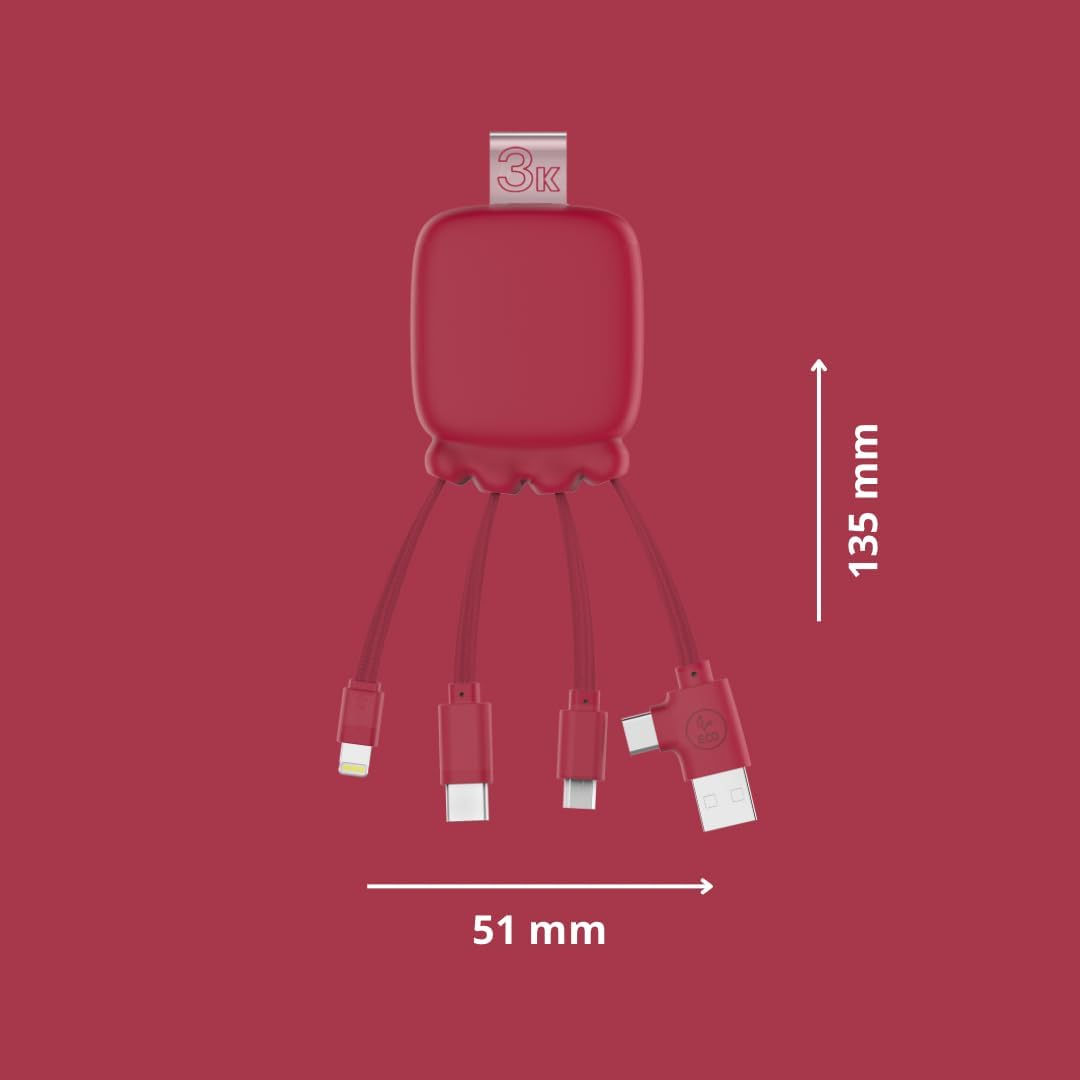
Image 3.2: The Octopus Gamma connected to a power strip, demonstrating simultaneous charging of both the connected device and the internal power bank.

Image 3.3: The Octopus Gamma in a typical use environment, connected to a laptop, alongside a keyboard and smartphone.
4. الصيانة
To ensure the longevity and optimal performance of your Xoopar Octopus Gamma, follow these maintenance guidelines:
- تنظيف: امسح الجهاز بقطعة قماش ناعمة وجافة. تجنب استخدام المواد الكيميائية القاسية أو المواد الكاشطة.
- تخزين: قم بتخزين الجهاز في مكان بارد وجاف بعيدًا عن أشعة الشمس المباشرة ودرجات الحرارة القصوى.
- التعامل: Avoid excessive bending or pulling of the cables to prevent damage to the connectors or internal wiring.
- العناية بالبطارية: For optimal battery life, avoid fully discharging the internal power bank frequently. Recharge it regularly.
5. استكشاف الأخطاء وإصلاحها
| مشكلة | السبب المحتمل | حل |
|---|---|---|
| الجهاز لا يشحن. | تم استخدام موصل غير صحيح. مشكلة في مصدر الطاقة. Internal power bank depleted. | Ensure the correct connector is firmly plugged into your device. Try a different USB-A port or wall adapter. Recharge the Octopus Gamma by connecting its USB-A end to a power source. |
| الشحن البطيء. | انخفاض الطاقة الخارجة من المصدر. شحن أجهزة متعددة. | استخدم طاقة أعلىtagمحول الطاقة الإلكتروني. اشحن الأجهزة واحداً تلو الآخر لشحن أسرع. |
| Octopus Gamma not recharging. | Faulty USB-A connection. مشكلة في مصدر الطاقة. | Ensure the USB-A connector is securely plugged into a working power source. Try a different USB-A port or wall adapter. |
6. المواصفات
| ميزة | التفاصيل |
|---|---|
| اسم الموديل | Gamma RP |
| رقم الموديل | إكس بي 61075 |
| الموصلات | Lightning, Micro USB, USB Type A, USB Type C |
| سعة بنك الطاقة | 3000 مللي أمبير |
| نوع البطارية | ليثيوم بوليمر |
| وزن | 70 جرام |
| الأبعاد (الطول × العرض × الارتفاع) | 13.5 × 5.1 × 1.7 سم |
| المميزات الخاصة | Fast Charging, Lightweight, Recycled Plastic Construction |
| الأجهزة المتوافقة | Smartphones, Tablets, Laptops, Speakers, Earphones (Universal compatibility) |
| الشركة المصنعة | XOOPAR |
| بلد المنشأ | الصين |

Image 6.1: Dimensions of the Octopus Gamma, showing its compact size.
7. الضمان والدعم
7.1 معلومات الضمان
The Xoopar Octopus Gamma (Model XP61075) comes with a ضمان الشركة المصنعة لمدة عامينيغطي هذا الضمان عيوب المواد والتصنيع في ظل الاستخدام العادي. يُرجى الاحتفاظ بإيصال الشراء للمطالبة بالضمان.
الضمان لا يشمل:
- الأضرار الناجمة عن سوء الاستخدام أو الإساءة أو الحوادث أو الإهمال.
- الإصلاحات أو التعديلات غير المصرح بها.
- التآكل والتلف الطبيعي.
7.2 دعم العملاء
For technical assistance, warranty claims, or any questions regarding your Xoopar Octopus Gamma, please contact Xoopar customer support through their official webالموقع أو بائع التجزئة الذي تم شراء المنتج منه.
You can visit the official Xoopar store for more information: Xoopar Official Store