
1. المقدمة
This manual provides detailed instructions for the installation, operation, and maintenance of your SECULINK C17-4MP Dual-Band WiFi Dome Security Camera. This camera is designed for outdoor surveillance, featuring 4MP resolution, pan/tilt/zoom capabilities, automatic tracking, human detection, and color night vision. Please read this manual thoroughly before use to ensure proper functionality and safety.
2. محتويات العبوة
تأكد من وجود جميع العناصر في الحزمة الخاصة بك:
- SECULINK C17-4MP Dome Security Camera
- محول الطاقة (شاحن)
- مسامير التثبيت ومقابس الحائط
- طقم مقاوم للماء لكابل الشبكة (إن وجد)
- دليل البدء السريع
3. انتهى المنتجview
The SECULINK C17-4MP camera features a robust dome design suitable for outdoor environments. Key components include:
- عدسة الكاميرا: يلتقط فيديو فوtage.
- مصابيح الأشعة تحت الحمراء: توفير الإضاءة للرؤية الليلية.
- White Light LEDs (Floodlight): Enhance color night vision and act as a deterrent.
- ميكروفون: لإدخال الصوت والاتصال ثنائي الاتجاه.
- المتحدث: لإخراج الصوت والاتصال ثنائي الاتجاه.
- هوائيات: For dual-band 2.4GHz/5GHz Wi-Fi connectivity.
- منفذ كارت الذاكرة الصغيرة: يدعم التخزين المحلي حتى 256 جيجابايت.
- زر إعادة الضبط: لإعادة ضبط المصنع.
- منفذ الطاقة: مدخلات الطاقة DC 12V.

الصورة 3.1: انتهىview of the SECULINK C17-4MP camera and its mobile application interface.
4. الإعداد
4.1 تنزيل التطبيق وتسجيل الحساب
- تنزيل سيكيي mobile application from the App Store (iOS) or Google Play Store (Android).
- افتح التطبيق واتبع التعليمات التي تظهر على الشاشة لتسجيل حساب جديد أو تسجيل الدخول إذا كان لديك حساب بالفعل.
4.2 تشغيل الكاميرا
Connect the provided power adapter to the camera's power port and plug it into an electrical outlet. The camera will initiate its self-test sequence, indicated by a rotating motion and status light changes.
4.3 الاتصال بشبكة Wi-Fi
The SECULINK C17-4MP supports dual-band Wi-Fi (2.4GHz and 5GHz) for flexible network connectivity.
- Ensure your mobile device is connected to the same Wi-Fi network you intend to connect the camera to.
- In the SECUEYE app, tap the "Add Device" or "+" icon.
- حدد طراز الكاميرا أو امسح رمز الاستجابة السريعة الموجود على الكاميرا (إن وجد).
- Follow the app's instructions to enter your Wi-Fi network name (SSID) and password.
- The app will guide you through the pairing process, which may involve scanning a QR code displayed on your phone with the camera lens or listening for an audio prompt.
- Once connected, the camera's status light will indicate a successful connection (refer to the app or quick start guide for specific light indicators).
4.4 تركيب الكاميرا
The camera is designed for wall mounting and is IP65/IP66 weatherproof, making it suitable for outdoor installation.
- اختر موقع تركيب مناسب يوفر المطلوب viewزاوية التصوير وتقع ضمن نطاق شبكة الواي فاي.
- Use the mounting template (if provided) or the camera base to mark the drill holes on the wall.
- قم بحفر الثقوب وإدخال المقابس الحائطية.
- قم بتأمين قاعدة الكاميرا على الحائط باستخدام البراغي المتوفرة.
- Attach the camera body to the base.
- Ensure all cable connections are secure and protected from weather using the waterproof kit if necessary.
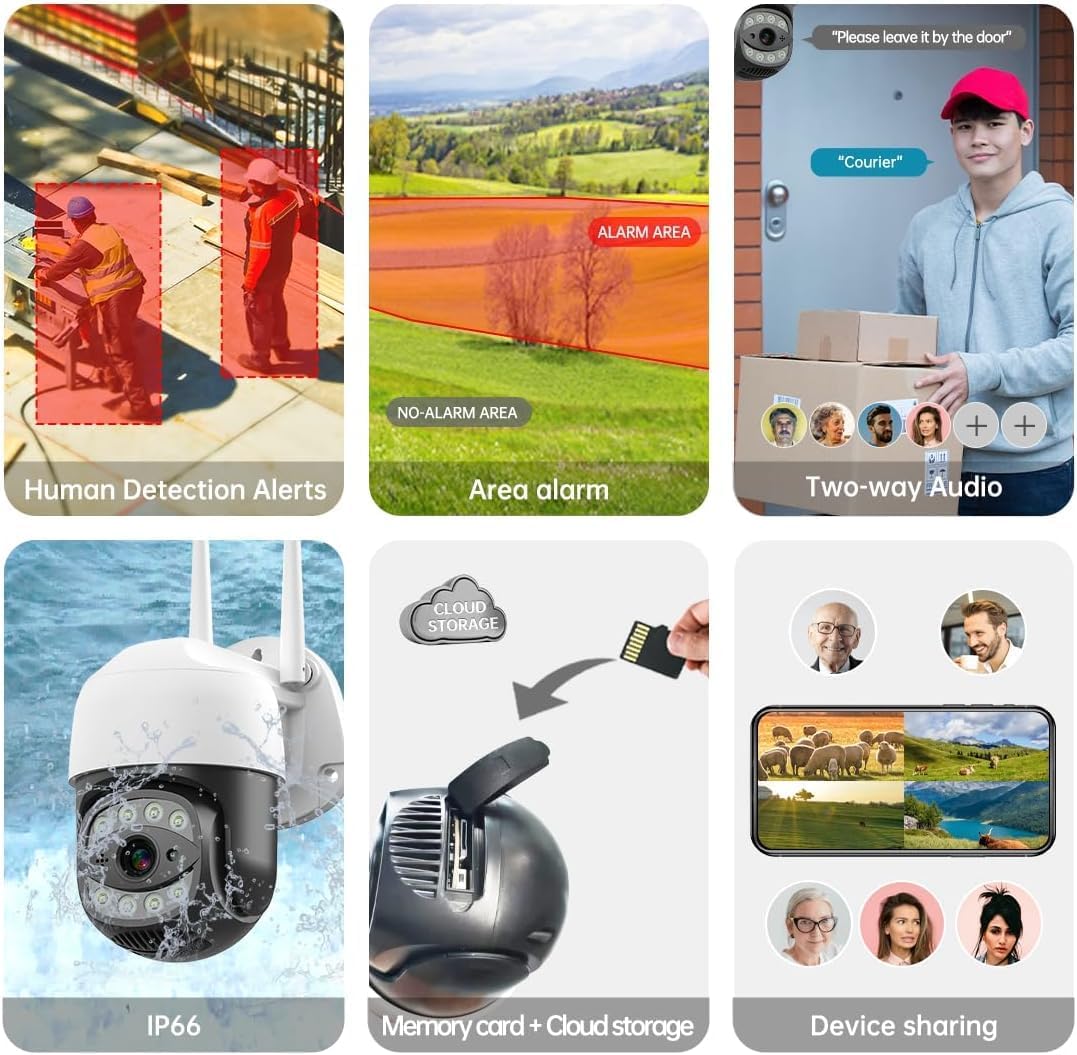
Image 4.1: The SECULINK C17-4MP camera is rated IP66 for dust and water resistance, suitable for various weather conditions.
5. تعليمات التشغيل
5.1 مباشر View والتشغيل
Access the live video feed and review تم تسجيل فوtage through the SECUEYE app. The camera provides 4MP (2560x1440p) resolution for clear images.

Image 5.1: Visual comparison demonstrating the enhanced clarity of 5MP resolution over lower resolutions.
5.2 Pan, Tilt, and Digital Zoom (PTZ)
التحكم في الكاميرا viewing angle remotely using the SECUEYE app. The camera offers:
- الدوران الأفقي: 335 درجة
- إمالة رأسية: 90 درجة
- التكبير الرقمي: تكبير 10x
Use pinch-to-zoom gestures on your mobile device to digitally zoom in on specific areas of interest.

Image 5.2: Demonstrates controlling the camera's pan and tilt functions via the mobile app.

Image 5.3: Illustration of the 10x digital zoom feature, allowing closer inspection of details.
5.3 Automatic Tracking and Human Motion Detection
The camera features intelligent detection capabilities to enhance security monitoring.
- التتبع التلقائي: When enabled, the camera will automatically detect and follow moving human figures within its field of view, recording their path.
- كشف الحركة البشرية: Advanced algorithms distinguish human activity from other movements (e.g., pets, swaying branches), reducing false alarms.
- التنبيهات: Upon detection, the camera can send real-time alerts to your mobile phone.
- Floodlight and Sound Alarm: Built-in spotlights activate upon motion detection at night, and a security siren can be triggered as an additional deterrent.

Image 5.4: The camera's AI Humanoid Detection identifies human presence and sends alerts.

Image 5.5: The camera's automatic tracking capability follows detected human movement.

Image 5.6: Illustrates the camera's ability to differentiate human activity from other movements, reducing false alarms.
5.4 أوضاع الرؤية الليلية
The camera offers multiple night vision options for clear surveillance in low-light conditions:
- الرؤية الليلية بالأشعة تحت الحمراء (IR): Uses IR LEDs to provide black and white video in complete darkness, with a range of up to 100ft (30m).
- رؤية ليلية ملونة: Utilizes white light LEDs (floodlight) to capture full-color video at night when motion is detected or manually activated.
- Starlight Sensor: Enhances low-light performance to produce clearer images even without additional illumination.

Image 5.7: Demonstrates the different night vision modes: infrared (black and white), white light (color), and full-color night vision.

Image 5.8: The camera's infrared night vision provides visibility up to 20 meters in darkness.
5.5 الصوت ثنائي الاتجاه
The built-in microphone and speaker allow for real-time two-way communication through the SECUEYE app. You can listen to audio from the camera's location and speak through the camera's speaker.
5.6 خيارات التخزين
تدعم الكاميرا طريقتين أساسيتين لتخزين الصور المسجلةtage:
- بطاقة مايكرو التنمية المستدامة: Insert a Micro SD card (up to 256GB, sold separately) into the designated slot for local storage. The camera can record 24/7 or motion-triggered videos.
- التخزين السحابي: Optional cloud storage services are available through the SECUEYE app for secure, remote backup of your recordings.
5.7 مشاركة الجهاز
You can share access to your camera's live feed and recordings with family members or trusted individuals through the SECUEYE app, allowing multiple users to monitor the property simultaneously.
6. الصيانة
To ensure optimal performance and longevity of your SECULINK C17-4MP camera, consider the following maintenance tips:
- تنظيف العدسة: Periodically wipe the camera lens with a soft, clean, lint-free cloth to remove dust, dirt, or water spots that may affect image clarity. Avoid abrasive cleaners.
- تحقق من اتصال الطاقة: Ensure the power adapter and cable remain securely connected and free from damage, especially in outdoor environments.
- تحديثات البرامج الثابتة: Regularly check the SECUEYE app for available firmware updates. Updates often include performance improvements, new features, and security enhancements.
- فحص التركيب: Periodically check the camera's mounting for stability, especially after severe weather conditions.
7. استكشاف الأخطاء وإصلاحها
If you encounter issues with your SECULINK C17-4MP camera, refer to the following common troubleshooting steps:
7.1 الكاميرا لا تتصل بشبكة Wi-Fi
- التحقق من إشارة الواي فاي: Ensure the camera is within range of your Wi-Fi router. Weak signals can cause connection issues.
- Verify Network Credentials: Double-check that the Wi-Fi network name (SSID) and password entered in the app are correct.
- توافق جهاز التوجيه: Confirm your router supports 2.4GHz or 5GHz bands, and that the camera is attempting to connect to a compatible band.
- إعادة تشغيل الأجهزة: Power cycle both your Wi-Fi router and the camera.
- إعادة تعيين الكاميرا: If issues persist, perform a factory reset on the camera (refer to the quick start guide for reset button location and procedure) and attempt the setup process again.
7.2 جودة الصورة الرديئة
- عدسة نظيفة: تأكد من أن عدسة الكاميرا نظيفة وخالية من البقع والأوساخ.
- عرض النطاق الترددي للشبكة: قد يؤثر بطء اتصال الإنترنت على جودة البث المباشر. تحقق من سرعة شبكتك.
- ظروف الإضاءة: Ensure adequate lighting for optimal image quality, especially for color night vision.
7.3 خاصية كشف الحركة لا تعمل أو حساسة للغاية
- ضبط الحساسية: In the SECUEYE app settings, adjust the motion detection sensitivity level.
- مناطق الكشف: Configure specific detection zones to monitor only relevant areas and exclude areas with frequent irrelevant motion (e.g., public roads, swaying trees).
- Check Schedule: Ensure motion detection is enabled for the desired time periods in the app.
7.4 No Recording to SD Card
- Insert SD Card Correctly: Ensure the Micro SD card is inserted properly into the slot.
- تنسيق بطاقة SD: Format the SD card through the camera settings in the SECUEYE app.
- سعة البطاقة/صحتها: Ensure the SD card is not full or corrupted. Try a different, known-good SD card if necessary.
- إعدادات التسجيل: Verify that continuous recording or motion-triggered recording is enabled in the app settings.
8. المواصفات
| ميزة | مواصفة |
|---|---|
| نموذج | C17-4MP |
| دقة | 4MP (2560x1440p Max) |
| مستشعر الصورة | سيموس |
| البعد البؤري | 3.6 ملم |
| زاوية دوران عموم | 335 درجة أفقي |
| زاوية دوران الميل | 90 درجة عمودي |
| تقريب رقمي | 10x |
| الرؤية الليلية | IR-Cut, Starlight, LED (Color Night Vision) |
| المسافة بالأشعة تحت الحمراء | حتى 100 قدم (30 أمتار) |
| صوتي | Built-in Microphone and Speaker (Two-Way Audio) |
| مقاومة الماء | IP65, IP66 (Waterproof) |
| الاتصال | Dual-Band Wi-Fi (2.4GHz/5GHz), Wired Ethernet |
| تخزين | بطاقة ذاكرة مايكرو إس دي (حتى 256 جيجابايت)، تخزين سحابي |
| قوة | DC 12V, 9 Watts |
| درجة حرارة التشغيل | -10 درجة مئوية إلى + 50 درجة مئوية (14 درجة فهرنهايت إلى 122 درجة فهرنهايت) |
| توافق التطبيق | SECUEYE (iOS, Android) |
| أبعاد | 7 × 7 × 5 بوصة (الحزمة) |
| وزن العنصر | 1.2 رطل |
9. الضمان والدعم
For warranty information and technical support, please refer to the official SECULINK webالموقع أو تواصل مع خدمة العملاء مباشرةً. احتفظ بإيصال الشراء كإثبات للشراء في حال وجود أي مطالبات بالضمان.
الشركة المصنعة: سيكيولينك