
1. المقدمة
The ORIVISION EHV1401 is a versatile HDMI and VGA video encoder designed for professional video streaming and broadcasting applications. It supports H.265 and H.264 video encoding at resolutions up to 1080P@60Hz, offering multi-channel output and various streaming protocols. This manual provides detailed instructions for setting up, operating, and maintaining your encoder.
2. الميزات الرئيسية
- Supports H.265/H.264 video encoding.
- Adaptive selection for HDMI or VGA input.
- Simultaneous HDMI and VGA loop-out display.
- Supports 1x HDMI and 1x VGA input with corresponding loop-out.
- Digital and analog audio loop-out support.
- Wide protocol support: HTTP, HTTPS, RTSP, RTMP, RTMPS, SRT, UDP, RTP, HLS, FLV, Onvif.
- Up to 1080P@60Hz resolution input and output.
- Supports 4 channels of simultaneous stream output.
- Audio encoding without video input capability.
- Two-way audio transmission support.
- AAC/G.711 advanced audio coding format.
- 1000M full-duplex network interface for LAN and WAN transmission.
- Supports POE power supply (optional).
- SDK support for secondary development.
- Network remote management and upgrade capabilities.
- مُصمم للعمل على مدار الساعة طوال أيام الأسبوع.
3. انتهى المنتجview والواجهات
The ORIVISION EHV1401 encoder features multiple input and output ports for flexible connectivity. Understanding these interfaces is crucial for proper setup.

الشكل 3.1: Front panel of the ORIVISION EHV1401 encoder. From left to right, it shows VGA input, HDMI input, Audio input, Audio output, VGA output, HDMI output, LAN port, and 12V DC power input.
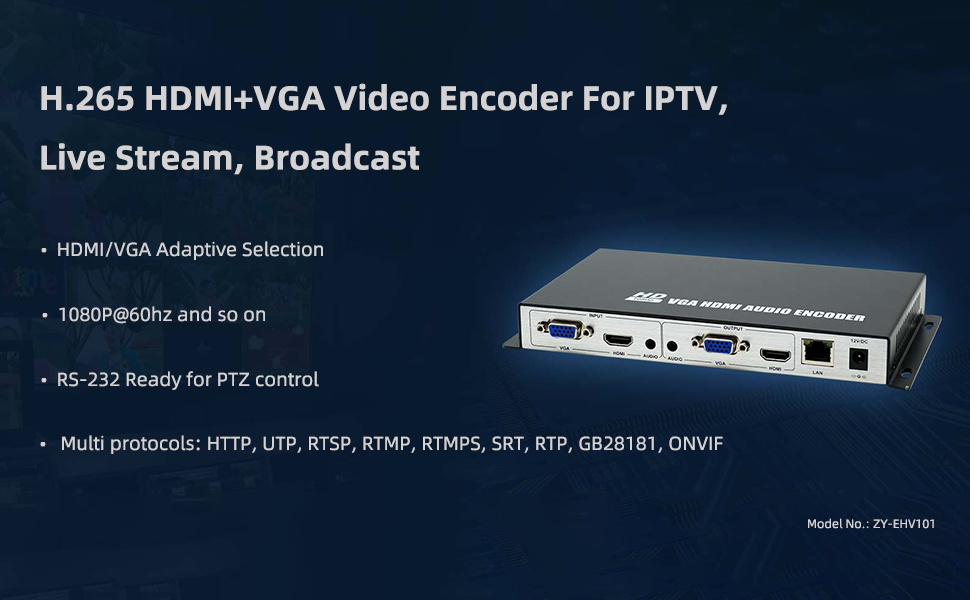
الشكل 3.2: زيادةview of the ORIVISION EHV1401 encoder highlighting its primary applications for IPTV, Live Stream, and Broadcast, along with key features like adaptive input, 1080P@60Hz support, RS-232 for PTZ, and multiple protocols.
4. الإعداد والاتصال
Follow these steps to connect your ORIVISION EHV1401 encoder to your video sources, displays, and network.
- توصيل مصدر الفيديو: Connect your HDMI or VGA video source (e.g., PC, camera, monitor, DVD player) to the corresponding HDMI or VGA input port on the encoder.
- توصيل مصدر الصوت (اختياري): If using external audio, connect your audio source to the Audio input port.
- Connect Local Displays (Loop-out): For local monitoring, connect HDMI or VGA displays to the HDMI Loopout and VGA Loopout ports.
- إتصال شبكة: Connect an Ethernet cable from the encoder's LAN port to your network router or switch.
- توصيل الطاقة: Connect the 12V DC power adapter to the encoder's 12VDC port and plug it into a power outlet. If using POE (Power over Ethernet), ensure your network switch supports POE and connect the Ethernet cable.

الشكل 4.1: Basic connection diagram illustrating how to connect video sources (PC, camera, monitor, DVD), local loop-out displays, and network for streaming to various platforms.
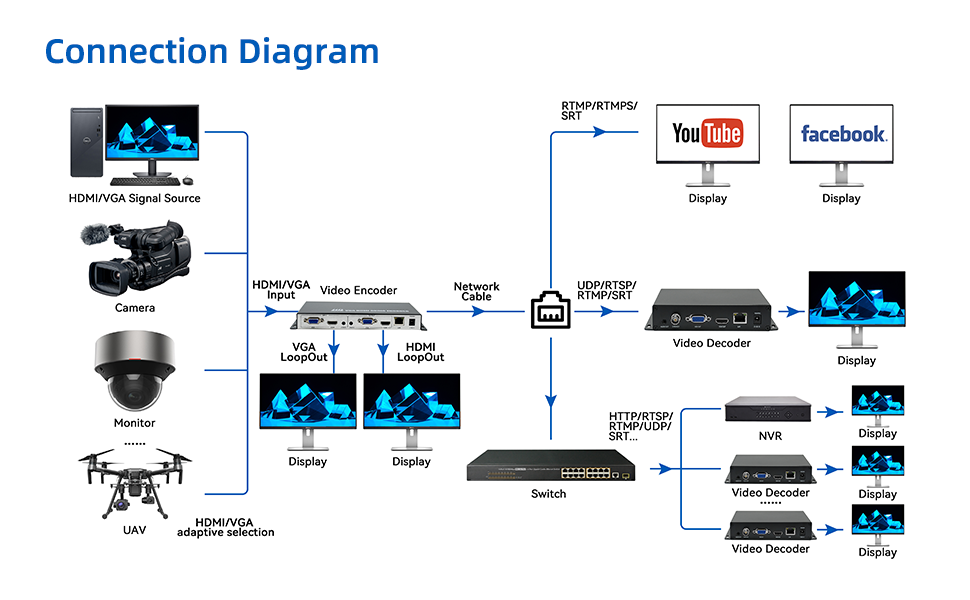
الشكل 4.2: Advanced connection diagram showing integration with multiple signal sources, local displays, network switches, and various streaming/recording destinations including YouTube, Facebook, video decoders, and NVRs.
5. تعليمات التشغيل
Once the encoder is connected, you can configure and manage it via its web واجهة.
5.1 الوصول إلى Web الواجهة
- Ensure your computer is on the same network as the encoder.
- افتح web browser and enter the encoder's IP address (refer to your network settings or default IP if provided in documentation).
- Log in using the provided credentials (default username/password are usually 'admin'/'admin' or similar, check product documentation).

الشكل 5.1: Example screenshot of the encoder's web interface, providing access to system information and configuration settings.
5.2 Configuring Video and Audio Settings
- Navigate to the "Encoder" or "Video Settings" section in the web واجهة.
- Select your desired input source (HDMI or VGA).
- Configure video resolution (up to 1080P@60Hz), frame rate, and bitrate.
- Adjust audio encoding settings (AAC/G.711) and bitrate.
الشكل 5.2: The encoder supports AAC and G.711 audio encoding for high-quality audio transmission.
5.3 Streaming Configuration
The encoder supports various streaming protocols. Configure your desired protocol and destination.

الشكل 5.3: The encoder supports a wide range of streaming protocols including RTMP, RTMPS, RTSP, SRT, HLS, UDP/RTP, Multicast, HTTP, and Onvif.
- Select the streaming protocol (e.g., RTMP for YouTube/Facebook Live).
- Enter the streaming server URL and stream key/name provided by your streaming platform.
- Save your settings and start the stream.
6. المواصفات
Detailed technical specifications for the ORIVISION EHV1401 encoder (Model ZY-EHV101).

الشكل 6.1: Comprehensive specifications table for the ZY-EHV101 model, detailing video input/output, supported resolutions, encoding, audio interfaces, network features, and general device parameters.
| فئة | المعلمة | قيمة |
|---|---|---|
| فيديو | واجهات الإدخال | 1x HDMI 1.4 and VGA (HDCP1.4) |
| دعم القرار | 1920*1080, 1280*720, 1280*800, 1280*768, 1024*768, 1024*576, 960*540, 850*480, 800*600, 720*576, 720*540, 720*480, 720*404, 704*576, 640*480, 640*360, 480*270, Auto | |
| معدل الإطارات | 5-60 هرتز | |
| واجهات الإخراج | 1x Ethernet port (RJ45), 1x HDMI and VGA Loop-out | |
| ترميز الفيديو | H.265 & H.264 | |
| معدل الكود | 16kbps - 12Mbps | |
| صوتي | واجهات الإدخال | 1x External audio, HDMI and VGA built-in Audio |
| واجهات الإخراج | 1x External audio | |
| ترميز الصوت | AAC, G.711 | |
| شبكة | آر جيه 45 | منفذ إيثرنت 1000 ميجابايت |
| Program Streaming | HTTP, RTSP, RTMP/RTMPS, SRT, GB28181, HLS, FLV, ONVIF, Multicast: UDP/RTP | |
| عام | Dimension (W*L*H) | 8.5*4.4*0.98in (217*112*25mm) |
| الوزن الإجمالي | 0.35كجم | |
| درجة حرارة | 0 ~ 45°C (for working), -20~60°C (for storing) | |
| رطوبة | <90٪ ، دون تكاثف | |
| حجم الإدخالtage | تيار مستمر 12 فولت/1 أمبير | |
| استهلاك الطاقة | 5W |

الشكل 6.2: Physical dimensions of the ORIVISION EHV1401 encoder.
7. استكشاف الأخطاء وإصلاحها
This section addresses common issues you might encounter with your ORIVISION EHV1401 encoder.
- لا يوجد مخرج فيديو:
- Check all HDMI/VGA cable connections. Ensure they are securely plugged in.
- Verify the input source is active and outputting a signal.
- Confirm the resolution and refresh rate of the input source are supported by the encoder (refer to specifications).
- Ensure the correct input source is selected in the encoder's web واجهة.
- لا يوجد اتصال بالشبكة:
- Check the Ethernet cable connection to the encoder and your network device.
- Verify network settings (IP address, subnet mask, gateway) in the encoder's web واجهة.
- Ensure your network router/switch is functioning correctly.
- Streaming Issues (Buffering, Disconnections):
- تحقق من سرعة اتصالك بالإنترنت واستقراره.
- Reduce the video bitrate in the encoder settings if your internet upload speed is insufficient.
- Verify the streaming server URL and stream key/name are correct.
- Ensure no firewall or network security settings are blocking the streaming protocols.
- لا يوجد صوت:
- Check audio cable connections (if using external audio).
- Ensure audio is enabled and correctly configured in the encoder's web واجهة.
- Verify the audio source is active and producing sound.
8. الصيانة
Proper maintenance ensures the longevity and optimal performance of your ORIVISION EHV1401 encoder.
- تنظيف: استخدم قطعة قماش ناعمة وجافة لتنظيف الجزء الخارجي من الجهاز. تجنب استخدام المنظفات السائلة أو المواد الكاشطة.
- تهوية: Ensure the encoder is placed in a well-ventilated area to prevent overheating. Do not block ventilation openings.
- تحديثات البرامج الثابتة: Periodically check the ORIVISION webموقع لتحديثات البرامج الثابتة. يمكن أن يؤدي تحديث البرامج الثابتة إلى تحسين الأداء وإضافة ميزات جديدة.
- تخزين: If storing the device for an extended period, ensure it is kept in a cool, dry place within the specified storage temperature range (-20~60°C).
9. الضمان والدعم
For warranty information and technical support, please refer to the documentation included with your purchase or visit the official ORIVISION website. You can also contact ORIVISION customer service for assistance with product setup, operation, or troubleshooting.
الشركة المصنعة: Nantong ZYDZ Electronic Co.,Ltd.
ماركة: أورفيجن