
symcode USA-6709DA-Green
Symcode Wireless Bluetooth Barcode Scanner User Manual
Model: USA-6709DA-Green
1. المقدمة
This user manual provides comprehensive instructions for the Symcode Wireless Bluetooth Barcode Scanner, Model USA-6709DA-Green. This device is designed for accurate and efficient data capture, supporting various 1D and 2D barcode types. It offers versatile connectivity options including Bluetooth, 2.4G wireless, and USB wired connections, making it suitable for a wide range of business applications.

Image 1: Symcode Wireless Bluetooth Barcode Scanner and accessories.
2. محتويات العبوة
يرجى التأكد من وجود جميع العناصر في الحزمة الخاصة بك:
- Symcode Barcode Scanner (Model: USA-6706DA-Green)
- كابل شحن USB
- 2.4G دونجل USB
- دليل المستخدم

Image 2: Components included with the Symcode Barcode Scanner.
3. مواصفات المنتج
- تكنولوجيا المسح الضوئي المتقدمة: CMOS optical imaging for quick and precise scanning of 1D and 2D barcodes (QR, DataMatrix, PDF417, Aztec, Hanxin, etc.) even on damaged or poorly printed labels.
- أوضاع الاتصال الثلاثي: Supports Bluetooth, 2.4G wireless, and USB wired connections for maximum flexibility.
- نطاق لاسلكي موسع: Up to 200m in open environments and 30m indoors with the 2.4G USB dongle.
- عمر بطارية طويل: 2000mAh battery provides up to 30 hours of continuous scanning, with a full recharge in approximately 2 hours.
- تكوين متعدد الاستخدامات: Features include hands-free intelligent sensor mode, trigger scan mode, vibration/buzzer settings, data storage/instant upload modes, multiple keyboard languages, and customizable prefix/suffix options.
- متانة فائقة: Constructed with strong ABS material, designed to withstand drops of up to 2.4 meters (8 ft) and features an integrated dustproof housing (IP67 rated).
4. الإعداد والاتصال
The scanner offers three primary connection methods:
4.1. اتصال لاسلكي 2.4G
- قم بتوصيل محول USB 2.4G بمنفذ USB المتاح على جهاز الكمبيوتر الخاص بك.
- Turn on the scanner. It will automatically pair with the dongle.
- A successful connection is indicated by a specific beep sound and LED indicator.
4.2. اتصال بلوتوث
- Ensure your device (smartphone, tablet, computer) has Bluetooth enabled.
- Scan the Bluetooth pairing barcode (usually found in the user manual or on a setup card).
- On your device, search for Bluetooth devices and select "Symcode Scanner" (or similar name).
- تأكيد الاقتران.
4.3. اتصال سلكي عبر USB
- قم بتوصيل الماسح الضوئي بجهاز الكمبيوتر الخاص بك باستخدام كابل USB المرفق.
- سيعمل الماسح الضوئي كجهاز سلكي وسيشحن في نفس الوقت.

Image 3: Connectivity options for the Symcode Barcode Scanner.

Image 4: Operating system compatibility.
5. تعليمات التشغيل
5.1. Basic Scanning Operation
To scan a barcode, point the scanner's window at the barcode and press the trigger button. A successful scan will be indicated by a beep and/or vibration, and the data will be transmitted to your connected device.
5.2. أوضاع تحميل البيانات
يدعم الماسح الضوئي وضعين لتحميل البيانات:
- وضع التحميل الفوري: Data is transmitted to the connected device immediately after each scan. This is the default mode.
- وضع التخزين غير المتصل: Scanned data is stored in the scanner's internal memory (up to 10,000 codes). To upload stored data, scan the specific setup code for 'Upload Data' found in your detailed user manual.

Image 5: Instant Upload Mode vs. Offline Storage Mode.
5.3. قدرات فك التشفير
The scanner can decode a wide array of barcode types, including:
- الرموز الشريطية ثنائية الأبعاد: UPC/EAN, Code 39, Code 128, Codabar, Interleaved 2 of 5, Code 93, MSI, Code 11, RSS variants, etc.
- الرموز الشريطية ثنائية الأبعاد: QR Code, Data Matrix, PDF417, Aztec, Hanxin.
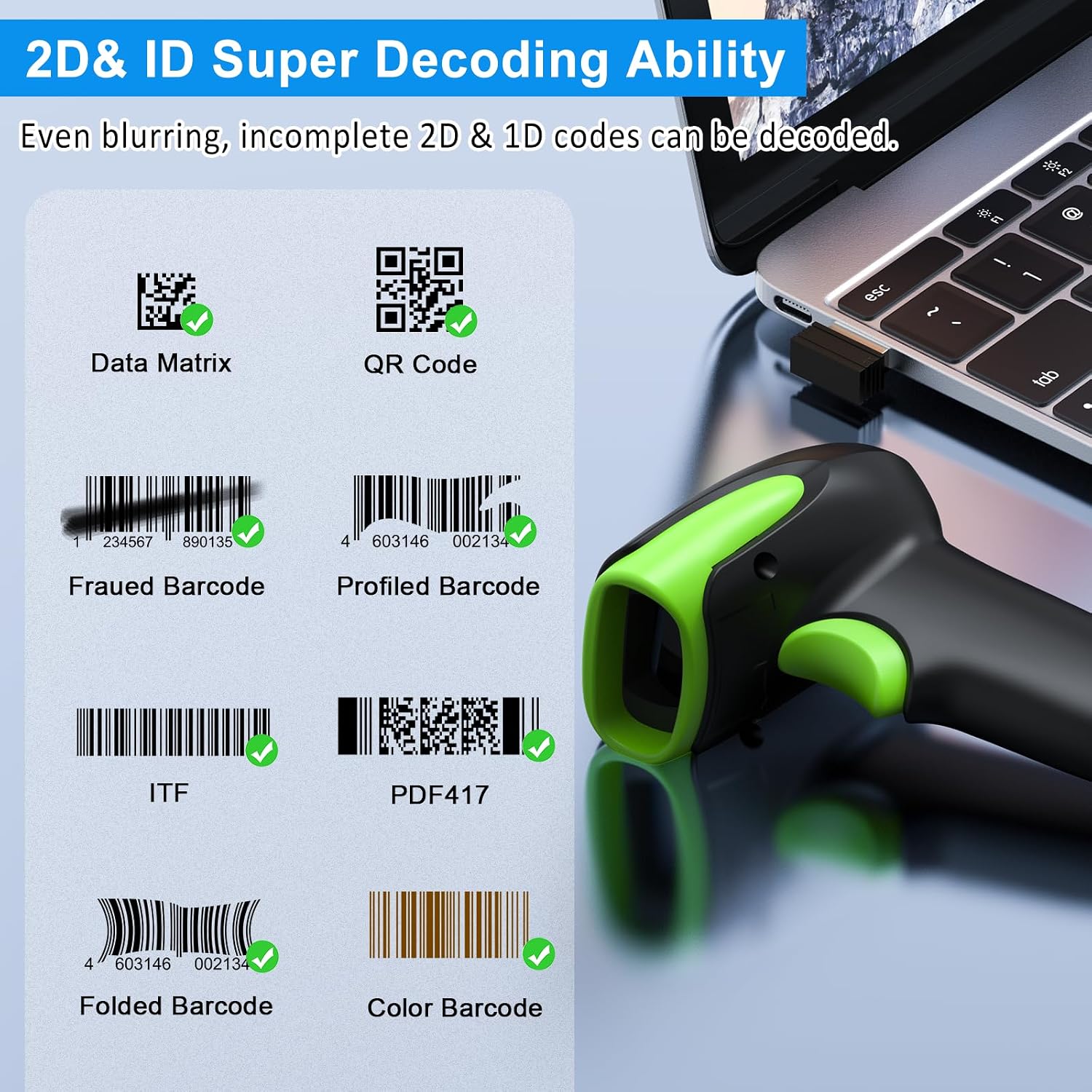
الصورة 6: مثالamples of decodable 1D and 2D barcodes.
6. الصيانة
To ensure optimal performance and longevity of your scanner:
- تنظيف: استخدم قطعة قماش ناعمة وجافة لتنظيف السطح الخارجي للماسح الضوئي. أما بالنسبة لنافذة المسح، فاستخدم قطعة قماش مخصصة لتنظيف العدسات لتجنب الخدوش. لا تستخدم مواد تنظيف كاشطة أو مذيبات.
- الشحن: Recharge the battery using the provided USB cable. Avoid overcharging or completely draining the battery for extended periods.
- تخزين: قم بتخزين الماسح الضوئي في مكان بارد وجاف بعيدًا عن أشعة الشمس المباشرة ودرجات الحرارة القصوى.
- متانة: While rugged, avoid intentional drops or impacts. The scanner is designed to withstand accidental drops up to 2.4 meters.

Image 7: The scanner's rugged design and drop resistance.
7. استكشاف الأخطاء وإصلاحها
إذا واجهت مشكلات مع الماسح الضوئي الخاص بك، فيرجى الرجوع إلى المشكلات والحلول الشائعة التالية:
- الماسح الضوئي غير متصل:
- تأكد من شحن الماسح الضوئي.
- Verify the correct connection mode (Bluetooth, 2.4G, USB) is selected and properly set up.
- For 2.4G, ensure the dongle is securely plugged in. For Bluetooth, ensure your device's Bluetooth is on and the scanner is paired.
- حاول إعادة تشغيل كل من الماسح الضوئي والجهاز المضيف.
- الماسح الضوئي لا يقرأ الباركود:
- Ensure the barcode is not excessively damaged, smudged, or poorly printed.
- تحقق من المسافة والزاوية بين الماسح الضوئي والباركود.
- تأكد من أن نوع الرمز الشريطي مدعوم من قبل الماسح الضوئي.
- Clean the scanning window if it is dirty.
- Data not transmitting:
- Confirm the scanner is successfully connected to your device.
- Check if the scanner is in 'Offline Storage Mode' and needs to be manually uploaded.
- Ensure the application on your device is ready to receive input.
For further assistance, please refer to the comprehensive troubleshooting section in the full user manual or contact Symcode customer support.
8. المواصفات
| ميزة | مواصفة |
|---|---|
| رقم الموديل | USA-6709DA-Green |
| حجم الإدخالtage | DC5V±0.25v |
| Current (Work/Instantaneous) | 25 مللي أمبير / 95 مللي أمبير |
| سرعة فك التشفير | 100 مرة / ثانية |
| النطاق اللاسلكي (2.4G) | Up to 200m (open air), 30m (indoors) |
| وقت الشحن | حوالي 2.5 ساعات |
| عمر البطارية | Up to 30 Hours (continuous scanning) |
| نوع البطارية | 1 بطارية ليثيوم بوليمر (متضمنة) |
| الاتصال | Bluetooth 6.1, Wireless 2.4G, USB Cable |
| الأجهزة المتوافقة | Desktop, Laptop, Smartphone, POS systems |
| أنظمة التشغيل | Windows 11/10/8/7/XP, Mac OS, iOS, Android, Linux |
| وزن العنصر | 10.2 أونصات |
| أبعاد الحزمة | 6.89 × 4.49 × 3.31 بوصة |

Image 8: Wireless transmission range.
9. الضمان والدعم
This Symcode product is manufactured by USA Scanner. For any product inquiries, technical support, or warranty claims, please contact USA Scanner directly. Refer to the contact information provided in your product packaging or visit the official Symcode brand store on Amazon for support resources.
قم بزيارة Symcode Store لمزيد من المعلومات.
Ask a question about this manual
Ask about setup, troubleshooting, compatibility, parts, safety, or missing instructions. Manuals+ will review the question and use this page’s manual context to help answer it.