
1. المقدمة
This manual provides detailed instructions for the safe and effective use of your AOPUTTRIVER AP-856A CFM Anemometer and AP-QX-1201 HVAC Manometer. Please read this manual thoroughly before operating the devices and retain it for future reference. These instruments are designed for measuring air flow, wind velocity, and gas pressure in various applications, including HVAC systems.
2. معلومات السلامة
Always observe the following safety precautions to prevent injury and damage to the instruments:
- Do not attempt to repair or modify the devices. Refer all servicing to qualified personnel.
- Ensure proper battery installation and replacement. Do not mix old and new batteries or different battery types.
- Keep the instruments away from water, dust, and extreme temperatures.
- When measuring pressure, ensure the tubes are securely connected to prevent leaks and inaccurate readings.
- تجنب إسقاط الأجهزة أو تعريضها لصدمات قوية.
- Always power off the devices when not in use to conserve battery life.
3. انتهى المنتجview
3.1. AOPUTTRIVER AP-856A CFM Anemometer
The AP-856A is a digital anemometer designed for accurate measurement of wind velocity and air flow (CFM/CMM). It features a separate vane sensor for flexible positioning and PC connectivity for data download and analysis.

Figure 3.1: AP-856A Anemometer Components. This image displays the AOPUTTRIVER AP-856A Anemometer, highlighting its key components with numbered labels. These include the LCD display, Max/Min value switch, Power key, Wind velocity/flow transform key, Data holding key, Unit transform key, Data record key, Measuring key for average value of wind flow, Read out recorded data key, Wind flow AVG 2/3 MAX and figure input, Reset key, Backlight on/off key, Temperature unit switch, Duct area input and sampling time setting key, USB interface, Connecting wire, and Wind velocity sensors.
المميزات الرئيسية:
- Wind Velocity Range: 0.001~100 mph (0.001~45 m/s)
- Wind Flow Range: 0-999900 m³/min or 0-999900 ft³/min (CFM/CMM)
- Multiple Wind Speed Units: m/s, km/h, ft/min, knots, mph
- Temperature Measurement: 14℉-113℉ (-10℃~45℃) with ℃/℉ option
- Data Hold, Data Logging, Backlight Display
- PC Connect for data download and analysis
- Max/Min/Average/Current wind speed readings
3.2. AOPUTTRIVER AP-QX-1201 HVAC Manometer
The AP-QX-1201 is a digital manometer designed for measuring gas pressure, differential pressure, and ambient temperature. It offers high accuracy and a wide range of measurement units, making it suitable for HVAC applications.

Figure 3.2: AP-QX-1201 Manometer Components. This image illustrates the AOPUTTRIVER AP-QX-1201 Manometer, showing its main parts. These include the Tube Connector (-) and (+), LCD Screen, 12 Unit Switch, Hold Data button, Pressure Differential Mode (DIF) button, Max/Min Mode button, ℃/℉ Switchable button, and Manual Power ON/Auto Power OFF button.
المميزات الرئيسية:
- Measurement Range: ±2.999 psi / ±20.68 KPa
- Accuracy: ±0.3% FSO (25℃)
- 12 Optional Units: mmHg, inHg, ftH₂O, cmH₂O, inH₂O, Pa, KPa, mbar, bar, psi, Kgcm², ozin²
- Measurement Modes: Max, Min, Differential (DIF)
- Ambient Temperature Display: -40℉~176℉ (-40℃~80℃)
- Automatic Shut Down (15 minutes)
- 100 Groups Data Storage
- Fahrenheit & Celsius degree Switchable
- Dual Input Ports for differential pressure measurement

Figure 3.3: Portable Carrying Case. This image shows a person carrying a black portable case, indicating that the instruments come with a protective case for easy transport and storage.
4. الإعداد
4.1. تركيب البطارية
Both the AP-856A Anemometer and AP-QX-1201 Manometer require batteries for operation. Open the battery compartment cover on the back of each device, insert the required batteries (typically 9V or AAA, refer to device markings) observing correct polarity, and close the cover securely.
4.2. AP-856A Anemometer PC Connection Setup
To utilize the PC connect feature for data download and analysis:
- Insert the provided CD into your computer's CD drive.
- Double-click the "Setup.exe" program icon to begin the software installation.
- Follow the on-screen prompts, clicking "Next" to proceed through the installation wizard until completion.
- Once installed, connect the AP-856A Anemometer to your PC using the provided USB cable.
- Open the installed software to analyze and save the data from the anemometer.

Figure 4.1: PC Software Installation and Data Interface. This image shows the steps for installing the AP-856A software from a CD and the interface for viewing and analyzing recorded wind data on a computer. The software allows for graphical representation and tabular display of wind values and temperature.
4.3. AP-QX-1201 Manometer Tube Connection
For differential pressure measurements, connect the pressure tubes to the designated input ports on the top of the manometer. Ensure the tubes are securely fitted to prevent leaks. The ports are typically labeled for positive (+) and negative (-) pressure inputs.
5. تعليمات التشغيل
5.1. AP-856A Anemometer Operation
- تشغيل/إيقاف التشغيل: اضغط على مفتاح التشغيل (labeled '3' in Figure 3.1) to turn the device on or off.
- Wind Velocity/Flow Measurement: Position the wind velocity sensor (vane) in the airflow. The LCD will display the current wind speed or flow.
- وحدات التبديل: اضغط على Unit Transform Key (labeled '4') to cycle through wind speed units (m/s, km/h, ft/min, knots, mph).
- CFM/CMM Calculation: To measure air flow (CFM/CMM), you may need to input the duct area. Use the Duct Area Input Key (labeled '14') to set the area. The device will automatically calculate and display the CFM/CMM value.
- امسك المعلومات: اضغط على Data Holding Key (labeled '5') to freeze the current reading on the display. Press again to release.
- الحد الأقصى/الحد الأدنى/المتوسط: استخدم Max/Min Value Switch (labeled '2') to view maximum, minimum, or average recorded values.
- تسجيل البيانات: اضغط على Data Record Key (labeled '7') to start/stop recording data. Use the Read Out Recorded Data Key (labeled '9') to review بيانات مخزنه.
- الإضاءة الخلفية: اضغط على Backlight On/Off Key (labeled '12') to activate or deactivate the display backlight.
- درجة الحرارة وحدة: اضغط على مفتاح وحدة درجة الحرارة (labeled '13') to toggle between Celsius (℃) and Fahrenheit (℉).

Figure 5.1: Anemometer in Use. This image demonstrates the AP-856A Anemometer being used to measure airflow within an HVAC duct. The separate vane sensor, attached via a telescopic rod, allows for precise positioning in confined spaces, while the main unit displays readings.
5.2. AP-QX-1201 Manometer Operation
- تشغيل/إيقاف التشغيل: اضغط على Manual Power ON/Auto Power OFF button (labeled 'Power' in Figure 3.2) to turn the device on. It will automatically shut down after 15 minutes of inactivity.
- قياس الضغط: Connect the pressure source to the appropriate tube connectors. The LCD will display the pressure reading.
- وحدات التبديل: اضغط على الوحدات button (labeled '12 Unit Switch') to cycle through the 12 available pressure units (mmHg, inHg, ftH₂O, cmH₂O, inH₂O, Pa, KPa, mbar, bar, psi, Kgcm², ozin²).
- امسك المعلومات: اضغط على يمسك button (labeled 'Hold Data') to freeze the current reading. Press again to release.
- Max/Min Mode: اضغط على الأعلى button (labeled 'Max / Min Mode') to display the maximum or minimum pressure recorded since the mode was activated.
- Differential (DIF) Mode: اضغط على ديف button (labeled 'Pressure Differential Mode') to measure the difference between two pressure inputs.
- درجة الحرارة وحدة: اضغط على ℃ / ℉ button (labeled '℃ & ℉ Switchable') to toggle between Celsius (℃) and Fahrenheit (℉) for ambient temperature display.

Figure 5.2: Manometer Unit Conversions. This image shows the AP-QX-1201 Manometer's display cycling through its 12 available measurement units, including mmHg, inHg, ftH₂O, cmH₂O, inH₂O, Pa, KPa, mbar, bar, psi, Kgcm², and ozin². This highlights the device's versatility in different pressure measurement contexts.
6. الصيانة
- تنظيف: Wipe the device surfaces with a soft, dry cloth. Do not use abrasive cleaners or solvents.
- استبدال البطارية: استبدل البطاريات عند ظهور مؤشر انخفاض مستوى البطارية على الشاشة. أزل البطاريات إذا لم يتم استخدام الجهاز لفترة طويلة.
- تخزين: Store the instruments in their protective case in a cool, dry place, away from direct sunlight and extreme temperatures.
- Sensor Care (AP-856A): Keep the wind velocity sensor (vane) clean and free from obstructions to ensure accurate readings. Avoid bending or damaging the fan blades.
- Tube Care (AP-QX-1201): Inspect pressure tubes regularly for cracks or damage. Replace if necessary to maintain measurement accuracy.
7. استكشاف الأخطاء وإصلاحها
| مشكلة | السبب المحتمل | حل |
|---|---|---|
| الجهاز لا يعمل. | البطاريات الميتة أو المثبتة بشكل غير صحيح. | تحقق من قطبية البطارية واستبدلها ببطاريات جديدة. |
| Inaccurate readings (Anemometer). | Obstructed vane sensor; incorrect duct area input. | Clear any obstructions from the vane. Verify the duct area setting. |
| Inaccurate readings (Manometer). | Leaking pressure tubes; incorrect unit selection. | Ensure tubes are securely connected. Select the correct measurement unit. |
| PC software not detecting Anemometer. | Incorrect USB connection; driver issue; software not installed correctly. | Ensure USB cable is firmly connected. Reinstall software and drivers if necessary. |
| العرض خافت أو وميض. | بطارية منخفضة. | استبدال البطاريات. |
8. المواصفات
8.1. AOPUTTRIVER AP-856A CFM Anemometer
- مدى سرعة الرياح: 0.001~100 mph (0.001~45 m/s)
- Wind Velocity Accuracy: ±3% + 0.2 rdg (mph), ±3% + 0.1 rdg (m/s)
- Wind Velocity Resolution: 0.001 ميل في الساعة
- Wind Flow Range: 0-999900 m³/min or 0-999900 ft³/min
- Wind Flow Resolution: 001-100
- Wind Flow Area: 0.001-9999 ft²
- Wind Speed Units: m/s, km/h, ft/min, knots, mph
- نطاق درجة الحرارة: 14 ℉-113 ℉ (-10 درجه مئوية ~ 45 درجه مئوية)
- وحدات قياس درجة الحرارة: ℃/℉ Switchable
- سمات: Data Hold, Data Logging, Backlight Display, Wind Chill Indicator, Low Battery Indicator, Max/Min/Average/Current readings, PC Connect.
- مادة: البولي كربونات (PC)
8.2. AOPUTTRIVER AP-QX-1201 HVAC Manometer
- نطاق القياس: ±2.999 psi / ±20.68 KPa
- دقة: ±0.3% FSO (25℃)
- إمكانية التكرار: ±0.2% (MAX ± 0.5% FSO)
- Linearity / Hysteresis: ±0.29% FSO (25℃)
- معدل القياس: 0.5 ثانية
- الحد الأقصى للضغط: 20 KPa
- Automatic Shut Down: 15 دقائق
- وحدات القياس: 12 units (mmHg, inHg, ftH₂O, cmH₂O, inH₂O, Pa, KPa, mbar, bar, psi, Kgcm², ozin²)
- تخزين البيانات: 100 مجموعة
- عرض درجة الحرارة المحيطة: -40 ℉ ~ 176 ℉ (-40 ℃ ~ 80 ℃)
- سمات: Low Power Indicator, Automatic Power OFF, 0.5 Second Quick Response, Fahrenheit & Celsius degree Switchable, Max/Min/Differential (DIF) modes, Dual Input Ports.
- مادة: البولي كربونات (PC)
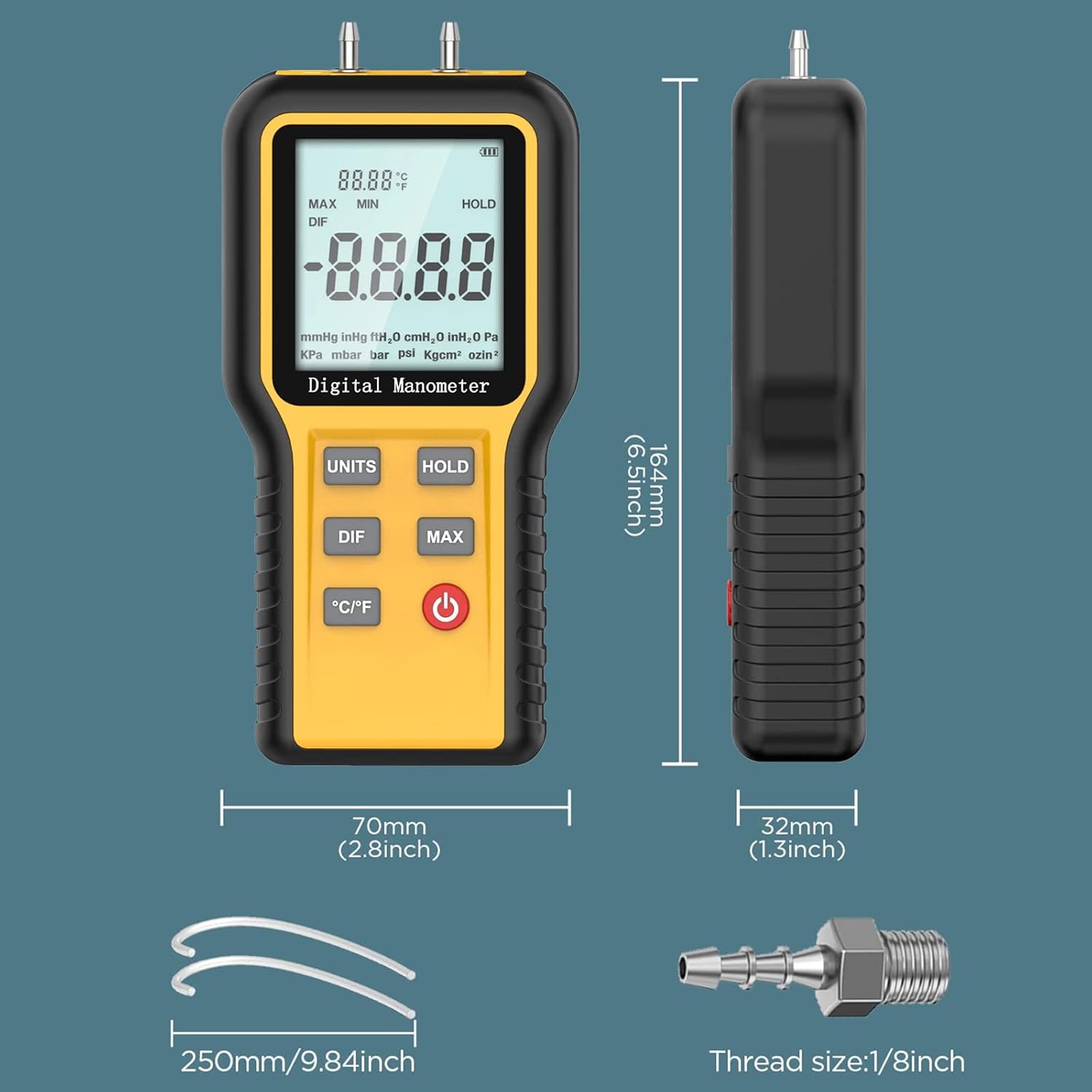
Figure 8.1: Manometer Dimensions and Accessories. This image provides the physical dimensions of the AP-QX-1201 Manometer (164mm height, 70mm width, 32mm thickness) and illustrates included accessories such as 250mm pressure tubes and a 1/8 inch thread connector, essential for setup and operation.
9. الضمان والدعم
AOPUTTRIVER provides a ضمان الجودة لمدة 365 يومًا for the AP-856A CFM Anemometer and AP-QX-1201 HVAC Manometer combo package. Additionally, الدعم الفني مدى الحياة is available for these products.
For technical assistance, warranty claims, or any questions regarding your product, please contact AOPUTTRIVER customer support through the official channels provided at the point of purchase or on the manufacturer's webموقع.