
1. المقدمة وما فوقview
The Microseven M7B4K-PSAA is a professional 4K (8MP) IP Power over Ethernet (PoE) security camera designed for robust surveillance. This camera features a Sony CMOS Sensor, a 2.8mm lens providing a 150° wide-angle view, and digital zoom capabilities. It is equipped with 18 IR LEDs for up to 100ft clear night vision and an automatic IR filter for true day/night video. The camera boasts an IP66 weatherproof rating and a durable all-metal casing, suitable for outdoor use.
Key functionalities include two-way audio with an amplified microphone and high-power speaker, intelligent human/vehicle motion detection with real-time alerts, and flexible recording options to a microSD card (up to 256GB, not included), Microseven Cloud, Microseven NVR, or an FTP server. The M7B4K-PSAA is open-source compatible, supporting RTSP, RTMP, Blue Iris, and other third-party software, and integrates with Alexa for voice control.
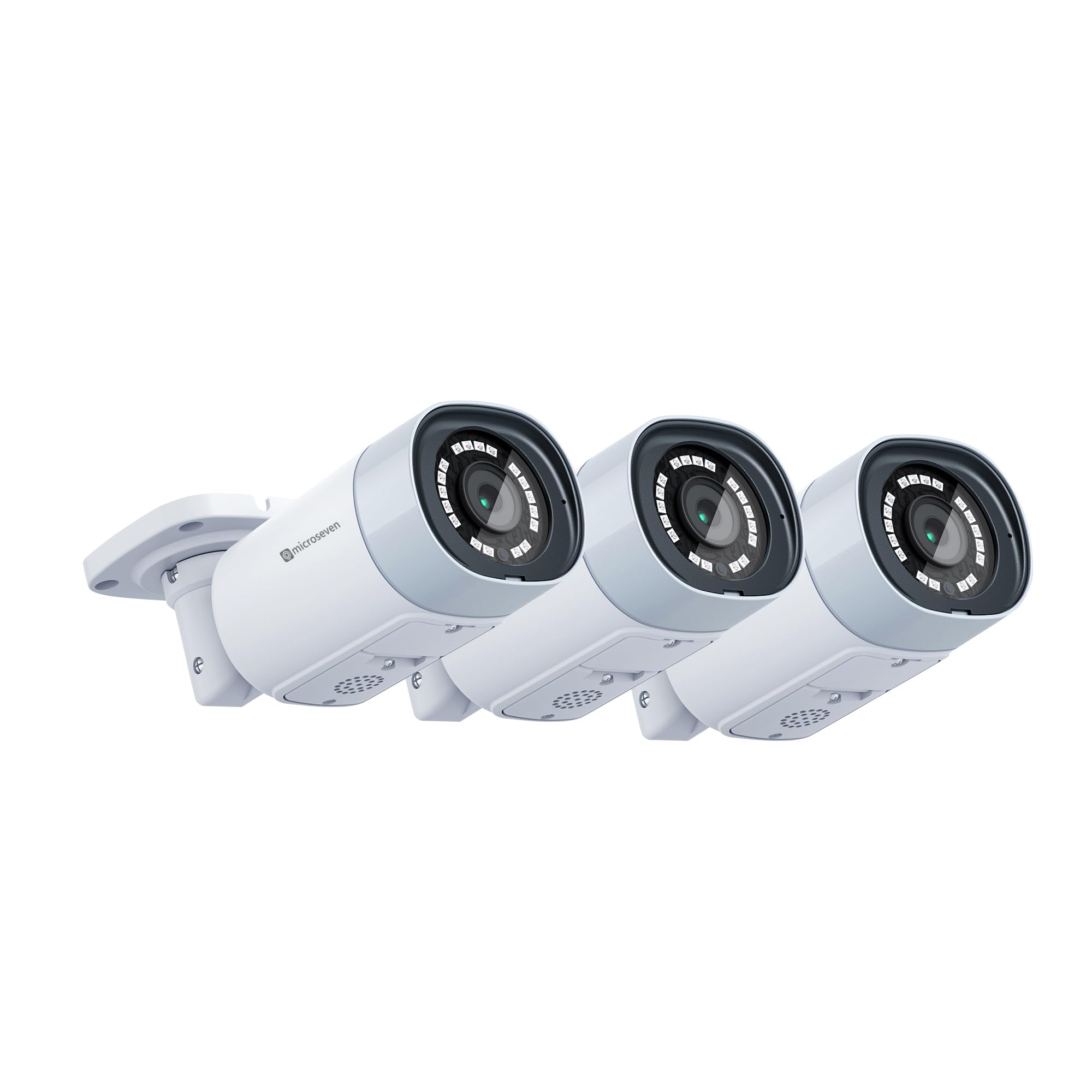
Image 1.1: Three Microseven M7B4K-PSAA 4K IP PoE security cameras. These cameras offer 8MP resolution and wide-angle viewعمل.

Image 1.2: Resolution comparison illustrating the superior detail of 8MP compared to 5MP and 2MP.
2. الإعداد
2.1 فك الصندوق والمكونات
قبل التثبيت، تأكد من وجود جميع المكونات:
- Microseven M7B4K-PSAA Camera(s)
- براغي التثبيت والمراسي
- موصل مقاوم للماء لكابل إيثرنت
- دليل البدء السريع (هذا الدليل)
2.2 التثبيت المادي
- اختر الموقع: اختر موقعًا خارجيًا مناسبًا يوفر ما هو مطلوب viewing angle and is within range of your network infrastructure. Ensure the camera is mounted securely.
- تركيب الكاميرا: Use the provided mounting screws and anchors to securely attach the camera to a wall or ceiling. The universal ball mount allows for flexible positioning.
- توصيل الطاقة والشبكة:
- PoE (مستحسن): Connect an Ethernet cable from a PoE switch or PoE injector to the camera's Ethernet port. This provides both power and data.
- الطاقة القياسية: If not using PoE, connect a 12V DC power adapter (not included) to the camera's power input and an Ethernet cable to your network router/switch.
- واي فاي: For wireless connectivity, ensure the camera is powered on and within range of your 2.4/5 GHz Wi-Fi network. Configuration will be done via the Microseven App or CMS.
- اتصالات آمنة: Use the waterproof connector for the Ethernet cable to protect against environmental elements.
2.3 التكوين الأولي
After physical installation and power connection, configure the camera using the Microseven software:
- تحميل برنامج: Download the Microseven CMS (Camera Management System) for Windows or macOS, or the Microseven App for iOS or Android from the official Microseven webمواقع الويب أو متاجر التطبيقات.
- اكتشف الكاميرا: Launch the software/app. The application should automatically discover cameras on your local network. If not, use the 'Add Camera' function and manually enter the camera's IP address (if known) or scan the network.
- ضبط كلمة السر: For security, change the default password immediately upon first access.
- Network Settings (for Wi-Fi): If using Wi-Fi, navigate to the camera's network settings within the app/CMS and connect to your desired 2.4/5 GHz Wi-Fi network.

Image 2.1: Microseven Camera Management System (CMS) interface for managing multiple camera feeds.

Image 2.2: Software platform compatibility for Microseven cameras, including desktop and mobile applications.
3. تشغيل الكاميرا
3.1 مباشر View والتشغيل
Access the live video feed and recorded footage through the Microseven App or CMS software. You can view multiple cameras simultaneously and navigate through recorded events.
3.2 خيارات التسجيل
The M7B4K-PSAA offers flexible recording configurations:
- التسجيل المستمر: التسجيلات متاحة على مدار الساعة طوال أيام الأسبوع.
- التسجيل المجدول: Records during specified time intervals.
- التسجيل عند استشعار الحركة: لا يتم التسجيل إلا عند اكتشاف الحركة.
Recordings can be saved to a microSD card (up to 256GB, not included), Microseven Cloud, Microseven NVR, or an FTP server. Configure these options within the camera settings in the app or CMS.
3.3 اكتشاف الحركة والتنبيهات
The camera features intelligent human/vehicle motion detection to reduce false alarms. Configure detection zones and sensitivity:
- نوع الكشف: Choose between human-only detection or regular motion detection.
- التنبيهات: Set up real-time alerts via email (with images), app push notifications (with video clips), or FTP uploads (video clips and images).
- Smart Alert Zone: تحديد مناطق محددة داخل الكاميرا view for motion detection to minimize irrelevant alerts.

Image 3.1: Motion alert notifications with video clips displayed on a mobile device and desktop.

Image 3.2: Visual representation of human motion detection, highlighting a detected person.
3.4 الصوت ثنائي الاتجاه
الاستفادة من المدمج في amplified microphone and high-power speaker for two-way communication. Access this feature through the Microseven App or CMS to listen and talk back.
3.5 Night Vision Control
The camera automatically switches to night vision in low-light conditions. You can manually enable or disable the IR LEDs and modify other camera properties remotely using the Microseven software.
3.6 التسجيل بتقنية الفاصل الزمني
Configure the camera to capture time-lapse videos, allowing you to condense long periods into short, viewable clips. This feature is accessible through the camera's settings in the Microseven software.
4. الصيانة
Regular maintenance ensures optimal performance and longevity of your Microseven camera:
- تنظيف العدسة: قم بتنظيف عدسة الكاميرا بشكل دوري باستخدام قطعة قماش ناعمة.amp قطعة قماش لإزالة الغبار أو الأوساخ أو بقع الماء التي قد تحجب الرؤية view. تجنب المنظفات الكاشطة.
- التحقق من الاتصالات: Ensure all cable connections (Ethernet, power) are secure and free from damage. Verify the waterproof connector is properly sealed.
- تحديثات البرامج الثابتة: Check the Microseven website or app for available firmware updates. Keeping the firmware updated ensures access to the latest features and security enhancements.
- إدارة بطاقة SD: If using a microSD card for storage, periodically check its status and ensure it has sufficient space. Format the card if necessary (this will erase all data).
- تحديثات البرامج: Keep the Microseven CMS and mobile apps updated to their latest versions for compatibility and performance improvements.
5. استكشاف الأخطاء وإصلاحها
If you encounter issues with your Microseven M7B4K-PSAA camera, refer to the following common troubleshooting steps:
5.1 No Power/No Indicator Lights
- التحقق من مصدر الطاقة: Ensure the PoE switch/injector or power adapter is functioning correctly and providing power.
- اتصال سلكي: Verify the Ethernet cable is securely connected to both the camera and the PoE source/router.
- Test with Different Port/Cable: If possible, try connecting to a different PoE port or using a different Ethernet cable.
5.2 لا يوجد بث فيديو
- الاتصال بالشبكة: Ensure the camera is properly connected to your network (wired or Wi-Fi). Check your router/switch status.
- Software/App Status: Verify that the Microseven App or CMS is running and the camera is added correctly. Try refreshing the device list.
- تعارض عنوان IP: Ensure the camera has a unique IP address on your network. Check your router's DHCP client list.
- إعدادات جدار الحماية: If accessing remotely, ensure your network firewall is not blocking the camera's ports.
- إعادة تشغيل الكاميرا: Power cycle the camera by disconnecting and reconnecting its power source.
5.3 الإنذارات الكاذبة لكشف الحركة
- ضبط الحساسية: قم بخفض حساسية كشف الحركة في إعدادات الكاميرا.
- تكوين مناطق الكشف: Exclude areas with frequent irrelevant motion (e.g., trees swaying, busy roads) using the smart alert zone feature.
- Human-Only Detection: Enable human-only detection if available in your firmware version to filter out non-human movements.
5.4 مشاكل الصوت ثنائي الاتجاه
- مستويات الصوت: Check the volume settings on your viewing device and within the Microseven App/CMS.
- إعاقة الميكروفون/مكبر الصوت: Ensure the camera's microphone and speaker are not blocked.
- عرض النطاق الترددي للشبكة: Poor network connection can affect audio quality. Ensure stable bandwidth.
For further assistance, refer to the Microseven support webالموقع أو الاتصال بخدمة العملاء.
6. المواصفات
| ميزة | مواصفة |
|---|---|
| ماركة | ميكروسفين |
| رقم الموديل | M7B4K-PSAA |
| تكنولوجيا الاتصال | Wired (PoE), Wireless (2.4/5 GHz Wi-Fi) |
| دقة التقاط الفيديو | 3840x2160 (4K/8MP) |
| ميزة خاصة | Two-Way Audio, Human/Vehicle Motion Detection |
| سعة تخزين الذاكرة | Supports up to 256 GB Micro SD Card (not included) |
| مصدر الطاقة | Corded Electric (PoE or 12V DC adapter) |
| أبعاد المنتج الطول × العرض × الارتفاع | 6 × 2.4 × 2.4 بوصة |
| توافق نظام التشغيل | أندرويد، iOS، ويندوز، ماك أو إس |
| الاستخدامات الموصى بها للمنتج | Outdoor Surveillance |
| نطاق الرؤية الليلية | 100 أقدام |
| نوع العدسة | Wide Angle (2.8mm lens, 150° view) |
| تصنيف مانعة لتسرب الماء | IP66 |
| رمز المنتج الموحد | 018406663859 |
7. الضمان والدعم
Microseven provides free software (CMS for Windows/macOS) and free mobile applications (iOS/Android) to manage and operate your camera. For detailed warranty information, technical support, and frequently asked questions, please visit the official Microseven webموقع. احتفظ بإيصال الشراء الخاص بك لمطالبات الضمان.
Microseven cameras are designed for broad compatibility, working with various third-party software and systems such as Blue Iris, Milestone, Synology, QNAP, and ONVIF-compliant devices.

Image 7.1: Compatibility with various NVRs, software, and smart home platforms.