
1. انتهى المنتجview
The Joysico USB C Wired Type C Earbuds are designed for comfort, durability, and clear audio, featuring an over-ear hook design for secure fit during activities and an in-line remote for easy control.
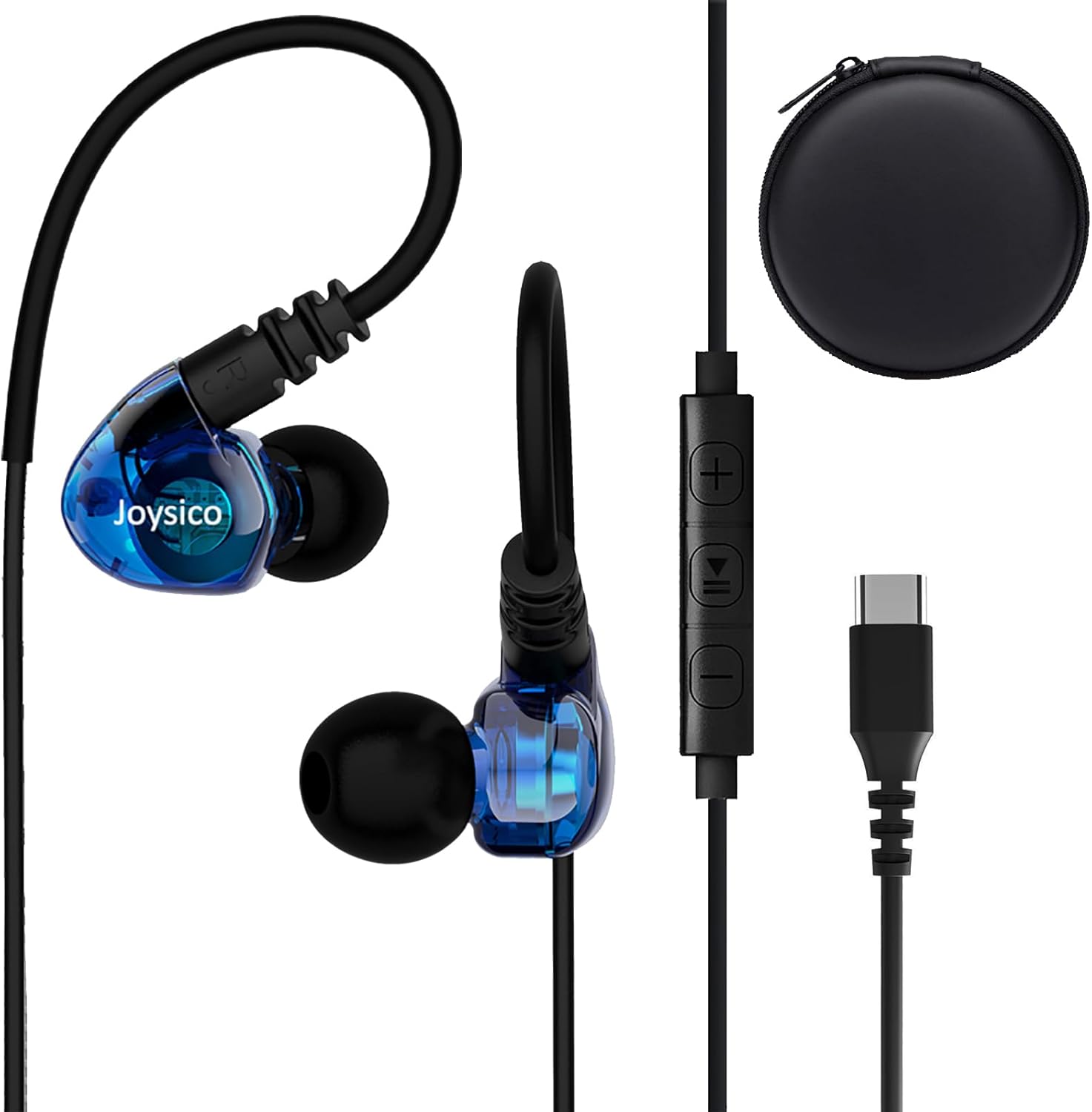
Image: Joysico USB C Wired Type C Earbuds, showing the earbuds, in-line remote, USB-C connector, and included carrying case.
المميزات الرئيسية:
- اتصال USB-C: Direct plug-and-play with USB-C devices.
- Over-Ear Hook Design: Provides a secure and comfortable fit, ideal for sports and active use.
- ميكروفون مدمج: For clear hands-free calls and voice commands.
- Multi-function Remote: Control volume, playback, and calls.
- كابل متين: Thick and sturdy cable with reinforced plug.
2. محتويات العبوة
يرجى التأكد من وجود جميع العناصر في الحزمة:
- Joysico USB C Wired Type C Earbuds
- دليل المستخدم (هذا المستند)
- Eartips (various sizes: Small, Medium, Large silicone, and Memory Foam)
- حقيبة حمل واقية
- مشبك قميص

Image: An illustration of the package contents, including the earbuds, a 52-inch cord, a carrying case, a shirt clip, and four pairs of replacement ear tips (S, M, L silicone, and memory foam).
3. الإعداد والاتصال
These earbuds are designed for simple plug-and-play operation with USB-C compatible devices.
الاتصال بجهازك:
- Locate the USB-C port on your device (e.g., smartphone, tablet, laptop).
- أدخل موصل USB-C الخاص بسماعات الأذن بإحكام في منفذ USB-C الخاص بالجهاز.
- Your device should automatically recognize the earbuds as an audio output device.
ملحوظة: For some devices, especially certain Macbook models, you may need to manually select the earbuds as the audio output device in your system's sound settings.

الصورة: تفصيلية view of the USB-C connector and its robust design, highlighting its ease of insertion and removal, and the sturdy construction of the earbud cable.
4. ارتداء سماعات الأذن
Proper fit is crucial for comfort, sound quality, and secure wear, especially during physical activity.
Achieving a Comfortable and Secure Fit:
- اختر أطراف الأذن المناسبة: Experiment with the included silicone (S, M, L) and memory foam eartips to find the size that creates a comfortable seal in your ear canal. A good seal enhances bass response and noise isolation.
- ضع سماعات الأذن في مكانها: أدخل سماعة الأذن برفق في قناة أذنك.
- Adjust the Over-Ear Hook: Guide the flexible ear hook over the top of your ear. The hook should rest comfortably behind your ear, securing the earbud in place.
- Use the Shirt Clip: Attach the included shirt clip to your clothing to minimize cable movement and reduce microphonics (noise from cable rubbing).

Image: A person wearing the earbuds, illustrating how the over-ear hook and ergonomic design provide a comfortable and secure fit, even for users with smaller ear canals.

Image: A person engaged in a workout, demonstrating the earbuds' ability to stay securely in place without falling out or requiring adjustments during physical activity.
5. تشغيل أدوات التحكم
The in-line remote provides convenient control over your audio and calls.

Image: A diagram detailing the functions of the in-line remote, including volume up/down, play/pause, next/previous track, answer/end/reject calls, and voice assistant activation. The microphone's position is also indicated.
وظائف عن بعد:
| الزر/الإجراء | وظيفة |
|---|---|
| + زر | رفع الصوت |
| - زر | خفض الصوت |
| Center Button (Single Press) | تشغيل/إيقاف مؤقت للموسيقى؛ الرد/إنهاء المكالمة |
| Center Button (Double Press) | المسار التالي |
| Center Button (Triple Press) | المسار السابق |
| الزر الأوسط (الضغط المطول) | رفض المكالمة؛ تفعيل المساعد الصوتي |
ملحوظة: Remote functions may vary or be limited on certain devices or applications. Refer to your device's manual for specific compatibility details regarding external audio controls.
6. التوافق
These USB C headphones are designed for broad compatibility with devices featuring a USB-C audio output.
تشمل الأجهزة المتوافقة ما يلي:
- أجهزة Apple: iPhone 15 series (15, 15 Plus, 15 Pro, 15 Pro Max), iPad Pro, iPad Air, iPad Mini, MacBook Pro, MacBook Air.
- سامسونج جالاكسي: S24, S23, S22, S21 Ultra, S20 FE, Note 10, Note 20, and other USB-C enabled Galaxy phones and tablets.
- جوجل بيكسل: All Pixel phones with USB-C.
- ون بلس: Various models with USB-C.
- Other Android Phones: Most Android smartphones and tablets with a USB-C port.
- Laptops/Chromebooks: Devices with USB-C audio output.
No adapter is needed, and the earbuds are designed to work even with phone cases on.

Image: An illustration demonstrating the wide compatibility of the USB-C earbuds with various devices, including popular smartphone brands, tablets, and laptops.
7. الرعاية والصيانة
Proper care will extend the life and maintain the performance of your earbuds.
- تنظيف: Regularly clean the eartips with a soft, dry cloth. For the earbuds themselves, use a slightly damp cloth and ensure they are completely dry before storage. Do not use harsh chemicals or abrasive materials.
- تخزين: When not in use, store the earbuds in the provided protective carrying case to prevent tangling and damage.
- تجنب الظروف القاسية: Do not expose the earbuds to extreme temperatures, high humidity, or direct sunlight for prolonged periods. While sweatproof, avoid submerging them in water.
- التعامل معها بحذر: Avoid pulling the cable forcefully when disconnecting from your device. Always grasp the USB-C plug.
8. استكشاف الأخطاء وإصلاحها
إذا واجهت مشكلات، فجرّب الحلول التالية:
المشاكل الشائعة والحلول:
- لا يوجد صوت:
- تأكد من إدخال موصل USB-C بالكامل في جهازك.
- تحقق من إعدادات مستوى الصوت بجهازك وتأكد من عدم كتم الصوت.
- Verify that the earbuds are selected as the audio output device in your device's sound settings.
- Test the earbuds with another compatible device to rule out a device-specific issue.
- الميكروفون لا يعمل:
- تأكد من عدم تغطية الميكروفون.
- تحقق من إعدادات إدخال الميكروفون في جهازك.
- Some apps or devices may not fully support the in-line microphone. Test with a standard call app.
- جهاز التحكم عن بعد لا يستجيب:
- Ensure the earbuds are properly connected.
- Some remote functions may not be supported by all devices or applications.
- جودة صوت رديئة / تشويش:
- Ensure eartips provide a good seal in your ear canal. Try different eartip sizes.
- تحقق من مصدر الصوت بحثًا عن مشكلات الجودة.
- قم بتنظيف أي حطام من فوهات سماعات الأذن.
9. المواصفات
| ميزة | التفاصيل |
|---|---|
| اسم الموديل | YC-1 BLUE |
| تكنولوجيا الاتصال | سلكي (USB-C) |
| مقبس سماعات الرأس | يو اس بي سي |
| وضع الأذن | In Ear with Over-Ear Hook |
| التحكم في الضوضاء | عزل الصوت |
| ميكروفون | Integrated, Noise Canceling |
| نوع التحكم | Volume Control, Remote (Button) |
| طول الكابل | 52 بوصة / 131 سم |
| وزن العنصر | 20 جرام/0.705 أونصة |
| مستوى مقاومة الماء | مقاوم للماء (مقاوم للعرق) |
| نطاق التردد | 20 هرتز - 20,000 هرتز |
| مقاومة | 32 أوم |
| مادة | بلاستيك |
10. معلومات الضمان
Joysico provides a ضمان لمدة سنتين for these USB C Wired Type C Earbuds from the date of purchase. This warranty covers manufacturing defects and issues arising from normal use.
لا يغطي الضمان الأضرار الناجمة عن سوء الاستخدام أو الحوادث أو التعديلات غير المصرح بها أو التلف الناتج عن الاستخدام العادي.
To Claim Warranty Support:
Please retain your proof of purchase. For warranty claims or technical support, contact Joysico customer service through the retailer where the product was purchased or visit the official Joysico support webالموقع (إن وجد).
Image: An illustration highlighting the 1-year warranty provided with the product, alongside the earbuds and the various ear tip sizes and shirt clip.