مقدمة
Thank you for choosing the AIR 7 Mini Wireless Bluetooth Earbuds. These earbuds are designed to provide a superior audio experience with advanced features such as Bluetooth 5.3 connectivity, active noise cancellation, and a comfortable, secure fit. This manual will guide you through the setup, operation, and maintenance of your new earbuds to ensure optimal performance and longevity.
The AIR 7 Mini earbuds offer crisp tones, deep bass, and clear sound, making them ideal for music, podcasts, and calls. With their IPX4 waterproof rating, they are suitable for various activities, including workouts and outdoor use. Enjoy wireless freedom and intuitive touch controls for a seamless audio experience.
ماذا يوجد في الصندوق
- AIR 7 Mini L side earbud
- AIR 7 Mini R side earbud
- Charging station (charging case)
- Reinforced charging cable
- دليل المستخدم

Image: Unboxing the AIR 7 Mini Earbuds, displaying all included components.
يثبت
شحن سماعات الأذن والعلبة
Before first use, fully charge the AIR 7 Mini earbuds and their charging case. Place the earbuds into the charging case, ensuring they are properly seated. Connect the provided charging cable to the charging port on the case and plug the other end into a USB power source. The indicator light on the case will show charging status.
A full charge provides 3-4 hours of playback, and the 200mAh charging case extends this significantly, offering up to 90 hours of standby time. The case can reach 50% charge in approximately 30 minutes.
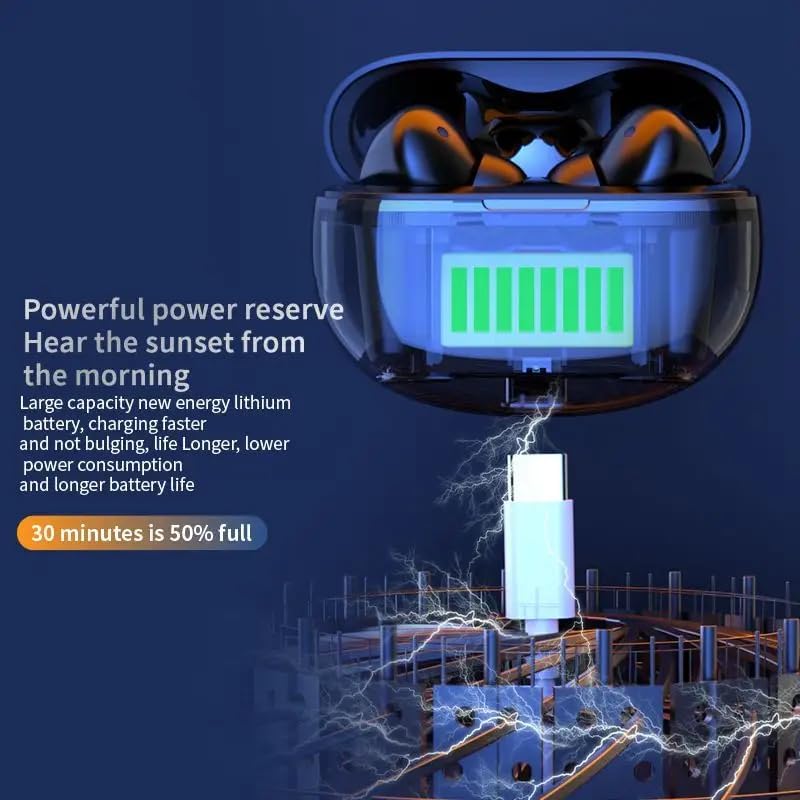
Image: The AIR 7 Mini charging case being charged via its USB-C port.
الاقتران بجهازك
- تأكد من شحن سماعات الأذن ووضعها داخل علبة الشحن.
- افتح علبة الشحن. ستدخل سماعات الأذن تلقائيًا في وضع الاقتران، ويُشار إلى ذلك بضوء وامض على سماعات الأذن.
- على جهازك (الهاتف الذكي، الجهاز اللوحي، الكمبيوتر المحمول)، انتقل إلى إعدادات البلوتوث وقم بتشغيل البلوتوث.
- بحث عن available devices. Select "AIR 7 Mini" from the list.
- Once connected, a voice prompt will confirm successful pairing, and the earbud lights will stop flashing.
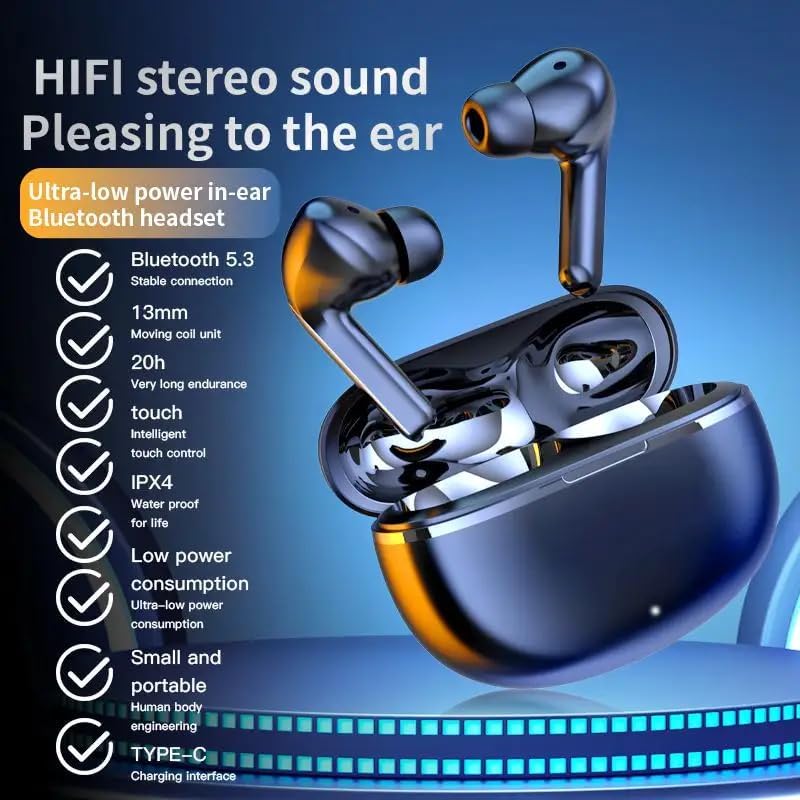
Image: Visual representation of the AIR 7 Mini earbuds' features, including Bluetooth 5.3 connectivity.
تعليمات التشغيل
عناصر التحكم باللمس
The AIR 7 Mini earbuds feature intuitive touch controls for easy management of music playback and calls. The touch-sensitive area is located on the outer surface of each earbud.
| فعل | وظيفة |
|---|---|
| نقرة واحدة (يسار/يمين) | تشغيل / إيقاف الموسيقى ، الرد / إنهاء المكالمة |
| انقر مرتين (يمينًا) | المسار التالي |
| انقر مرتين (يسارًا) | المسار السابق |
| النقر الثلاثي (يسار/يمين) | تفعيل المساعد الصوتي |
| الضغط لفترة طويلة (يسار/يمين) | تبديل إلغاء الضوضاء النشط (ANC) / وضع الشفافية |
| مكالمة واردة (ضغطة طويلة) | رفض المكالمة |

Image: The AIR 7 Mini earbuds providing low sound delay for synchronized audio and visuals, ideal for gaming.
ارتداء سماعات الأذن
For optimal sound quality and comfort, ensure the earbuds are properly seated in your ears. Gently insert each earbud into the ear canal and twist slightly until it feels secure and comfortable. The ergonomic design of the AIR 7 Mini ensures a snug fit for prolonged listening sessions and active use.

Image: The AIR 7 Mini earbuds in their charging case, demonstrating their compact and ergonomic design.
إلغاء الضوضاء
The AIR 7 Mini earbuds feature Dual ENC (Environmental Noise Cancellation) technology to reduce ambient noise, allowing you to focus on your audio. This feature is particularly useful in noisy environments, such as commutes or busy offices. To activate or deactivate noise cancellation, use the designated touch control as described in the "Touch Controls" table.

Image: The AIR 7 Mini earbuds illustrating their intelligent noise reduction capabilities.
صيانة
تنظيف
Regular cleaning helps maintain the performance and hygiene of your earbuds. Use a soft, dry, lint-free cloth to wipe the earbuds and charging case. For stubborn dirt, slightly dampen the cloth with water. Do not use abrasive cleaners or submerge the earbuds or case in liquid.
The earbuds are IPX4 waterproof, meaning they are resistant to splashes and sweat, but they are not designed for submersion.

Image: The AIR 7 Mini earbuds showcasing their life-grade waterproof and sweat-resistant design.
تخزين
عند عدم استخدام سماعات الأذن، احفظها في علبة الشحن لحمايتها من الغبار والتلف، وللحفاظ على شحنها. خزّن العلبة في مكان بارد وجاف بعيدًا عن أشعة الشمس المباشرة ودرجات الحرارة المرتفعة والمنخفضة.

Image: The small and mini design of the AIR 7 Mini charging case, highlighting its portability.
استكشاف الأخطاء وإصلاحها
If you encounter any issues with your AIR 7 Mini earbuds, please refer to the following common solutions:
- سماعات الأذن غير مقترنة:
- تأكد من شحن كلا سماعات الأذن.
- أعد وضع سماعات الأذن في العلبة، وأغلق الغطاء، وانتظر بضع ثوانٍ، ثم افتح الغطاء مرة أخرى لإعادة الدخول إلى وضع الاقتران.
- قم بإيقاف وتشغيل البلوتوث على جهازك.
- Forget "AIR 7 Mini" from your device's Bluetooth list and try pairing again.
- لا يوجد صوت من سماعة أذن واحدة:
- تأكد من شحن كلا سماعتي الأذن.
- حاول إعادة وضع سماعتي الأذن في العلبة ثم إخراجهما مرة أخرى.
- Perform a factory reset if available (refer to specific product instructions if provided, otherwise assume long press or similar).
- قضايا الشحن:
- تأكد من توصيل كابل الشحن بشكل آمن بكل من العلبة ومصدر الطاقة.
- جرب منفذ USB أو محول طاقة مختلفًا.
- قم بتنظيف نقاط اتصال الشحن الموجودة على سماعات الأذن وداخل العلبة باستخدام قطعة قطن جافة.
- جودة صوت رديئة أو انقطاعات في الاتصال:
- تأكد من أن جهازك يقع ضمن نطاق البلوتوث الفعال (عادةً 10 أمتار / 33 قدمًا) دون وجود عوائق كبيرة.
- تجنب التداخل الكهرومغناطيسي القوي.
- تأكد من أن سماعات الأذن نظيفة وخالية من الأوساخ والحطام.
تحديد
| ميزة | التفاصيل |
|---|---|
| ماركة | نوعي |
| نموذج | AIR 7 Mini |
| لون | أسود |
| وضع الأذن | في الأذن |
| عامل الشكل | في الأذن |
| التحكم في الضوضاء | Active Noise Cancellation (Dual ENC) |
| نسخة البلوتوث | 5.3 |
| وقت التشغيل | 3-4 ساعات (شحنة واحدة) |
| علبة شحن البطارية | 200 مللي أمبير |
| وقت الاستعداد | تصل إلى 90 ساعة |
| تصنيف مقاومة الماء | IPX4 |
| نوع التحكم | عناصر التحكم باللمس |
معلومات هامة حول السلامة
- لا تقم بتفكيك أو تعديل سماعات الأذن أو علبة الشحن.
- يُحفظ بعيداً عن درجات الحرارة القصوى وأشعة الشمس المباشرة واللهب المكشوف.
- Avoid exposing to excessive moisture or liquids beyond the IPX4 rating.
- لا تستخدم الكابلات أو أجهزة الشحن التالفة.
- قد يؤدي التعرض المطول لمستويات صوت عالية إلى تلف السمع. اضبط مستوى الصوت على مستوى آمن.
- يحفظ بعيدًا عن متناول الأطفال والحيوانات الأليفة.
فيديو المنتج
Video: An official product video titled "Air7 Earbuds: Premium Sound" from the seller, showcasing the features and design of the AIR 7 Mini True Wireless Headset, including its sound quality, low latency, long endurance, and touch controls.


