
SEMAITU 9" Autoradio(DAB)
SEMAITU TH0029DAB Car Radio User Manual
Model: TH0029DAB
مقدمة
Welcome to the user manual for your SEMAITU TH0029DAB Car Radio. This advanced multimedia system is designed to enhance your driving experience with features such as DAB digital radio, Android 12 operating system, Wireless Apple CarPlay, Android Auto, GPS navigation, Bluetooth connectivity, and a reverse camera. This manual provides detailed instructions for installation, operation, maintenance, and troubleshooting to ensure optimal performance and longevity of your device.
يرجى قراءة هذا الدليل جيداً قبل استخدام المنتج والاحتفاظ به للرجوع إليه مستقبلاً.
المنتج انتهىview
The SEMAITU TH0029DAB Car Radio is a state-of-the-art in-car entertainment and navigation system. Key features include:
- نظام التشغيل: أندرويد 12.0
- عرض: 9-inch QLED Quantum Touchscreen (1280x720 resolution)
- ذاكرة: ذاكرة وصول عشوائي 2 جيجابايت + سعة تخزين داخلية 32 جيجابايت
- راديو: DAB Digital Radio, FM/RDS Radio (NXP6856 chip)
- الاتصال: Wireless Apple CarPlay, Wireless Android Auto, GPS Navigation (Europe maps), WiFi, Bluetooth (with dual microphone), Dual USB ports
- صوتي: DSP EQ for Hi-Fi sound
- دعم الكاميرا: AHD Reverse Camera (170° wide angle, night vision, waterproof)
- التوافق: Designed for VW, Seat, and Skoda models (specific models listed in compatibility section)
- الميزات الإضافية: Steering Wheel Control (SWC) function, Mirror Link for iOS and Android

Figure 1: SEMAITU TH0029DAB Car Radio main unit with included accessories (DAB antenna, USB cable, reverse camera).
التوافق
This car radio is specifically designed for certain VW, Seat, and Skoda models. Please verify your vehicle's compatibility before installation.
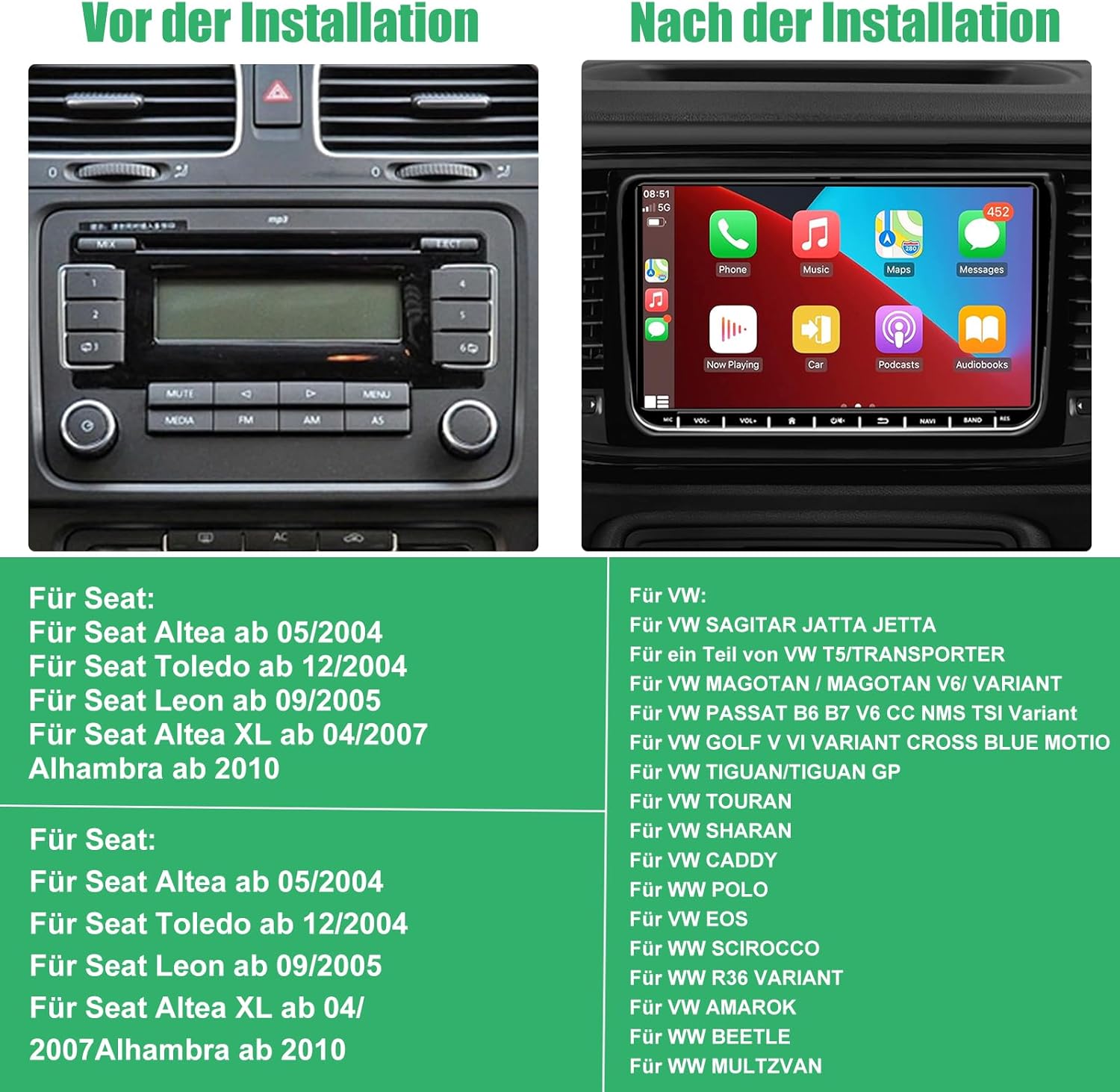
Figure 2: Visual comparison of a car dashboard before and after installation, alongside a list of compatible Seat and VW vehicle models.
النماذج المتوافقة:
للمقعد:
- Seat Altea from 05/2004
- Seat Toledo from 12/2004
- Seat Leon from 09/2005
- Seat Altea XL from 04/2007
- Alhambra from 2010
For VW:
- VW SAGITAR JETTA
- VW T5/TRANSPORTER (partial models)
- VW MAGOTAN / MAGOTAN V6 / VARIANT
- VW PASSAT B6 B7 V6 CC NMS TSI VARIANT
- VW GOLF V VI VARIANT CROSS BLUE MOTIO
- VW TIGUAN/TIGUAN GP
- VW TOURAN
- VW SHARAN
- VW CADDY
- VW POLO
- فولكس فاجن EOS
- VW SCIROCCO
- VW R36 VARIANT
- فولكس فاجن أمروك
- VW BEETLE
- VW MULTZVAN
محتويات الحزمة
Before installation, please check that all components are present in the package:
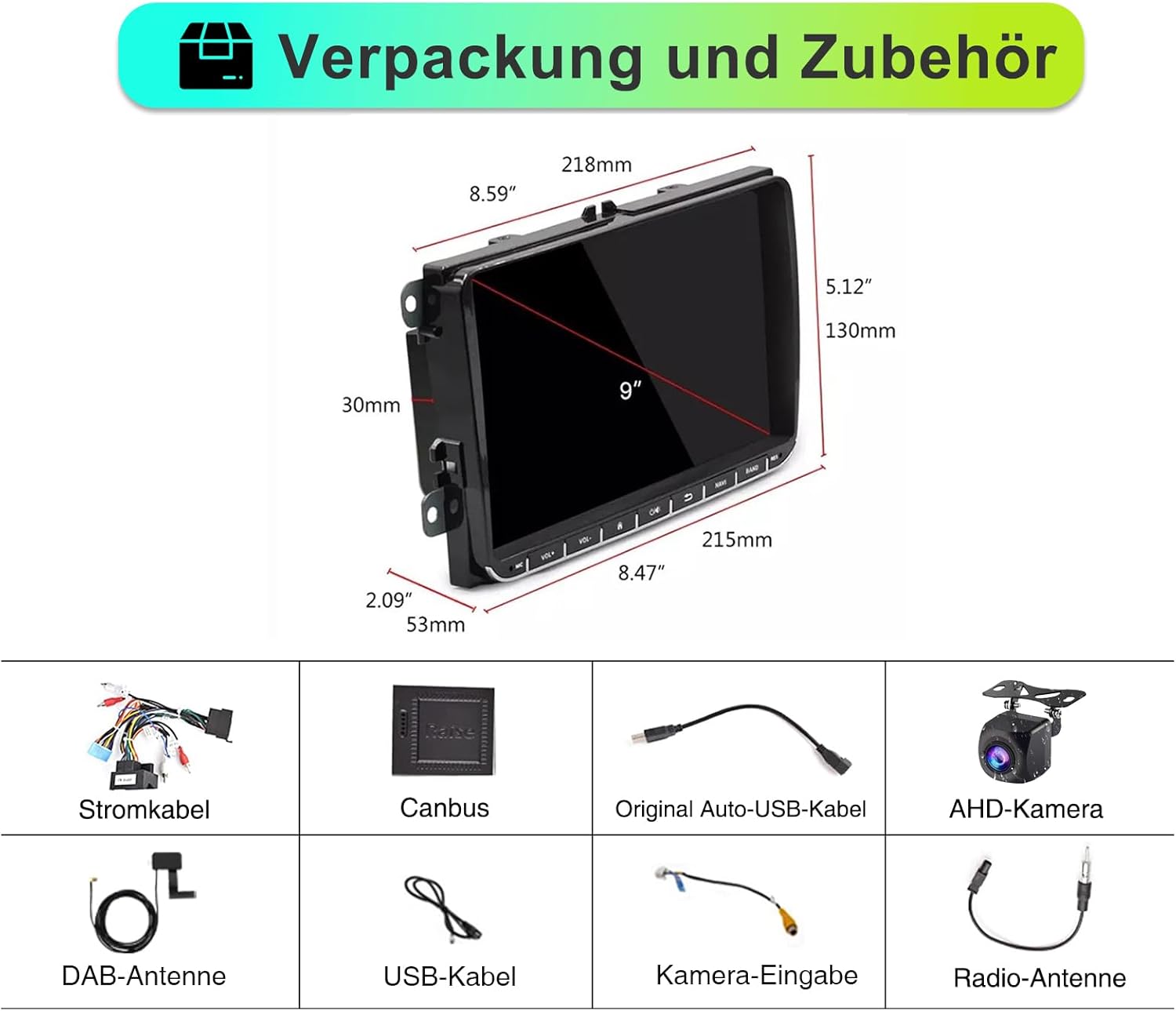
الشكل 3: انتهىview of the car radio dimensions and all included accessories.
- SEMAITU TH0029DAB Car Radio Unit
- كابل الطاقة
- فك تشفير كانبوس
- Original Auto USB Cable
- AHD Camera (Reverse Camera)
- هوائي DAB
- كابل يو اس بي
- كابل إدخال الكاميرا
- هوائي الراديو
الإعداد والتثبيت
Professional installation is recommended. Ensure the vehicle's battery is disconnected before beginning installation to prevent electrical damage.
خطوات التثبيت العامة:
- تحضير: Disconnect the negative terminal of the car battery. Remove the original car radio unit from the dashboard.
- التوصيلات السلكية:
- Connect the main power cable harness from the new radio to the vehicle's wiring harness.
- Connect the Canbus decoder to ensure proper communication with the vehicle's systems (e.g., steering wheel controls, door status).
- Connect the radio antenna and DAB antenna.
- قم بتوصيل كابلات USB للأجهزة الخارجية.
- If installing the reverse camera, route the camera cable from the rear of the vehicle to the radio unit and connect it to the camera input. Ensure the camera's power is connected to the reverse light circuit.
- التركيب: Secure the new SEMAITU car radio into the dashboard opening. Ensure all cables are neatly tucked away and not pinched.
- الاختبار: Reconnect the car battery. Turn on the ignition and test the radio's basic functions: power on/off, radio reception, touchscreen responsiveness, and sound output.
- التجميع النهائي: Reassemble the dashboard trim panels.
For detailed wiring diagrams and specific vehicle instructions, please refer to the included installation guide or consult a professional installer.
تعليمات التشغيل
التشغيل الأساسي:
- تشغيل/إيقاف التشغيل: Press the power button (usually located on the front panel or integrated with volume knob) to turn the unit on or off.
- التحكم في مستوى الصوت: استخدم زر التحكم في مستوى الصوت أو عناصر التحكم في الشاشة اللمسية لضبط مستويات الصوت.
- الشاشة الرئيسية: انقر على أيقونة الصفحة الرئيسية على الشاشة اللمسية للعودة إلى القائمة الرئيسية.
- ملاحة: Swipe left/right on the touchscreen to access different application pages.
Radio Functions (DAB/FM/RDS):

Figure 4: DAB Digital Radio interface showing station selection and signal strength.
- أوضاع التحويل: Select "Radio" from the main menu. Choose between FM or DAB mode.
- محطات المسح الضوئي: In FM mode, use the "Scan" or "Seek" function to find available stations. In DAB mode, the unit will automatically scan for digital stations upon first use or when entering a new area.
- حفظ الإعدادات المسبقة: Tune to your desired station, then press and hold a preset button (P1-P6) on the screen to save it.
- RDS (نظام بيانات الراديو): When available, RDS will display station information, song titles, and traffic announcements on FM.
Apple CarPlay اللاسلكي وAndroid Auto:
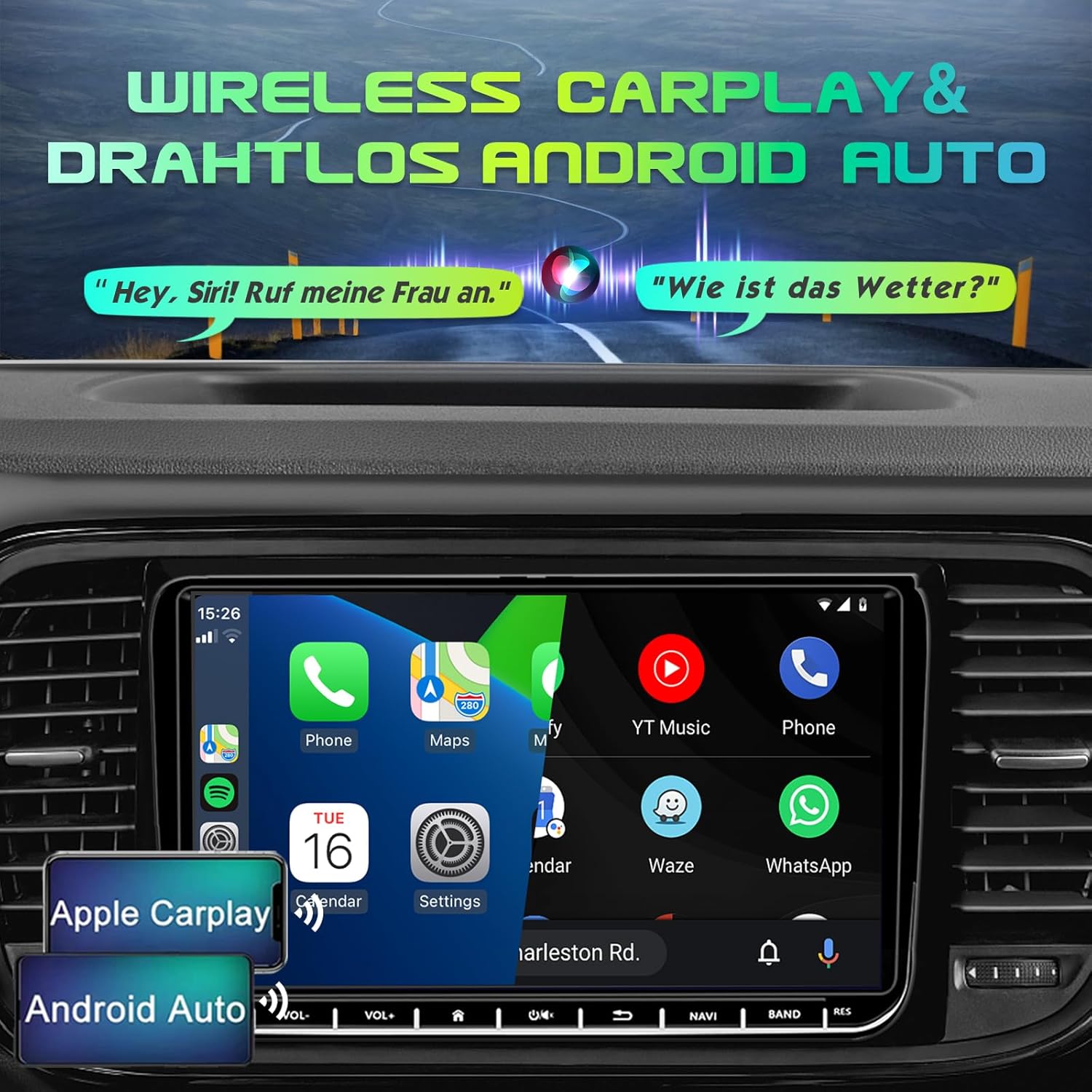
Figure 5: Display demonstrating Wireless Apple CarPlay and Android Auto functionality.
Connect your smartphone wirelessly to access navigation, music, calls, and messages directly on the car radio screen.
- تفعيل البلوتوث والواي فاي: تأكد من تمكين Bluetooth وWi-Fi على هاتفك الذكي.
- الاقتران: On the car radio, go to the Bluetooth settings and search for your phone. Pair the devices.
- Launch CarPlay/Android Auto: Once paired, the system should prompt you to launch Apple CarPlay or Android Auto. Follow the on-screen instructions.
- التحكم الصوتي: Use voice commands (e.g., "Hey Siri" for CarPlay, "Hey Google" for Android Auto) for hands-free operation.
تحديد المواقع والملاحة:

Figure 6: GPS Navigation interface displaying map, current location, and route details.
The unit comes with pre-installed Europe maps and supports online and offline navigation.
- Starting Navigation: Tap the "Navigation" icon on the main screen.
- Entering Destination: Use the on-screen keyboard to enter your destination address or select from recent destinations/points of interest.
- تحديثات الخريطة: Connect to Wi-Fi to download map updates or use online navigation services.
الاتصال عبر البلوتوث:

Figure 7: Bluetooth interface for hands-free calling and audio streaming.
- الاقتران: Go to "Bluetooth" settings, enable Bluetooth on your phone, and select the car radio from the list of available devices.
- الاتصال بدون استخدام اليدين: Make and receive calls directly through the car radio. Your phonebook can be synchronized.
- تدفق الصوت: Play music from your phone via Bluetooth audio streaming (A2DP).
Reverse Camera (AHD Camera):
When the vehicle is shifted into reverse gear, the display will automatically switch to the rear view camera feed, providing a wide 170° view مزودة بإمكانيات الرؤية الليلية.
Figure 8: AHD Reverse Camera display showing day and night vision modes.
DSP EQ (Digital Sound Processor Equalizer):
Customize your audio experience with the built-in DSP EQ. Adjust frequency bands to match your preferences and vehicle acoustics.
Figure 9: DSP EQ interface for advanced audio customization.
- الوصول إلى الذكاء العاطفي: Navigate to the "Sound Settings" or "DSP" menu.
- ضبط الإعدادات: Use the sliders to adjust individual frequency bands. Select from preset sound modes (e.g., Pop, Rock, Jazz) or create custom profiles.
التحكم في عجلة القيادة (SWC):
If your vehicle supports it and the Canbus is correctly connected, you can program the steering wheel buttons to control the car radio functions (e.g., volume, track skip, mode change).
Figure 10: Steering Wheel Control (SWC) setup interface.
- يثبت: Go to "Settings" > "Steering Wheel Control" and follow the on-screen instructions to map your vehicle's steering wheel buttons to the radio functions.
رابط المرآة:
Mirror Link allows you to display your smartphone's screen directly on the car radio, supporting both iOS and Android devices. This enables you to view content like navigation, videos, and messages from your phone on the larger display.
Figure 11: Mirror Link feature displaying a mirrored smartphone screen.
- اتصال: Connect your smartphone via USB or Wi-Fi (depending on the specific Mirror Link app/protocol).
- التفعيل: Launch the Mirror Link application on the car radio and follow the pairing instructions on both devices.
صيانة
- تنظيف الشاشة: استخدم قطعة قماش ناعمة وخالية من الوبر لمسح شاشة اللمس برفق. لإزالة البقع الصعبة، امسحها برفق.ampامسح الشاشة بقطعة قماش مبللة بالماء أو بمنظف آمن. تجنب المواد الكاشطة أو المواد الكيميائية القاسية.
- النظافة العامة: حافظ على جهازك خاليًا من الغبار والأوساخ. استخدم فرشاة ناعمة أو هواءً مضغوطًا للتنظيف حول الأزرار والمنافذ.
- تحديثات البرامج: Periodically check for software updates from the manufacturer (if available) to ensure optimal performance and access to new features. Updates can usually be performed via Wi-Fi.
- تجنب درجات الحرارة القصوى: لا تعرض الوحدة للحرارة أو البرودة الشديدة، لأن ذلك قد يؤثر على أدائها وعمرها الافتراضي.
- إدارة الطاقة: Ensure the vehicle's electrical system is stable. Avoid frequent power fluctuations.
استكشاف الأخطاء وإصلاحها
If you encounter issues with your SEMAITU TH0029DAB Car Radio, please refer to the following common problems and solutions:
| مشكلة | السبب المحتمل | حل |
|---|---|---|
| الوحدة لا تعمل بالطاقة. | لا يوجد مصدر طاقة؛ فيوز محترق؛ توصيلات كهربائية خاطئة. | Check vehicle's fuse box and radio fuse. Verify power cable connections. Ensure battery is connected. |
| لا يوجد إخراج صوت. | مستوى الصوت منخفض جدًا؛ تم تفعيل كتم الصوت؛ مشكلة في توصيلات السماعات؛ مصدر صوت غير صحيح. | Increase volume. Check if mute is on. Verify speaker connections. Select correct audio source (e.g., FM, Bluetooth). |
| Poor radio reception (FM/DAB). | الهوائي غير موصول؛ هوائي تالف؛ منطقة إشارة ضعيفة. | Ensure radio and DAB antennas are securely connected. Check antenna for damage. Try scanning for stations in a different location. |
| CarPlay/Android Auto غير متصل. | Bluetooth/Wi-Fi off on phone; Incorrect pairing; Software glitch. | Ensure Bluetooth and Wi-Fi are enabled on your phone. Re-pair the devices. Restart both phone and car radio. Update phone OS. |
| Reverse camera not displaying. | Camera not powered; Incorrect camera input connection; Reverse trigger wire not connected. | Check camera power supply (usually from reverse light). Verify camera input cable is connected to the correct port. Ensure reverse trigger wire is connected. |
| شاشة اللمس لا تستجيب. | تجمد النظام؛ وجود أوساخ على الشاشة. | Restart the unit (press and hold power button). Clean the screen. If issue persists, a factory reset might be needed (consult support). |
| أزرار التحكم في عجلة القيادة لا تعمل. | Canbus not connected; Incorrect SWC programming. | Ensure Canbus decoder is correctly installed. Re-program the steering wheel controls in the settings menu. |
إذا استمرت المشكلة بعد تجربة هذه الحلول، فيرجى الاتصال بدعم العملاء.
تحديد
| ميزة | التفاصيل |
|---|---|
| اسم الموديل | Autoradio Android 12.0 9" (DAB) |
| الشركة المصنعة | سيمايتو |
| نظام التشغيل | أندرويد 12.0 |
| حجم الشاشة | 9 بوصة |
| نوع العرض | QLED Quantum Touchscreen |
| دقة | 1280 × 720 بكسل |
| Memory (RAM + Storage) | 2 جيجا بايت رام + 32 جيجا بايت روم |
| موالف الراديو | DAB, FM, RDS (NXP6856) |
| الاتصال | Bluetooth, Wi-Fi, USB (Dual ports) |
| ملاحة | GPS (Europe maps included) |
| تكامل الهاتف الذكي | Wireless Apple CarPlay, Wireless Android Auto, Mirror Link |
| وضع إخراج الصوت | Stereo with DSP EQ |
| المميزات الخاصة | Touchscreen, AHD Reverse Camera Support, Steering Wheel Control (SWC) |
| نوع خدمة المركبة | سيارة |
| نوع التركيب | جبل لوحة القيادة |
| أبعاد الحزمة | 28 × 25.3 × 9 سم |
| وزن العنصر | 1.4 كيلوغرام |
الضمان والدعم
For warranty information and customer support, please refer to the documentation provided with your purchase or contact SEMAITU customer service directly. Keep your proof of purchase for warranty claims.
For technical assistance or further inquiries, please visit the official SEMAITU webالموقع أو اتصل بفريق الدعم الخاص بهم.
Ask a question about this manual
Ask about setup, troubleshooting, compatibility, parts, safety, or missing instructions. Manuals+ will review the question and use this page’s manual context to help answer it.