
1. المقدمة
This manual provides comprehensive instructions for the safe and effective operation of your Annadue K6 MAX Drone. The K6 MAX is a foldable RC quadcopter equipped with advanced features including a 4K triple camera system, 50X digital zoom, optical flow positioning, and 4-way intelligent obstacle avoidance. Please read this manual thoroughly before first use to ensure proper setup and flight.

Image 1.1: The Annadue K6 MAX Drone, featuring its three-camera system and obstacle avoidance capabilities.
2. معلومات السلامة
Always prioritize safety during drone operation. Failure to follow these guidelines may result in injury, damage to property, or legal consequences.
- بيئة الرحلة: Fly in open areas, away from people, animals, buildings, and power lines. Avoid flying in strong winds, rain, or snow.
- خط البصر: حافظ دائمًا على خط رؤية مباشر مع الطائرة بدون طيار أثناء الطيران.
- سلامة البطارية: Use only the provided charger and battery. Do not overcharge or puncture batteries. Discontinue use if batteries are damaged or swollen.
- سلامة المروحة: أبقِ يديك ووجهك بعيداً عن المراوح الدوارة. تأكد من تثبيت المراوح بإحكام قبل الطيران.
- توصية العمر: This drone is recommended for adults and advanced beginners. Supervise younger users.
- اللوائح المحلية: Be aware of and comply with all local drone flight regulations and restrictions.
3. محتويات العبوة
تأكد من وجود جميع العناصر في العبوة:
- Annadue K6 MAX Drone
- جهاز التحكم عن بعد
- Rechargeable Drone Battery (Lithium)
- كابل شحن USB
- مراوح احتياطية
- Screwdriver (for propeller installation)
- دليل المستخدم
4. دليل الإعداد
4.1. شحن بطارية الطائرة بدون طيار
- قم بتوصيل كابل الشحن USB ببطارية الطائرة بدون طيار.
- قم بتوصيل الطرف الآخر من كابل USB بمحول طاقة USB بقوة 5 فولت/2 أمبير (غير مرفق).
- The indicator light on the battery will show charging status. Charge until fully charged (approximately 60-90 minutes).
4.2. تركيب بطارية الطائرة بدون طيار
- تأكد من إيقاف تشغيل الطائرة بدون طيار.
- حدد مكان حجرة البطارية على الطائرة بدون طيار.
- أدخل البطارية المشحونة بالكامل في الحجرة حتى تسمع صوت طقطقة عند تثبيتها في مكانها.
- أغلق غطاء حجرة البطارية جيدًا.
4.3. Attaching Propellers
If propellers are not pre-installed, attach them according to the markings (A and B) on the propellers and motor arms. Use the provided screwdriver to secure them.
4.4. إعداد جهاز التحكم عن بعد
- Install 3x AAA batteries (not included) into the remote controller.
- Extend the phone holder on the remote controller.
4.5. تثبيت التطبيق والاتصال به
- Scan the QR code in the manual or search for the designated app (e.g., "K6 MAX Drone" or similar) in your device's app store.
- قم بتثبيت التطبيق على هاتفك الذكي.
- قم بتشغيل الطائرة بدون طيار وجهاز التحكم عن بعد.
- On your smartphone, go to Wi-Fi settings and connect to the drone's Wi-Fi network (usually starts with "K6 MAX" or similar).
- افتح التطبيق لإنشاء اتصال مع الطائرة بدون طيار.
5. تعليمات التشغيل
5.1. فحوصات ما قبل الرحلة
- Ensure drone battery is fully charged and securely installed.
- Remote controller has fresh batteries.
- Propellers are correctly installed and undamaged.
- Fly in a safe, open environment.
- App is connected to the drone's Wi-Fi.
5.2. الإقلاع والهبوط
- انطلاق بمفتاح واحد: Press the one-key takeoff button on the remote or in the app. The drone will automatically ascend to a safe height and hover.
- الإقلاع اليدوي: Push both joysticks down and outwards to unlock the motors. Then push the left joystick up to ascend.
- هبوط بمفتاح واحد: اضغط على زر الهبوط ذي المفتاح الواحد. ستهبط الطائرة بدون طيار تلقائيًا.
- الهبوط اليدوي: Pull the left joystick down to descend slowly.
5.3. أدوات التحكم الأساسية في الطيران
- عصا التحكم اليسرى (الخانق/الانحراف): Up/Down for altitude, Left/Right for rotation.
- Right Joystick (Forward/Backward/Sideways): Up/Down for forward/backward flight, Left/Right for left/right sideways flight.
5.4. تشغيل الكاميرا
The K6 MAX features a triple camera system with 4K recording capability.
- التقاط الصور/الفيديو: Use the dedicated buttons on the remote or in the app to take photos or start/stop video recording.
- تكبير 50x: Utilize the app to digitally zoom from 0 to 50 times, allowing for detailed distant shots.
- نظام الكاميرا الثلاثية: Switch between horizontal, vertical, and downward-facing camera views via the app for diverse creative angles.
- Beauty Filter Shooting: The drone supports a beauty filter feature for enhanced photo capture directly from the app.
- التحكم بالإيماءات: During flight, specific hand gestures can trigger photo or video recording. Refer to the app for detailed gesture instructions.
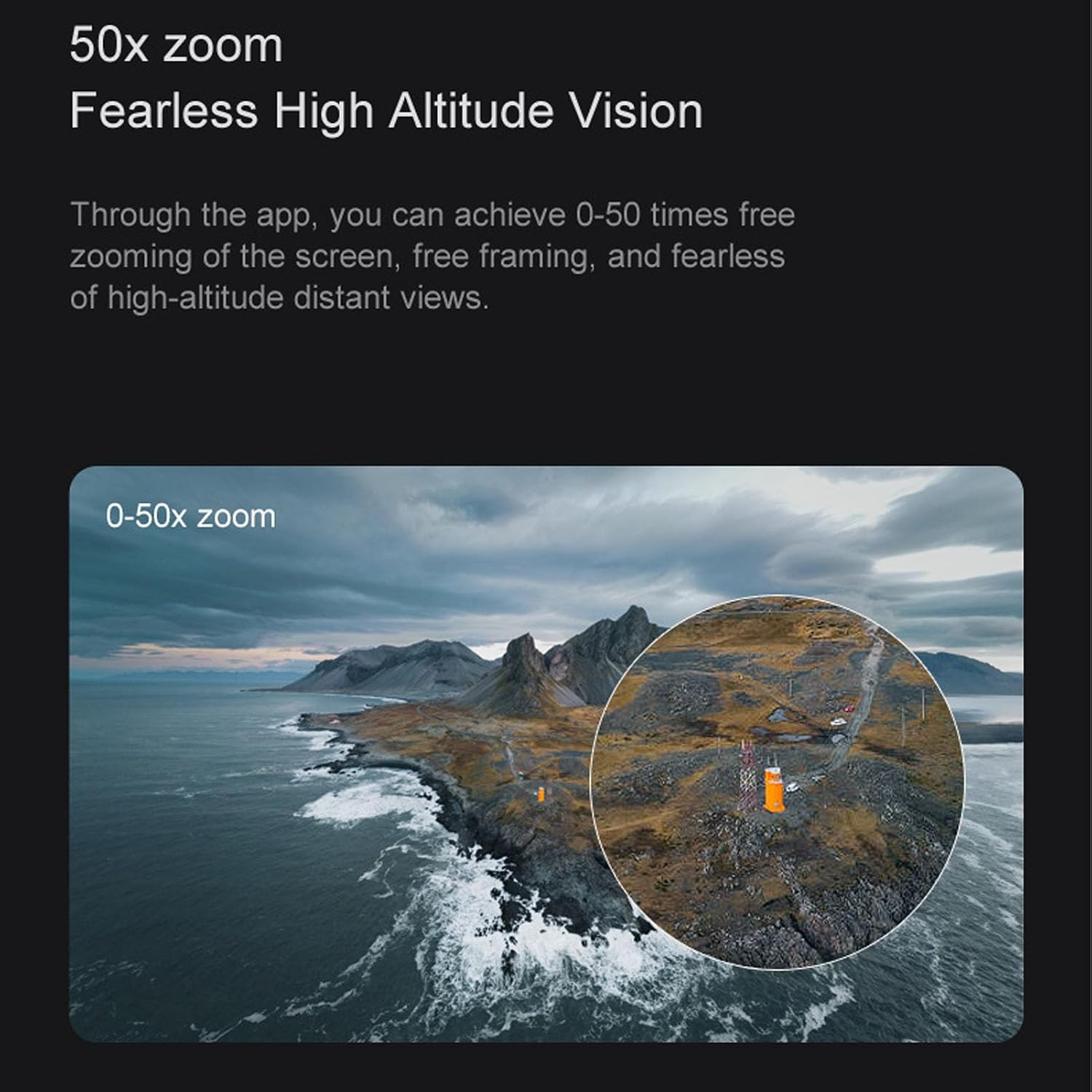
Image 5.1: Demonstration of the 50X digital zoom feature, allowing for detailed capture from high altitudes.

Image 5.2: Gesture control in action, enabling hands-free photo or video capture.

الصورة 5.3: مثالample of the beauty filter shooting feature, enhancing image quality with a single click.

Image 5.4: The triple camera system supports horizontal, vertical, and overlooking shooting modes for creative flexibility.

Image 5.5: Close-up of the drone's triple camera system, designed for versatile photography and videography.
5.5. Optical Flow Positioning
The drone utilizes optical flow positioning to maintain a stable hover both indoors and outdoors, simplifying control for users.

Image 5.6: Optical flow positioning allows the drone to maintain a consistent height, making it easier to control.
5.6. تجنب العوائق
The K6 MAX is equipped with 4-way intelligent obstacle avoidance, detecting obstacles and helping to prevent collisions during flight.

Image 5.7: The 4-way intelligent obstacle avoidance system helps the drone navigate safely, preventing crashes.
5.7. مسار الرحلة
Draw a desired flight path on the app interface, and the drone will automatically follow the trajectory, enabling intelligent and autonomous flight.
5.8. 360° Flips
Perform impressive 360-degree flips with a single button press on the remote controller, adding excitement to your flight experience.
6. الصيانة
- تنظيف: Use a soft, dry cloth to clean the drone body and camera lenses. Avoid using liquids or solvents.
- استبدال المروحة: If propellers are damaged, replace them immediately with spare parts. Ensure correct A/B propeller orientation.
- العناية بالبطارية: Store batteries in a cool, dry place. Do not store fully charged or completely depleted batteries for extended periods. Charge them to about 50% for long-term storage.
- تخزين: When not in use, store the drone and remote controller in a safe, dry place, away from direct sunlight and extreme temperatures.
7. استكشاف الأخطاء وإصلاحها
| مشكلة | السبب المحتمل | حل |
|---|---|---|
| الطائرة بدون طيار لا تعمل | البطارية غير مشحونة أو مثبتة بشكل غير صحيح. | Charge battery fully. Reinstall battery correctly. |
| جهاز التحكم عن بعد لا يتصل | Remote batteries low or drone not powered on. | Replace remote batteries. Ensure drone is powered on. |
| App not connecting to drone | Not connected to drone's Wi-Fi or app not launched. | Connect to drone's Wi-Fi in phone settings. Relaunch the app. |
| الطائرة بدون طيار غير مستقرة أثناء الطيران | Propellers damaged or incorrectly installed. Calibration needed. | Replace damaged propellers. Perform gyroscope calibration (refer to app/remote instructions). |
| جودة صورة الكاميرا رديئة | Lens dirty or insufficient lighting. | Clean camera lens. Ensure adequate lighting for optimal results. |
8. المواصفات
- نموذج: Annadueg01obg7dwk
- ماركة: أنادو
- الأبعاد (الحزمة): 22 × 18 × 7 سم
- وزن: 410 جرام
- مادة: بلاستيك
- آلة تصوير: 4K (Effective Still Resolution: 8 Megapixels)
- قرار تسجيل الفيديو: 2K (Output: 1080p)
- صيغة الفيديو: إم بي 4
- تنسيق الصورة: JPEG
- تكبير: تقريب رقمي 50X
- سعة البطارية: بطارية ليثيوم 1800 مللي أمبير
- أقصى مدى: 150 مترا
- الاتصال: Wi-Fi, Radio Frequency (Remote Control)
- المميزات الخاصة: 4K Camera, 50x Zoom, Triple Camera System, Optical Flow Positioning, 4-Way Obstacle Avoidance, Gesture Control, 360° Flips, Trajectory Flight
- مستوى المهارة: Advanced Beginner
9. الضمان والدعم
9.1. معلومات الضمان
This Annadue K6 MAX Drone comes with a ضمان لمدة عام واحد ضد عيوب التصنيعيرجى الاحتفاظ بإثبات الشراء الخاص بك لاستخدامه في المطالبات بالضمان.
9.2. دعم العملاء
For technical assistance, troubleshooting, or warranty inquiries, please contact Annadue customer support through the retailer's platform or the official Annadue website. Provide your model number (Annadueg01obg7dwk) and a detailed description of the issue for faster service.