
مقدمة
Thank you for choosing the La Crosse Technology WS6207 Modern Design Weather Station. This device provides accurate indoor and outdoor temperature and humidity readings, a radio-controlled clock, weather forecasts, and other useful meteorological data. This manual will guide you through the setup, operation, and maintenance of your new weather station.
المميزات الرئيسية:
- Radio-controlled time and date (12 or 24-hour format)
- Calendar and day of the week display in 7 languages
- منبهان مع وظيفة الغفوة
- Indoor and outdoor temperature and humidity display
- Min/Max records for temperature and humidity
- Outdoor temperature alerts
- مؤشر الراحة الداخلي
- Weather forecast with atmospheric pressure detection
- Snow alert and moon phases display
- Window opening/closing advice
- إضاءة خلفية قابلة للتعديل
- Supports up to 3 outdoor sensors (one included)
- مؤشر البطارية المنخفضة
- التردد: 433 ميغاهيرتز
محتويات الحزمة
يرجى التأكد من أن جميع العناصر موجودة وفي حالة جيدة:
- 1 x WS6207 Modern Design Weather Station (Main Unit)
- 1 × مستشعر خارجي لاسلكي
- 1 × دليل المستخدم

صورة: The La Crosse Technology WS6207 weather station displayed in a home setting. This image provides an overall view of the product and its modern design with a wooden base.
يثبت
1. تزويد المستشعر الخارجي بالطاقة
- افتح غطاء حجرة البطارية الموجود في الجزء الخلفي من المستشعر الخارجي.
- Insert 2 x AA batteries (not included) according to the polarity markings (+/-).
- أغلق غطاء حجرة البطارية جيدًا.
2. تزويد الوحدة الرئيسية بالطاقة
- افتح غطاء حجرة البطارية الموجود في الجزء الخلفي من الوحدة الرئيسية.
- أدخل 3 بطاريات AAA (غير مرفقة) وفقًا لعلامات القطبية (+/-).
- Close the battery compartment cover securely. The display will light up and begin searching for the outdoor sensor and radio-controlled time signal.
3. وضع المستشعر
For accurate outdoor readings, place the wireless sensor in a shaded area, away from direct sunlight and sources of heat or moisture. Ensure it is protected from direct rain. The maximum transmission range is approximately 100 meters (330 feet) in open air. Walls and other obstructions may reduce this range.
4. المزامنة الأولية
بعد إدخال البطاريات في كلا الجهازين، سيحاول الجهاز الرئيسي تلقائيًا الاتصال بمستشعر درجة الحرارة الخارجية. قد تستغرق هذه العملية بضع دقائق. بمجرد الاتصال، ستظهر درجة الحرارة والرطوبة الخارجية على شاشة الجهاز الرئيسي.
5. Radio-Controlled Time Setup
The weather station will automatically attempt to synchronize with the DCF (or similar regional) radio time signal. This process can take several hours, especially during initial setup. For best reception, place the unit near a window and away from electronic devices that may cause interference. The time will automatically adjust for Daylight Saving Time (DST).
تعليمات التشغيل
1. عرض أكثرview
The main unit's LCD display is divided into several sections, providing a comprehensive overview of current conditions and time information.

صورة: This image displays the main unit's screen, illustrating the layout of information including the current time, date, day of the week, indoor temperature and humidity, outdoor temperature and humidity, and weather forecast icons.
- القسم العلوي: Weather forecast icons (sunny, cloudy, rainy, snowy), atmospheric pressure, and radio-controlled time.
- القسم الأوسط: Current time, DST indicator, date, and day of the week.
- Bottom Left Section: Outdoor temperature and humidity, with min/max indicators.
- Bottom Right Section: Indoor temperature and humidity, with comfort indicator (DRY, OK, WET).
2. ضبط الوقت والتاريخ يدوياً
If the radio-controlled time signal is not available, you can set the time and date manually. Refer to the detailed instructions in the included printed manual for specific button presses.
3. وظيفة التنبيه
The weather station features two independent alarms. To set an alarm, press the 'ALARM' button, then use the '+' and '-' buttons to adjust the hour and minute. Press 'ALARM' again to confirm. The snooze function can be activated by pressing any button (except 'ALARM' or 'SET') when the alarm sounds.
4. عرض درجة الحرارة والرطوبة
Press the 'C/F' button to switch between Celsius and Fahrenheit temperature units. The station automatically records minimum and maximum temperature and humidity values for both indoor and outdoor readings. Press the 'MIN/MAX' button to cycle through these records.
5. توقعات الطقس
The weather station predicts weather conditions for the next 12-24 hours based on atmospheric pressure changes. The forecast icons (sunny, partly cloudy, cloudy, rainy, snowy) are indicative and may not always reflect real-time conditions. The atmospheric pressure is displayed in hPa.
6. Window Opening/Closing Advice
This feature provides a recommendation on whether to open or close windows based on the indoor and outdoor temperature and humidity differences, aiming to optimize indoor comfort and energy efficiency.
7. Adjustable Backlight
The display features an adjustable backlight for improved visibility in various lighting conditions. Press the 'LIGHT' button to cycle through different brightness levels or to turn it off.
صيانة
1. استبدال البطارية
When the low battery indicator appears on the display for either the main unit or the outdoor sensor, replace the batteries promptly. Use fresh, high-quality batteries of the specified type (AAA for main unit, AA for sensor).
2. التنظيف
نظف محطة الأرصاد الجوية والمستشعر بقطعة قماش ناعمة و...amp لا تستخدم المنظفات أو المذيبات الكاشطة، لأنها قد تؤدي إلى تلف الشاشة أوasing. Ensure no moisture enters the battery compartments.
3. التخزين
If the weather station will not be used for an extended period, remove all batteries from both units to prevent leakage and corrosion. Store the units in a cool, dry place.
استكشاف الأخطاء وإصلاحها
- لا يوجد عرض على الوحدة الرئيسية: Check if batteries are inserted correctly with correct polarity. Replace with fresh batteries.
- لا يتصل المستشعر الخارجي: Ensure the sensor is within range of the main unit. Check and replace sensor batteries. Press the 'SEARCH' button on the main unit (if available) to manually initiate a search for the sensor. Avoid major metal objects or electronic interference between units.
- قراءات غير دقيقة لدرجة الحرارة/الرطوبة: Ensure the outdoor sensor is placed in a shaded, well-ventilated area, away from direct sunlight, heat sources, or excessive moisture. Allow time for readings to stabilize after initial setup or battery replacement.
- Time not synchronizing (radio-controlled clock): Place the main unit near a window, away from electronic devices that may cause interference. Allow up to 24 hours for the initial synchronization. Manual time setting is an alternative if the signal is consistently weak.
- Weather forecast seems incorrect: The weather forecast is a prediction based on atmospheric pressure trends and may not always match local conditions perfectly. It is an indication for the next 12-24 hours, not a real-time observation.
تحديد
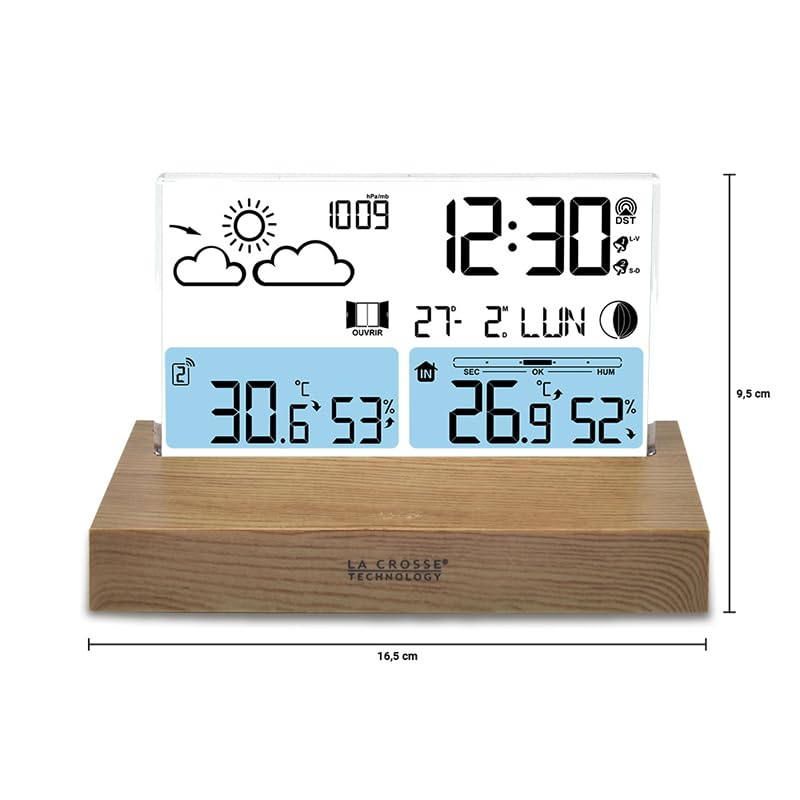
صورة: This diagram illustrates the physical dimensions of the weather station's main unit, indicating a width of 16.5 cm and a height of 9.5 cm, useful for placement considerations.
| ميزة | التفاصيل |
|---|---|
| رقم الموديل | WS6207 |
| الأبعاد (الوحدة الرئيسية) | 16 × 4 × 9 سم (الطول × العرض × الارتفاع) |
| وزن | 350 جرام |
| مصدر الطاقة (الوحدة الرئيسية) | Battery powered (3 x AAA, not included) |
| مصدر الطاقة (مستشعر خارجي) | تعمل بالبطارية (2 × AA، غير متضمنة) |
| تكنولوجيا الاتصال | لاسلكي، 433 ميجا هرتز |
| ميزة خاصة | مستشعر لاسلكي |
| مادة | Wood (base) |
| نوع العرض | شاشة الكريستال السائل |
| دقة درجة الحرارة | 1 إلى 2 درجة مئوية |
| Temperature Reading Accuracy | ±0.5 degrees Celsius |
| درجة الحرارة القصوى المقدرة | 35 درجة مئوية |
| تقنية الاستشعار | تردد الراديو (RF) |
الضمان والدعم
La Crosse Technology products are manufactured to high-quality standards. For specific warranty information, please refer to the warranty card included in your product packaging or visit the official La Crosse Technology webالموقع. احتفظ بإيصال الشراء كإثبات للشراء.
If you encounter any issues or have questions not covered in this manual, please contact La Crosse Technology customer support. Contact details can typically be found on the product packaging or the official brand webموقع.