
1. المقدمة
Thank you for choosing the GameSir T4 Cyclone Wireless Controller. This manual provides detailed instructions for setting up, operating, maintaining, and troubleshooting your controller. The GameSir T4 Cyclone is designed for a versatile gaming experience across multiple platforms.

الصورة: الجبهة view of the GameSir T4 Cyclone Wireless Controller.
2. محتويات العبوة
- GameSir T4 Cyclone Wireless Controller
- كابل USB-C
- دليل المستخدم
- Note: The 2.4G wireless receiver is sold separately.
3. الإعداد
3.1 شحن وحدة التحكم
Before first use, fully charge the controller. Connect the supplied USB-C cable to the controller's charging port and the other end to a USB power source (e.g., computer, wall adapter). The controller features an 860mAh battery, providing approximately 25 hours of playtime on a full charge.

Image: Illustration showing 860mAh battery capacity and 25 hours playing time.
3.2 التوافق
The GameSir T4 Cyclone Wireless Controller is compatible with the following platforms:
- Nintendo Switch (including Switch, Switch Lite, and Switch OLED)
- أجهزة الكمبيوتر التي تعمل بنظام Windows 10/11
- أجهزة أندرويد (أندرويد 6.0 وما فوق)
- iOS devices (iOS 13.0 and above)
- سطح بخاري
Note: Xbox consoles are NOT supported.

Image: Controller shown with icons for Switch, PC, iOS, and Android, indicating multi-platform compatibility.
3.3 خيارات الاتصال
The controller offers three ways to connect to your devices:
- اتصال بلوتوث:
- تأكد من شحن وحدة التحكم.
- قم بتشغيل وحدة التحكم.
- On your device (Switch, Android, iOS, PC), go to Bluetooth settings and search for available devices.
- Select "GameSir T4 Cyclone" to pair.
- 2.4G Wireless Connection (Receiver Sold Separately):
- Plug the 2.4G wireless receiver into an available USB port on your device (PC, Steam Deck).
- قم بتشغيل وحدة التحكم. يجب أن تتصل تلقائيًا بجهاز الاستقبال.
- اتصال سلكي عبر منفذ USB-C:
- Connect the controller to your device using the supplied USB-C cable.
- The controller will function as a wired controller and charge simultaneously.

Image: Visual representation of Bluetooth, USB-C, and 2.4G wireless connectivity options.
4. تعليمات التشغيل
4.1 Hall Effect Sensing Joysticks
The GameSir T4 Cyclone features Hall Effect joysticks, which use magnetic sensors to detect movement. This technology provides:
- منطقة الصفر الميتة: يضمن الاستجابة الفورية حتى لأبسط المدخلات.
- Anti-Drift Performance: Eliminates common stick drift issues found in traditional joysticks, ensuring long-term precision.
- متانة: Designed for up to 5 million cycles.

Image: Diagram illustrating the internal components of GameSir Hall Effect Sticks, highlighting anti-drift and longevity.
4.2 مشغلات تناظرية بتأثير هول
The analog triggers also utilize Hall Effect technology, offering precise and consistent input. You can switch between two trigger modes:
- Regular Trigger Mode: Provides a full range of motion for nuanced control in racing or driving games.
- Fast Trigger Mode (Hair Trigger): Reduces travel distance for quicker, mouse-click-like responses, ideal for FPS or RPG games.

Image: Diagram showing the internal mechanism of Hall Effect Analog Triggers with 0.1mm accuracy.
4.3 أزرار خلفية قابلة للبرمجة
The controller features two programmable back buttons (L4 and R4) that can be customized for enhanced gameplay. These buttons allow you to:
- تعيين الزر: Assign a single button function to L4 or R4.
- وظيفة التربو: Set a button to rapidly repeat its input.
- وظيفة مركبة: Program a sequence of button presses to execute complex actions with a single press.
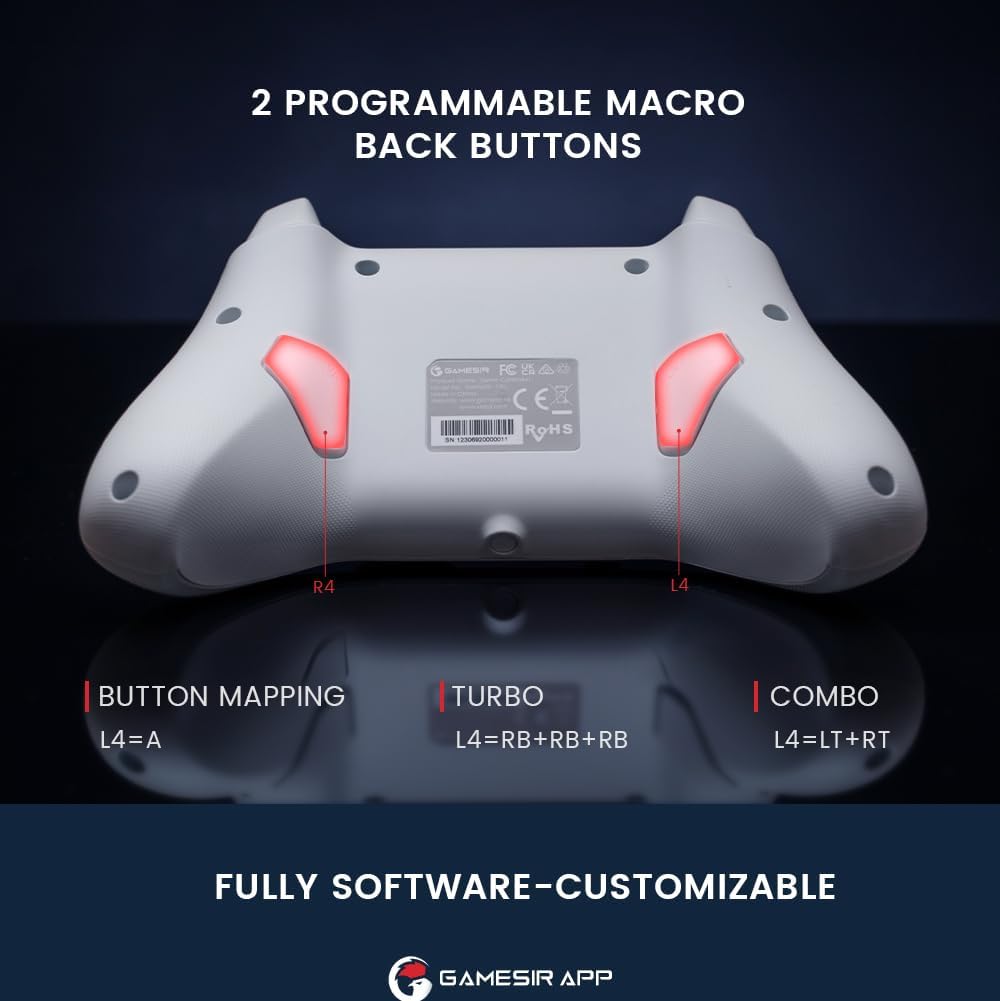
الصورة: الخلفية view of the controller highlighting the L4 and R4 programmable macro back buttons.
4.4 Multi-function M Button
The 'M' button provides quick access to various settings without needing the app:
- M + LT/RT: Switch between Hair Trigger (fast) and Linear Trigger (regular) modes.
- M + LS/RS: Adjust stick deadzone settings.
- M + D-pad Up/Down: ضبط شدة الاهتزاز.
- M + A: Change ABXY button layout (e.g., Switch layout vs. Xbox layout).

Image: Diagram showing the multi-function M button and its combinations for various settings.
4.5 التحكم في الحركة
The controller supports motion controls, allowing for interactive gameplay in compatible Nintendo Switch titles. Tilt, shake, or rotate the controller to interact with your games.

Image: Controller shown with dynamic lines indicating motion control in action during gameplay.
4.6 GameSir App Customization
For advanced customization, download the GameSir App. The app allows you to:
- تخصيص وظائف الأزرار.
- Adjust stick deadzone.
- اضبط مسافة حركة الزناد.
- Fine-tune vibration intensity.
- قم بتحديث برنامج وحدة التحكم.

Image: Screenshots of the GameSir App interface showing options for button mapping, stick, triggers, and vibration settings.
5. الصيانة
- تنظيف: استخدم قطعة قماش ناعمة وجافة لتنظيف وحدة التحكم. تجنب استخدام المواد الكيميائية القاسية أو المواد الكاشطة.
- تخزين: قم بتخزين وحدة التحكم في مكان بارد وجاف بعيدًا عن أشعة الشمس المباشرة ودرجات الحرارة القصوى.
- العناية بالبطارية: Do not attempt to replace the internal battery. If the controller will not be used for an extended period, charge it periodically to maintain battery health.
6. استكشاف الأخطاء وإصلاحها
- وحدة التحكم غير متصلة:
- تأكد من أن وحدة التحكم مشحونة بالكامل.
- تأكد من تفعيل البلوتوث على جهازك وأن وحدة التحكم في وضع الاقتران.
- If using 2.4G wireless, ensure the receiver is properly inserted and the controller is in 2.4G mode.
- حاول إعادة تشغيل كل من وحدة التحكم وجهازك.
- Input Lag or Unresponsive Controls:
- Ensure there are no obstructions or excessive distance between the controller and your device.
- تقليل التداخل من الأجهزة اللاسلكية الأخرى.
- For critical gaming, consider using the USB-C wired connection for the lowest latency.
- Stick Drift or Inaccurate Movement:
- The Hall Effect joysticks are designed to prevent drift. If you experience issues, ensure the controller firmware is up to date via the GameSir App.
- Check the stick deadzone settings in the GameSir App and ensure it is set to 0 for optimal responsiveness.
- Rumble Motor Noise:
- Some users may notice a high-pitched squeal from the rumble motors. If this is distracting, the vibration intensity can be adjusted or disabled via the multi-function M button or the GameSir App.
- LED Indicator Too Bright:
- The LED brightness can be adjusted through the GameSir App.
- GameSir App Not Recognizing Controller:
- Ensure Bluetooth is enabled and the controller is paired with your mobile device.
- Check for app updates and controller firmware updates.
- Verify that the app has necessary permissions on your mobile device.
7. المواصفات
| ميزة | التفاصيل |
|---|---|
| ماركة | جيم سير |
| اسم الموديل | GameSir T4 Cyclone |
| الأجهزة المتوافقة | Android, iOS, Nintendo Switch, PC, Steam Deck |
| نوع وحدة التحكم | عصا التحكم |
| تكنولوجيا الاتصال | Bluetooth, 2.4G Wireless (receiver sold separately), USB C |
| مميزات اضافية | Wireless, Hall Effect Joysticks, Hall Effect Triggers, Programmable Back Buttons, Motion Control |
| كمية الأزرار | 16 |
| منصة الأجهزة | جهاز كمبيوتر مكتبي، جهاز ألعاب، كمبيوتر محمول، هاتف ذكي، جهاز لوحي |
| مصدر الطاقة | لاسلكي (بطارية قابلة لإعادة الشحن) |
| سعة البطارية | 860 مللي أمبير |
| وقت اللعب | حوالي 25 ساعات |
| وزن العنصر | 400 جرام |
| أبعاد العنصر (الطول × العرض × الارتفاع) | 6.14 × 4.21 × 2.48 بوصة |
8. فيديو المنتج الرسمي
فيديو: مسؤول فوقview of the GameSir T4 Cyclone and Pro Wireless Controllers, demonstrating features and compatibility.
9. الضمان والدعم
GameSir products come with a limited warranty. For detailed warranty information, please refer to the warranty card included with your product or visit the official GameSir website. For technical support, troubleshooting assistance, or to download the GameSir App and firmware updates, please visit the GameSir support page or contact customer service.
تطبيق GameSir: The GameSir App is essential for unlocking the full customization potential of your controller and for keeping its firmware updated. It is available for download on Google Play and the Apple App Store.