
1. المقدمة
The TOPPING D70 Pro Sabre is a high-performance Digital-to-Analog Converter (DAC) designed for audiophiles seeking exceptional sound quality. Featuring the ES9039SPro chip, advanced I/V conversion circuitry, and versatile input/output options, this device delivers precise and immersive audio reproduction. It supports various audio formats and offers a user-friendly interface for an enhanced listening experience.
2. معلومات السلامة
- لا تقم بتفكيك الجهاز أو تعديله. قد تؤدي التعديلات غير المصرح بها إلى إلغاء الضمان وتشكل مخاطر على السلامة.
- أبقِ الجهاز بعيداً عن الماء والرطوبة ودرجات الحرارة العالية.
- تأكد من التهوية المناسبة حول الوحدة لمنع ارتفاع درجة الحرارة.
- استخدم فقط كابل الطاقة والملحقات المتوفرة.
- Disconnect the power cable during lightning storms or when unused for extended periods.
3. محتويات العبوة
يرجى التأكد من وجود جميع العناصر في العبوة:
- 1 x TOPPING D70 Pro Sabre DAC
- 1 × جهاز التحكم عن بعد
- 1 × كابل يو اس بي
- 1 × كابل طاقة التيار المتردد
- 1 × هوائي بلوتوث
- 1 × دليل المستخدم (هذه الوثيقة)

Image: TOPPING D70 Pro Sabre DAC with its included accessories and dimensions.
4. انتهى المنتجview
4.1 اللوحة الأمامية

الصورة: الجبهة view of the TOPPING D70 Pro Sabre, showing the full-color display and control knob.
The front panel features a full-color display (Aurora UI) that shows current input, sample rate, volume level, and other playback information. A multi-function knob allows for input selection, volume adjustment, and menu navigation. Touch buttons provide quick access to various settings and display modes like FFT and VU meters.
4.2 اللوحة الخلفية

الصورة: الخلفية view of the TOPPING D70 Pro Sabre, illustrating the various input and output connections.
The rear panel provides a comprehensive set of input and output options:
- المدخلات: USB, AES, Optical, Coaxial, Bluetooth 5.1 (with antenna connector).
- المخرجات: Balanced XLR, Unbalanced RCA.
- قوة: مدخلات طاقة التيار المتردد.
5. الإعداد
5.1 توصيل الطاقة
- Connect the provided AC power cable to the power input on the rear panel of the D70 Pro Sabre.
- Plug the other end of the AC power cable into a suitable wall outlet.
5.2 توصيل مصادر الصوت
اختر إحدى طرق الإدخال التالية:
- مدخل USB: Connect a USB cable from your computer (Windows 10/11, macOS, Linux) to the USB input on the D70 Pro Sabre. For Windows systems, a driver installation may be required for ASIO applications.
- Optical/Coaxial/AES Input: Connect your digital audio source (e.g., CD player, streamer) using an optical, coaxial, or AES cable to the corresponding input on the D70 Pro Sabre.
- مدخلات بلوتوث: Screw the Bluetooth antenna onto the designated connector on the rear panel.
5.3 الاتصال بـ Amplifier/Headphones
Connect the D70 Pro Sabre to your ampمكبر أو سماعة رأس amplifier using either XLR or RCA cables:
- إخراج XLR: For balanced connections, use XLR cables to connect the D70 Pro Sabre to an amplifier with XLR inputs.
- إخراج RCA: For unbalanced connections, use RCA cables to connect the D70 Pro Sabre to an amplifier with RCA inputs.

Image: Diagram illustrating typical connections for the D70 Pro Sabre with a PC, headphone amplifier, and headphones.
6. تعليمات التشغيل
6.1 تشغيل/إيقاف التشغيل
Press the power button on the front panel or the remote control to turn the device on or off.
6.2 اختيار المدخلات
Rotate the multi-function knob or use the remote control to cycle through available inputs (USB, AES, Optical, Coaxial, Bluetooth).
6.3 التحكم في مستوى الصوت
Rotate the multi-function knob to adjust the output volume. The D70 Pro Sabre features independent volume memory for Single Ended, Balanced, and All modes, automatically recalling the last used volume for each output type.

Image: The D70 Pro Sabre display showing the current volume level and PCM sampمعدل جنيه.
6.4 Display Modes (Aurora UI)
The D70 Pro Sabre features an intuitive Aurora UI with a full-color display. Use the touch buttons or remote to navigate and customize the display, including options for FFT (Fast Fourier Transform) and VU (Volume Unit) meters to visualize playback information.
6.5 اقتران بلوتوث
- Select Bluetooth as the input source on the D70 Pro Sabre.
- On your Bluetooth device (e.g., smartphone, tablet), search for available devices and select "TOPPING D70 Pro Sabre".
- Once paired, audio will be streamed wirelessly to the DAC. The D70 Pro Sabre supports LDAC, aptX-Adaptive, aptX HD, aptX, AAC, and SBC codecs for high-quality wireless audio transmission.

Image: Illustration of Bluetooth 5.1 connectivity and performance graphs of the D70 Pro Sabre.
6.6 Timbre Fine-Tuning
The D70 Pro Sabre allows direct switching between different timbre modes: Default, Valve, and Transistor. These modes adjust the sound characteristics to suit your preference.
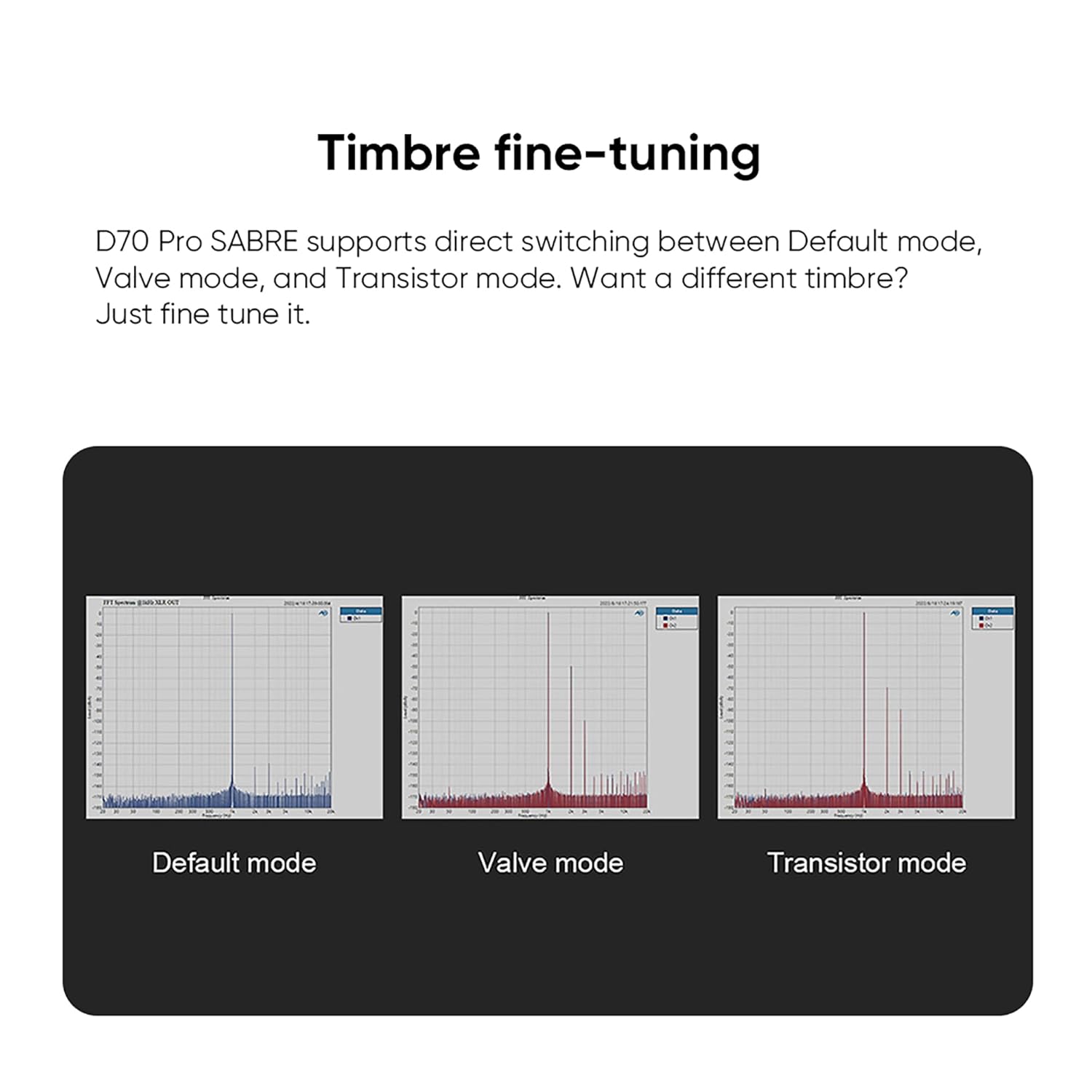
Image: Visual representation of the Default, Valve, and Transistor timbre modes available on the D70 Pro Sabre.
7. الصيانة
- نظّف الجهاز بانتظام بقطعة قماش ناعمة وجافة. تجنّب استخدام المنظفات أو المذيبات الكاشطة.
- Ensure all connections are secure and free from dust.
- قم بتخزين الجهاز في مكان بارد وجاف عندما لا يكون قيد الاستخدام.
8. استكشاف الأخطاء وإصلاحها
| مشكلة | السبب المحتمل | حل |
|---|---|---|
| لا يوجد مخرج صوت | Incorrect input selected, cables loose, amplifier off, volume too low. | Verify input selection, check all cable connections, ensure amplifier is on and volume is adequate. |
| اتصال البلوتوث غير مستقر | Antenna not connected, interference, device too far. | Ensure Bluetooth antenna is securely attached. Reduce distance between devices. Avoid sources of interference. |
| لا يوجد عرض | Device not powered on, display settings. | Check power connection and power button. Adjust display settings via menu. |
| صوت مشوه | غير صحيح sample rate, faulty cable, source issue. | Check source sample rate matches DAC capabilities. Try different cables. Test with another audio source. |
9. المواصفات
The TOPPING D70 Pro Sabre DAC features the powerful ES9039SPro chip and advanced I/V conversion circuitry. Below are key performance parameters (Line Out/USB In@96kHz):
| المعلمة | رسيا الإخراج | إخراج XLR |
|---|---|---|
| THD+N (A-wt) @1kHz | <0.00008% | <0.00006% |
| THD @90kBw (No-wt) @20-20kHz | <0.0004% | <0.0002% |
| SNR (A-wt) @1kHz | 128 ديسيبل | 133 ديسيبل |
| Dynamic Range (A-wt) @1kHz | 128 ديسيبل | 133 ديسيبل |
| استجابة التردد | 20Hz-20kHz (+0.05dB), 20Hz-40kHz (+0.2dB) | 20Hz-20kHz (+0.05dB), 20Hz-40kHz (+0.2dB) |
| Output Level @0dBFS (4V mode) | 2.1Vrms | 4.2Vrms |
| Output Level @0dBFS (5V mode) | 2.5Vrms | 5.0Vrms |
| الضوضاء (بالوزن) | <1.0 ميكرو فولت جذر متوسط مربع | <1.0 ميكرو فولت جذر متوسط مربع |
| قناة Crosstalk @ 1kHz | -128 ديسيبل | -140 ديسيبل |
| توازن القناة | 0.3 ديسيبل | 0.3 ديسيبل |
| معاوقة الخرج | 50 أوم | 100 أوم |
Note: The above data is the result obtained from TOPPING's laboratory tests at AC220V 50Hz, with D70 Pro SABRE set to 5V output mode.
المواصفات العامة:
- الشركة المصنعة: تتصدر
- رقم القطعة: D70Pro SE
- وزن المنتج: 2.02 كيلوغرام
- أبعاد المنتج: 22.2 × 17.6 × 4.8 سم
- لون: أسود
- نوع الواجهة: RCA ، USB
- Minimum/Maximum Supply Voltage: 5 فولت (تيار مستمر)
10. الضمان والدعم
TOPPING provides after-sales support and technical assistance for its products. If you encounter any issues during purchase or use, please contact the seller directly for assistance. For general inquiries or technical support, refer to the official TOPPING webالموقع أو الاتصال بخدمة العملاء الخاصة بهم.
The seller, AOSHIDA Audio-JP, is available to assist with product-related concerns. You can find their contact information on the Amazon platform.