
1. المقدمة
Welcome to your WOOXGEHM 4-in-1 Wired Arcade Fight Stick Joystick. This manual provides essential information for setting up, operating, and maintaining your new arcade controller. Designed for compatibility with Nintendo Switch, PC, PlayStation 3, and Android devices, this joystick enhances your gaming experience with precise control and turbo functions.
2. معلومات السلامة
إرشادات السلامة
- احفظ الجهاز بعيدًا عن الماء والرطوبة.
- تجنب تعريض الجهاز لدرجات حرارة شديدة.
- لا تحاول تفكيك الجهاز أو إصلاحه بنفسك.
- استخدم فقط الكابلات والملحقات المرفقة.
- يحفظ بعيدًا عن متناول الأطفال الصغار.
3. محتويات العبوة
ما هو المشمول
- 1 x Universal Arcade Fight Stick
- 1 x Remote Lever Handle (Joystick)
- 1 x Fixed Small Parts (e.g., suction cups)
- 1 × دليل التعليمات
4. انتهى المنتجview
The WOOXGEHM Arcade Fight Stick is designed for comfort and precision, featuring a spherical metal joystick and six round control buttons. It also includes additional buttons for various functions and platform compatibility.

الشكل 1: WOOXGEHM 4-in-1 Wired Arcade Fight Stick Joystick, top view. A black arcade fight stick with a red spherical joystick on the left and six red circular action buttons on the right. Smaller function buttons are located above the main action buttons. The surface features a racing car graphic.
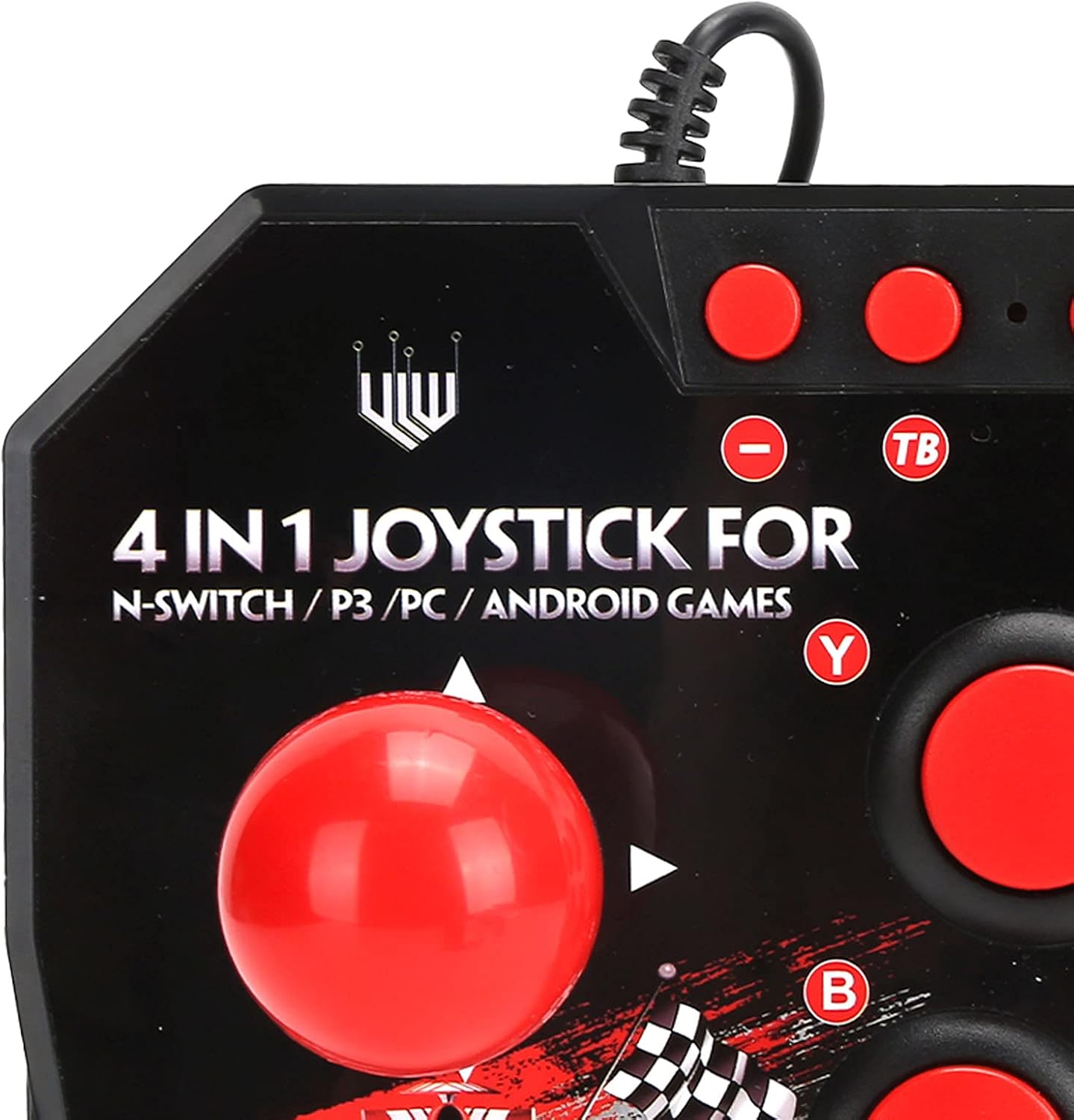
الشكل 2: Close-up of WOOXGEHM 4-in-1 Wired Arcade Fight Stick Joystick buttons. A detailed view of the joystick's top panel, showing the "4 IN 1 JOYSTICK FOR N-SWITCH / P3 / PC / ANDROID GAMES" text, along with the red spherical joystick and several red action buttons labeled Y, B, X, A, L, R, and smaller buttons for Turbo functions.

الشكل 3: قاع view of WOOXGEHM 4-in-1 Wired Arcade Fight Stick Joystick with suction cups. The underside of the arcade fight stick, showing four clear suction cups designed to secure the device to a flat surface during use. The label indicates "Input: DC5V / 500mA", "Working current: 20mA", and "MADE IN CHINA".
5. الإعداد والاتصال
The arcade fight stick connects via a wired USB cable. Ensure your console or device is powered on before connecting.
5.1 وصلة نينتندو سويتش
- Connect the USB cable from the arcade fight stick to an available USB port on your Nintendo Switch dock.
- Ensure "Pro Controller Wired Communication" is enabled in your Switch System Settings.
- The controller should be automatically recognized.
5.2 اتصال الكمبيوتر
- Connect the USB cable from the arcade fight stick to an available USB port on your PC.
- The system should automatically install the necessary drivers. If not, manual driver installation may be required (refer to your PC's operating system documentation).
- The controller will be recognized as a standard USB gamepad.
5.3 اتصال بلاي ستيشن 3 (PS3)
- Connect the USB cable from the arcade fight stick to an available USB port on your PS3 console.
- يجب أن يتم التعرف على وحدة التحكم تلقائيًا وأن تكون جاهزة للاستخدام.
5.4 اتصال جهاز أندرويد
- Connect the USB cable from the arcade fight stick to your Android device using an OTG (On-The-Go) adapter (not included).
- Ensure your Android device supports OTG functionality.
- The controller should be recognized as an external gamepad.

الشكل 4: Multi-platform compatibility. This image illustrates the multi-platform compatibility of the arcade fight stick, showing it connected to a Nintendo Switch console, a PlayStation 3, a PC monitor, and an Android device, highlighting its versatility.

الشكل 5: Plug-and-Play functionality. This image highlights the plug-and-play nature of the arcade fight stick, showing it connected to a PlayStation console, a Nintendo Switch, and a monitor displaying game content, emphasizing ease of use across platforms.
6. تعليمات التشغيل
6.1 الضوابط الأساسية
- عصا التحكم: Use the spherical metal joystick for directional movement.
- أزرار العمل: The six large round buttons (A, B, X, Y, L, R) are for primary game actions.
- أزرار الوظائف: Smaller buttons above the main action buttons provide additional controls (e.g., Home, Select, Start).
6.2 Turbo Functions
The controller features turbo functions for rapid button presses.
- To activate Turbo for a button, press and hold the desired action button, then press the "TB" (Turbo) button. The button will now rapidly repeat its input when held down.
- To deactivate Turbo, press and hold the same action button, then press the "TB" button again.
6.3 تبديل الوضع
The joystick may have a mode switch to toggle between different input modes (e.g., D-Pad, Left Analog Stick, Right Analog Stick) for specific games or platforms. Refer to the small buttons near the top left of the controller for these options.
7. الصيانة والعناية
العناية بالمنتج
- تنظيف: Wipe the surface of the joystick with a soft, dry cloth. Do not use abrasive cleaners or solvents.
- تخزين: قم بتخزين الجهاز في مكان بارد وجاف بعيدًا عن أشعة الشمس المباشرة عند عدم استخدامه.
- إدارة الكابلات: تجنب الانحناءات الحادة أو السحب المفرط لكابل USB لمنع التلف.
8. استكشاف الأخطاء وإصلاحها
المشاكل الشائعة والحلول
- لم يتم التعرف على وحدة التحكم:
حل: Ensure the USB cable is securely connected to both the joystick and the device/console.
حل: بالنسبة لجهاز نينتندو سويتش، تأكد من تفعيل "الاتصال السلكي بوحدة التحكم الاحترافية" في إعدادات النظام.
حل: حاول الاتصال بمنفذ USB مختلف.
حل: Restart your console/PC/Android device. - Buttons or joystick unresponsive:
حل: Disconnect and reconnect the joystick.
حل: Test the joystick on another compatible device to determine if the issue is with the controller or the device. - خاصية Turbo لا تعمل:
حل: Ensure you are correctly activating/deactivating the turbo mode as described in the Operating Instructions.
9. المواصفات
المواصفات الفنية
| ميزة | التفاصيل |
|---|---|
| نموذج | B0C7GYXMLZ |
| ماركة | WOOXGEHM |
| نوع وحدة التحكم | التحكم بالأزرار، عصا التحكم |
| واجهة الأجهزة | USB |
| مادة | أكريلونيتريل بوتادين ستايرين (ABS) |
| وزن العنصر | 0.52 كيلوجرام (1.14 رطل) |
| الحجم (تقريبًا) | 21 x 15 x 6 cm (8.3 x 5.9 x 2.4 inches) |
| العمل المجلدtagهـ / الحالية | تيار مستمر 5 فولت/20 مللي أمبير |
| طول كابل USB | 3 م / 9.8 قدم |
| التوافق | Nintendo Switch, PC, PS3, Android Games |

الشكل 6: المواصفات الفنية أعلاهview. An image displaying the technical specifications of the arcade fight stick, including item type, material (ABS), size (21 x 15 x 6 cm), working voltage/current (DC5V/20mA), and USB cable length (3m/9.8ft), along with a list of package contents.
10. الضمان والدعم
معلومات الضمان
This WOOXGEHM product comes with a standard manufacturer's warranty. For specific warranty terms and conditions, please refer to the warranty card included in your package or contact WOOXGEHM customer support.
دعم العملاء
If you encounter any issues or have questions regarding your Arcade Fight Stick, please visit the official WOOXGEHM webالموقع أو الاتصال بخدمة العملاء للحصول على المساعدة.