
1. المقدمة
شكرا لك على الشراءasing the Akozon Portable DV Camcorder. This manual provides essential information for the safe and effective operation of your device. Please read it thoroughly before use and retain it for future reference.
This camcorder is designed for capturing video and still images, featuring a 1080P video resolution, 16MP photo capability, a 2.7-inch rotating TFT screen, and 16x digital zoom. It is suitable for various recording scenarios, including family events, travel, and personal vlogging.
2. انتهى المنتجview
2.1 الميزات الرئيسية
- دقة الفيديو: 1080P (1920x1080), HD (1280x720), 640x480
- دقة الصورة: 16MP (4608x3456), 12MP, 5MP, 1MP, VGA
- عرض: 2.7-inch TFT rotating screen
- تكبير: تقريب رقمي 16x
- تخزين: Supports up to 32GB Micro SD card (not included)
- الاتصال: USB port for PC connection and charging
- المميزات الخاصة: Selfie fill light, self-timer (2s/10s), built-in speakers, HD output, recording while charging
2.2 محتويات العبوة
- Akozon Portable DV Camcorder
- بطارية ليثيوم (1020 مللي أمبير)
- كابل يو اس بي
- حزام المعصم
- دليل المستخدم (هذا المستند)
2.3 مكونات كاميرا الفيديو

Figure 2.3.1: Akozon Portable DV Camcorder with included battery and USB cable. This image shows the camcorder, a rechargeable battery, and a USB charging cable, providing a complete view of the product and its essential accessories.
- Video Lens: Main lens for capturing images and videos.
- 2.7-inch TFT Rotating Screen: ل viewing, playback, and menu navigation. Can be rotated for selfie mode.
- Selfie Fill Light: Provides additional illumination for close-up shots and selfies.
- زر الطاقة: To turn the camcorder on or off.
- زر التسجيل/التصوير: To start/stop video recording or take a photo.
- عناصر التحكم في التكبير: For digital zoom in/out.
- زر القائمة: To access settings and options.
- أزرار التنقل: For moving through menus and selections.
- منفذ USB: للشحن والاتصال بالكمبيوتر.
- حجرة البطارية: يحتوي على بطارية الليثيوم القابلة لإعادة الشحن.
- منفذ كارت الذاكرة الصغيرة: لإدخال بطاقة الذاكرة.

الشكل 2.3.2: الصورة عن قرب view of the Akozon DV Camcorder's video lens. This image highlights the camcorder's lens, showing details like "VIDEO LENS" and "Aperture 5.0".
3. الإعداد
3.1 تركيب البطارية
- Locate the battery compartment cover on the camcorder.
- حرك الغطاء لفتحه.
- Insert the provided 1020mAh lithium battery, ensuring the correct polarity (+/-) as indicated inside the compartment.
- أغلق غطاء حجرة البطارية جيدًا.
3.2 تركيب بطاقة الذاكرة
The camcorder requires a Micro SD card (up to 32GB, not included) to store videos and photos.
- Locate the Micro SD card slot, usually near the battery compartment or on the side.
- Insert the Micro SD card with the gold contacts facing down (or as indicated by a diagram near the slot) until it clicks into place.
- To remove, gently push the card in until it clicks again, then release, and it will spring out.
ملحوظة: Ensure the camcorder is powered off before inserting or removing the memory card.
3.3 الشحن الأولي
Before first use, fully charge the camcorder battery.
- Connect the small end of the USB cable to the camcorder's USB port.
- قم بتوصيل الطرف الأكبر من كابل USB بمحول طاقة USB (غير متضمن) أو بمنفذ USB الخاص بالكمبيوتر.
- سيضيء مؤشر الشحن. سينطفئ أو يتغير لونه عند اكتمال الشحن.
ملحوظة: The camcorder supports recording while charging.
4. تعليمات التشغيل
4.1 تشغيل/إيقاف التشغيل
- لتشغيل: اضغط مع الاستمرار على زر الطاقة حتى تضيء الشاشة.
- لإيقاف التشغيل: اضغط مع الاستمرار على زر الطاقة حتى تنطفئ الشاشة.
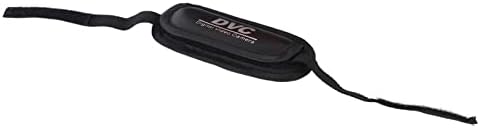
Figure 4.1.1: Akozon DV Camcorder screen displaying the 'Digital Camcorder' startup message. This image shows the camcorder's screen powered on, displaying the initial "Digital Camcorder" text.
4.2 تسجيل الفيديو
- Ensure the camcorder is in video recording mode (check the icon on the screen). If not, use the Mode button (if available) or menu to switch.
- Frame your subject using the rotating TFT screen.
- Press the Record/Shutter button once to start recording. A red indicator or recording timer will appear on the screen.
- Press the Record/Shutter button again to stop recording. The video file سيتم حفظه في بطاقة Micro SD.
4.3 التقاط الصور
- Ensure the camcorder is in photo capture mode.
- Frame your subject.
- Press the Record/Shutter button once to take a photo. The image will be saved to the Micro SD card.
4.4 Selfie Mode and Fill Light
The rotating screen allows for easy selfie capture. The front-facing fill light can be used for additional illumination.
- Rotate the TFT screen 180 degrees towards yourself.
- To activate the fill light, navigate to the menu settings or use a dedicated button (if available).
- Utilize the self-timer function (2 seconds or 10 seconds) for hands-free photo or video capture. Access this setting via the menu.

Figure 4.4.1: Akozon Portable DV Camcorder with rotating screen displaying a selfie. This image shows the camcorder's screen rotated, capturing a group selfie, demonstrating its selfie capability.
4.5 التشغيل
- Enter Playback mode via the Mode button or menu.
- Use the navigation buttons to browse through your recorded videos and photos.
- Press the Record/Shutter button (or a dedicated Play button) to view مختار file.
4.6 Connecting to a Computer (PC Mode)
You can connect the camcorder to a computer to transfer files or use it as a PC camera.
- تأكد من تشغيل كاميرا الفيديو.
- Connect the camcorder to your computer using the provided USB cable.
- The camcorder screen may display options like "Mass Storage" (for file transfer) or "PC Camera". Select the desired mode using the navigation buttons and confirm.
- If "Mass Storage" is selected, the camcorder will appear as a removable drive on your computer, allowing you to copy files.
- If "PC Camera" is selected, the camcorder can be used as a webcam with compatible software.
5. الصيانة
- تنظيف: Use a soft, dry cloth to clean the camcorder body. For the lens, use a specialized lens cleaning cloth and solution. Avoid harsh chemicals.
- تخزين: خزّن كاميرا الفيديو في مكان بارد وجاف بعيدًا عن أشعة الشمس المباشرة ودرجات الحرارة العالية. انزع البطارية إذا كنت ستخزنها لفترات طويلة.
- العناية بالبطارية: Do not expose the battery to high temperatures or disassemble it. Recharge the battery regularly, even if not in use, to maintain its lifespan.
- بطاقة الذاكرة: Periodically back up your files from the Micro SD card to a computer or other storage device.
6. استكشاف الأخطاء وإصلاحها
| مشكلة | السبب المحتمل | حل |
|---|---|---|
| كاميرا الفيديو لا تعمل. | تم استنزاف البطارية أو تم تركيبها بشكل غير صحيح. | اشحن البطارية بالكامل. تأكد من تركيب البطارية بالقطبية الصحيحة. |
| لا يمكن تسجيل الفيديو/التقاط الصور. | No Micro SD card inserted, card full, or card error. | Insert a Micro SD card. Delete unnecessary files or replace the card. Format the card (this will erase all data). |
| Computer does not recognize camcorder via USB. | Incorrect USB mode selected, faulty cable, or driver issue. | Ensure "Mass Storage" or "PC Camera" mode is selected on the camcorder. Try a different USB port or cable. Restart both camcorder and computer. |
| جودة الصورة/الفيديو رديئة. | إضاءة غير كافية، أو عدسة متسخة، أو إعدادات غير صحيحة. | Ensure adequate lighting. Clean the lens. Check resolution settings in the menu. |
7. المواصفات
| ميزة | مواصفة |
|---|---|
| رقم الموديل | Akozon3v6tcg2u7b-12 |
| ماركة | أكوزون |
| تكنولوجيا مستشعرات الصور | سيموس |
| دقة تسجيل الفيديو | 1080p (FHD), HD, 640x480 |
| Effective Capture Resolution | 16 ميجا بكسل |
| نوع ذاكرة فلاش | بطاقة Micro SD (تدعم حتى 32 جيجابايت) |
| تنسيق التقاط الفيديو | أفي |
| تنسيق الصورة | JPEG |
| حجم الشاشة | 2.7 Inches (TFT rotating screen) |
| تقريب رقمي | 16x |
| تكنولوجيا الاتصال | USB |
| المميزات الخاصة | Selfie fill light, Rotating screen |
| بطارية | بطارية ليثيوم 1020 مللي أمبير (مرفقة) |
| الموقت الذاتي | ثانيتين، 2 ثواني |
| انقطع التلفاز | NTSC 30fps, PAL 25fps |
| أبعاد المنتج | 12.5 × 10.5 × 7.2 سم؛ 210 جرام |
| بلد المنشأ | الصين |
8. الضمان والدعم
For warranty information and technical support, please refer to the documentation provided at the time of purchase or contact your retailer. You may also visit the official Akozon webالموقع للحصول على مزيد من المساعدة.
يرجى الاحتفاظ بإثبات الشراء الخاص بك لاستخدامه في أي مطالبات بالضمان.