
1. المقدمة
This manual provides detailed instructions for the installation, configuration, and maintenance of the Essentielb MS-7848 VER 1.0 Desktop Motherboard. This motherboard supports LGA1150 processors and DDR3 memory, designed for personal computer systems. Please read this manual thoroughly before proceeding with any installation or operation to ensure proper functionality and safety.
2. معلومات السلامة
- افصل دائمًا مصدر الطاقة من مأخذ الحائط قبل تثبيت أو إزالة أي مكونات.
- Wear an anti-static wrist strap or frequently touch a grounded metal object to discharge static electricity before handling the motherboard or other components. Static electricity can damage electronic components.
- قم بالتعامل مع اللوحة الأم من حوافها لتجنب لمس المكونات الحساسة.
- تأكد من وجود تهوية مناسبة داخل علبة الكمبيوتر لمنع ارتفاع درجة الحرارة.
- احفظ اللوحة الأم بعيدًا عن الرطوبة ودرجات الحرارة القصوى.
3. محتويات العبوة
تأكد من وجود جميع المنتجات في طردك. في حال وجود أي منتج مفقود أو تالف، يرجى الاتصال بالبائع.
- Essentielb MS-7848 VER 1.0 Motherboard
- I / O Shield
- SATA Data Cable(s) (quantity may vary)
- دليل المستخدم (هذا المستند)
- Driver CD/DVD (or link to download drivers)
4. الإعداد والتثبيت
4.1 تخطيط اللوحة الأم
تعرّف على المكونات والموصلات المختلفة الموجودة على اللوحة الأم قبل التثبيت.
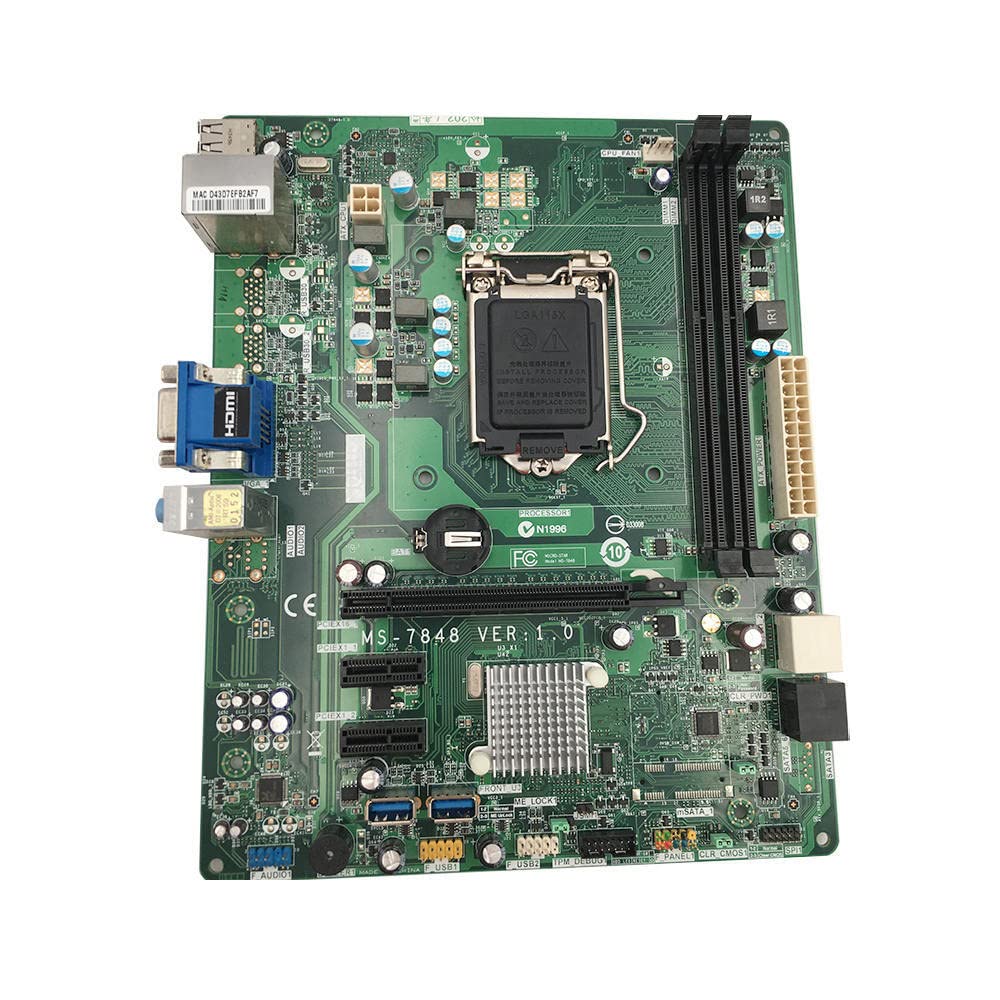
الشكل 1: من أعلى إلى أسفل view of the Essentielb MS-7848 motherboard. This image displays the central LGA1150 CPU socket, two DDR3 RAM slots to its right, multiple PCIe expansion slots below, and various power and data connectors around the board's perimeter. The rear I/O panel is visible on the left side.

الشكل 2: Close-up of the LGA1150 CPU socket. This image provides a detailed view of the CPU socket with its retention mechanism, surrounded by power delivery components and the CMOS battery. The model number 'MS-7848 VER 1.0' is clearly visible on the PCB.
4.2 تثبيت وحدة المعالجة المركزية
- حدد موقع مقبس وحدة المعالجة المركزية LGA1150 على اللوحة الأم.
- اضغط برفق على ذراع التحميل واسحبه بعيدًا عن المقبس لفتح غطاء مقبس وحدة المعالجة المركزية.
- Carefully align the notches on your LGA1150 CPU with the alignment keys on the socket. The golden triangle on the CPU should match the triangle on the socket.
- Place the CPU gently into the socket. Do not force it. If it does not sit correctly, re-check alignment.
- Close the load plate and push the load lever back into place until it clicks. This will secure the CPU.
- Apply thermal paste to the CPU surface and install the CPU cooler according to its manufacturer's instructions.
4.3 تركيب ذاكرة الوصول العشوائي (RAM)
The Essentielb MS-7848 supports DDR3 memory modules. Refer to the specifications for supported speeds and capacities.
- افتح المشابك الموجودة في كلا طرفي فتحة DIMM.
- قم بمحاذاة الشق الموجود على وحدة الذاكرة DDR3 مع المفتاح الموجود في فتحة DIMM.
- Insert the memory module firmly into the slot until the clips snap into place, securing the module.
4.4 Storage Device (SATA) Connection
Connect your SATA hard drives or SSDs to the SATA ports on the motherboard using SATA data cables. Connect the power cables from your power supply to the drives.
4.5 Expansion Card (PCIe) Installation
This motherboard features PCIe slots for graphics cards and other expansion cards.
- Align the expansion card with the desired PCIe slot.
- Press down firmly until the card is fully seated in the slot.
- Secure the card with a screw to the computer case.
4.6 توصيلات اللوحة الأمامية
Connect the front panel cables (power button, reset button, HDD LED, power LED, USB ports, audio jacks) from your computer case to the corresponding headers on the motherboard. Refer to the motherboard diagram for exact pin locations.
4.7 توصيل التيار الكهربائي
Connect the 24-pin ATX main power connector and the 4-pin or 8-pin ATX 12V CPU power connector from your power supply to the respective ports on the motherboard.
5. تعليمات التشغيل
5.1 التمهيد الأول
After completing all hardware installations, connect your monitor, keyboard, and mouse. Power on the system. The system should display the BIOS/UEFI splash screen.
5.2 تكوين BIOS/UEFI
During startup, press the designated key (usually ديل or F2) to enter the BIOS/UEFI setup utility. Here you can configure boot order, system time, and other hardware settings. Save changes before exiting.
5.3 تثبيت برنامج التشغيل
After installing your operating system, install the necessary drivers for the motherboard's chipset, audio, network, and any other integrated components. These drivers are typically provided on a CD/DVD or can be downloaded from the manufacturer's webموقع.
6. الصيانة
6.1 التنظيف
Regularly clean the interior of your computer case to prevent dust buildup, which can lead to overheating. Use compressed air to remove dust from fans, heatsinks, and other components. Ensure the system is powered off and unplugged before cleaning.
6.2 تحديثات BIOS
التحقق بشكل دوري من الشركة المصنعة website for BIOS/UEFI updates. Updates can improve system stability, add support for new hardware, or fix bugs. Follow the update instructions carefully to avoid damaging the motherboard.
7. استكشاف الأخطاء وإصلاحها
- لا يوجد طاقة: Ensure all power cables (24-pin ATX, 4/8-pin CPU) are securely connected. Check the power supply unit (PSU) and wall outlet.
- لا يوجد عرض: Verify that the monitor is connected and powered on. Ensure the graphics card (if dedicated) is properly seated and powered. Try reseating RAM modules.
- عدم استقرار النظام/الأعطال: Check RAM modules for proper seating. Ensure CPU cooler is correctly installed and making good contact. Verify power supply is sufficient for all components.
- نظام التشغيل لا يقوم بالتمهيد: Check boot order in BIOS/UEFI. Ensure storage drives are properly connected and detected.
- القضايا الطرفية: Ensure USB devices are connected to functional ports. Install correct drivers for all peripherals.
8. المواصفات
| ميزة | مواصفة |
|---|---|
| ماركة | نوعي |
| اسم الموديل | المخطوطة رقم 7848 |
| مقبس وحدة المعالجة المركزية | إل جي إيه 1150 |
| المعالجات المتوافقة | Intel Core i5-4xxx, Intel Core i7-4xxx, Intel Core i5-5xxx, Intel Core i7-5xxx |
| تقنية ذاكرة الوصول العشوائي (RAM) | دي دي ار 3 |
| Available Memory Slots | 1 |
| الأجهزة المتوافقة | كمبيوتر شخصي |
| منصة | نوافذ |
| موصل الطاقة الرئيسي | 24 دبابيس |
| واجهة بطاقة الرسوميات | بي سي اي اكسبريس |
| Supported System Bus Standard | منفذ PCIe 2.0 |
| Total SATA Ports | 6 |
| إجمالي منافذ USB | 2 |
| Total PCIe Ports | 1 |
| رقم القطعة | VCDi_Sei_101665 |
| ASIN | B0C64XFTV1 |
9. الضمان والدعم
For warranty information and technical support, please refer to the documentation provided by your retailer or contact the product manufacturer directly. Keep your proof of purchase for warranty claims.