
1. المقدمة
The MOBI CONNECT Smart DualScan Bluetooth Thermometer (Model 700026) is designed for accurate and versatile temperature measurement. It offers multiple reading methods including ear, forehead, room, and object temperature. This device features a backlit screen, LED fever indicators, and memory recall for up to 20 previous readings. It supports both Fahrenheit and Celsius modes and can connect via Bluetooth to the MOBI Smart App for enhanced tracking and management capabilities.

Image: The MOBI CONNECT Smart DualScan Bluetooth Thermometer, its packaging, and a smartphone displaying the companion app.
2. محتويات العبوة
تأكد من وجود جميع العناصر في العبوة:
- 1 x MOBI CONNECT Smart DualScan Bluetooth Thermometer
- 1 x Protective Cap (for forehead mode)
- 1 × الحقيبة التخزين
- 1 × دليل المستخدم
- 1 × دليل البدء السريع
- 2 بطاريات AAA

الصورة: مفصلة view of the thermometer with its components labeled for easy identification.
3. الإعداد
3.1. تركيب البطارية
- Open the battery compartment cover located on the back of the thermometer.
- قم بإدخال بطاريتين AAA، مع التأكد من القطبية الصحيحة (+/-).
- أغلق غطاء حجرة البطارية جيدًا.
3.2. تشغيل / إيقاف التشغيل
- للتشغيل ، اضغط على SCAN/Power button. The device will perform a self-test and display the last reading.
- The thermometer will automatically power off after approximately 30 seconds of inactivity to conserve battery life.
3.3. Switching Temperature Units (Fahrenheit/Celsius)
With the device powered on, press and hold the وضع button for 3 seconds to switch between Fahrenheit (°F) and Celsius (°C).
4. أوضاع التشغيل
4.1. Forehead Measurement
- Ensure the protective cap is on the probe.
- اضغط على SCAN/Power زر لتشغيل مقياس الحرارة.
- Position the thermometer approximately 0.5 to 1 inch (1-2.5 cm) from the center of the forehead.
- اضغط مع الاستمرار على مسح ضوئي button. A beep will sound, and the temperature will be displayed on the LCD screen.

Image: Demonstrating forehead temperature measurement.
4.2. Ear Measurement
- Gently remove the protective cap from the probe.
- اضغط على SCAN/Power زر لتشغيل مقياس الحرارة.
- Carefully insert the probe into the ear canal. For children under 1 year, gently pull the ear straight back. For children over 1 year and adults, gently pull the ear up and back.
- اضغط مع الاستمرار على مسح ضوئي button. A beep will sound, and the temperature will be displayed on the LCD screen.

Image: Removing the protective cap for ear measurement.

Image: Demonstrating ear temperature measurement.
4.3. Room and Object Temperature Measurement
The thermometer can also measure ambient room temperature and the temperature of objects (e.g., liquids, surfaces). To switch to these modes, press the وضع button repeatedly until the desired icon (room or object) appears on the display. Then, point the thermometer at the object or area and press مسح ضوئي.
4.4. مؤشر الحمى
The LCD display changes color to indicate temperature status:
- إضاءة خلفية خضراء: Indicates a normal body temperature.
- إضاءة خلفية حمراء: Indicates a high body temperature (fever warning).
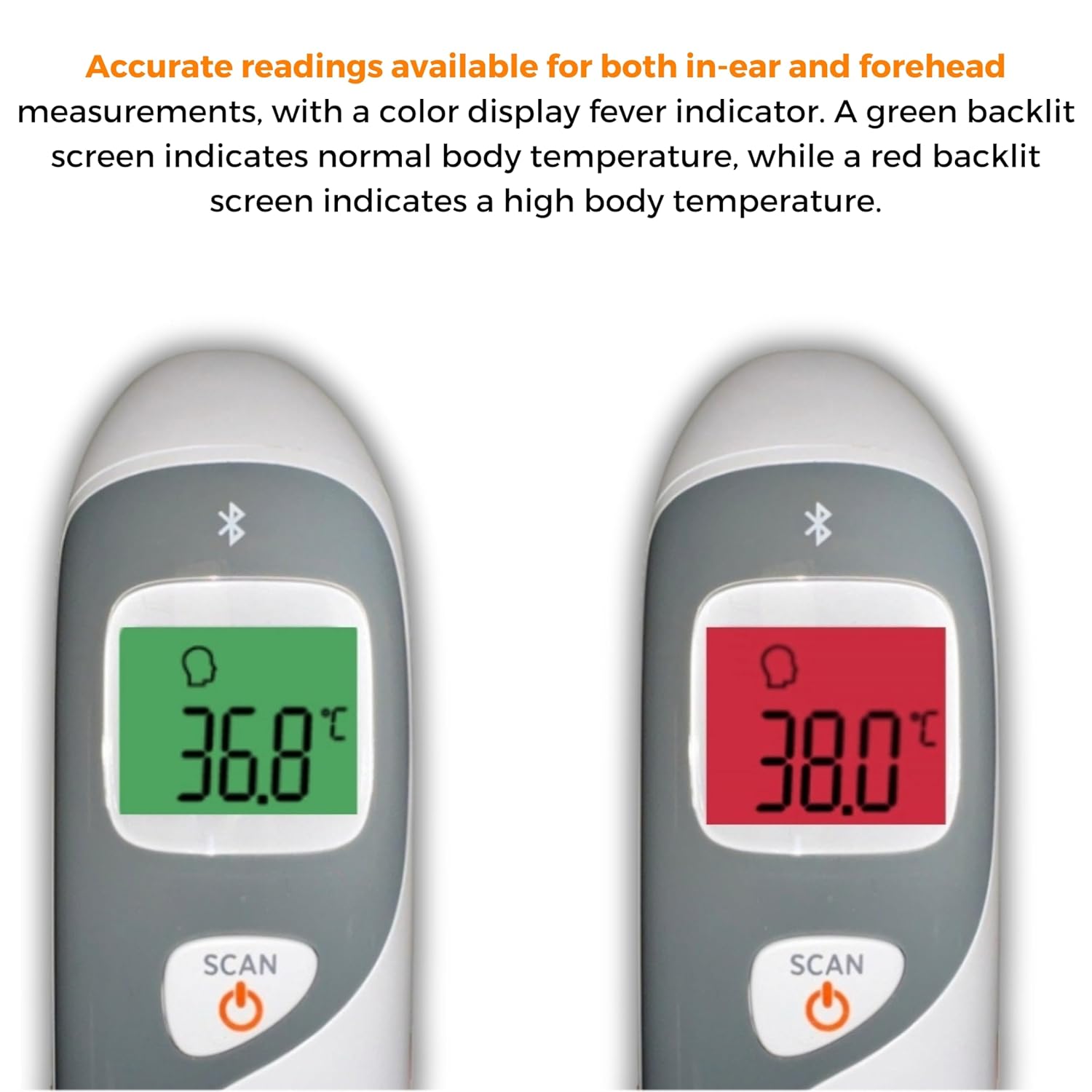
Image: The thermometer's color-changing LCD display indicating normal (green) and high (red) temperatures.
4.5. استدعاء الذاكرة
The thermometer stores the last 20 temperature readings. To access these readings, press the MEM/MUTE button while the device is on. Each press will cycle through the stored readings.
5. Bluetooth Connectivity and MOBI Smart App
The MOBI CONNECT Smart DualScan Thermometer can be used independently or paired with your smartphone via Bluetooth for enhanced tracking and features through the MOBI Smart App.
5.1. تنزيل التطبيق وإقرانه
- Download the "MOBI Smart" app from your device's app store (available on iOS and Android).
- تأكد من تمكين Bluetooth على هاتفك الذكي.
- Open the MOBI Smart App and follow the on-screen instructions to pair your thermometer.
5.2. ميزات التطبيق
- التتبع التلقائي: Automatically records temperature readings from the thermometer.
- متعدد المستخدمين بروfiles: إنشاء وإدارة المحترفينfiles for each family member to track their health data independently.
- تسجيل البيانات: Add comments to each reading for context.
- Reporting & Graphs: View powerful reports and graphs for daily, weekly, monthly, or yearly temperature trends.
- خيارات التصدير: Export data for sharing with healthcare professionals.
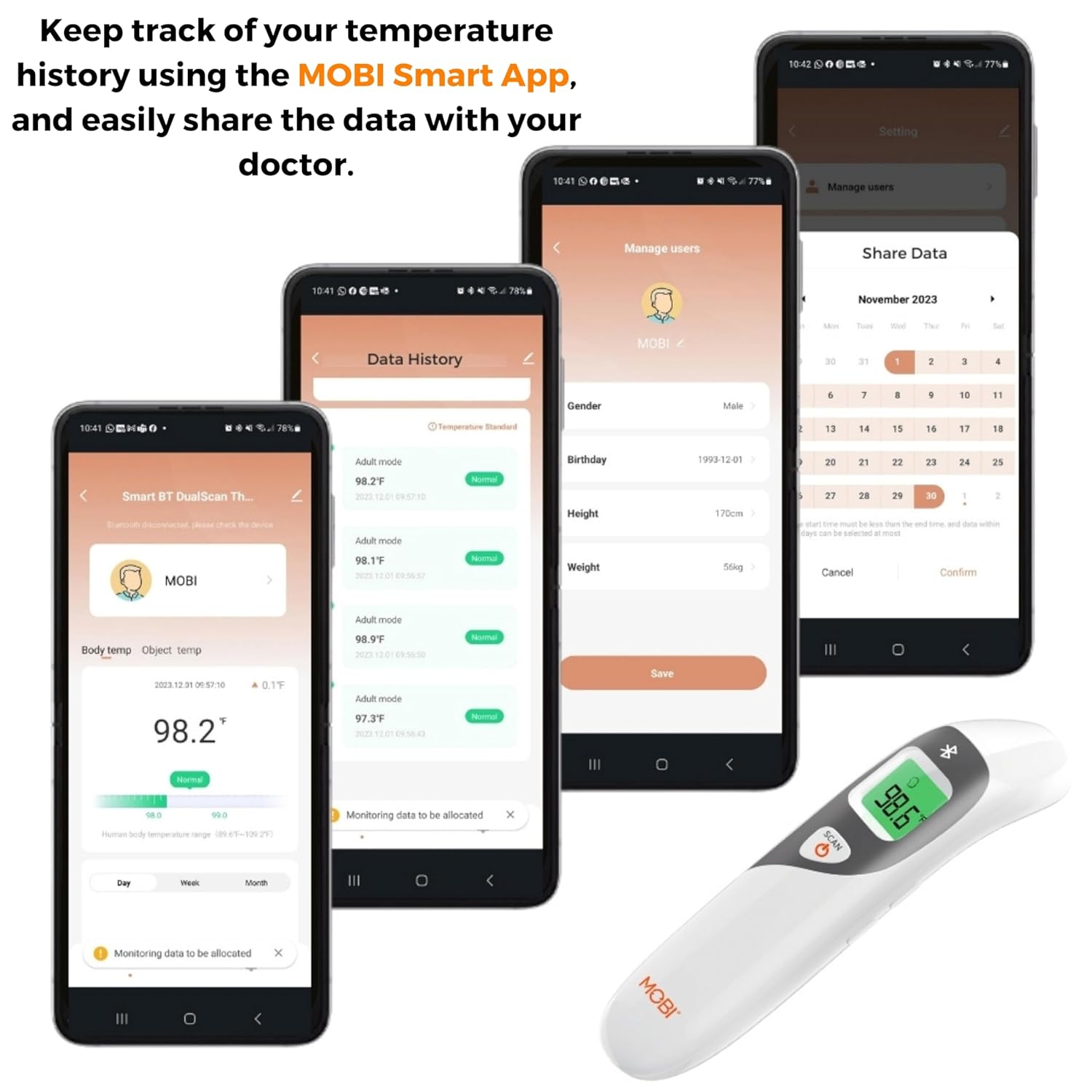
Image: Screenshots of the MOBI Smart App interface, showing data tracking and user management.
5.3. فيديو المنتج الرسمي
فيديو: مسؤول فوقview of the MOBI Smart DualScan Bluetooth Ear & Forehead Thermometer, demonstrating its features and usage.
6. الصيانة
6.1. التنظيف
To clean the thermometer, wipe it with a soft, damp cloth. Do not immerse the device in water or use abrasive cleaners. Ensure the probe is clean before each use, especially for ear measurements.
6.2. التخزين
Store the thermometer in its protective pouch in a cool, dry place, away from direct sunlight and extreme temperatures. Remove batteries if the device will not be used for an extended period.
7. استكشاف الأخطاء وإصلاحها
- "Lo" or "Hi" Reading: Indicates a temperature outside the measurable range. Ensure proper placement and try again.
- قراءات غير دقيقة:
- Check for proper probe placement (ear or forehead).
- تأكد من نظافة المسبار.
- Verify the correct mode (Adult/Child/Object) is selected if applicable.
- Allow the thermometer to acclimate to room temperature for 30 minutes if it has been in a significantly different environment.
- مشاكل اتصال البلوتوث:
- تأكد من تمكين Bluetooth على هاتفك الذكي.
- Restart the thermometer and the MOBI Smart App.
- Ensure the thermometer is within range of your smartphone.
- لا يوجد عرض: تحقق من تركيب البطارية واستبدل البطاريات إذا لزم الأمر.
8. المواصفات
| رقم الموديل | 700026 |
| مصدر الطاقة | يعمل بالبطارية (2 × AAA) |
| نوع العرض | شاشة LCD مع إضاءة خلفية |
| الاتصال | بلوتوث |
| طرق القياس | Ear, Forehead, Room, Object |
| وحدات قياس درجة الحرارة | فهرنهايت (درجة فهرنهايت) / مئوية (درجة مئوية) |
| استدعاء الذاكرة | آخر 20 قراءة |
| العناية بالمنتج | امسح نظيفة |
| مادة | بلاستيك |
| الشركة المصنعة | Mobi Technologies Inc. |
9. الضمان والدعم
For warranty information or technical support, please contact Mobi Technologies Inc. directly. Refer to the product packaging or the official MOBI webالموقع للحصول على تفاصيل الاتصال الحالية.