
مقدمة
The DIHOOM DM-P074G is a 4G LTE solar-powered PTZ (Pan-Tilt-Zoom) security camera designed for outdoor surveillance in areas without traditional power or Wi-Fi access. This camera features 2K 4MP resolution, full-color night vision, intelligent motion detection, and two-way audio communication. Its integrated solar panel and high-capacity battery ensure continuous operation, while IP66 waterproofing provides durability in various weather conditions. This manual provides essential information for the proper setup, operation, and maintenance of your security camera.

Figure 1: The DIHOOM 4G LTE Solar PTZ Security Camera mounted with its solar panel, demonstrating wireless installation and remote monitoring via a smartphone app.
محتويات الحزمة
يرجى التأكد من أن جميع العناصر المدرجة أدناه متضمنة في الحزمة الخاصة بك:
- وحدة كاميرات المراقبة
- لوحة شمسية × 1
- قوس تصاعد × 1
- Mounting Sticker x 1
- حزمة المسمار × 2
- Iron Bracket x 1
- حلقة × 2
- Quick User Manual x 1
- SIM Card (with 300 MB free data)

Figure 2: All components included in the DIHOOM DM-P074G security camera package.
يثبت
1. تركيب بطاقة SIM وبطاقة SD
- Locate the SIM card slot on the camera.
- Insert the provided 4G LTE SIM card into the slot. Ensure it is correctly oriented.
- For local storage, insert a microSD card (up to 256GB, not included) into the designated slot.
2. تنزيل التطبيق والاتصال
- Download the dedicated mobile application from your smartphone's app store.
- Open the app and follow the on-screen instructions to add your new camera. This typically involves scanning a QR code on the camera or its packaging.
- تأكد من أن هاتفك الذكي متصل بالإنترنت بشكل فعال أثناء عملية الإعداد.
3. تركيب الكاميرا واللوحة الشمسية
The camera supports wall and pole mounting. Choose a location that provides optimal surveillance coverage and receives ampضوء الشمس المباشر للوحة الشمسية.
- Use the mounting bracket and screws to securely attach the camera to a wall or pole.
- Mount the 7W solar panel in a position that maximizes sun exposure throughout the day.
- Connect the solar panel cable to the camera's charging port. The camera's battery (18000mAh) will charge via the solar panel.

Figure 3: The camera's IP66 waterproof design and simplified setup steps, including SIM card insertion and app connection.

Figure 4: Details of the 7W solar panel and 18000mAh battery, illustrating the camera's self-sustaining power system.
تعليمات التشغيل
1. التحكم في التحريك والإمالة والتكبير (PTZ)
الوصول إلى البث المباشر view in the mobile app. Use the on-screen controls to remotely adjust the camera's viewing angle. The camera offers 350° horizontal pan and 150° vertical tilt capabilities, allowing comprehensive coverage. Digital zoom is also available to view تفاصيل.

Figure 5: Illustration of the camera's 350-degree pan and 150-degree tilt rotation for wide area surveillance.
2. كشف الحركة والتنبيهات
The camera features intelligent PIR (Passive Infrared) human and motion detection. When motion is detected, the camera can trigger spotlights, an alarm, and send instant notifications to your smartphone. Sensitivity settings can be adjusted within the app to minimize false alarms.

Figure 6: The camera's smart PIR human detection feature, highlighting detected movement within the surveillance area.
3. الرؤية الليلية
The camera provides 2K 4MP resolution for clear images. It supports full-color night vision, which activates when warm lights are engaged, capturing color video even in low-light conditions. Standard infrared night vision is also available for clear black and white footagفي ظلام دامس.
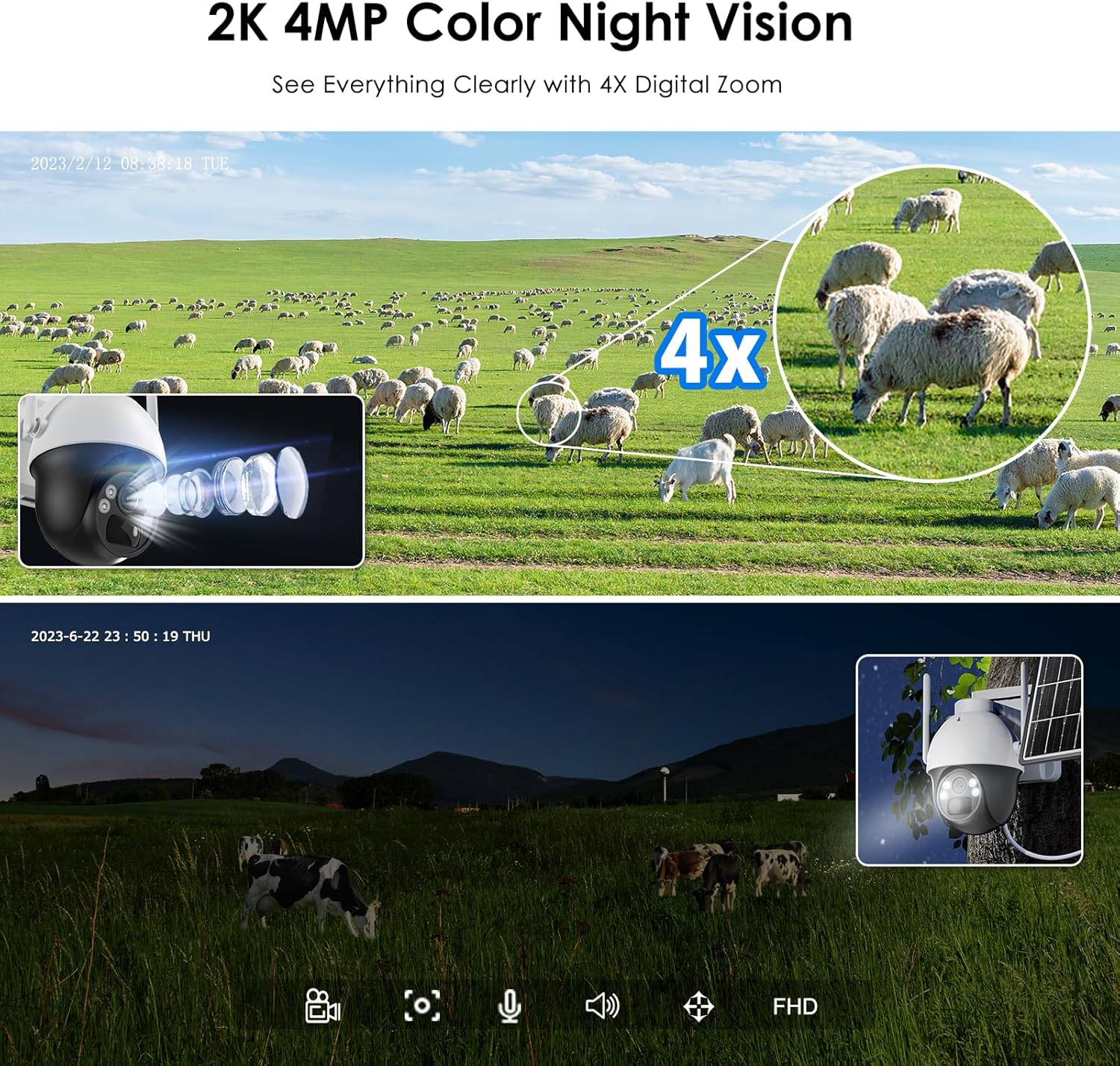
Figure 7: Comparison of daytime 2K 4MP footage with 4X digital zoom and full-color night vision capabilities.
4. الاتصال ثنائي الاتجاه
Utilize the built-in microphone and speaker for two-way audio communication. This allows you to speak to individuals near the camera or use the siren function for deterrence.
5. التسجيل والتخزين
The camera supports continuous recording and event-triggered recording to a local microSD card (up to 256GB). Footage can be accessed and managed through the mobile application.
صيانة
- تنظيف: نظّف عدسة الكاميرا واللوحة الشمسية بشكل دوري باستخدام قطعة قماش ناعمة.amp cloth to ensure optimal image clarity and charging efficiency.
- مراقبة البطارية: راقب مستوى البطارية عبر التطبيق. تأكد من خلو اللوحة الشمسية من أي عوائق للحفاظ على شحن مستمر.
- تحديثات البرامج الثابتة: Check the mobile app regularly for available firmware updates to ensure your camera has the latest features and security enhancements.
- حماية البيئة: على الرغم من حصولها على تصنيف IP66، تجنب توجيه نفاثات المياه عالية الضغط مباشرة نحو الكاميرا.
استكشاف الأخطاء وإصلاحها
- الكاميرا غير متصلة/غير متصلة بالإنترنت:
- Ensure the 4G SIM card has an active data plan and good signal strength in the camera's location.
- Restart the camera by powering it off and on.
- Check if the camera's battery is sufficiently charged. - ضعف جودة الصورة:
- Clean the camera lens for any dirt or smudges.
- تأكد من عدم وجود أي عوائق في مجال رؤية الكاميرا view.
- Verify the camera's resolution settings in the app. - كشف الحركة لا يعمل:
- Check the motion detection settings in the app, ensuring it is enabled and sensitivity is adjusted correctly.
- Ensure there are no physical obstructions blocking the PIR sensor. - البطارية لا تشحن:
- Ensure the solar panel is clean and free from debris.
- Verify the solar panel is positioned to receive maximum direct sunlight.
- Check the connection cable between the solar panel and the camera. - مشكلات الصوت ثنائية الاتجاه:
- Ensure the microphone and speaker are not obstructed.
- Check volume settings in the app and on your smartphone.
تحديد
| ميزة | مواصفة |
|---|---|
| ماركة | ديهوم |
| اسم الموديل | 4G Solar Powered Security Camera (DM-P074G) |
| تكنولوجيا الاتصال | لاسلكي (4G LTE) |
| الأجهزة المتوافقة | الهاتف الذكي |
| مصدر الطاقة | يعمل بالبطارية، يعمل بالطاقة الشمسية |
| نوع التركيب | التثبيت في السقف ، التثبيت على الحائط |
| دقة تسجيل الفيديو | 4 ميجابكسل (2K) |
| لون | أبيض |
| نوع التثبيت | Wall Mounted, Pole Mounted |
| مادة | بلاستيك |
| مستوى مقاومة الماء | مقاوم للماء (IP66) |
| نوع التنبيه | الحركة فقط |
| دقة مستشعر الصورة | 4 ميجا بكسل |
| تكنولوجيا الاتصالات اللاسلكية | 4G |
| واتtage | 5 watts (Camera), 7 watts (Solar Panel) |
| سعة البطارية | 18000 مللي أمبير |
| عدد القنوات | 2 |
| أبعاد العنصر | 10 × 9 × 6 سم |
| دقة الفيديو الفعالة | 1080 بكسل (إخراج) |
| Viewزاوية جي | 120 درجة |
| نوع التركيز | التركيز اليدوي |
| تقنية مستشعر الصور | سيموس |
| استخدامات المنتج المحددة | 2K 4MP Super HD, 4G-LTE connection, IP66 waterproof, Continuous solar energy, PIR human and motion detection |
الضمان والدعم
The DIHOOM DM-P074G security camera comes with a ضمان لمدة 2 سنوات من تاريخ الشراء.
لأي استفسارات أو مساعدة فنية أو مطالبات ضمان، يرجى الاتصال بفريق الدعم لدينا:
- بريد إلكتروني: ukdihoom@hotmail.com
- We offer online service and lifetime technical support.