
F&D T60x PRO
F&D T-60X Pro Bluetooth Tower Speaker User Manual
Model: T60x PRO
1. المقدمة
شكرا لك على الشراءasing the F&D T-60X Pro Bluetooth Tower Speaker. This manual provides essential information for setting up, operating, and maintaining your speaker system. Please read it thoroughly before use to ensure optimal performance and longevity of your product.

Figure 1: F&D T-60X Pro Tower Speaker System, including two tower speakers, a remote control, and a wired microphone.
2. مواصفات المنتج
- مخرج صوت قوي: 120W strong power for excellent sound.
- Premium Wooden Material: Massive wooden box design controls resonance for pure sound.
- Reflective Panel Design: Speaker wrapped in reflective panel for enhanced acoustics and vintagالنمط الإلكتروني.
- Easy Control Interface: Intuitive touch buttons located on top of the speaker.
- High-Quality Speaker System: Equipped with full-range speakers and a 1-inch tweeter for clear high-pitch sound.
- Rich Bass: Two 8-inch subwoofers provide booming, punchy bass.
- اتصال بلوتوث 5.3: Fast and stable wireless transmission with a working distance of over 10 meters.
- Multiple Input Types: Supports Bluetooth 5.3, AUX, USB, Optical, and Coaxial cable connections.
- Full-Featured Remote Control: Convenient infrared remote for complete control.

Figure 2: The F&D T-60X Pro speakers integrate seamlessly into a home entertainment setup, providing 2.0 channel multimedia audio.
3. محتويات العبوة
يرجى التحقق من محتويات العبوة بعناية. في حال وجود أي أغراض مفقودة أو تالفة، يُرجى التواصل مع البائع.
- F&D T-60X Pro Tower Speaker (x2)
- جهاز التحكم عن بعد (x1)
- ميكروفون سلكي (x1)
- دليل المستخدم (هذا المستند)
- كابل الطاقة (x1)
- Audio Cables (AUX, Optical, Coaxial - specific types may vary)
4. دليل الإعداد
4.1 فك التعبئة
أزل جميع المكونات من العبوة بعناية. احتفظ بالعبوة لنقلها أو تخزينها مستقبلاً.
4.2 وضع السماعات
Place the tower speakers on a flat, stable surface. For optimal stereo sound, position the speakers equidistant from your listening position and spaced appropriately apart. Ensure there is adequate ventilation around the speakers.

Figure 3: The speaker features a natural and high-quality wooden material, designed to control resonance for pure sound.
4.3 توصيل الطاقة
- Connect the power cable to the power input port on the back of the main speaker unit.
- قم بتوصيل الطرف الآخر من كابل الطاقة بمأخذ حائط مناسب.
4.4 توصيل مصدر الصوت
The T-60X Pro supports multiple input options:
- بلوتوث: للاتصال اللاسلكي من الهواتف الذكية أو الأجهزة اللوحية أو أجهزة الكمبيوتر.
- AUX (3.5 مم): لتوصيل الأجهزة بمقبس صوت قياسي.
- USB: لتشغيل الصوت files مباشرة من محرك أقراص فلاش USB.
- بصري: For high-quality digital audio connection from TVs or other optical output devices.
- متحد المحور: For high-quality digital audio connection from compatible devices.
Connect your desired audio source to the corresponding input port on the speaker.

Figure 4: The speaker's reflective panel design contributes to its acoustic performance and vintagه الجمالية.
4.5 توصيل الميكروفون
Plug the wired microphone into the designated microphone input jack on the speaker.
5. تعليمات التشغيل
5.1 تشغيل/إيقاف التشغيل
Press the Power button on the top panel of the speaker or on the remote control to turn the speaker On or Off.
5.2 اختيار المصدر
Press the "SOURCE" button on the top panel or the corresponding input button on the remote control to switch between Bluetooth, AUX, USB, Optical, and Coaxial input modes.

Figure 5: The speaker features an easy-to-use touch control interface on its top panel for convenient operation.
5.3 اقتران بلوتوث
- Switch the speaker to Bluetooth mode. The Bluetooth indicator will flash.
- On your device (smartphone, tablet, etc.), enable Bluetooth and search for "F&D T-60X Pro" (or similar name).
- Select the speaker from the list to pair. Once paired, the indicator will stop flashing and remain solid.
- يمكنك الآن تشغيل الصوت من جهازك عبر مكبر الصوت.

Figure 6: The F&D T-60X Pro utilizes Bluetooth 5.3 for fast and stable wireless audio transmission.
5.4 التحكم في مستوى الصوت
Adjust the volume using the Volume Up/Down buttons on the top panel or the remote control.
5.5 Using USB Playback
أدخل محرك أقراص فلاش USB يحتوي على الصوت files into the USB port. The speaker will automatically switch to USB mode and begin playback. Use the Play/Pause, Next/Previous track buttons on the top panel or remote to control playback.
5.6 استخدام الميكروفون
Once the microphone is connected, its audio will be mixed with the selected input source. Adjust microphone volume if a dedicated control is available (refer to remote control functions).
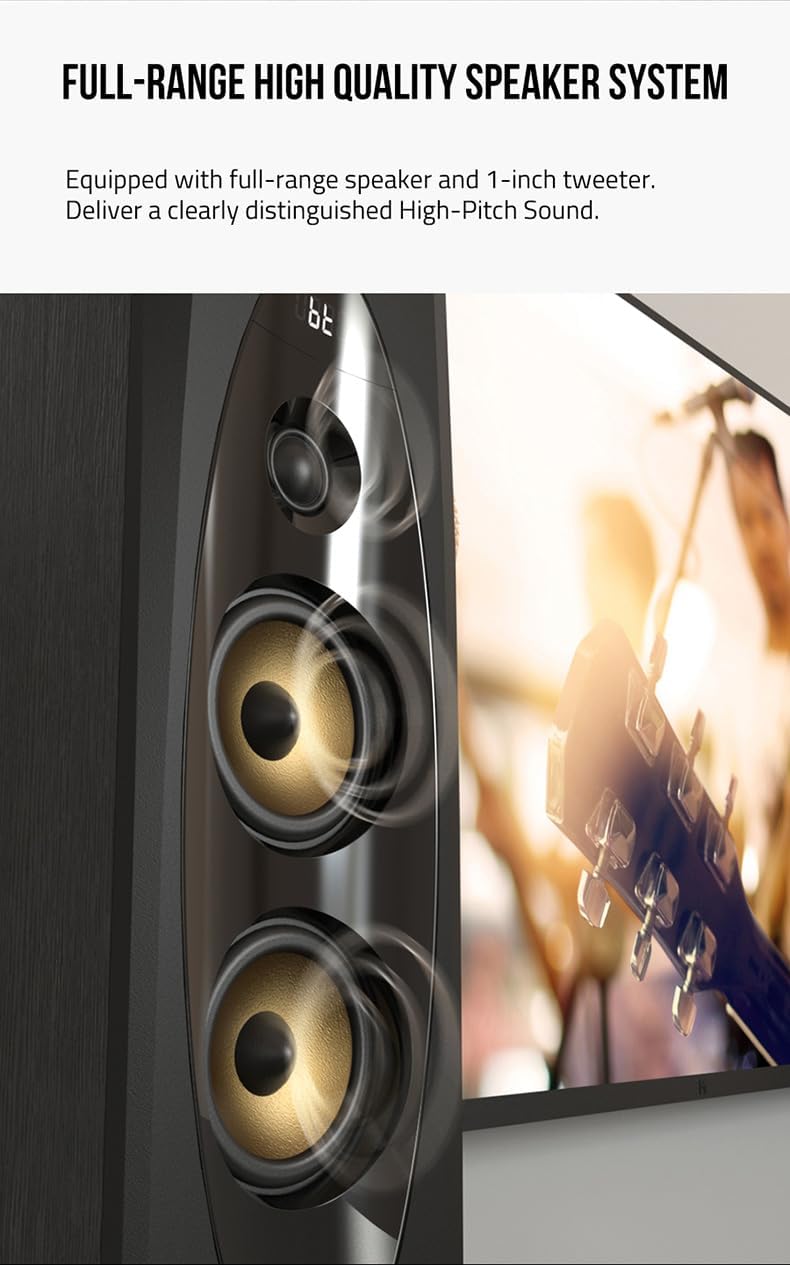
Figure 7: The speaker system is equipped with full-range speakers and a 1-inch tweeter, delivering clearly distinguished high-pitch sound.

Figure 8: The F&D T-60X Pro is finely tuned to provide booming, punchy bass with its two 8-inch subwoofers, creating an exceptional audio experience.

Figure 9: The F&D T-60X Pro delivers 120W of strong power, providing an excellent and immersive audio experience.
6. الصيانة
To ensure the longevity and optimal performance of your F&D T-60X Pro speakers, follow these maintenance guidelines:
- تنظيف: Use a soft, dry cloth to wipe the speaker surfaces. Do not use liquid cleaners, aerosols, or abrasive chemicals, as they may damage the finish.
- إزالة الغبار: Regularly dust the speaker grilles and vents to prevent accumulation that could affect sound quality or internal components.
- الموقع: تجنب وضع مكبرات الصوت في ضوء الشمس المباشر، أو بالقرب من مصادر الحرارة، أو في المناطق ذات الرطوبة العالية.
- التعامل: Handle the speakers with care. Avoid dropping or subjecting them to strong impacts.
- إيقاف التشغيل عند عدم الاستخدام: If the speakers will not be used for an extended period, it is advisable to turn them off and unplug them from the power outlet.
7. استكشاف الأخطاء وإصلاحها
If you encounter any issues with your F&D T-60X Pro speaker, refer to the following common problems and solutions:
| مشكلة | السبب المحتمل | حل |
|---|---|---|
| لا يوجد طاقة | Power cable not connected; Power outlet not working; Speaker is off. | Ensure power cable is securely connected. Try a different power outlet. Press the Power button to turn on the speaker. |
| لا يوجد صوت | Incorrect input source selected; Volume too low; Audio cable not connected properly; Device volume too low. | Select the correct input source. Increase speaker volume. Check audio cable connections. Increase volume on your connected device. |
| فشل اقتران البلوتوث | Speaker not in pairing mode; Device too far; Interference; Previous connection issues. | Ensure speaker is in Bluetooth pairing mode. Move device closer to speaker. Turn off other Bluetooth devices. Delete "F&D T-60X Pro" from your device's Bluetooth list and try pairing again. |
| صوت مشوه | Volume too high; Poor audio source quality; Damaged audio cable. | Lower the volume. Try a different audio source. Replace the audio cable if damaged. |
| جهاز التحكم عن بعد لا يعمل | Batteries are dead or incorrectly inserted; Obstruction between remote and speaker; Remote sensor blocked. | Replace batteries, ensuring correct polarity. Remove any obstructions. Ensure the remote sensor on the speaker is clear. |
إذا استمرت المشكلة بعد تجربة هذه الحلول، فيرجى الاتصال بدعم العملاء.
8. المواصفات
| ميزة | التفاصيل |
|---|---|
| اسم الموديل | Pro Peak Power 240 W Bluetooth Tower Speaker (Black, 2.0 Channel) |
| رقم موديل العنصر | T60x PRO |
| ماركة | F&D |
| نوع السماعة | برج |
| الحد الأقصى لقوة خرج السماعة | 120 واط |
| استجابة التردد | 240 جيجاهرتز |
| تكنولوجيا الاتصال | Bluetooth (Bluetooth 5.3), USB, AUX, Optical, Coaxial |
| وضع إخراج الصوت | Surround, Digital |
| نوع التركيب | يقف الكلمة |
| مادة | خشب |
| أبعاد المنتج (الطول × العرض × الارتفاع) | 38.2 × 43.6 × 91 سم |
| وزن العنصر | 18.5 كجم |
| المميزات الخاصة | USB Port, Touch Screen, Remote Control, Wired Microphone Input |
9. الضمان والدعم
For warranty information, please refer to the warranty card included with your product or contact your point of purchase. F&D provides customer support for product inquiries, technical assistance, and service requests.
يرجى الاحتفاظ بإثبات الشراء الخاص بك لمطالبات الضمان.
Ask a question about this manual
Ask about setup, troubleshooting, compatibility, parts, safety, or missing instructions. Manuals+ will review the question and use this page’s manual context to help answer it.