
THOMSON B206
THOMSON Sound Bar B206 User Manual
الموديل: B206
مقدمة
شكرا لك على الشراءasing the THOMSON Sound Bar B206. This sound bar is designed to enhance your audio experience for television, music, and gaming, featuring multiple connectivity options and two wireless microphones for karaoke. This manual provides essential information for safe and efficient use of your device. Please read it thoroughly before operation and retain it for future reference.
معلومات السلامة
- لا تعرض الجهاز للمطر أو الرطوبة أو درجات الحرارة العالية.
- Ensure proper ventilation around the sound bar to prevent overheating.
- لا تفتح الصندوقasinج؛ إحالة جميع الخدمات إلى الموظفين المؤهلين.
- استخدم فقط محول الطاقة المقدم.
- أبعد الجهاز عن المجالات المغناطيسية القوية.
- Avoid placing heavy objects on the sound bar.
محتويات الحزمة
تأكد من تضمين جميع العناصر المدرجة أدناه في الحزمة الخاصة بك:
- THOMSON Sound Bar (B206) x 1
- جهاز التحكم عن بعد × 1
- ميكروفون لاسلكي × 2
- محول الطاقة × 1
- كابل صوت × 1
- Coaxial Cable x 1
- Optical Fiber Cable x 1
- Wall Mounting Kit x 1 (includes padlocks, gel column, screws)
- دليل المستخدم × 1

الشكل 1: الملحقات المضمنة
This image displays the complete set of items provided with your THOMSON Sound Bar B206, including the sound bar unit, remote control, two wireless microphones, power adapter, user manual, audio cable, coaxial cable, optical fiber cable, and wall mounting kit components.
المنتج انتهىview
Sound Bar Components
The THOMSON Sound Bar B206 features a sleek design with integrated controls and various input ports for versatile connectivity.

Figure 2: Sound Bar, Microphones, and Remote
This image shows the main sound bar unit, two wireless microphones, and the remote control, providing a complete view of the primary components.
Internal Speaker Design
The sound bar is equipped with four large dual drive units, delivering a maximum output power of 200 Watts for HiFi sound quality, including dual bass and clear mid-range frequencies for a 3D surround sound effect.

Figure 3: Internal Speaker Structure
This diagram illustrates the internal construction of the sound bar's speakers, emphasizing the dual drive units responsible for audio output, alongside the Bluetooth connectivity symbol.
Rear Panel Connections and Remote Control
The rear panel provides various input options, while the remote control offers full command over the sound bar's functions.

Figure 4: Rear Panel Ports and Remote Control
This image details the connectivity options on the sound bar's rear panel, including the power switch, HDMI ARC, power input, subwoofer output, coaxial, optical, and AUX inputs. The accompanying remote control is also shown, indicating various function buttons.
يثبت
1. خيارات التنسيب
The THOMSON Sound Bar B206 can be placed on a desktop or mounted on a wall. A wall mounting kit is included for convenient installation.
- التنسيب على سطح المكتب: Place the sound bar on a stable, flat surface in front of your TV.
- التثبيت على الحائط: Use the provided wall mounting kit (padlocks, gel column, screws) to securely attach the sound bar to a wall below your TV. Ensure the wall material can support the weight of the sound bar.
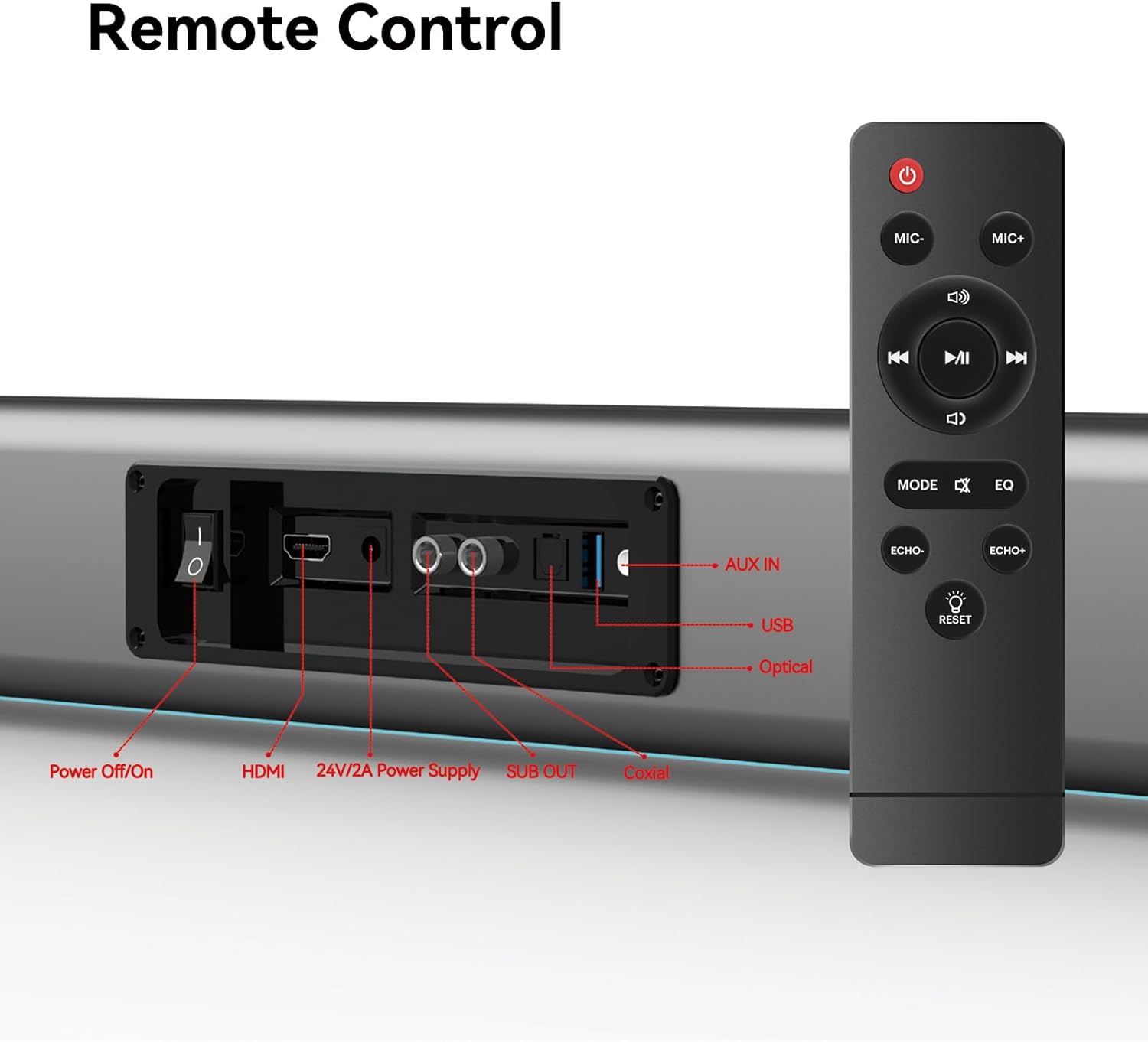
Figure 5: Placement Options (Wall Mount and Desktop)
This image illustrates the versatility of the sound bar's placement, showing it both mounted on a wall beneath a television and resting on a media console, highlighting the included wall mount kit for an elegant setup.
2 التوصيل بالطاقة
- Connect the power adapter to the "24V/2A Power Supply" port on the sound bar's rear panel.
- قم بتوصيل محول الطاقة بمأخذ الحائط.
3. اتصالات الصوت
Choose one of the following methods to connect the sound bar to your audio source (e.g., TV, smartphone, tablet, laptop):
- اتش دي ام اي ارك:
Connect an HDMI cable (not included) from the HDMI ARC port on your TV to the HDMI port on the sound bar. Ensure your TV's HDMI ARC function is enabled in its settings.
- بصري:
Connect the provided optical fiber cable from your TV's optical output to the "Optical" port on the sound bar. Select "Optical" as the input source on the sound bar.
- AUX (3.5mm Audio Jack):
Connect the provided audio cable from your device's headphone jack or audio output to the "AUX IN" port on the sound bar. Select "AUX" as the input source.
- متحد المحور:
Connect the provided coaxial cable from your TV's coaxial output to the "Coaxial" port on the sound bar. Select "Coaxial" as the input source.
- USB:
أدخل محرك أقراص USB يحتوي على الصوت files into the "USB" port. The sound bar will automatically switch to USB mode and begin playback.
- بلوتوث:
راجع قسم "اقتران البلوتوث" ضمن تعليمات التشغيل للاطلاع على الخطوات التفصيلية.
تعليمات التشغيل
1. تشغيل/إيقاف التشغيل
اضغط على إيقاف / تشغيل button on the sound bar's rear panel or the قوة زر على جهاز التحكم عن بعد لتشغيل الوحدة أو إيقاف تشغيلها.
2. اختيار مصدر الإدخال
اضغط على وضع button on the remote control to cycle through available input sources: HDMI ARC, Optical, AUX, Coaxial, USB, and Bluetooth. The LED display on the sound bar will indicate the currently selected mode.
3. التحكم في مستوى الصوت
استخدم حجم + و الصوت - buttons on the remote control or the physical controls on the right side of the sound bar to adjust the volume. The sound bar supports 8 levels of bass and treble adjustment.
4. أوضاع المعادل
The sound bar offers 5 Equalizer (EQ) modes to optimize audio for different content types. Press the EQ button on the remote control to switch between modes:
- وضع الفيلم: يعزز المؤثرات الصوتية والحوارات السينمائية.
- وضع الموسيقى: يعمل على تحسين الصوت لتشغيل الموسيقى.
- وضع الأخبار: Clarifies spoken dialogue for news and talk shows.
- Additional modes may be available for specific audio profiles.
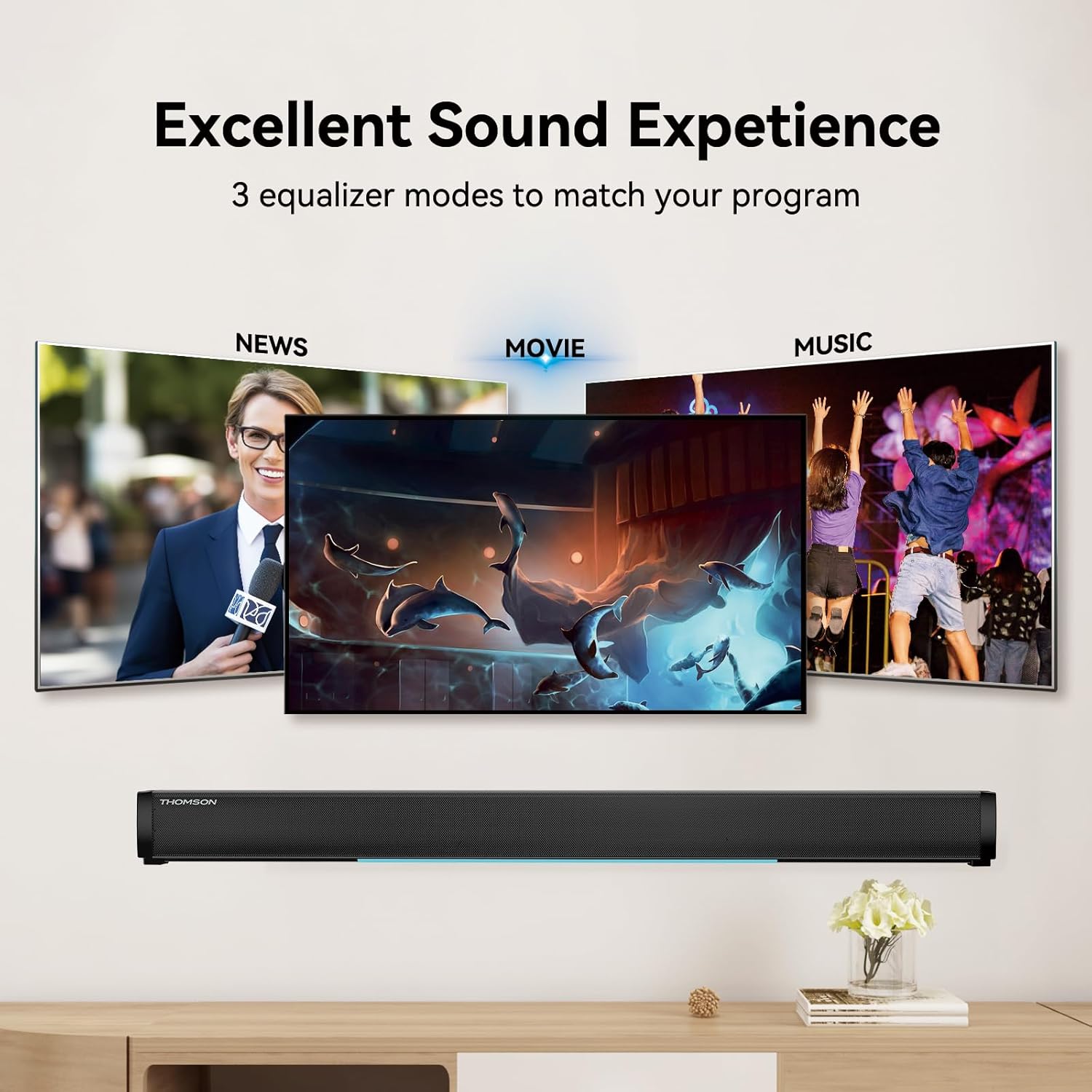
Figure 6: EQ Modes
This image illustrates the three primary equalizer modes (News, Movie, Music) available on the sound bar, demonstrating how each mode is tailored for different audio experiences.
5. اقتران بلوتوث
- Turn on the sound bar and select Bluetooth mode using the وضع button on the remote. The LED display will show "BT" and flash, indicating pairing mode.
- على جهازك (الهاتف الذكي، الجهاز اللوحي، وما إلى ذلك)، قم بتمكين البلوتوث وابحث عن الأجهزة المتاحة.
- Select "THOMSON B206" from the list. Once connected, the sound bar's LED display will stop flashing.
6. Wireless Microphones
The sound bar comes with two wireless microphones for karaoke or vocal use.
- Ensure the microphones have fresh batteries (AAA, not included).
- Turn on the microphones. They should automatically pair with the sound bar.
- استخدم ميكروفون + و ميك- buttons on the remote to adjust microphone volume.
- استخدم صدى + و صدى صوت- buttons to adjust the echo effect.

الشكل 7: وظائف الكاريوكي
This image depicts two individuals enjoying a karaoke session, utilizing the THOMSON sound bar and its wireless microphones connected to a large display, showcasing the product's entertainment capabilities.
استكشاف الأخطاء وإصلاحها
| مشكلة | السبب المحتمل | حل |
|---|---|---|
| لا يوجد طاقة | كابل الطاقة غير متصل؛ منفذ الطاقة غير نشط. | تأكد من توصيل كابل الطاقة بإحكام. تحقق من عمل مأخذ الطاقة. |
| لا يوجد صوت | تم اختيار مصدر إدخال غير صحيح؛ مستوى الصوت منخفض جداً؛ الكابلات غير موصلة بشكل صحيح. | Select the correct input source (HDMI, Optical, AUX, etc.). Increase volume. Check all audio cable connections. |
| فشل اقتران البلوتوث | Sound bar not in pairing mode; Device too far; Bluetooth disabled on device. | Ensure sound bar is in Bluetooth mode and flashing. Move device closer. Enable Bluetooth on your device. |
| الميكروفونات لا تعمل | Microphone batteries low/dead; Microphones not turned on. | Replace microphone batteries. Ensure microphones are switched on. |
| Volume jumps too much with one press | This can be a characteristic of the sound bar's volume control sensitivity. | Adjust volume carefully. Consider using the TV's volume control if connected via HDMI ARC, as it may offer finer adjustments. |
تحديد
| ميزة | التفاصيل |
|---|---|
| اسم الموديل | THOMSON Sound Bar B206 |
| نوع السماعة | شريط الصوت |
| الحد الأقصى لقوة خرج السماعة | 200 واط |
| تكوين قناة الصوت المحيطي | 2.0 |
| تكنولوجيا الاتصال | Auxiliary, Bluetooth, Coaxial, HDMI ARC, Optical, USB |
| تكنولوجيا الاتصالات اللاسلكية | بلوتوث |
| طريقة التحكم | بعيد |
| أبعاد المنتج | 37 بوصة عمق × 3.35 بوصة عرض × 2.9 بوصة ارتفاع |
| وزن العنصر | 8.63 رطل |
| مادة | بلاستيك |
| مصدر الطاقة | كهرباء سلكية |
| ميزة خاصة | الميكروفونات اللاسلكية |
صيانة
- تنظيف: Use a soft, dry cloth to clean the surface of the sound bar. Do not use liquid cleaners or abrasive materials.
- تخزين: When not in use for extended periods, store the sound bar in a cool, dry place, away from direct sunlight and extreme temperatures.
- العناية بالميكروفون: Remove batteries from the wireless microphones if they will not be used for a long time to prevent leakage.
الضمان والدعم
THOMSON products are designed and manufactured to the highest quality standards. For warranty information and customer support, please refer to the warranty card included in your package or visit the official THOMSON webالموقع. احتفظ بإيصال الشراء كإثبات للشراء.
معلومات الامتثال
This device complies with relevant regulations for electronic equipment. Any changes or modifications not expressly approved by the manufacturer could void the user's authority to operate the equipment.
Ask a question about this manual
Ask about setup, troubleshooting, compatibility, parts, safety, or missing instructions. Manuals+ will review the question and use this page’s manual context to help answer it.