
مقدمة
The TAXNELE THC30A is a digital programmable timer switch designed for automatic control of various electrical equipment. It features daily and weekly programming capabilities with up to 20 ON/OFF settings, a manual override function, and a built-in lithium battery for power-off memory. This manual provides detailed instructions for installation, operation, and maintenance to ensure safe and efficient use of your timer switch.
معلومات السلامة
- تأكد من فصل مصدر الطاقة قبل التثبيت أو الصيانة.
- ينبغي أن يتم التركيب بواسطة كهربائي مؤهل أو شخص ذي خبرة.
- لا تتجاوز سعة الحمل القصوى البالغة 30 أمبير / 5000 واط.
- احتفظ بالجهاز بعيدًا عن الماء ودرجات الحرارة العالية.
- Verify correct wiring connections to prevent damage to the device or connected appliances.
مميزات المنتج
- التحكم القابل للبرمجة: Up to 20 ON/OFF settings per day or week.
- ذاكرة إيقاف التشغيل: Built-in 3V lithium battery maintains timing, display, and data storage for up to 3 years during power interruptions.
- دقة عالية: Industrial-grade chip for accurate timing.
- التجاوز اليدوي: Allows temporary or permanent manual control.
- شاشة LCD: Clear digital display for easy programming and monitoring.
- Din Rail Mount: Designed for easy installation on a standard DIN rail.
- تطبيق واسع: Suitable for street lights, neon lamps, advertising signs, production equipment, and home appliances.

Figure 1: The THC30A timer switch highlighting its power-off memory function, which retains data for up to 3 years using a built-in CR2032 lithium battery.

Figure 2: The THC30A timer switch featuring a 30A big load relay for stable and safe operation with various electrical loads.
Product Components and Display
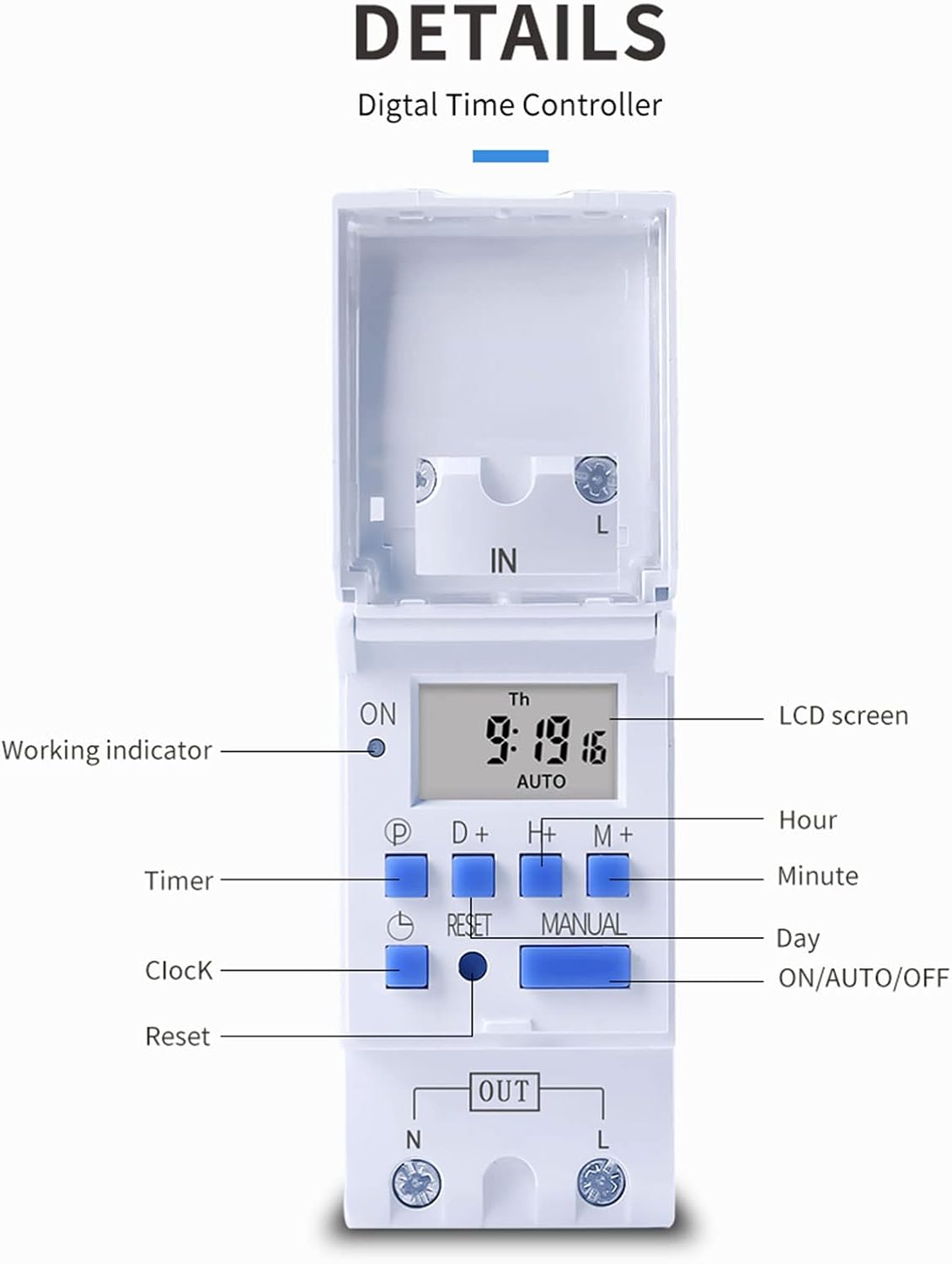
الشكل 3: مفصل view of the THC30A timer switch's LCD screen and control buttons. Labels include Working indicator, Timer, Clock, Reset, P (Program), D+ (Day), H+ (Hour), M+ (Minute), Manual, and ON/AUTO/OFF status.
- شاشة LCD: Displays current time, day, and ON/OFF status.
- مؤشر العمل: LED light indicating operation status.
- زر P: يدخل إلى وضع البرمجة.
- D+ Button: Adjusts day in clock setting or program.
- H+ Button: Adjusts hour in clock setting or program.
- M+ Button: Adjusts minute in clock setting or program.
- زر الساعة: Returns to clock display or exits programming mode.
- زر إعادة الضبط: Clears all settings and resets the timer.
- زر يدوي: يُبدّل بين أوضاع التشغيل والتلقائي والإيقاف.
تحديد
| المعلمة | قيمة |
|---|---|
| نموذج | THC30A |
| التقييم الحالي | 30 أمبير |
| تصنيف الطاقة | 5000 واط |
| المجلدtagهـ الخيارات | 12V DC AC, 24V DC AC, 48V DC AC, 110V AC, 220V AC |
| خطأ في الوقت | ≤2 seconds/day |
| عرض | شاشة الكريستال السائل |
| مدى التوقيت | من دقيقة واحدة إلى 168 ساعة (7 أيام) |
| إعدادات التشغيل / الإيقاف | 20 مجموعة |
| درجة حرارة التشغيل | -20 درجة مئوية إلى 50 درجة مئوية |
| أبعاد | شنومكس x شنومكس x شنومكسم (شنومكس x شنومكس x شنوم بوصة) |
| احتياطي الطاقة | 3V Lithium battery (CR2032 type) for 3 years data retention |

Figure 4: Dimensions of the THC30A timer switch, showing measurements for height, width, and depth for proper installation planning.
الإعداد والتثبيت
1. التركيب
The THC30A timer switch is designed for DIN rail mounting. Securely attach the device to a standard 35mm DIN rail in an appropriate electrical enclosure.
2. الأسلاك
تحذير: Ensure all power is disconnected before performing any wiring.
Connect the input power supply to the "IN" terminals (N for Neutral, L for Live). Connect the load (e.g., light, appliance) to the "OUT" terminals (N for Neutral, L for Live). The timer acts as a switch for the live wire. Refer to the wiring diagram below for correct connections.

Figure 5: Simplified wiring diagram for the THC30A timer switch. The new version offers direct power output, simplifying connections compared to older models.
- الإدخال (في): Connect your main power supply (e.g., AC 12V, 24V, 48V, 110V, 220V) to these terminals.
- الإخراج (خارج): Connect your electrical load (e.g., light, motor) to these terminals. The timer controls the power flow to this output.
تعليمات التشغيل
1. الإعداد الأولي / إعادة الضبط
عند الاستخدام الأول أو بعد انقطاع التيار الكهربائي لفترة طويلةtage, the display may be blank. Press the إعادة ضبط button (located in a small hole, use a pointed object) to clear all settings and initialize the timer. The LCD will display "0:00" and "AUTO".
2. ضبط الوقت واليوم الحاليين
- اضغط مع الاستمرار على ساعة زر.
- بينما يحمل ساعة، يضعط D+ to set the current day (Monday to Sunday).
- بينما يحمل ساعة، يضعط H+ لضبط الساعة الحالية (0-23).
- بينما يحمل ساعة، يضعط M+ لضبط الدقيقة الحالية (0-59).
- أطلق سراح ساعة زر. تم ضبط الوقت الآن.
3. برمجة دورات التشغيل/الإيقاف
يدعم المؤقت ما يصل إلى 20 برنامج تشغيل/إيقاف. يتكون كل برنامج من وقت تشغيل ووقت إيقاف.
- اضغط على P button once. The display will show "1 ON". This is for the first ON setting.
- يضعط D+ to select the day(s) for this ON event. You can choose a single day, specific days, or blocks of days (e.g., Mon-Fri, Sat-Sun, Mon-Sun).
- يضعط H+ لتحديد الساعة لبدء الحدث الأول.
- يضعط M+ لضبط الدقيقة لبدء الحدث الأول.
- اضغط على P button again. The display will show "1 OFF". This is for the first OFF setting.
- كرر الخطوات من 2 إلى 4 لضبط اليوم (الأيام) والساعة والدقيقة لأول حدث إيقاف.
- تواصل الضغط P to cycle through "2 ON", "2 OFF", up to "20 ON", "20 OFF" and set additional programs as needed.
- بعد ضبط جميع البرامج المطلوبة، اضغط على ساعة زر للخروج من وضع البرمجة والعودة إلى عرض الوقت الحالي.
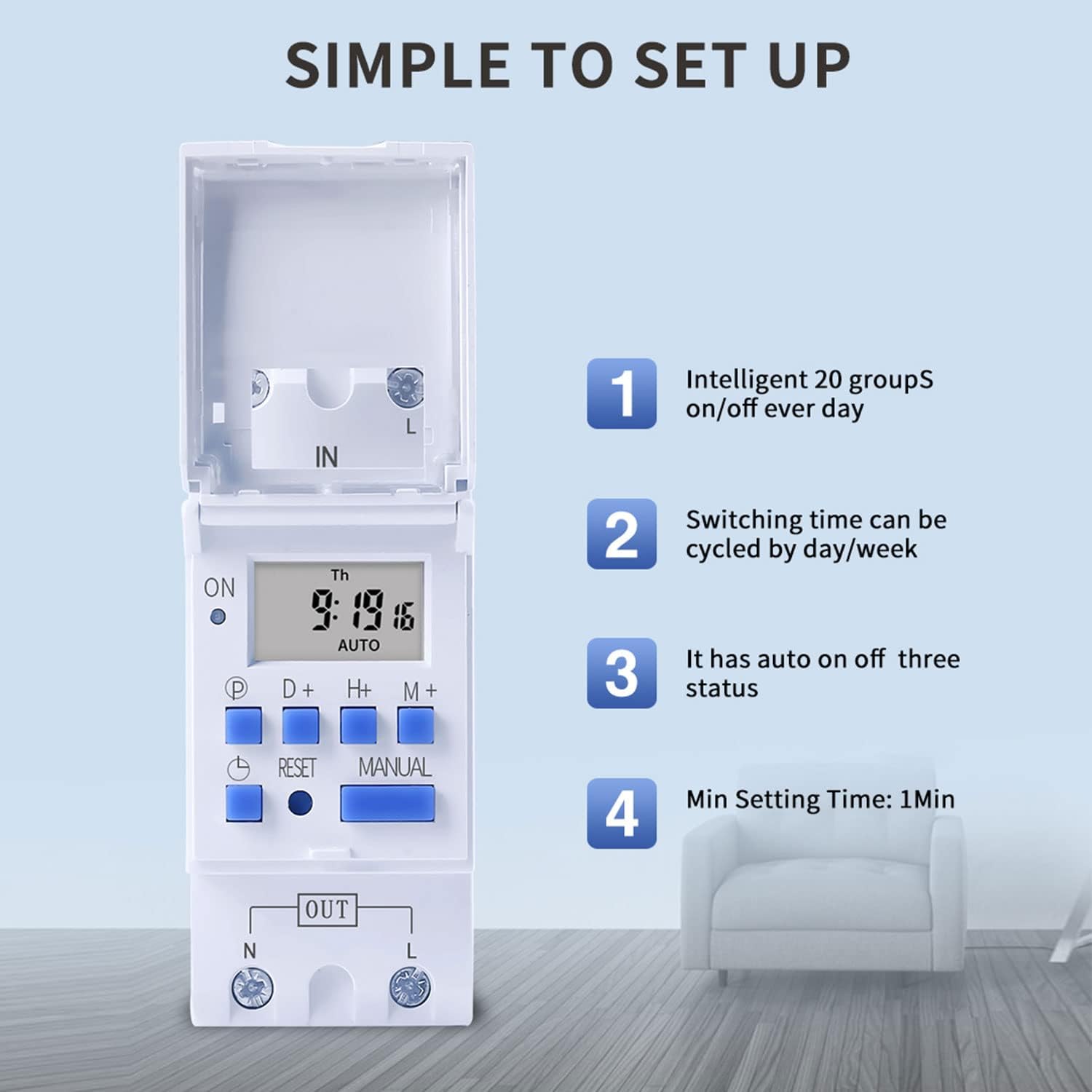
Figure 6: Visual guide to the simple setup of the THC30A timer, highlighting its 20 ON/OFF groups, daily/weekly cycling, auto ON/OFF status, and minimum 1-minute setting time.
4. تجاوز يدوي
اضغط على يدوي زر للتنقل بين أوضاع الإخراج:
- على: The output is continuously ON, overriding all programs.
- تلقاءي: The output operates according to the programmed ON/OFF cycles. This is the standard operating mode.
- OFF: The output is continuously OFF, overriding all programs.
تأكد من أن المؤقت في وضع التشغيل آلي mode for programmed operations to function.
صيانة
- Keep the timer clean and free from dust. Use a dry, soft cloth for cleaning.
- لا تستخدم المنظفات أو المذيبات الكاشطة.
- The internal lithium battery (CR2032) has a long lifespan (up to 3 years). If the display consistently goes blank after power outages, the battery may need replacement. This should be done by a qualified technician.
استكشاف الأخطاء وإصلاحها
| مشكلة | السبب المحتمل | حل |
|---|---|---|
| العرض فارغ. | لا يوجد مصدر للطاقة، البطارية الداخلية فارغة. | Check power connections. Press the Reset button. If problem persists, internal battery may need replacement. |
| لا يعمل المؤقت عند التشغيل/الإيقاف كما هو مبرمج. | Timer is not in AUTO mode; incorrect program settings; current time/day is wrong. | يضعط يدوي until "AUTO" is displayed. Verify program settings (ON/OFF times, days). Check and correct current time and day. |
| Output is always ON or always OFF. | Timer is in manual ON or OFF mode. | يضعط يدوي حتى يتم عرض كلمة "AUTO". |
| Programs are lost after power outage. | Internal backup battery is depleted. | The internal CR2032 battery may need replacement. Contact support if necessary. |
التطبيقات
The TAXNELE THC30A timer switch is versatile and can be used in various applications to automate electrical devices:

الشكل 7: مثالamples of common applications for the THC30A timer switch, including street light control, home appliance control, battery charging control, and advertising light control.
- Street Light Control: Automate the turning ON/OFF of street lights based on time.
- Home Appliance Control: Schedule operation of water heaters, fans, or other household devices.
- Battery Charging Control: Manage charging cycles for batteries to prevent overcharging.
- Advertising Light Control: Program display times for neon signs and advertising boards.
- Production Equipment: Control machinery operation in industrial settings.
الضمان والدعم
For warranty information or technical support, please refer to the contact details provided with your purchase or visit the official TAXNELE webالموقع. احتفظ بإيصال الشراء كإثبات للشراء.