
1. المقدمة
Thank you for choosing the XTUGA D900 Dual UHF Wireless Microphone System. This system is designed to provide high-quality audio transmission for various applications, including karaoke, DJ events, weddings, church services, business meetings, classroom activities, and live performances. This manual will guide you through the setup, operation, and maintenance of your new wireless microphone system.
The XTUGA D900 features dual handheld microphones with adjustable echo, treble, and bass controls, paired with a versatile mini receiver that offers both 3.5mm and 6.35mm output options for broad compatibility with audio devices.

Image: The XTUGA D900 system is suitable for performances, family entertainment, classroom speeches, and program hosting.
2. محتويات العبوة
يرجى التحقق من الحزمة للتأكد من وجود جميع العناصر:
- 2 x XTUGA D900 Handheld Wireless Microphones
- 1 x Mini Wireless Receiver (with 3.5mm jack)
- محول واحد مقاس 6.35 ملم (للجهاز)
- كابل شحن USB واحد (للجهاز)
- 2 x Anti-roll Rings (for microphones)
- دليل المستخدم
3. مواصفات المنتج
- صوت عالي الجودة: Clear voice transmission without feedback or distortion.
- Dual UHF Wireless System: Two microphones operating on independent UHF channels (ChA and ChB), each with 50 adjustable frequencies (573-599 MHz range) to prevent interference.
- On-Microphone Controls: Each handheld microphone features direct controls for volume, 7 levels of echo adjustment, and 5 levels of treble/bass adjustment.
- جهاز استقبال متعدد الاستخدامات: Mini wireless receiver with a 3.5mm output, convertible to 6.35mm for wide compatibility with various audio equipment.
- نطاق لاسلكي طويل: Stable signal transmission up to 20 meters (65 feet).
- جهاز استقبال قابل لإعادة الشحن: Built-in battery provides up to 8 hours of use on a 4-hour charge.
- تشغيل البلوتوث: The receiver supports Bluetooth connectivity for playing background music from a smartphone or other devices.

Image: Close-up of the XTUGA D900 microphone displaying its multifunctional adjustment capabilities for echo, volume, treble, and bass.
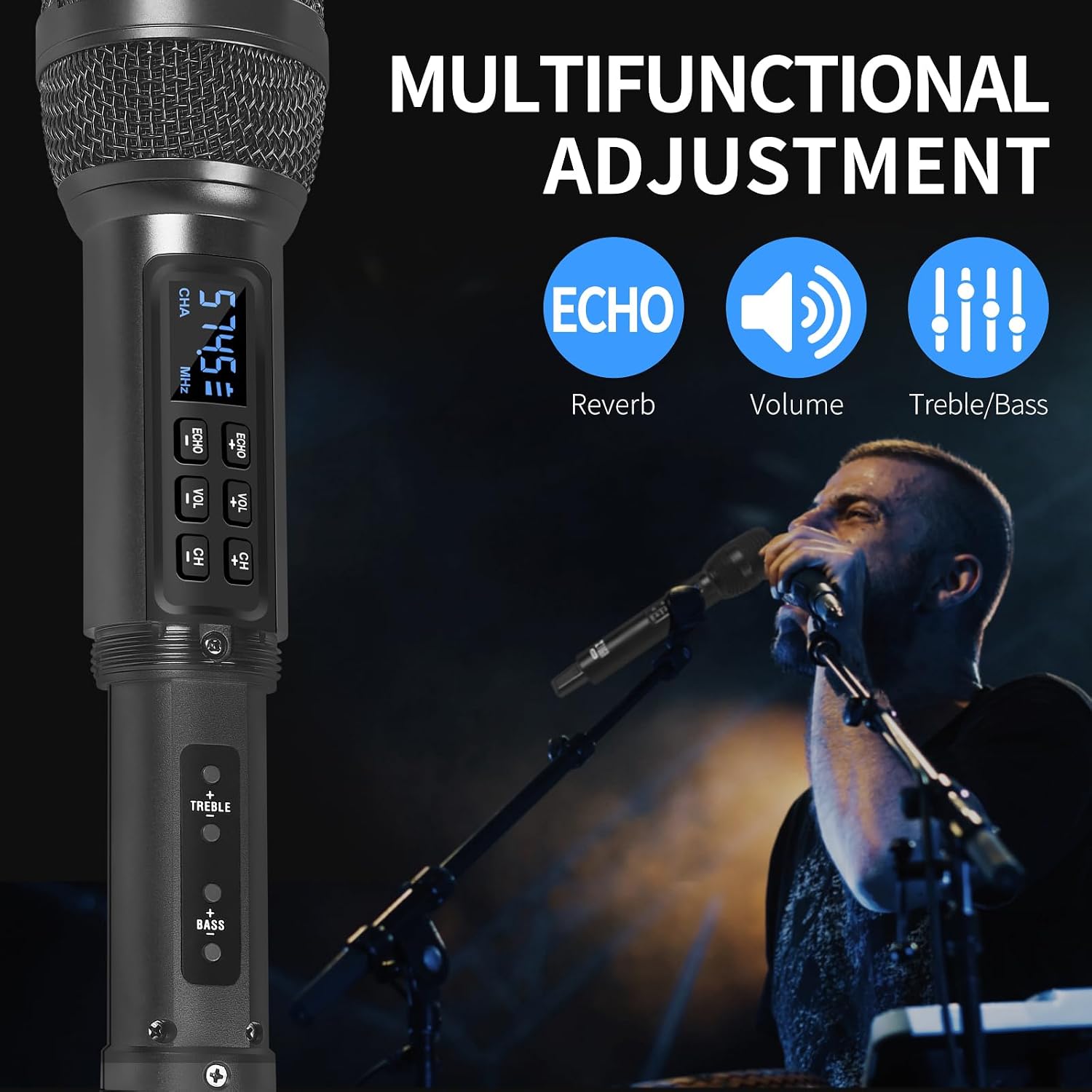
Image: The XTUGA D900 handheld microphone featuring a digital display for frequency and channel information.
4. دليل الإعداد
4.1. اتصال المتلقي
- Identify Output: Determine if your audio device (e.g., amplifier, mixer, speaker, soundbar, PC) requires a 3.5mm or 6.35mm input.
- توصيل جهاز الاستقبال:
- For 3.5mm input: Directly plug the mini wireless receiver's 3.5mm jack into your device's audio input port.
- For 6.35mm input: Attach the provided 6.35mm adapter to the receiver's 3.5mm jack, then plug it into your device's 6.35mm audio input port.
- مستقبل الطاقة: Press and hold the POWER button on the receiver until the indicator lights illuminate.
4.2. إعداد الميكروفون
- أدخل البطاريات: Open the battery compartment of each microphone and insert two AA batteries (not included), ensuring correct polarity.
- تشغيل الميكروفونات: Press and hold the power button on each microphone. The display will light up, showing the channel and frequency.
- الاقتران التلقائي: The microphones and receiver should automatically pair. The RF indicator lights (A.RF, B.RF) on the receiver will turn solid blue when a microphone is successfully connected.

Image: Connectivity diagram illustrating how to connect the XTUGA D900 microphone and receiver to different audio systems using 3.5mm or 6.35mm inputs. Note: Not recommended for small speakers under 15 watts.

Image: The XTUGA D900 system, showing two microphones and the receiver, highlighting a stable 20-meter wireless signal range.
5. تعليمات التشغيل
5.1. عناصر التحكم في الميكروفون
- تشغيل/إيقاف التشغيل: Press and hold the power button on the microphone for 2-3 seconds.
- ضبط مستوى الصوت: Press the 'VOL +' or 'VOL -' buttons on the microphone to adjust the microphone's output volume.
- تعديل الصدى: Press the 'ECHO +' or 'ECHO -' buttons to cycle through 7 levels of echo effect.
- Treble/Bass Adjustment: Press the 'TREBLE +' or 'TREBLE -' buttons to adjust the treble. Press the 'BASS +' or 'BASS -' buttons to adjust the bass. There are 5 levels for each.
- تعديل التردد: Press the 'CH +' or 'CH -' buttons to change the operating frequency. Each microphone (ChA and ChB) has 50 selectable frequencies to avoid interference.

Image: Two XTUGA D900 microphones illustrating the frequency adjustment buttons (CH+/-) and their digital displays.
5.2. Receiver Bluetooth Playback
The receiver supports Bluetooth connectivity for playing background music from a compatible device.
- تفعيل البلوتوث: تأكد من تشغيل جهاز الاستقبال.
- الاقتران: On your smartphone or Bluetooth-enabled device, search for Bluetooth devices and select "X168" to connect.
- تشغيل الموسيقى: Once connected, you can play music from your device, and the audio will be transmitted through the receiver to your connected sound system.

Image: The XTUGA D900 receiver demonstrating Bluetooth playback functionality, connected to a smartphone.
6. معلومات البطارية
6.1. Receiver Battery
- The receiver has a built-in rechargeable battery.
- To charge, connect the receiver to a USB power source using the provided USB charging cable.
- A full charge typically takes approximately 4 hours and provides up to 8 hours of continuous use.
- The POWER indicator light on the receiver will show charging status.
6.2. Microphone Batteries
- Each microphone requires two AA batteries (not included).
- Replace batteries when the microphone display indicates low power or when audio quality degrades.
- Always use fresh, high-quality batteries for optimal performance.

Image: The XTUGA D900 receiver highlighting its strong battery life, offering up to 8 hours of operation after a 4-hour charge.
7. الصيانة
- تنظيف: Wipe the microphones and receiver with a soft, dry cloth. Do not use liquid cleaners or solvents.
- تخزين: قم بتخزين النظام في مكان بارد وجاف بعيدًا عن أشعة الشمس المباشرة ودرجات الحرارة القصوى.
- العناية بالبطارية: Remove AA batteries from microphones if not used for an extended period to prevent leakage. Charge the receiver's battery periodically if stored for long durations to maintain battery health.
- التعامل: Avoid dropping the microphones or receiver, as this can damage internal components.
8. استكشاف الأخطاء وإصلاحها
| مشكلة | السبب المحتمل | حل |
|---|---|---|
| لا يوجد صوت من الميكروفون |
|
|
| Sound distortion or interference |
|
|
| Receiver Bluetooth not connecting |
|
|
9. المواصفات
| ميزة | التفاصيل |
|---|---|
| ماركة | XTUGA |
| اسم الموديل | XTUGA D900 |
| تكنولوجيا الاتصال | UHF Wireless, Auxiliary, Bluetooth (Receiver) |
| نوع الموصل | مقبس 3.5 ملم، مقبس 6.35 ملم (مع محول) |
| عامل شكل الميكروفون | محمول باليد |
| نطاق التردد | 573 MHz - 599 MHz (30 adjustable frequencies per channel) |
| عدد الترددات | 50 frequencies per channel (ChA and ChB) |
| لاسلكي المدى | حتى 20 مترا (65 قدما) |
| عمر بطارية جهاز الاستقبال | Up to 8 hours (after 4 hours charging) |
| مصدر طاقة الميكروفون | 2 x AA Batteries (per microphone, not included) |
| الأجهزة المتوافقة | PC, Smartphone, TV, Tablets, Laptops, Power Amplifiers, Mixers, Speakers, Soundbars, Bus Audio |
| المميزات الخاصة | Volume Control, 7-level Echo Adjustment, 5-level Treble Adjustment, 5-level Bass Adjustment |
| وشملت المكونات | 2 Microphones, 1 Mini Wireless Receiver, 1 6.35mm Adapter, 1 USB Charging Cable |
| بلد المنشأ | الصين |
10. معلومات السلامة
- لا تعرض الجهاز للمطر أو الرطوبة.
- لا تقم بتفكيك الوحدة. قم بإحالة جميع أعمال الصيانة إلى فنيين مؤهلين.
- الابتعاد عن مصادر الحرارة واللهب المكشوف.
- تخلص من البطاريات بطريقة مسؤولة وفقًا للوائح المحلية.
- Avoid using the system near strong electromagnetic fields, which may cause interference.
11. الضمان والدعم
XTUGA products are designed for reliability and performance. For warranty information or technical support, please refer to the warranty card included with your purchase or contact XTUGA customer service through the retailer where you purchased the product.
يرجى الاحتفاظ بإثبات الشراء الخاص بك لاستخدامه في أي مطالبات بالضمان.