
1. المقدمة
The Geemarc CL610 is a corded emergency telephone designed for individuals seeking enhanced safety and communication features. It includes an amplified receiver, large customizable photo buttons, and a waterproof SOS bracelet for remote emergency activation and call answering. This manual provides essential information for setting up, operating, and maintaining your CL610 phone.
المميزات الرئيسية:
- التوافق مع السماعات الطبية: Designed for users with hearing aids (T-position compatible).
- Powerful Ringer: Adjustable ringer volume up to 90dB.
- Amplified Reception Volume: حتى 40 ديسيبل amplification for clear conversations.
- وظيفة SOS: Automatically dials up to 30 pre-programmed emergency numbers, attempting each up to 15 times.
- Waterproof Emergency Bracelet: Activates SOS function and answers calls remotely.
- Voice Caller ID: Announces caller's name for saved contacts.
- Photo Buttons: Three customizable memory buttons for one-touch dialing with pictures.
2. معلومات السلامة
- اقرأ جميع التعليمات بعناية قبل استخدام الجهاز.
- Keep the phone and SOS bracelet away from water and excessive moisture.
- استخدم فقط محول الطاقة المرفق مع المنتج.
- لا تحاول فتح الجهاز أو تعديله أو إصلاحه بنفسك. قم بإحالة جميع أعمال الصيانة إلى فنيين مؤهلين.
- تخلص من البطاريات والمنتج بطريقة مسؤولة وفقًا للوائح المحلية.
3. محتويات العبوة
تأكد من وجود جميع العناصر في العبوة:
- Geemarc CL610 Corded Phone Base
- سماعة الهاتف
- سماعة الهاتف
- سلك خط الهاتف
- محول الطاقة
- Waterproof SOS Bracelet
- دليل المستخدم (هذا المستند)
- 1 x AA Battery (for backup power)
4. انتهى المنتجview
The Geemarc CL610 phone features a large, easy-to-read keypad and clearly labeled function buttons. The SOS bracelet is lightweight and designed for comfortable wear.
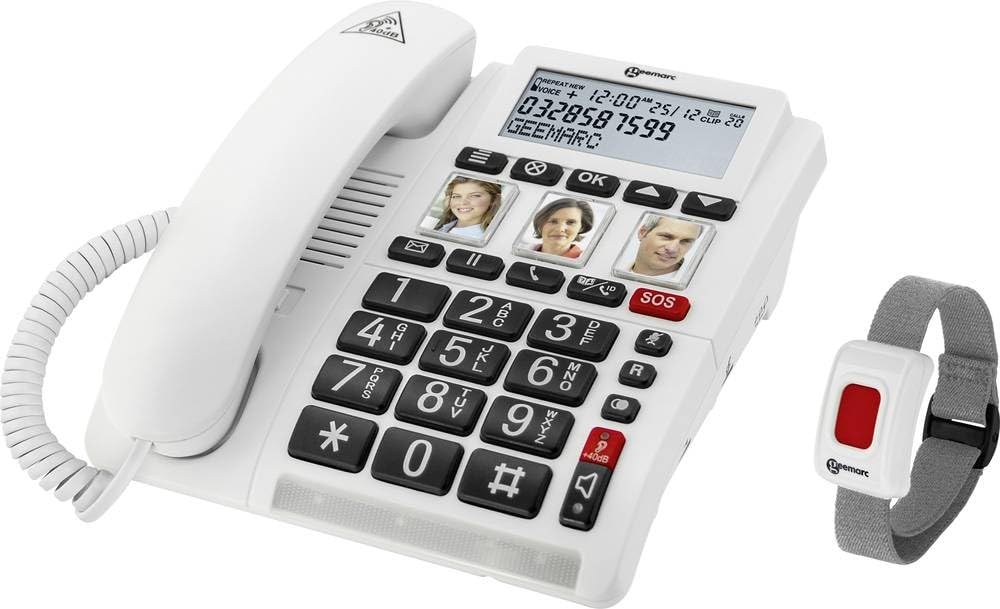
Image: The Geemarc CL610 corded phone, showing the large keypad, photo buttons, and the red SOS button on the base. The accompanying SOS bracelet is also visible.
المكونات الرئيسية:
- قاعدة الهاتف: Contains the keypad, photo buttons (M1, M2, M3), red SOS button, and volume controls.
- سماعة الهاتف: For standard calls, with an amplification slider underneath.
- SOS Bracelet: A wearable, waterproof device with a single button for remote SOS activation and call answering.
5. الإعداد
5.1 توصيل الهاتف
- Connect one end of the telephone line cord to the wall jack and the other end to the designated port on the phone base.
- Connect the handset cord to the handset and the phone base.
- Plug the power adapter into the phone base and then into a standard electrical outlet.
5.2 تركيب البطارية (الاحتياطية)
The phone requires 1 AA battery for backup power, which helps retain settings and provides limited functionality during a power outage.
- Locate the battery compartment on the underside of the phone base.
- قم بإدخال بطارية AA واحدة، مع التأكد من القطبية الصحيحة (+/-).
- أغلق غطاء حجرة البطارية جيدًا.
5.3 Programming Photo Buttons (M1, M2, M3)
These buttons allow for one-touch dialing to frequently called numbers.
- ارفع سماعة الهاتف.
- Press and hold the desired photo button (M1, M2, or M3) until you hear a confirmation tone.
- Dial the phone number you wish to save (up to 24 digits).
- Press the same photo button again to save the number. You will hear another confirmation tone.
- Insert a photo of the contact under the transparent cover of the button.
5.4 Programming SOS Emergency Numbers
The SOS function can dial up to 30 pre-programmed emergency contacts.
- Access the SOS programming mode (refer to the detailed manual for specific menu navigation steps, usually involving a 'SET' or 'PROG' button).
- Enter the first emergency contact number.
- Repeat for up to 30 numbers.
- You may also have the option to record a personalized SOS message that will play when an emergency contact answers.
- اخرج من وضع البرمجة لحفظ الإعدادات.
5.5 SOS Bracelet Pairing
The SOS bracelet must be paired with the phone to function correctly.
- Ensure the phone is powered on.
- Initiate pairing mode on the phone (refer to the detailed manual for specific button presses, often a dedicated 'PAIR' button or menu option).
- Press and hold the button on the SOS bracelet until the phone indicates successful pairing.
- Test the bracelet's functionality by briefly pressing its button to ensure it triggers the SOS sequence or answers a call.
6. تعليمات التشغيل
6.1 إجراء مكالمة
- الاتصال القياسي: Lift the handset, dial the desired number using the large keypad, and wait for the call to connect.
- Photo Button Dialing: Lift the handset, then press the desired pre-programmed photo button (M1, M2, or M3). The phone will automatically dial the saved number.
6.2 تلقي مكالمة
- عندما يرن الهاتف، ارفع سماعة الهاتف للرد على المكالمة.
- Alternatively, if wearing the SOS bracelet, press the button on the bracelet to answer the call in hands-free (speakerphone) mode.
6.3 Amplified Volume
For users with hearing difficulties, the CL610 offers significant volume ampالتصفية.
- أثناء المكالمة، اضغط على الزر المخصص amplification button on the phone base (often marked with a speaker icon or '+').
- Use the slider control located under the handset to adjust the reception volume up to 40dB to a comfortable level.
6.4 Using the SOS Function
In an emergency, the SOS function can be activated in two ways:
- On the Phone Base: Press the large red SOS button on the phone base.
- Via SOS Bracelet: Press the button on the waterproof SOS bracelet.
Upon activation, the phone will automatically dial the pre-programmed emergency numbers sequentially. It will attempt to connect with each number up to 15 times until an answer is detected. If a personalized SOS message was recorded, it will play upon connection.
6.5 توافق أجهزة السمع
The CL610 is compatible with hearing aids equipped with a 'T' (Telecoil) position. To use this feature, simply switch your hearing aid to the 'T' position during a call for direct audio transmission to your ears.
6.6 Ringer Volume Adjustment
Adjust the ringer volume using the dedicated control on the phone base. The ringer can be set to a loud level, up to 90dB, to ensure you do not miss incoming calls.
6.7 Voice Caller ID
If you have saved contacts in the phone's directory (up to 30 names) with associated voice recordings, the phone will announce the caller's name aloud when they call, instead of just ringing. This feature helps identify callers without needing to look at the display.
7. الصيانة
7.1 تنظيف الجهاز
To clean your Geemarc CL610 phone and SOS bracelet:
- Wipe the surfaces with a soft, slightly damp قطعة قماش.
- لا تستخدم المنظفات الكاشطة أو المذيبات أو المواد الكيميائية القوية.
- Do not immerse the phone base in water. The SOS bracelet is waterproof but should be cleaned gently.
7.2 استبدال البطارية
The AA backup battery in the phone base should be replaced periodically, or when the low battery indicator appears (if applicable). The SOS bracelet also contains a battery that may require replacement by a qualified technician if its functionality diminishes.
8. استكشاف الأخطاء وإصلاحها
If you encounter issues with your Geemarc CL610, try the following solutions:
- لا طنين:
- Check that all cables (telephone line, power adapter, handset cord) are securely connected.
- Ensure the phone is powered on and the power adapter is plugged into a working outlet.
- Cannot Hear Caller / Low Volume:
- Adjust the reception volume using the slider under the handset.
- تفعيل amplification function by pressing the dedicated button on the phone base.
- Ensure your hearing aid is in the 'T' position if you are using it.
- SOS Function Not Working:
- Verify that emergency numbers are correctly programmed in the phone's memory.
- Check the battery status of the SOS bracelet and ensure it is properly paired with the phone.
- Ensure there is an active telephone line connection.
- Phone Not Ringing:
- Check the ringer volume settings on the phone base.
- Ensure that any 'Do Not Disturb' or silent modes are not activated.
إذا استمرت المشكلة بعد تجربة هذه الخطوات، يرجى الاتصال بدعم العملاء.
9. المواصفات
| ماركة | جيمارك |
| رقم الموديل | CL610_WH_VDE |
| الأبعاد (الطول × العرض × الارتفاع) | 20 × 18 × 7 سم |
| مصدر الطاقة | محول التيار المتردد |
| بطارية احتياطية | 1 x AA (required) |
| Reception Volume Ampالتصفية | حتى 40 ديسيبل |
| حجم الرنين | حتى 90 ديسيبل |
| SOS Number Capacity | ما يصل إلى 30 رقم |
| تسجيل القدرات | 30 Minutes (for voice messages/caller ID) |
| وقت التحدث | 6 ساعة |
| وقت الاستعداد | 2 Minutes (Note: This typically refers to handset standby, unusual for a corded phone, but as per source data) |
| معرف المتصل | نعم |
| متوافق مع أجهزة السمع | Yes (T-position) |
| مادة | بلاستيك |
| الملحقات المتضمنة | SOS Bracelet |
10. الضمان والدعم
This Geemarc CL610 product comes with a standard manufacturer's warranty. For detailed warranty terms and conditions, including coverage period and limitations, please refer to the warranty card included in your product packaging or visit the official Geemarc webموقع.
For technical support, troubleshooting assistance beyond what is provided in this manual, or inquiries regarding spare parts, please contact Geemarc customer service. Contact details, such as phone numbers or email addresses, can typically be found on the manufacturer's webموقع (www.gemarc.com) أو في عبوة المنتج.