
مقدمة
This manual provides detailed instructions for the installation, operation, and maintenance of your Strong SRT 7040 Digital Satellite HD Receiver. Please read this manual carefully before using the device to ensure proper functionality and to prevent damage.

Image: The Strong SRT 7040 DTT Tuner and its retail packaging.
The Strong SRT 7040 is a Full HD digital satellite receiver designed for Free-To-Air (FTA) channels. It features a USB port for multimedia playback and software updates, and supports Dolby Audio for enhanced sound quality.
1. الإعداد
1.1 فك التعبئة
أزل جميع المكونات من العبوة بعناية. تأكد من وجود العناصر التالية:
- Strong SRT 7040 DTT Tuner
- جهاز التحكم عن بعد (مع بطاريتين AAA)
- محول الطاقة
- دليل المستخدم
1.2 توصيل الجهاز
Follow these steps to connect your SRT 7040 receiver:
- مدخلات القمر الصناعي: Connect your satellite dish cable to the سات إن منفذ في الجزء الخلفي من جهاز الاستقبال.
- Video Output (HDMI): قم بتوصيل كابل HDMI من منفذ HDMI قم بتوصيل منفذ جهاز الاستقبال بمدخل HDMI في جهاز التلفزيون الخاص بك.
- Video Output (SCART): Alternatively, for older televisions, connect a SCART cable from the تلفزيون سكارت قم بتوصيل منفذ جهاز الاستقبال بمدخل SCART في جهاز التلفزيون الخاص بك.
- Audio Output (Digital): For digital audio, connect a coaxial cable from the COAXIAL S/PDIF port to your digital audio ampمكبر.
- Audio Output (Analog): بالنسبة للصوت التناظري، قم بتوصيل كابلات RCA من AUDIO R/L ports to your audio Hi-Fi ampمكبر.
- جهاز USB: If desired, connect a USB storage device to the USB port for multimedia playback or software updates.
- قوة: قم بتوصيل محول الطاقة بـ 12 فولت === 1.5 أمبير input on the receiver, then plug the adapter into a wall outlet.

Image: Rear panel connections of the Strong SRT 7040 DTT Tuner, showing SAT IN, HDMI, TV SCART, COAXIAL S/PDIF, AUDIO R/L, USB, and Power input.
1.3 First-Time Installation and Channel Scan
Upon first power-on, the receiver will guide you through an initial setup wizard. Follow the on-screen prompts to select your language, country, and perform an automatic channel scan. This process will detect and store all available satellite channels.
2. تعليمات التشغيل
2.1 التحكم عن بعد أكثرview
The included remote control allows you to access all functions of the SRT 7040. Insert the two AAA batteries into the remote control, ensuring correct polarity.

Image: The remote control for the Strong SRT 7040 DTT Tuner, showing buttons for power, numbers, volume, channel, menu, and special functions.
2.2 الوظائف الأساسية
- قوة: اضغط على قوة button to turn the receiver on or off (standby mode).
- اختيار القناة: استخدم CH+ / CH- buttons to change channels sequentially, or use the numeric keypad to enter a channel number directly.
- التحكم في مستوى الصوت: استخدم المجلد+ / المجلد- أزرار لضبط مستوى الصوت.
- صامت: اضغط على كتم الصوت زر لإيقاف الصوت مؤقتًا.
2.3 تصفح القائمة
اضغط على قائمة طعام button to access the main menu. Use the arrow keys (UP, تحت, غادر, يمين) to navigate through options and OK to confirm selections. Press EXIT to return to the previous screen or live TV.
2.4 ميزات خاصة
- المؤقتات: The receiver supports programming timers for recording or switching to specific channels at scheduled times. Access this feature via the menu.
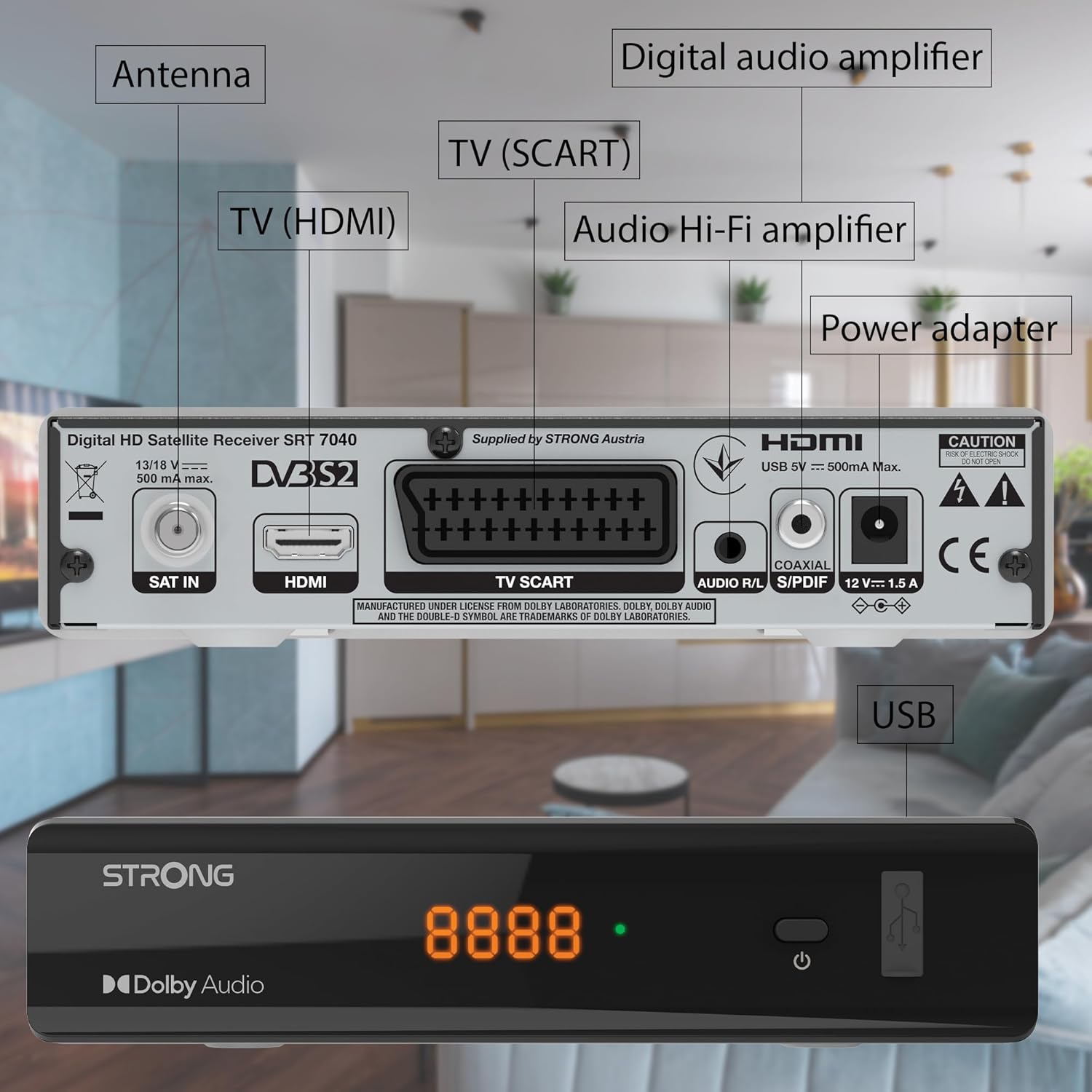
Image: The Strong SRT 7040 DTT Tuner displaying a timer icon, indicating its scheduling capabilities.
- القوائم المفضلة: Create customized lists of your preferred channels for quick access.
- الترجمة التوضيحية: Enable or disable subtitles for compatible broadcasts using the فرعي الزر الموجود على جهاز التحكم عن بعد.
- دليل البرامج الإلكتروني (EPG): اضغط على دليل البرامج الإلكتروني زر ل view program information for upcoming broadcasts.
- صوت دولبي: The receiver supports Dolby Audio for a high-quality sound experience.

Image: The Strong SRT 7040 DTT Tuner with the Dolby Audio logo, illustrating its sound processing capability.
3. الصيانة
3.1 التنظيف
To clean the receiver, disconnect it from the power supply. Use a soft, dry cloth to wipe the exterior. Do not use liquid cleaners, aerosols, or abrasive materials, as these can damage the finish or internal components.
3.2 تحديثات البرامج
التحقق بشكل دوري من الشركة المصنعة website for available software updates. Updates can improve performance, add new features, or resolve issues. Software updates are typically performed via the USB port following specific instructions provided with the update file.
3.3 معلومات السلامة
- لا تفتح جهاز الاستقبال جasinز. لا توجد قطع غيار قابلة للصيانة من قِبل المستخدم. يُرجى إحالة جميع أعمال الصيانة إلى فنيين مؤهلين.
- أبقِ جهاز الاستقبال بعيدًا عن أشعة الشمس المباشرة ومصادر الحرارة والرطوبة.
- تأكد من وجود تهوية كافية حول الجهاز لمنع ارتفاع درجة حرارته.
- استخدم فقط محول الطاقة المرفق.
4. استكشاف الأخطاء وإصلاحها
If you encounter problems with your SRT 7040, consult the following table before contacting support.
| مشكلة | السبب المحتمل | حل |
|---|---|---|
| لا يوجد طاقة | محول الطاقة غير موصول؛ مأخذ الطاقة معطل | Check power adapter connection; Try a different power outlet |
| لا توجد إشارة / شاشة سوداء | Satellite cable loose or disconnected; Incorrect input selected on TV; Satellite dish alignment issue | Check SAT IN cable connection; Ensure TV is on correct HDMI/SCART input; Perform a channel scan; Consult a professional for dish alignment if necessary |
| جهاز التحكم عن بعد لا يعمل | نفدت البطاريات أو تم إدخالها بشكل غير صحيح؛ وجود عائق بين جهاز التحكم عن بعد وجهاز الاستقبال | Replace batteries; Ensure correct polarity; Remove any obstructions; Point remote directly at receiver |
| جودة الصورة رديئة | Weak satellite signal; Incorrect display settings | Check satellite signal strength in menu; Adjust TV display settings; Ensure Full HD content is being broadcast |
5. المواصفات
The following are the technical specifications for the Strong SRT 7040 Digital Satellite HD Receiver:
- نموذج: SRT 7040 (SAT FTA Full HD)
- ماركة: قوي
- أبعاد: 3.39 × 6.46 × 1.38 بوصة (8.6 × 16.4 × 3.5 سم)
- وزن السلعة: 9.2 أونصة (260 جرامًا)
- لون: أسود
- تقنية الاتصال: USB
- المجلدtage: 100 - 240 فولت
- تكرار: 50 - 60 هرتز
- استهلاك الطاقة: 18 kWh (operational, typical)
- نطاق درجة حرارة العمل: 0 درجة مئوية إلى 40 درجة مئوية
- الرطوبة النسبية: 10% - 95%
- البطاريات: بطاريتان AAA (متضمنتان لجهاز التحكم عن بعد)
- التقى المواصفات: DVB-S2
- متضمن: Wally Receiver
6. الضمان والدعم
For warranty information and technical support, please refer to the warranty card included in your product packaging or visit the official Strong webالموقع. احتفظ بإيصال الشراء الخاص بك كإثبات للشراء في حالة مطالبات الضمان.
For further assistance, you may contact Strong customer service through the contact details provided on their official webموقع.