
BoxWave SlimKeys Bluetooth Keyboard
BoxWave SlimKeys Bluetooth Keyboard User Manual
Model: SlimKeys Bluetooth Keyboard
Brand: BoxWave
1. المقدمة
Thank you for choosing the BoxWave SlimKeys Bluetooth Keyboard. This portable, backlit keyboard is designed to enhance your typing experience across various devices, including tablets and PCs. This manual provides detailed instructions on setting up, operating, and maintaining your keyboard to ensure optimal performance.
2. محتويات العبوة
- BoxWave SlimKeys Bluetooth Keyboard
- كابل شحن USB
- دليل المستخدم (هذا المستند)
3. انتهى المنتجview
The BoxWave SlimKeys Bluetooth Keyboard is engineered for portability and functionality. Key features include a vibrant LED backlight, multi-platform compatibility, and a slim, lightweight design.

Figure 3.1: BoxWave SlimKeys Bluetooth Keyboard with a tablet, showcasing its compact design and compatibility.
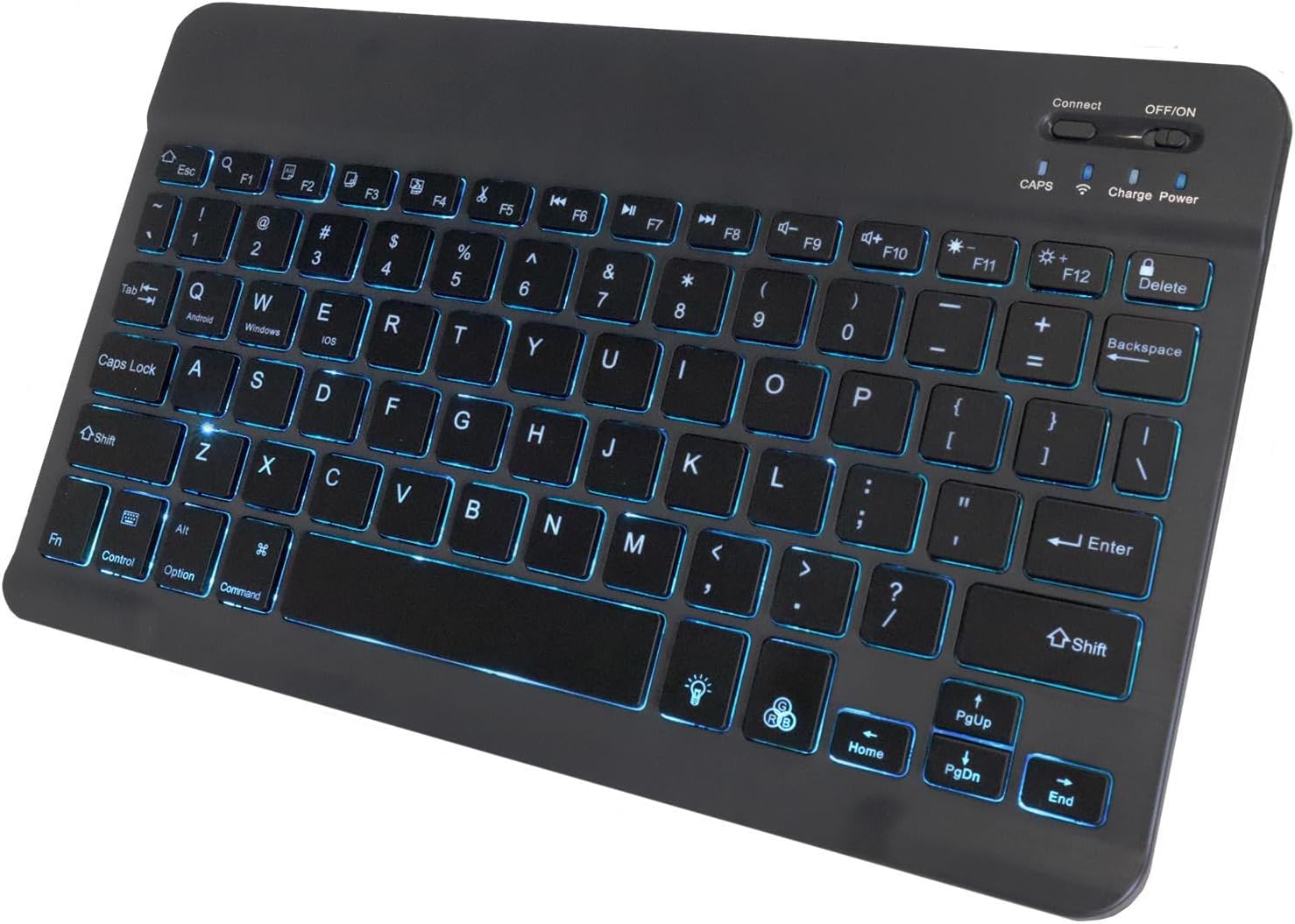
الشكل 3.2: الجزء العلوي view of the keyboard, highlighting the illuminated keys and control switches.
المميزات الرئيسية:
- مفاتيح ذات إضاءة خلفية: Integrated LED backlight with seven customizable colors for typing in low-light conditions.
- اتصال لاسلكي موثوق: Connects quickly and easily via Bluetooth 3.0.
- نحيف وسهل الحمل: Compact and lightweight design, ideal for travel and easy storage.
- Chiclet Keys: منخفضة المواليةfile keys designed for quiet and comfortable typing.
- Battery-Saving Power Switch: Dedicated on/off switch to conserve battery life.
4. الإعداد
4.1 شحن لوحة المفاتيح
Before first use, ensure the keyboard is fully charged. Connect the included USB charging cable to the keyboard's charging port and the other end to a USB power source (e.g., computer USB port, USB wall adapter). The charging indicator light will illuminate during charging and turn off when fully charged.

Figure 4.1: Keyboard connected to a charging cable, illustrating the charging process.
4.2 اقتران بلوتوث
- تشغيل الطاقة: Locate the ON/OFF switch on the keyboard and slide it to the "ON" position. The power indicator light will briefly illuminate.
- تنشيط وضع الاقتران: اضغط على "يتصل" button on the keyboard. The Bluetooth indicator light will begin to flash, indicating the keyboard is in pairing mode.
- تمكين البلوتوث على جهازك: On your tablet, PC, or smartphone, navigate to the Bluetooth settings and ensure Bluetooth is enabled.
- بحث عن الأجهزة: Your device will scan for available Bluetooth devices. Look for "SlimKeys Keyboard" or a similar name in the list of found devices.
- زوج: Select "SlimKeys Keyboard" from the list. Your device may prompt you to enter a pairing code displayed on your screen. Type this code on the SlimKeys keyboard and press يدخل.
- تأكيد: Once successfully paired, the Bluetooth indicator light on the keyboard will stop flashing and remain solid or turn off, and your device will show the keyboard as connected.
The keyboard supports multi-platform compatibility, including Android, Windows, and iOS devices.

Figure 4.2: Multi-platform compatibility icons.
5. تعليمات التشغيل
5.1 Backlight Features
The SlimKeys keyboard features an integrated LED backlight with seven customizable colors to enhance visibility in various lighting conditions.
- Turning On/Off Backlight: اضغط على مصباح كهربائي key (usually located near the bottom right of the keyboard) to toggle the backlight on or off.
- تغيير لون الإضاءة الخلفية: اضغط على مصباح كهربائي key repeatedly to cycle through the seven available colors.
- ضبط السطوع: استخدم Fn + لمبة الإضاءة key combination to adjust the backlight brightness levels.

الشكل 5.1: عرض لوحة المفاتيحasing the seven available backlight colors.
5.2 Specialized Function Keys
The keyboard includes specialized function keys (F1-F12) that provide quick access to common commands. These functions are typically accessed by pressing the Fn اضغط على المفتاح في نفس الوقت مع مفتاح الوظيفة المطلوبة.
| مجموعة المفاتيح | وظيفة | وصف |
|---|---|---|
| Fn + Esc (Home) | بيت | Returns to the home screen or main page. |
| Fn + F1 (Search) | بحث | Activates the search function. |
| Fn + F2 (Select All) | حدد الكل | Selects all content. |
| Fn + F3 (Copy) | ينسخ | Copies selected content. |
| Fn + F4 (Paste) | لصق | Pastes copied content. |
| Fn + F5 (Cut) | يقطع | Cuts selected content. |
| Fn + F6 (Skip Back) | تخطي للخلف | Skips to the previous track/media. |
| Fn + F7 (Play/Pause) | تشغيل/إيقاف مؤقت | تشغيل الوسائط أو إيقافها مؤقتًا. |
| Fn + F8 (Skip Forward) | تخطي للأمام | Skips to the next track/media. |
| Fn + F9 (Volume Down) | خفض الصوت | يقلل من حجم الصوت. |
| Fn + F10 (Volume Up) | رفع الصوت | يزيد من حجم الصوت. |
| Fn + F11 (Brightness Down) | خفض السطوع | تقليل سطوع الشاشة. |
| Fn + F12 (Brightness Up) | زيادة السطوع | يزيد سطوع الشاشة. |
| Fn + Delete (Lock) | قفل | Locks the device screen. |

Figure 5.2: Layout of specialized function keys.
6. الصيانة
- تنظيف: Use a soft, dry, lint-free cloth to clean the keyboard. For stubborn dirt, slightly dampانقع قطعة القماش في الماء أو محلول تنظيف خفيف. تجنب الرطوبة الزائدة.
- تخزين: When not in use for extended periods, turn off the keyboard using the ON/OFF switch to conserve battery life. Store in a cool, dry place.
- تجنب السوائل: Do not expose the keyboard to liquids. In case of accidental spills, immediately turn off the keyboard and allow it to dry completely before reuse.
- العناية بالبطارية: To prolong battery life, avoid fully discharging the keyboard frequently. Recharge when the battery low indicator appears.
7. استكشاف الأخطاء وإصلاحها
| مشكلة | السبب المحتمل | حل |
|---|---|---|
| لوحة المفاتيح لا تعمل. | نفدت طاقة البطارية. | اشحن لوحة المفاتيح باستخدام كابل USB المرفق. |
| لا يمكن الاتصال عبر البلوتوث. | Bluetooth is off on the device or keyboard. Keyboard is not in pairing mode. Device is out of range. Interference. |
|
| المفاتيح لا تستجيب. | Connection issue. Low battery. |
|
| الإضاءة الخلفية لا تعمل. | Backlight is off. Low battery. |
|
8. المواصفات
| ميزة | التفاصيل |
|---|---|
| ماركة | بوكس ويف |
| نموذج | SlimKeys Bluetooth Keyboard |
| تكنولوجيا الاتصال | بلوتوث 3.0 |
| الأجهزة المتوافقة | PC, Tablet (Android, Windows, iOS) |
| ميزة خاصة | Backlit (7 Colors) |
| وصف لوحة المفاتيح | Gaming (as per product data, though general use) |
| لون | أسود كالفحم |
| وزن العنصر | 8.6 أونصة (حوالي 244 جرامًا) |
| الأبعاد (تقريبًا) | 9.5 in (Width) x 5.75 in (Depth) x 0.2 in (Height) |
| عمر البطارية | Up to 30 days (usage), 6 months (standby when powered off) |
| بلد المنشأ | الصين |

Figure 8.1: Approximate dimensions of the SlimKeys Bluetooth Keyboard.
9. الضمان والدعم
BoxWave products are designed for quality and reliability. While specific warranty details are not provided in this manual, for any technical assistance or inquiries regarding your BoxWave SlimKeys Bluetooth Keyboard, please refer to the support information provided at the point of purchase or on the official BoxWave webموقع.
Limited 3rd party tech support for your device (up to 3 inquiries via messaging) may be available. Please note this support is not affiliated with or endorsed by DUODUOGO.
Ask a question about this manual
Ask about setup, troubleshooting, compatibility, parts, safety, or missing instructions. Manuals+ will review the question and use this page’s manual context to help answer it.