
1. المقدمة
شكرا لك على الشراءasing the SOAR XL ShockBox BTH6 Wireless Bluetooth Speaker. This speaker is designed to provide high-quality audio with versatile connectivity options, including Bluetooth 5.0, AM/FM radio, USB, and Aux inputs. Its portable and shockproof design, combined with dynamic multicolor LED lights, makes it suitable for various environments. Please read this manual carefully to ensure proper use and maintenance of your device.
2. انتهى المنتجview
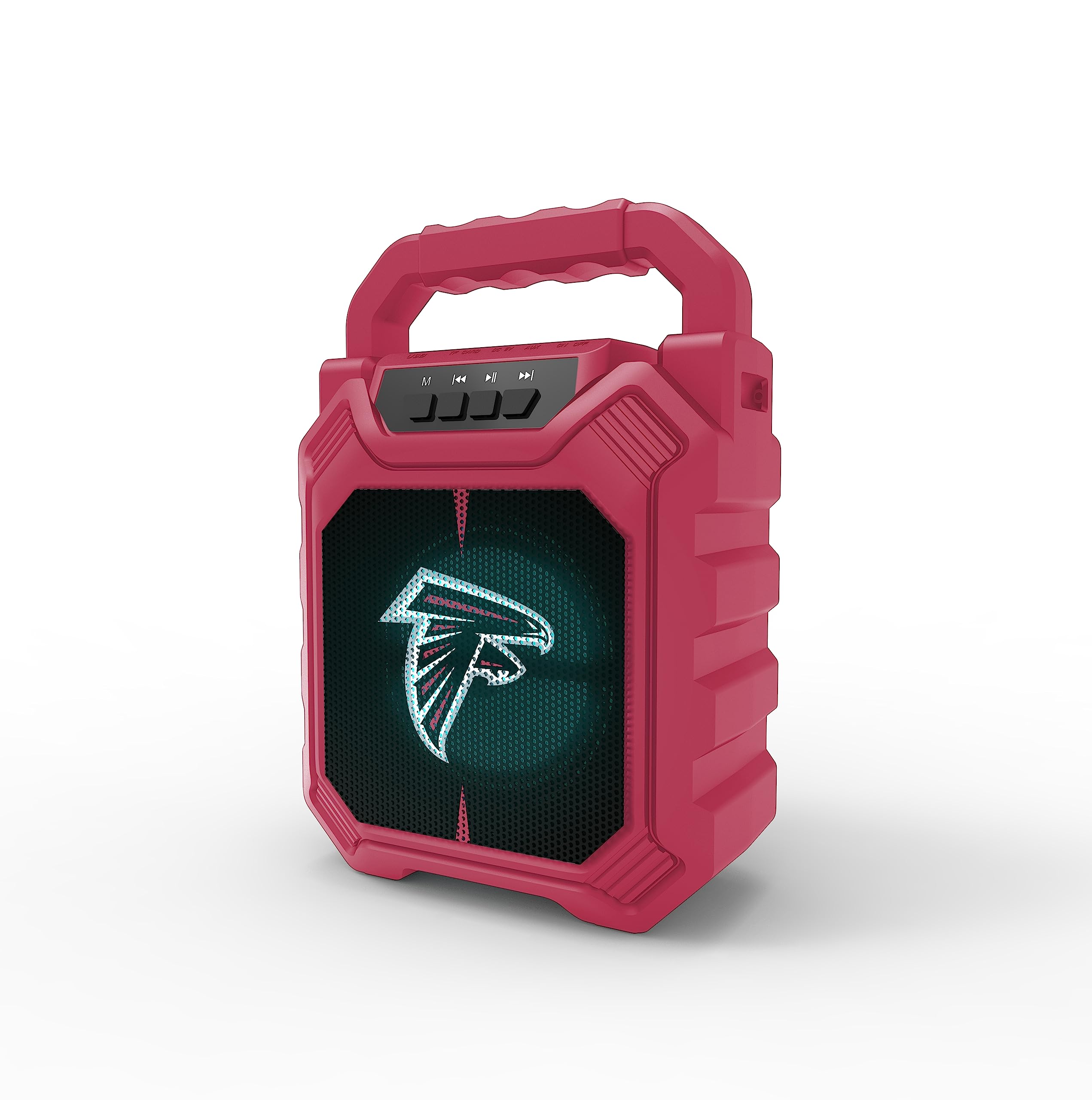
الصورة 1: الجبهة view of the SOAR XL ShockBox BTH6 Wireless Bluetooth Speaker, featuring the Atlanta Falcons logo.
المميزات الرئيسية:
- اتصال بلوتوث 5.0: For seamless wireless audio streaming.
- مدخلات صوتية متعددة: Supports AM/FM radio, USB, and Aux connections.
- تصميم محمول: Features a convenient top handle and shockproof construction.
- عمر بطارية طويل: Provides over 5 hours of playback on a single charge.
- أضواء LED الديناميكية: Multicolor LED lights pulse with the music.
- ستيريو لاسلكي حقيقي (TWS): Connect two speakers for enhanced stereo sound.
3. عناصر التحكم والمنافذ

Image 2: Top panel of the speaker, illustrating the control buttons and various input ports.
وظائف الأزرار:
- زر الطاقة: Press and hold to turn the speaker ON/OFF. Short press to switch modes (Bluetooth, FM, USB, Aux).
- 'M' (Mode) Button: Short press to cycle through input modes (Bluetooth, FM Radio, USB, Aux).
- المسار السابق / خفض مستوى الصوت: Short press for previous track (in Bluetooth/USB mode). Press and hold to decrease volume.
- زر التشغيل/الإيقاف المؤقت: اضغط لفترة قصيرة لتشغيل الصوت أو إيقافه مؤقتًا. في وضع FM، اضغط لفترة قصيرة للبحث التلقائي عن المحطات وحفظها.
- المسار التالي / رفع مستوى الصوت: Short press for next track (in Bluetooth/USB mode). Press and hold to increase volume.
منافذ الإدخال:
- منفذ شحن Micro-USB: لشحن مكبر الصوت.
- منفذ USB: لتشغيل الصوت من ذاكرة فلاش USB.
- منفذ إدخال صوتي إضافي (3.5 مم): لتوصيل أجهزة الصوت الخارجية عبر كابل مساعد.
- منفذ كارت الذاكرة الصغيرة: لتشغيل الصوت من بطاقة MicroSD.
4. الإعداد والتشغيل
4.1 شحن السماعة
- Connect the provided micro-USB cable to the charging port on the speaker.
- قم بتوصيل الطرف الآخر من الكابل بمحول طاقة USB (غير متضمن) أو بمنفذ USB الخاص بالكمبيوتر.
- سيضيء مؤشر الشحن. بعد اكتمال الشحن، قد يتغير لونه أو ينطفئ.
- A full charge provides over 5 hours of playback time.
4.2 تشغيل/إيقاف التشغيل
- To turn ON, press and hold the Power button until you hear an audible prompt.
- To turn OFF, press and hold the Power button again until the speaker powers down.
4.3 اقتران بلوتوث
- قم بتشغيل السماعة. ستدخل تلقائيًا في وضع الاقتران عبر البلوتوث، وسيتم الإشارة إلى ذلك من خلال ضوء LED وامض وتنبيه صوتي.
- على جهازك (الهاتف الذكي، الجهاز اللوحي، وما إلى ذلك)، قم بتمكين البلوتوث وابحث عن الأجهزة المتاحة.
- Select "SOAR BTH6" from the list of devices.
- بمجرد الاقتران، سيصدر مكبر الصوت تأكيدًا صوتيًا، وسيتوقف ضوء LED عن الوميض.
- سيتم إعادة توصيل مكبر الصوت تلقائيًا بالجهاز المقترن الأخير عند تشغيله، إذا كان الجهاز ضمن النطاق وتم تمكين البلوتوث.
تشغيل راديو 4.4 FM
- Turn on the speaker and press the 'M' (Mode) button until you enter FM Radio mode.
- To auto-scan and save available FM stations, short press the Play/Pause button. The speaker will scan and store stations automatically.
- Use the Previous Track and Next Track buttons to navigate between saved stations.
4.5 USB and Aux Input
- مدخل USB: Insert a USB flash drive into the USB port. The speaker will automatically switch to USB mode and begin playing audio files.
- مدخلات Aux: Connect an external audio device (e.g., MP3 player) to the Aux-in port using a 3.5mm audio cable. Press the 'M' button to switch to Aux mode.
4.6 وضعًا لإضاءة LED

Image 3: The speaker displaying its dynamic LED lights in a vibrant setting.
The speaker features dynamic multicolor LED lights that pulse to the rhythm of the music. These lights activate automatically when the speaker is in use. There are no user-adjustable modes for the LED lights; they are designed to enhance the audio experience visually.
4.7 إقران ستيريو لاسلكي حقيقي (TWS)

Image 4: Two SOAR XL ShockBox BTH6 speakers paired together for True Wireless Stereo (TWS) sound.
To achieve a wider soundstage, you can pair two SOAR XL ShockBox BTH6 speakers together using the TWS function:
- Ensure both speakers are turned OFF.
- Turn ON both speakers. They will enter Bluetooth pairing mode.
- On one of the speakers (this will be your primary speaker), double-press the 'M' (Mode) button. The speakers will attempt to connect to each other.
- Once successfully paired, you will hear an audible confirmation. The LED lights on both speakers will synchronize.
- الآن، قم بتوصيل جهازك بالسماعة الرئيسية عبر البلوتوث كما هو موضح في القسم 4.3. سيتم تشغيل الصوت من خلال كلا السماعتين بنظام ستيريو.
5. الصيانة
- تنظيف: استخدم قطعة قماش ناعمة وجافة لتنظيف الجزء الخارجي من مكبر الصوت. لا تستخدم منظفات أو مذيبات كاشطة.
- تخزين: قم بتخزين مكبر الصوت في مكان بارد وجاف بعيدًا عن أشعة الشمس المباشرة ودرجات الحرارة القصوى.
- العناية بالبطارية: لإطالة عمر البطارية، اشحن السماعة بانتظام، حتى لو لم تكن تستخدمها بكثرة. تجنب تفريغ البطارية بالكامل لفترات طويلة.
- مقاومة الماء: While designed to be durable, avoid submerging the speaker in water.
6. استكشاف الأخطاء وإصلاحها
| مشكلة | الحل المحتمل |
|---|---|
| مكبر الصوت لا يعمل. | Ensure the battery is charged. Connect the speaker to a power source using the micro-USB cable. |
| لا يمكن الاقتران عبر البلوتوث. | Make sure the speaker is in Bluetooth mode and within range (approx. 10 meters). Turn off and on your device's Bluetooth. Forget "SOAR BTH6" from your device's Bluetooth list and try pairing again. |
| لا يوجد صوت أو مستوى الصوت منخفض. | تحقق من مستوى الصوت في كل من السماعة والجهاز المتصل. تأكد من تحديد وضع الإدخال الصحيح. |
| استقبال الراديو FM ضعيف. | Adjust the speaker's position. Ensure you are in an area with good signal strength. |
| فشل اقتران TWS. | Ensure both speakers are fully charged and not connected to any other Bluetooth devices. Follow the TWS pairing steps carefully. |
7. المواصفات
| ميزة | التفاصيل |
|---|---|
| رقم الموديل | BTH6 (Variant: NFL-BTH6-DLPH) |
| نسخة البلوتوث | 5.0 |
| المدخلات الصوتية | Bluetooth, AM/FM Radio, USB, Aux-in, MicroSD |
| وقت اللعب | Over 5 hours (per charge) |
| منفذ الشحن | ميكرو يو اس بي |
| الشركة المصنعة | مجموعة برايم براندز المحدودة |
| تاريخ أول توفر | 6 سبتمبر 2023 |
8. فيديو المنتج الرسمي
الفيديو 1: عرض فيديو رسمي للمنتجasing the features and dynamic LED lights of the SOAR BTH6 Wireless Bluetooth Speaker.
9. الضمان والدعم
For warranty information and customer support, please refer to the documentation included with your product or contact the manufacturer, Prime Brands Group Inc., directly. Details regarding specific warranty periods and support procedures are typically provided at the point of purchase or on the manufacturer's official webموقع.