
1. المقدمة
This manual provides comprehensive instructions for the installation, operation, and maintenance of your Splenssy 433MHz WiFi GSM Wireless Home Security Alarm System. Please read this manual thoroughly before installation and use to ensure proper functionality and safety. Keep this manual for future reference.
2. محتويات العبوة
تأكد من وجود جميع العناصر المدرجة أدناه في الحزمة الخاصة بك:
- 1 x Wireless Alarm Panel
- 1 x Wireless PIR Motion Sensor
- 3 x Wireless Door/Window Sensors
- 2 × جهاز تحكم عن بعد
- 2 × بطاقات رفيد
- صفارة إنذار سلكية واحدة
- 1 x PIR Sensor Holder
- 1 × مجموعة من مسامير التثبيت
- 1 × كابل شحن USB
- 1 × محول طاقة تيار مستمر 5 فولت / 1 أمبير
- Batteries for sensors and remote controls (pre-installed or included separately)
- 1 × دليل المستخدم (الإنجليزية)
3. المواصفات
| ميزة | مواصفة |
|---|---|
| محول الطاقة | تيار مستمر 5 فولت/1 أمبير |
| التيار العامل | <120 مللي أمبير |
| التيار الاحتياطي | <80 ميكرو أمبير |
| التردد اللاسلكي | 433 ميجا هرتز |
| Coded Mode | 1527 |
| المعيار اللاسلكي | IEEE802.11b/g/n 2.4G |
| Alarm Panel Battery | ليثيوم أيون تيار مستمر 3.7 فولت 500 مللي أمبير |
| PIR Sensor Battery | بطاريتان AAA بقوة 3 فولت |
| بطارية مستشعر الباب | 1 × CR2450 3 فولت |
| بطارية جهاز التحكم عن بعد | 2 × CR2025 3 فولت |
| صفارات الإنذار حجم | 110 ديسيبل |
| مدى درجة الحرارة | 0 درجة مئوية ~ 55 درجة مئوية |
| نطاق الرطوبة | <80٪ RH (بدون تكاثف) |
| طريقة التحكم | Remote, Smartphone App, RFID |
| أقصى مدى لاسلكي | 100 Metres (open area) |
| Battery Average Life (Panel) | 72 Hours (standby) |
| عرض | شاشة TFT LCD مقاس 2.4 بوصة |
4. معلومات السلامة
- تأكد من توصيل محول الطاقة بمأخذ كهربائي مناسب.
- Do not expose the alarm panel to water or extreme temperatures.
- أبقِ الجهاز بعيداً عن التداخل الكهرومغناطيسي القوي.
- Replace batteries in sensors and remote controls as needed to maintain optimal performance.
- لا تحاول تفكيك الجهاز أو إصلاحه بنفسك. اتصل بدعم العملاء للحصول على المساعدة.
5. الإعداد
5.1 تركيب لوحة الإنذار
The alarm panel can be installed in two ways: wall-mounted or desktop placement.

Image: The alarm panel can be placed on a desktop using its integrated stand or mounted on a wall. The image shows both side and rear views of the panel's versatile placement options.
- تثبيت سطح المكتب: Simply unfold the stand at the back of the panel and place it on a flat, stable surface.
- تركيب الحائط: Use the provided mounting screws and the PIR sensor holder (which can also be used for the panel) to secure the panel to a wall at a suitable height. Ensure the location allows for good Wi-Fi and GSM signal reception.
5.2 تركيب جهاز الاستشعار
شرطة التدخل السريع استشعار الحركة: Install the PIR sensor in a corner or on a wall where it can cover the desired area without obstructions. Avoid placing it directly facing heat sources or windows where direct sunlight or drafts might cause false alarms. Insert 3 x 1.5V AAA batteries.
أجهزة استشعار الأبواب والنوافذ: Install the two parts of the door/window sensor on the frame and the movable part of a door or window. Ensure the two parts are aligned and within 1cm of each other when the door/window is closed. Insert 1 x CR2450 3V battery.
5.3 توصيل صفارة الإنذار السلكية
Connect the wired siren to the designated siren port on the alarm panel. Ensure the connection is secure.
5.4 التشغيل والإعداد الأولي
- Connect the alarm panel to power using the USB charging cable and DC 5V/1A power adapter.
- The panel will power on automatically. Follow the on-screen prompts for initial setup.
- Insert a valid GSM SIM card (if using GSM features) into the designated slot on the panel.
- اتصال واي فاي: Access the system settings on the LCD screen to connect the panel to your 2.4GHz Wi-Fi network. This enables app control and smart home integration.
5.5 App Connection and Smart Home Integration
Download the dedicated mobile application (available for Android and iOS) from your device's app store. Follow the in-app instructions to add your alarm system. This allows for remote control, parameter configuration, and accessory management.

Image: The alarm system can link to various smart home products, including smart speakers, cameras, and smart bulbs, all controllable via a smartphone application.
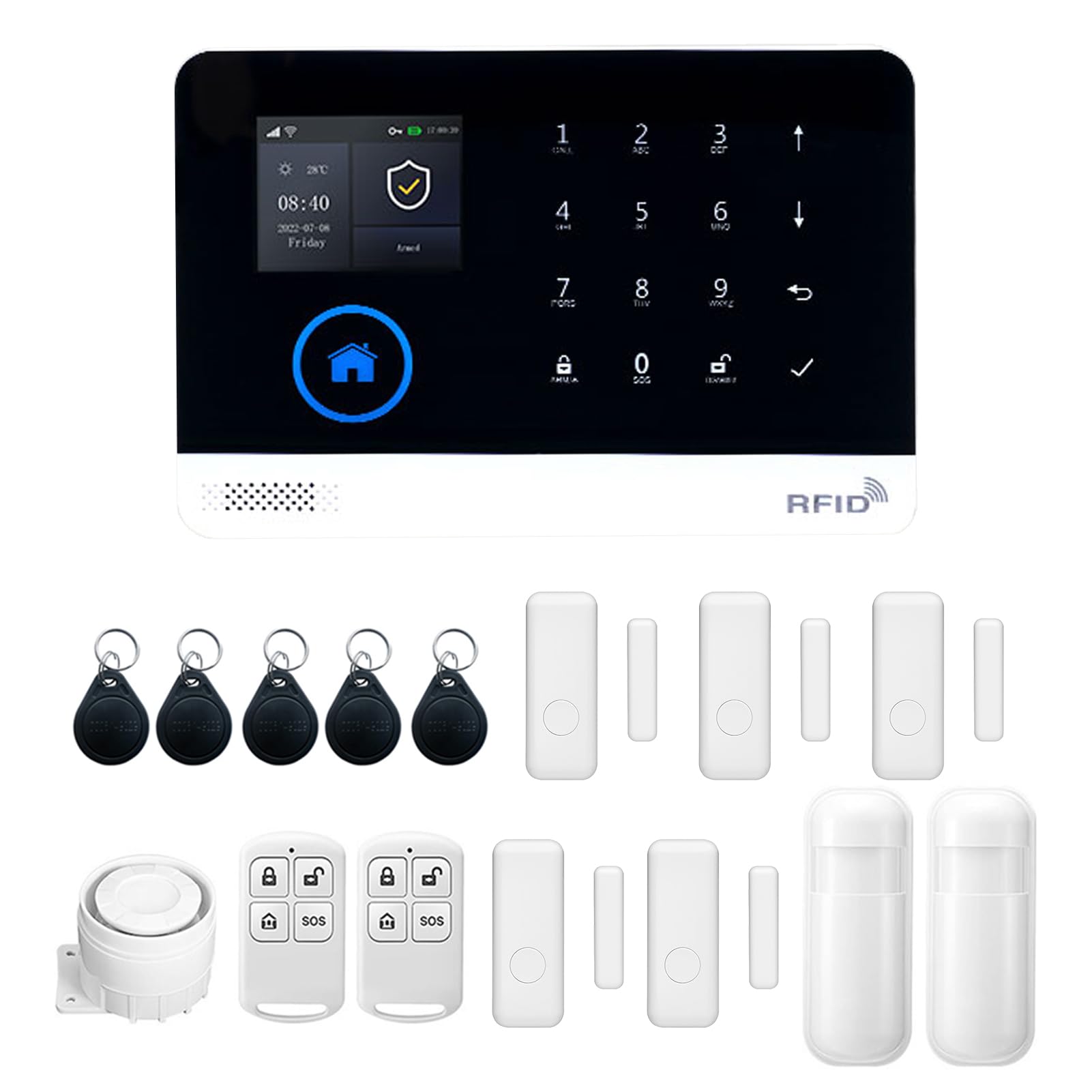
Image: The alarm panel supports eight defense areas and can link to a number of other wireless devices, offering various functions like intelligent prevention, ordinary zone, doorbell mode, and SOS.
6. تعليمات التشغيل
6.1 التسليح ونزع السلاح
يمكن تفعيل النظام أو تعطيله باستخدام طرق متعددة:
- جهاز التحكم عن بعد: Press the arm/disarm buttons on the provided remote controls.
- بطاقة RFID: Tap an authorized RFID card on the panel's RFID reader.
- تطبيق الهاتف المحمول: Use the dedicated smartphone application for remote arming/disarming.
- وظيفة المؤقت: Set scheduled arming and disarming times through the panel settings or mobile app.

Image: The alarm panel features a timer function for automatic arming and disarming, allowing users to set specific schedules, such as arming at 21:15 and disarming at 06:00.
6.2 نظام الاتصال الداخلي الصوتي ثنائي الاتجاه
The alarm panel supports two-way voice communication. When an alarm is triggered or a call is initiated, you can communicate through the panel using your smartphone app.

Image: The system offers a two-way voice intercom feature, enabling communication between the alarm panel and a smartphone, useful for family members to stay connected.
6.3 Voice Control (Alexa Support)
The system supports voice control integration with compatible smart assistants like Amazon Alexa. Once configured through the mobile app, you can use voice commands to arm or disarm your system.

Image: The anti-theft alarm host supports Alexa voice control, allowing users to arm or disarm the system using voice commands through a smart speaker.
6.4 إعدادات اللغة
The alarm panel supports multiple languages. You can switch the display language through the system settings menu on the LCD screen. No restart is required after changing the language.

Image: The alarm panel supports 9 languages, including Chinese, English, German, Russian, Spanish, Polish, Greek, French, and Portuguese, allowing users to switch freely without restarting the device.
6.5 Adding/Managing Accessories
New wireless sensors, remote controls, or RFID cards can be added to the system via the mobile app or the alarm panel's settings menu. Refer to the on-screen instructions for pairing new devices.
6.6 Alarm Functions and Zones
The system features various defense areas and alarm types:
- Intelligent Prevention Area: For critical areas requiring immediate alerts.
- المنطقة العادية: Standard detection zone.
- وضع الجرس: Configures a sensor to act as a doorbell.
- Welcome Mode Prevention Area: For entry points with a welcome chime.
- Emergency Prevention Area: For specific emergency sensors.
- Left-behind Prevention Area: For monitoring items left behind.
- SOS Distress Function: يقوم بتفعيل جهاز إنذار الطوارئ.
Configure these zones and their behaviors through the system settings.
7. الصيانة
7.1 استبدال البطارية
Regularly check the battery status of your wireless sensors and remote controls. Replace batteries promptly when low battery indicators appear on the alarm panel or app.
- مستشعر PIR: Replace with 3 x 1.5V AAA batteries.
- مستشعر الباب: Replace with 1 x CR2450 3V battery.
- جهاز التحكم عن بعد: Replace with 2 x CR2025 3V batteries.
The alarm panel has a built-in Li-ion battery for backup power during outages. This battery is designed for long endurance.

Image: The alarm panel features a low power consumption main board and a super long endurance built-in lithium battery, allowing it to dial phone calls and send SMS even during power outagإِسْ
7.2 التنظيف
Wipe the alarm panel and sensors with a soft, dry cloth. Do not use abrasive cleaners or solvents, as these can damage the device surfaces.
8. استكشاف الأخطاء وإصلاحها
- النظام لا يعمل: Ensure the power adapter is correctly connected and the power outlet is functional. Check the USB cable for damage.
- أجهزة الاستشعار لا تستجيب: Check the batteries in the sensors and replace if necessary. Ensure sensors are within the wireless range of the alarm panel. Re-pair the sensor if needed.
- لا يوجد اتصال واي فاي: Verify your Wi-Fi network is 2.4GHz. Ensure the Wi-Fi password is entered correctly. Check your router for issues.
- لا توجد إشارة GSM: Ensure the SIM card is correctly inserted and has an active plan. Check for network coverage in your area.
- الإنذارات الكاذبة: Review sensor placement to avoid environmental triggers (e.g., direct sunlight, drafts, pets). Adjust sensor sensitivity if applicable.
- مشاكل الاتصال بالتطبيق: Ensure your smartphone has an active internet connection. Restart the app and the alarm panel.
9. الضمان والدعم
يأتي هذا المنتج مع ضمان قياسي من الشركة المصنعة. يرجى الرجوع إلى بطاقة الضمان المرفقة بالعبوة أو الاتصال بالبائع لمعرفة شروط وأحكام الضمان المحددة.
For technical support, troubleshooting assistance, or inquiries regarding your Splenssy Home Security Alarm System, please contact the retailer or manufacturer's customer service. Contact details are typically provided on the product packaging or the manufacturer's official webموقع.