
Aspen ASTF-A40-BLK
دليل مستخدم مروحة Aspen العمودية القابلة للغسل مقاس 40 بوصة
Model: ASTF-A40-BLK
1. المقدمة
شكرا لك على الشراءasing the Aspen 40-inch Washable Tower Fan. This manual provides important information regarding the safe operation, installation, maintenance, and troubleshooting of your new fan. Please read this manual thoroughly before use and retain it for future reference.
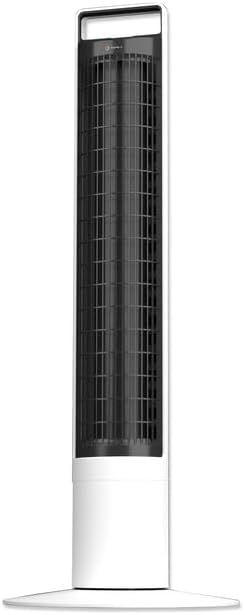
الصورة: الجبهة view of the Aspen 40-inch Washable Tower Fan.
2. معلومات السلامة
اتبع دائمًا احتياطات السلامة الأساسية عند استخدام الأجهزة الكهربائية لتقليل خطر الحريق والصدمة الكهربائية وإصابة الأشخاص.
- لا تقم بتشغيل أي مروحة باستخدام سلك أو قابس تالف.
- لا تمرر السلك تحت السجاد. لا تغطي السلك بسجاد أو أغطية أو أغطية مماثلة. ضع السلك بعيدًا عن منطقة المرور حيث لن يتعثر.
- افصل المروحة دائمًا قبل تحريكها أو تنظيفها أو إجراء الصيانة عليها.
- Do not immerse the main unit (base) in water or other liquids. Only the detachable tower is designed for washing.
- Ensure the fan is completely dry before reassembling and plugging in after cleaning.
- هذه المروحة مخصصة للاستخدام الداخلي فقط.
3. محتويات العبوة
تأكد من وجود جميع المكونات في العبوة:
- Aspen 40-inch Tower Fan (Main Unit and Detachable Tower)
- Base Assembly (2 parts)
- جهاز تحكم عن بعد (مع بطارية CR2 واحدة مرفقة)
- دليل المستخدم (هذا المستند)
4. الإعداد
اتبع الخطوات التالية لتجميع مروحة البرج الخاصة بك وإعدادها:
- تجميع القاعدة: Connect the two halves of the base assembly. Align the fan tower with the assembled base and twist clockwise to secure it. A screwdriver may be needed for initial base assembly.
- الموقع: Place the fan on a firm, level surface. Ensure there is adequate space around the fan for proper airflow and oscillation.
- توصيل الطاقة: قم بتوصيل سلك الطاقة بمأخذ كهربائي قياسي.

Image: Illustration of the fan base assembly process.
5. تعليمات التشغيل
Your Aspen Tower Fan can be operated using the control panel on top of the unit or the included magnetic RF remote control.
لوحة التحكم ووظائف جهاز التحكم عن بعد:

Image: Close-up of the fan's top control panel and the magnetic remote control, showing button functions.
- تشغيل/إيقاف التشغيل: اضغط على زر الطاقة (⏻) لتشغيل المروحة أو إيقافها.
- سرعة المروحة: Cycle through 4 fan speeds (Low, Medium, High, Turbo) by pressing the fan speed button (⇋).
- التذبذب: اضغط على زر التذبذب (↻) to activate or deactivate the 60-degree narrow-angle oscillation feature. This provides a consistent, focused breeze.

Image: Visual representation of the fan's 60-degree narrow-angle oscillation, showing airflow.
- المؤقت: اضبط مؤقت الإيقاف التلقائي لمدة تصل إلى 8 ساعات بالضغط على زر المؤقت (◷). Each press adds an hour to the timer.
- ضوء الليل: Activate the 3-color LED nightlight by pressing the nightlight button (💡). Cycle through colors or turn off the light.

Image: The Aspen Tower Fan with its base illuminated by the built-in nightlight.
مميزات مريحة:
- مقبض الحمل: The integrated handle on top of the fan allows for easy transport.

Image: A hand holding the fan by its convenient top carry handle.
- Magnetic Remote: The remote control magnetically attaches to the top of the fan for convenient storage.
6. الصيانة
The Aspen Tower Fan features an easy-wash design for convenient cleaning. Regular cleaning ensures optimal performance and extends the life of your fan.
Cleaning the Detachable Fan Tower:
- Remove Remote: First, remove the magnetic remote control from the top of the fan.
- Detach Tower: Twist the fan tower counter-clockwise from the base and gently pull it up to detach.
- غسل: The detached fan tower can be washed or rinsed with soap and water. You can soak it or spray it with a water nozzle.
- يجف تماما: Allow the fan tower to dry completely before reassembling. Ensure no moisture remains inside.
- إعادة التجميع: Align the line on the fan tower with the unlock symbol on the base, then push down and twist clockwise to lock it into place. Reinsert the remote.

Image: A person rinsing the detached fan tower with a shower head in a bathtub.

Image: A visual sequence showing a dusty fan, the rinsing process, and a clean, fresh fan.
فيديو تعليمي:
Video: Official Aspen video demonstrating how to clean the tower fan. This video shows the steps for detaching the tower, washing it, and reassembling it.
7. استكشاف الأخطاء وإصلاحها
If you encounter issues with your Aspen Tower Fan, refer to the following common problems and solutions:
| مشكلة | السبب المحتمل | حل |
|---|---|---|
| المروحة لا تعمل. | No power, loose connection, remote battery low. | Check power cord connection. Ensure outlet is working. Replace remote battery (CR2). |
| انخفاض تدفق الهواء. | Dust buildup in tower. | Clean the detachable fan tower as per Maintenance section. |
| المروحة تصدر صوتا غير عادي. | Obstruction, improper assembly. | Ensure no foreign objects are inside. Check if the tower is securely locked into the base. |
| جهاز التحكم عن بعد لا يعمل. | Battery depleted, obstruction between remote and fan. | Replace the CR2 battery in the remote. Ensure no objects are blocking the signal path. |
If the problem persists after trying these solutions, please contact Aspen customer support.
8. المواصفات
| ميزة | التفاصيل |
|---|---|
| ماركة | أسبن |
| اسم الموديل | Aspen Tower Fan Black (ASTF-A40-BLK) |
| أبعاد المنتج | 12 بوصة عمق × 12 بوصة عرض × 41 بوصة ارتفاع |
| وزن العنصر | 9.9 رطل |
| لون | أبيض |
| مصدر الطاقة | كهرباء سلكية |
| عدد مستويات الطاقة | 4 سرعات |
| طريقة التحكم | بعيد |
| المميزات الخاصة | Lightweight, Oscillating, Detachable for Washing, 3-Color Nightlight, 4 Timers, Magnetic RF Remote |
| نوع الغرفة | غرفة نوم ، غرفة معيشة ، مكتب منزلي |
| المكونات المضمنة | بعيد |
| الاستخدام الداخلي والخارجي | داخلي |
| البطاريات | مطلوب بطارية CR1 واحدة (مضمنة) |
9. الضمان والدعم
Specific warranty details are not provided in this manual. For warranty information, product support, or to purchase replacement parts, please contact Aspen customer service.
You can visit the official Aspen store on Amazon for more information: Aspen Store
Ask a question about this manual
Ask about setup, troubleshooting, compatibility, parts, safety, or missing instructions. Manuals+ will review the question and use this page’s manual context to help answer it.