
1. المقدمة
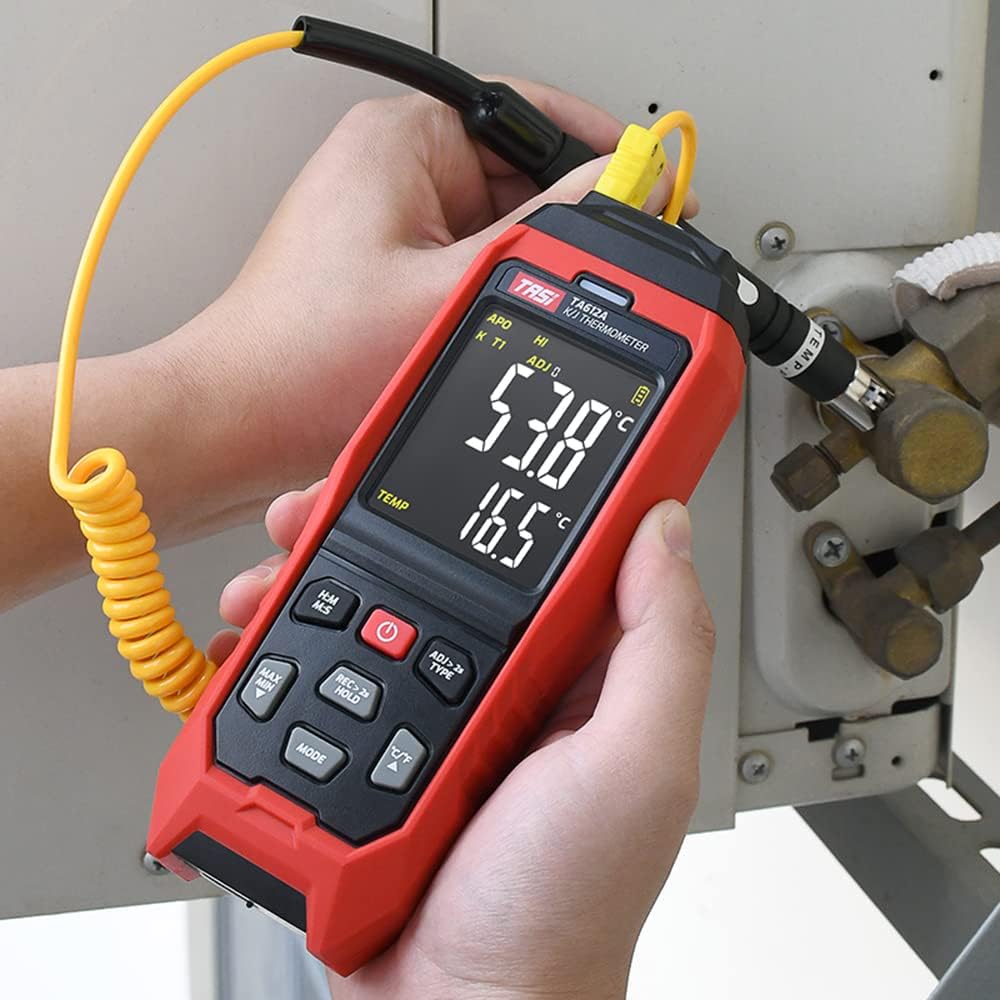
The TASI TA612C is a portable digital thermometer designed for precise temperature measurement using K/J type thermocouples. This model supports four channels, allowing simultaneous measurement of multiple points. It features a VA digital color display, data hold function, MAX/MIN value tracking, extensive data storage capabilities, an alarm buzzer, and automatic shutdown for convenient and efficient operation. The TA612C also includes a USB interface for data upload and real-time measurement.
2. محتويات العبوة
Please check the package contents upon unboxing to ensure all items are present and undamaged.
- 1 x TASI TA612C Thermometer
- 4 x K-type Thermocouple Probes
- 1 × كابل يو اس بي
- 1 × حقيبة تخزين
- 1 × دليل المستخدم (الإنجليزية)

3. مواصفات المنتج
- 4-Channel Measurement: Simultaneously monitor temperatures from up to four different locations using K/J type thermocouples.
- نطاق واسع لدرجة الحرارة: Measures temperatures from -200℃ to 1372℃ (-328℉ to 2501℉).
- VA Digital Color Display: Provides clear and easy-to-read temperature values and operational status.
- وظيفة الاحتفاظ بالبيانات: يقوم بتجميد قراءة درجة الحرارة الحالية على الشاشة.
- MAX/MIN Value Tracking: Records and displays the maximum and minimum temperatures measured during a session.
- تخزين بيانات واسع النطاق: Stores up to 5000 groups of temperature data.
- USB Data Logger: Allows data upload to a computer and real-time measurement monitoring via USB connection.
- Adjustable Probe Error Compensation (ADJ): Compensates for probe inaccuracies within a range of -9℃ to 9℃.
- إنذار درجة حرارة عالية / منخفضة: Configurable alarm limits (default 1300℃/-200℃) with dual sound and light alerts.
- الإغلاق التلقائي: يحافظ على عمر البطارية عن طريق إيقاف التشغيل تلقائيًا بعد فترة من عدم النشاط.

4. الإعداد
4.1 مصدر الطاقة
The TA612C thermometer can be powered by three AA/LR06 batteries (not included) or via a 5V 1A USB power source. Ensure batteries are inserted with correct polarity. For continuous operation or data transfer, connect the device using the provided USB cable.
4.2 Connecting Thermocouple Probes
The device supports K/J type thermocouples. Four K-type probes are included in the package. Connect the thermocouple probes to the corresponding input jacks (T1, T2, T3, T4) at the top of the device. Ensure a secure connection for accurate readings.
5. تعليمات التشغيل
5.1 تشغيل/إيقاف التشغيل
- اضغط على زر الطاقة (
 ) لتشغيل الجهاز.
 - اضغط مع الاستمرار على زر الطاقة for approximately 2 seconds to turn the device off.
5.2 عرض أكثرview
The VA color display provides comprehensive information. Refer to the diagram below for key indicators:

5.3 القياس الأساسي
Once powered on and probes are connected, the device will automatically begin displaying temperature readings for each active channel. The sampling rate is approximately 1 time per second.
5.4 عقد البيانات
اضغط على REC > 2s HOLD button briefly to activate/deactivate the data hold function. The 'HOLD' indicator will appear on the display when active.
5.5 MAX/MIN Value
اضغط على ماكس دقيقة button to cycle through current, maximum (MAX), and minimum (MIN) temperature readings. The corresponding indicator will show on the display.
5.6 تبديل الوحدات (°م/°ف)
اضغط على ° C / ° F زر للتبديل بين وحدات قياس درجة الحرارة المئوية والفهرنهايتية.
5.7 تخزين البيانات
The TA612C can store up to 5000 groups of temperature data. To manually record data, press and hold the REC > 2s HOLD button for more than 2 seconds. The 'REC' indicator will flash, and the data group number will increment. The device stores the temperature values of the thermocouple channels, not ambient temperature.

5.8 إعدادات التنبيه
The device has default high/low alarm limits of 1300℃ and -200℃. Consult the full user manual for detailed instructions on how to adjust these alarm thresholds. When an alarm condition is met, the device will provide both sound and light alerts.
5.9 Probe Error Compensation (ADJ)
The TA612C allows for probe error compensation (ADJ) within a range of -9℃ to 9℃. This feature helps to fine-tune the accuracy of readings for specific probes. Refer to the detailed user manual for steps on how to access and adjust this setting.
6. Data Management (USB)
The TA612C model features a USB interface for data connectivity. Connect the thermometer to a computer using the provided USB cable. This allows for:
- تحميل البيانات: Transfer stored temperature data from the device to your computer for analysis and record-keeping.
- Real-time Measurement: Monitor live temperature readings on your computer screen, which can be useful for long-term logging or detailed observation.
Software for data management is typically available from the manufacturer's website, as indicated in the included user manual.
7. الصيانة
7.1 التنظيف
لتنظيف الجهاز ، استخدم أداة ناعمة ، دamp cloth. Do not use abrasive cleaners, solvents, or immerse the device in water. Ensure the device is powered off and disconnected from any power source before cleaning.
7.2 التخزين
When not in use, store the thermometer and its probes in the provided storage bag in a cool, dry place, away from direct sunlight and extreme temperatures. Remove batteries if the device will not be used for an extended period to prevent leakage.
7.3 استبدال البطارية
When the battery indicator shows low power, replace the three AA/LR06 batteries. Ensure the device is powered off before opening the battery compartment and observe correct polarity when inserting new batteries.
8. استكشاف الأخطاء وإصلاحها
- الجهاز لا يعمل: Check battery installation and ensure batteries are not depleted. If using USB power, verify the cable and power source.
- قراءات غير دقيقة: Ensure thermocouple probes are correctly and securely connected. Check for any visible damage to the probes. Consider using the ADJ compensation feature if a known offset exists.
- الشاشة فارغة أو تومض: Replace batteries or connect to USB power. If the issue persists, contact customer support.
- مشاكل نقل البيانات: Ensure the USB cable is properly connected to both the device and the computer. Verify that the correct software/drivers are installed on your computer.
- جهاز الإنذار لا يعمل: Check alarm settings to ensure limits are correctly configured and the alarm function is enabled.
For issues not covered here, please refer to the comprehensive user manual or contact KKnoon customer support.
9. المواصفات الفنية
| المعلمة | مواصفة |
|---|---|
| نموذج | TA612C |
| قناة | 4 قنوات |
| تخزين البيانات | 5000 مجموعة |
| Data Upload & Real-time Measurement | Supported (USB) |
| مادة | ABS (Acrylonitrile Butadiene Styrene), PC (Polycarbonate) |
| K/J Type Measurement Range | -200 ~ 1372 درجة مئوية / -328 ~ 2501 درجة مئوية |
| دقة | ±0.2% + 0.7℃ |
| High/Low Alarm Limit (Default) | 1300℃ / -200℃ |
| ADJ Compensation Range | -9 درجة مئوية ~ 9 درجة مئوية |
| Sampمعدل لينغ | Approx. 1 time/s |
| مزود الطاقة | 3 x AA/LR06 Batteries (not included) or USB 5V 1A |
| حجم العنصر | 177 × 70 × 35 ملم (6.97 × 2.76 × 1.38 بوصة) |
| وزن العنصر | 565 جرام (1.25 رطل) |
| نوع العرض | Digital VA Color Display |
| تكنولوجيا الاتصال | USB |
10. معلومات السلامة
Please read and understand all safety instructions before using this device. Failure to follow these instructions may result in electric shock, fire, or personal injury.
- لا تقم بتشغيل الجهاز إذا بدا تالفًا أو لا يعمل بشكل صحيح.
- لا تحاول إصلاح الجهاز أو تعديله. أحل جميع أعمال الصيانة إلى فنيين مؤهلين.
- Ensure the correct type of thermocouple probes (K or J) are used and properly connected.
- تجنب تعريض الجهاز لدرجات حرارة شديدة أو رطوبة أو أشعة الشمس المباشرة.
- احتفظ بالجهاز بعيدًا عن المجالات الكهرومغناطيسية القوية.
- Remove batteries if the device is not used for a long period to prevent battery leakage.
- تخلص من البطاريات والجهاز وفقًا للوائح المحلية.
11. الضمان والدعم
For warranty information, technical support, or service inquiries, please refer to the contact details provided in the original product packaging or visit the official KKnoon webالموقع. احتفظ بإيصال الشراء الخاص بك كإثبات للشراء في حالة مطالبات الضمان.