
1. المقدمة
Thank you for choosing the HIKMICRO HEIMDAL H4D Digital Night Vision Monocular. This device is designed for observation in low light and complete darkness, featuring a high-resolution sensor and AMOLED display for clear imaging.
المميزات الرئيسية:
- 1.39" AMOLED display with 454 x 454 resolution
- High-resolution 2560 x 1440 sensor
- Integrated 850 nm infrared illuminator with smart IR function
- Day/Night/Auto/Defog modes
- تثبيت الصورة الإلكتروني (EIS)
- Detection range up to 200 meters
- Replaceable and rechargeable battery with over 4 hours of use
- Compact and portable design, waterproof and dustproof (IP67)
- Integrated 32 GB EMMC for storing recorded videos and photos
- Wireless connection via HIKMICRO Sight app, local album function
محتويات الحزمة:
- HIKMICRO HEIMDAL H4D Digital Night Vision Monocular
- بطارية
- قطعة قماش لإزالة الغبار
- حقيبة واقية
- حزام المعصم
- كابل USB-C
2. انتهى المنتجview
Familiarize yourself with the components and controls of your HIKMICRO HEIMDAL H4D monocular.
تخطيط الجهاز
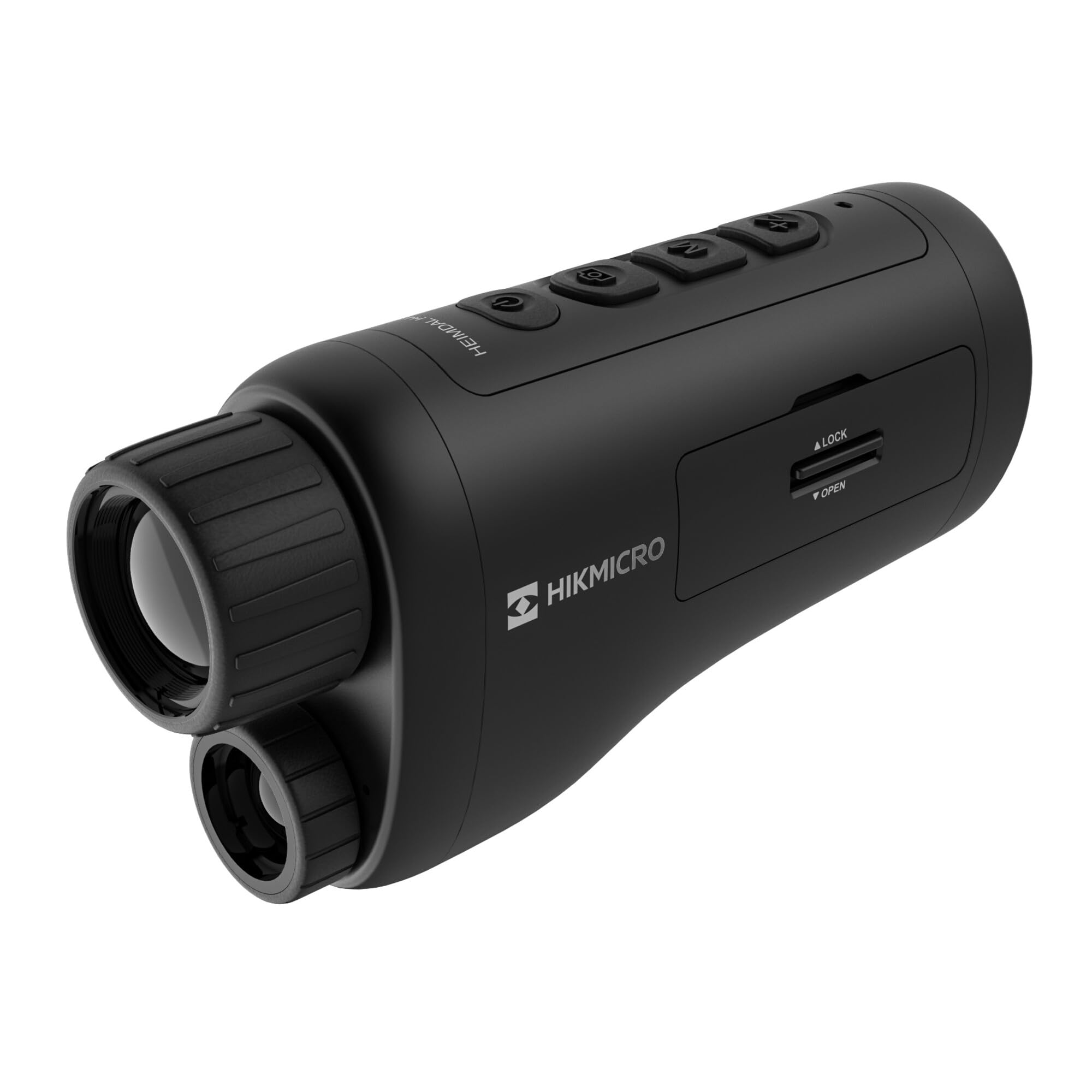
زاوية view of the HIKMICRO HEIMDAL H4D monocular, showing its compact, ergonomic design and the main lens.
الضوابط والأزرار

قمة view of the monocular showing the power button, photo/video record button, mode button, and zoom/IR adjustment buttons.
Lenses and Focus

أمام view displaying the objective lens and the integrated infrared illuminator.
حجرة البطارية

جانب view showing the battery compartment with 'LOCK' and 'OPEN' indicators.
3. الإعداد
تركيب البطارية
- حدد مكان حجرة البطارية على جانب الجهاز.
- Slide the lock mechanism to the 'OPEN' position.
- قم بإدخال البطارية القابلة لإعادة الشحن، مع التأكد من القطبية الصحيحة.
- Close the compartment and slide the lock mechanism to the 'LOCK' position.
شحن البطارية
Connect the device to a power source using the provided USB-C cable. The charging indicator will show the charging status.
التشغيل الأولي
اضغط مع الاستمرار على زر الطاقة (عادةً ما يكون مميزًا بـ Ⓘ) until the HIKMICRO logo appears on the display.
4. تعليمات التشغيل
تشغيل/إيقاف الطاقة
- تشغيل الطاقة: اضغط مع الاستمرار على زر الطاقة لمدة ثانيتين تقريبًا.
- إيقاف التشغيل: Press and hold the power button for approximately 3 seconds until the device shuts down.
ضبط التركيز
Rotate the focus ring on the objective lens to achieve a clear image of your target.
اختيار الوضع
Press the 'M' (Mode) button to cycle through observation modes: Day, Night, Auto, and Defog.
Zoom and IR Adjustment
Use the '+' and '-' buttons to adjust the digital zoom level. These buttons also control the intensity of the infrared illuminator in night mode.
Photo and Video Recording
- التقط الصورة: Press the photo/video button (usually marked with 📷) once to capture an image.
- تسجيل الفيديو: Press and hold the photo/video button to start recording. Press again to stop.
Connecting to HIKMICRO Sight App
Download the HIKMICRO Sight app from your device's app store. Follow the in-app instructions to connect your monocular for live view، والتحكم عن بعد، وإدارة الوسائط.
5. الصيانة
تنظيف
- Use the provided dust cloth or a soft, lint-free cloth to clean the lenses.
- For stubborn dirt, use a lens cleaning solution specifically designed for optics.
- امسح جسم الجهاز بقطعة قماش ناعمة و...amp القماش. لا تستخدم المنظفات أو المذيبات الكاشطة.
تخزين
- Store the monocular in its protective bag in a cool, dry place when not in use.
- قم بإزالة البطارية إذا كنت لن تستخدم الجهاز لفترة طويلة.
العناية بالبطارية
- Charge the battery regularly, even if not in frequent use, to maintain its lifespan.
- تجنب درجات الحرارة القصوى أثناء الشحن والتخزين.
6. استكشاف الأخطاء وإصلاحها
المشاكل الشائعة والحلول
| مشكلة | السبب المحتمل | حل |
|---|---|---|
| الجهاز لا يعمل. | تم استنزاف البطارية أو تم تركيبها بشكل غير صحيح. | اشحن البطارية. تأكد من تركيب البطارية بالقطبية الصحيحة. |
| الصورة غير واضحة. | لم يتم ضبط التركيز. | قم بتدوير حلقة التركيز الموجودة على العدسة الشيئية حتى تصبح الصورة واضحة. |
| جودة الصورة رديئة في الظلام. | جهاز الإضاءة بالأشعة تحت الحمراء مطفأ أو مضبوط على شدة منخفضة. | Activate the IR illuminator or increase its intensity using the '+' button. Ensure you are in Night mode. |
| Cannot connect to HIKMICRO Sight app. | Bluetooth/Wi-Fi is off on device or phone, or app is not updated. | Ensure Bluetooth/Wi-Fi is enabled on both devices. Restart the app and monocular. Check for app updates. |
| يتجمد الجهاز أو يصبح غير مستجيب. | خلل مؤقت في البرنامج. | قم بإعادة تشغيل الجهاز بالضغط مع الاستمرار على زر الطاقة حتى تتم إعادة تشغيله. إذا استمرت المشكلة، فاتصل بالدعم الفني. |
7. المواصفات
| ميزة | التفاصيل |
|---|---|
| الاستشعار القرار | 2560 × 1440 |
| نوع العرض | أموليد |
| دقة العرض | 454 × 454 |
| حجم العرض | 1.39 بوصة (3.5 سم) |
| إضاءة الأشعة تحت الحمراء | Integrated 850 nm |
| مدى الكشف | حتى 200 أمتار |
| تخزين | 32 GB EMMC (internal) |
| عمر البطارية | More than 4 hours (replaceable, rechargeable) |
| تصنيف مقاومة الماء | IP67 |
| أبعاد | 153 مم × 50 مم × 80 مم (6.02 بوصة × 1.97 بوصة × 3.15 بوصة) |
| وزن | 375 جرام (0.83 رطل) |
| مادة | بلاستيك |
| الأجهزة المتوافقة | Rifle, Compound Bow |
| نوع التركيب | جبل بيكاتيني |
| Sport Use | Campجي، المشي لمسافات طويلة |
| لون | أبيض |
8. الضمان والدعم
HIKMICRO products are covered by a limited warranty. For detailed warranty information, please refer to the official HIKMICRO webالموقع أو الاتصال بالموزع المحلي.
For technical support, troubleshooting assistance, or service inquiries, please visit the official HIKMICRO support page or contact their customer service department.
رسمي Webموقع: www.hikmicrotech.com