
تكناكس تكس -238
Technaxx Crank Radio with Mobile Phone Charging Function
الموديل: TX-238
العلامة التجارية: تكناكس
مقدمة
The Technaxx TX-238 is a versatile emergency radio designed for reliability and independence from external power sources. It integrates a hand crank, solar panel, and USB charging capabilities, making it an ideal companion for travel, camping, and emergency situations. This manual provides detailed instructions for the setup, operation, and maintenance of your device.

Image: The Technaxx TX-238 radio, showcasing its compact design, extended antenna, and illuminated LED flashlight. The hand crank is folded down on top.
الميزات الرئيسية
- مصدر طاقة مستقل: Features an integrated solar panel and a hand crank for charging, ensuring operation without external power.
- Excellent Radio Reception: Equipped with a special radio antenna for clear reception of AM/FM stations.
- Bright Emergency Lighting: Includes a super bright LED flashlight for illumination in dark environments or emergencies.
- شحن الأجهزة المحمولة: USB output allows convenient charging of smartphones and tablets on the go.
- بناء متين: Made from high-quality ABS plastic for robustness and durability.

Image: An infographic highlighting the multi-functional capabilities of the TX-238, including solar charging, SOS alarm, reading lamp, USB charging, 1200mAh battery, 3W flashlight, AM/FM radio, and headphone function. The radio is shown with its flashlight on, in a mountainous outdoor setting.
مكونات المنتج وعناصر التحكم
Familiarize yourself with the various parts and controls of your Technaxx TX-238 radio:
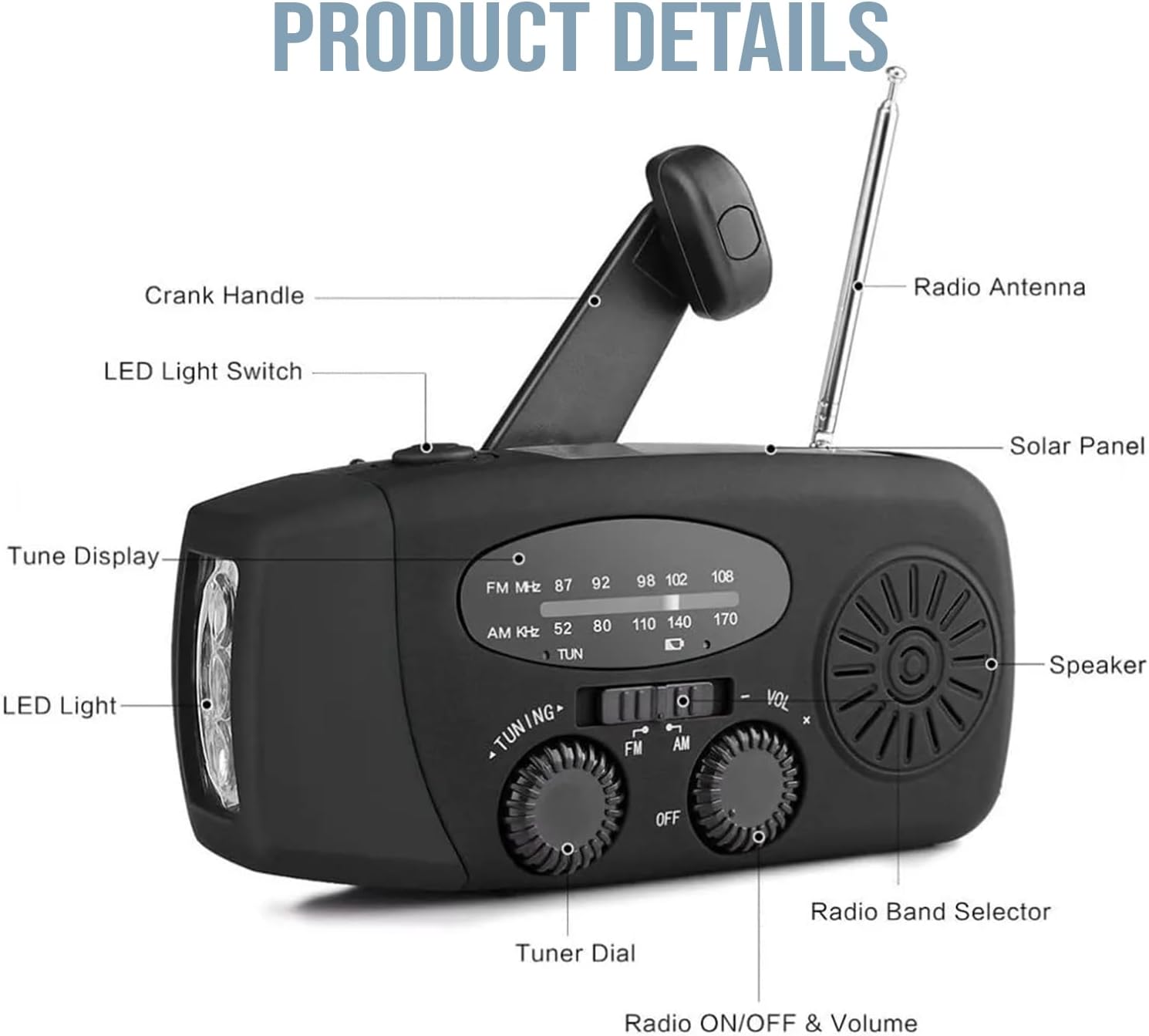
Image: A detailed diagram illustrating the various components of the TX-238 radio, including the crank handle, LED light switch, tune display, LED light, radio antenna, solar panel, speaker, radio band selector, tuner dial, and the combined radio ON/OFF and volume knob.
- مقبض الكرنك: Used for manual power generation.
- مفتاح ضوء LED: Activates the front LED flashlight.
- Tune Display: Shows the selected radio frequency.
- ضوء LED: Front-facing flashlight.
- هوائي الراديو: هوائي قابل للتمديد لتحسين استقبال الراديو.
- لوحة الطاقة الشمسية: Top-mounted panel for solar charging.
- المتحدث: Audio output for radio.
- Radio Band Selector: Switch between FM, AM, and WB (Weather Band, if applicable).
- Tuner Dial: Adjusts the radio frequency.
- Radio ON/OFF & Volume: Rotary knob to turn the radio on/off and control volume.
تشغيل الجهاز
The TX-238 offers multiple methods for power generation and charging:
1. Hand-Cranked Charging
Extend the crank handle from the back of the unit and rotate it clockwise or counter-clockwise at a steady pace. Approximately 2.5 hours of continuous cranking can fully charge the device.
2. الشحن بالطاقة الشمسية
Place the radio with its solar panel facing direct sunlight. Ensure no obstructions block the panel. Solar charging is slower, requiring approximately 40-50 hours of direct sunlight for a full charge. This method is ideal for maintaining charge or slow charging over extended periods.
3. USB Charging (Input)
Connect the provided USB cable to the micro-USB input port on the side of the radio and to a standard USB power adapter (not included) or a computer USB port. This is the fastest method for initial charging or quick top-ups.

Image: A visual guide demonstrating the three primary charging methods: USB input, manual hand-crank, and solar panel charging, with arrows indicating the direction of power input.
USB Output (Power Bank Function)
The radio features a USB-A output port to charge external mobile devices like smartphones and tablets. Connect your device's charging cable to this port. The internal battery of the radio will then supply power to your connected device.

Image: The TX-238 radio connected to a smartphone via its USB output, demonstrating its function as an emergency power bank. Text highlights the 1200mAh battery and charging duration estimates.
عملية
وظيفة راديو
- Turn On/Off and Volume: Rotate the "Radio ON/OFF & Volume" knob clockwise to turn on the radio and increase volume. Rotate counter-clockwise to decrease volume and turn off.
- اختر الفرقة: Use the "Radio Band Selector" switch to choose between FM, AM, or WB (Weather Band, if applicable).
- محطة الضبط: Rotate the "Tuner Dial" to scan for stations. The "Tune Display" will show the frequency. Extend the radio antenna for better reception.
تشغيل المصباح
Slide the "LED Light Switch" to turn the front LED flashlight on or off. This is useful for emergency lighting or general illumination in dark conditions.

Image: A split image demonstrating the lighting capabilities: the top panel shows the reading lamp feature, while the bottom panel illustrates the powerful flashlight illuminating a camping tent at night.
الاستعداد للطوارئ
The Technaxx TX-238 is designed to be a reliable tool in various emergency scenarios:
- تنبيهات الطقس: Tune into the Weather Band (WB) for critical weather updates during storms or natural disasters.
- تواصل: Stay informed with AM/FM radio broadcasts when other communication methods are unavailable.
- إضاءة: The integrated flashlight provides essential illumination during power outagأو في البيئات المظلمة.
- Power for Devices: Use the USB output to charge essential mobile devices, ensuring you can make emergency calls or access information.

Image: A composite image illustrating the TX-238 radio's utility in various emergency situations such as fires, earthquakes, hurricanes, snowstorms, and floods, emphasizing its role in preparedness.
تحديد
| ميزة | التفاصيل |
|---|---|
| اسم الموديل | تي اكس-238 |
| أبعاد | 130 × 48.5 × 62 مم (4.8 × 6.4 × 12.8 سم) |
| وزن | 235 جرام |
| مادة | أكريلونيتريل بوتادين ستايرين (ABS) |
| نطاقات الراديو | AM, FM (Frequency: 108 MHz for FM) |
| مصادر الطاقة | Hand Crank, Solar Panel, USB (Input) |
| الناتج | USB-A (for charging mobile devices) |
| المميزات الخاصة | Built-in Flashlight, Solar Powered |

Image: A visual representation of the TX-238 radio's physical dimensions, indicating its height (6.4cm), width (4.8cm), and length (12.8cm).
الصيانة والعناية
- تنظيف: امسح الجهاز بقطعة قماش ناعمة وجافة. لا تستخدم مواد كيميائية قاسية أو منظفات كاشطة.
- تخزين: قم بتخزين الراديو في مكان بارد وجاف بعيدًا عن أشعة الشمس المباشرة ودرجات الحرارة القصوى عندما لا يكون قيد الاستخدام لفترات طويلة.
- صحة البطارية: For optimal battery life, fully charge the device at least once every three months, even if not in regular use.
- مقاومة الماء: While designed to withstand some moisture (as indicated by "WATERPROOF" image), avoid submerging the device in water. Ensure all ports are dry before charging.

Image: The TX-238 radio being splashed with water, illustrating its water-resistant design suitable for use in rain and challenging weather conditions.
استكشاف الأخطاء وإصلاحها
- لا يوجد طاقة:
- Ensure the battery is charged using the hand crank, solar panel, or USB input.
- Check if the ON/OFF knob is fully rotated to the 'ON' position.
- استقبال الراديو ضعيف:
- قم بتمديد الهوائي التلسكوبي بشكل كامل.
- Try repositioning the radio to a different location, especially near a window or outdoors.
- Adjust the tuner dial slowly to fine-tune the station.
- المصباح لا يعمل:
- تأكد من أن البطارية بها شحن كافٍ.
- Check the LED Light Switch position.
- Mobile Device Not Charging via USB Output:
- تأكد من أن البطارية الداخلية للراديو مشحونة بشكل كافٍ.
- Verify the USB cable is securely connected to both the radio and the mobile device.
- Try a different USB cable or mobile device to rule out compatibility issues.
الضمان والدعم
Technaxx products are designed for reliability and performance. For warranty information, technical support, or service inquiries, please refer to the warranty card included with your product or visit the official Technaxx webالموقع. احتفظ بإيصال الشراء الخاص بك كإثبات للشراء في حالة مطالبات الضمان.
For further assistance, please contact Technaxx customer support through their official channels.
Ask a question about this manual
Ask about setup, troubleshooting, compatibility, parts, safety, or missing instructions. Manuals+ will review the question and use this page’s manual context to help answer it.