
1. المقدمة
This manual provides detailed instructions for the setup, operation, maintenance, and troubleshooting of your Cosmic Byte ARES Wired Controller for PC. Designed for an enhanced gaming experience, this controller features Hall Effect joysticks and triggers, dual vibration, and customizable Turbo functions.
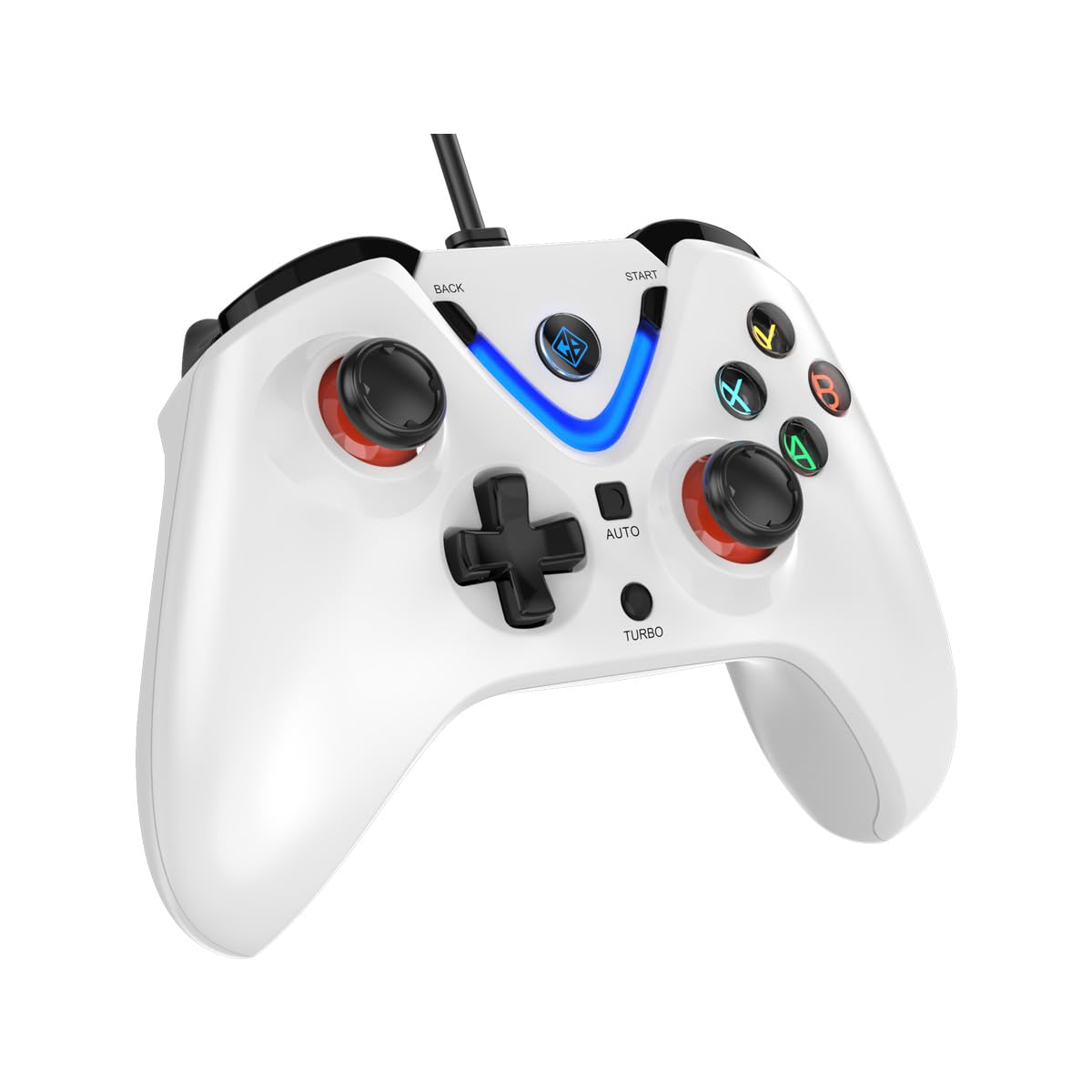
Image 1: The Cosmic Byte ARES Wired Controller in white, showcasinج- تصميمه المريح.
2. تعليمات الإعداد
2.1 الاتصال بجهاز الكمبيوتر
- تأكد من تشغيل جهاز الكمبيوتر الخاص بك.
- حدد موقع منفذ USB متاحًا على جهاز الكمبيوتر الخاص بك.
- Plug the USB connector of the Cosmic Byte ARES Wired Controller into the USB port.
- سيقوم نظام التشغيل تلقائيًا باكتشاف برامج التشغيل اللازمة وتثبيتها. قد تستغرق هذه العملية بضع لحظات.
- بمجرد اكتمال التثبيت، يصبح جهاز التحكم جاهزًا للاستخدام.

Image 2: The controller connected via its wired USB connection, ensuring fast response.
3. تعليمات التشغيل
3.1 الضوابط الأساسية
The Cosmic Byte ARES controller features standard gamepad layouts, including:
- Left and Right Analog Joysticks: للحصول على حركة دقيقة والتحكم في الكاميرا.
- D- الوسادة: لإدخال الاتجاهات، وغالبًا ما يستخدم في القوائم أو لإجراءات محددة في اللعبة.
- أزرار الإجراءات (A، B، X، Y): For primary game interactions.
- أزرار الكتف (L1، R1) وأزرار الزناد (L2، R2): For various in-game functions like shooting, aiming, or accelerating.
- أزرار البدء والرجوع: For pausing games, accessing menus, or specific in-game commands.
- زر توربو: For activating rapid-fire functions.
- زر تلقائي: For activating automatic rapid-fire functions.
3.2 عصي التحكم وأزرار التشغيل بتقنية تأثير هول
The controller is equipped with Hall Effect joysticks and triggers, which use magnetic sensors instead of physical contacts. This technology provides:
- دقة معززة: More accurate and responsive input.
- متانة معززة: Reduces wear and tear, preventing stick drift over time.
- التشغيل السلس: Consistent and linear response for triggers, allowing for nuanced control in games.

الصورة 3: انفجار view illustrating the Hall Effect joystick mechanism and the Hall Effect triggers.
3.3 التغذية الراجعة بالاهتزاز المزدوج
The controller features dual vibration motors that provide tactile feedback during gameplay, enhancing immersion by simulating in-game events such as impacts, explosions, or engine rumbling.
3.4 Backlit LED Buttons
The action buttons (A, B, X, Y) and the central V-shaped indicator feature LED backlighting, providing visibility in low-light conditions and adding to the controller's aesthetic.

Image 4: The controller with its LED buttons illuminated and visual representation of vibration effects.
3.5 Turbo and Auto Turbo Functions
The Turbo and Auto Turbo functions allow for rapid, repeated input of a button press without continuously pressing the button.
- تفعيل التوربو: Press and hold the desired action button (e.g., A) and then press the توربيني button. The button will now rapidly repeat its input as long as you hold it down.
- Activating Auto Turbo: Press and hold the desired action button (e.g., A) and then press the آلي button. The button will now rapidly repeat its input automatically without needing to be held down.
- Deactivating Turbo/Auto Turbo: To deactivate, repeat the activation steps for the specific button, or press the واضح button (if available) or disconnect and reconnect the controller.

Image 5: Close-up of the controller showing the Turbo and Auto function buttons.
4. الصيانة
- تنظيف: استخدم قطعة قماش ناعمة وجافة لتنظيف وحدة التحكم. للأوساخ العنيدة، استخدم قطعة قماش جافة قليلاً.amp cloth can be used, ensuring no liquid enters the controller. Avoid harsh chemicals or abrasive cleaners.
- تخزين: خزّن وحدة التحكم في مكان بارد وجاف بعيدًا عن أشعة الشمس المباشرة ودرجات الحرارة القصوى. تجنب وضع أشياء ثقيلة على وحدة التحكم.
- العناية بالكابلات: Do not sharply bend or pull the USB cable. Always grasp the plug when disconnecting from the PC.
5. استكشاف الأخطاء وإصلاحها
- لم يتم التعرف على وحدة التحكم:
- تأكد من توصيل كابل USB بشكل آمن بكل من وحدة التحكم والكمبيوتر.
- حاول توصيل وحدة التحكم بمنفذ USB مختلف.
- أعد تشغيل الكمبيوتر الخاص بك.
- Check Device Manager on Windows to see if the controller is listed and if there are any driver issues.
- الأزرار/عصي التحكم لا تستجيب:
- Verify the controller is recognized by your PC (see above).
- Test the controller in a different game or a controller testing utility to rule out game-specific issues.
- تأكد من عدم وجود أجهزة إدخال أخرى تتداخل مع الإشارة.
- الاهتزاز لا يعمل:
- تحقق من إعدادات اللعبة للتأكد من تفعيل خاصية الاهتزاز.
- Some games may not support vibration or may have limited vibration effects.
6. المواصفات
| ميزة | التفاصيل |
|---|---|
| ماركة | بايت كوني |
| اسم الموديل | آريس |
| الأجهزة المتوافقة | PC |
| نوع وحدة التحكم | لوحة الألعاب |
| تكنولوجيا الاتصال | USB |
| مميزات المنتج | بيئة العمل المريحة |
| كمية الأزرار | 16 |
| منصة الأجهزة | PC |
| نوع مصدر الطاقة | سلك كهرباء، كابل يو اس بي |
| وزن العنصر | 220 جرام |
| أبعاد العنصر | 6 × 10 × 4 سنتيمتر |
| لون | أبيض |
| بلد المنشأ | الصين |

Image 6: A comparison table highlighting features of different ARES controller models.
7. الضمان والدعم
7.1 معلومات الضمان
The Cosmic Byte ARES Wired Controller comes with a ضمان لمدة عام ضد عيوب التصنيع من تاريخ الشراء. يُرجى الاحتفاظ بإيصال الشراء للمطالبة بالضمان.
7.2 معلومات الاتصال بالشركة المصنعة
For support, service, or warranty inquiries, please contact:
بايت كونيPrakash Warehousing, S. No.163, Hissa No 1-2-3-4-5A-5B/2/1,
Phursungi, Pune 412308, Maharashtra, India
For further assistance, please visit the official Cosmic Byte webالموقع أو الاتصال بخدمة العملاء الخاصة بهم.