
1. المقدمة
This manual provides detailed instructions for the safe and effective operation of your INKEE GC60d5 Gold Crow COB LED Video Light. Please read this manual thoroughly before using the product to ensure proper functionality and to prevent damage. Keep this manual for future reference.

Figure 1: The INKEE GC60d5 Gold Crow COB LED Video Light shown with its included accessories: the light unit, lampshade, charging cable, and power adapter.
2. انتهى المنتجview
The INKEE GC60d5 is a high-performance COB LED video light designed for professional users, offering a daylight color temperature of 5600K. It features a high Color Rendering Index (CRI) and Television Lighting Consistency Index (TLCI) for accurate color reproduction.
المميزات الرئيسية:
- ارتفاع مؤشر CRI و TLCI: Average CRI of 95 and TLCI of 96 for precise color rendering.
- Controllable Light: Deformable lampshade with Bowens mount compatibility for various light control accessories.
- البطارية المتكاملة: Built-in 142Wh battery provides approximately 2 hours of operation at full 60W power.
- Fast Charging & Discharging: Supports up to 100W fast charging (fully charges in 2 hours) and 100W discharging to power other devices.
- حلقة التحكم العالمية: Intuitive control for brightness, color temperature, and lighting effects.
- NTC Intelligent Active Cooling: Ensures optimal operating temperature with a built-in fan and graphene radiator.
- قابلة للتوسيع: 1/4-inch screw hole allows for infinite splicing with multiple GC60d5 units using a magic arm (sold separately).
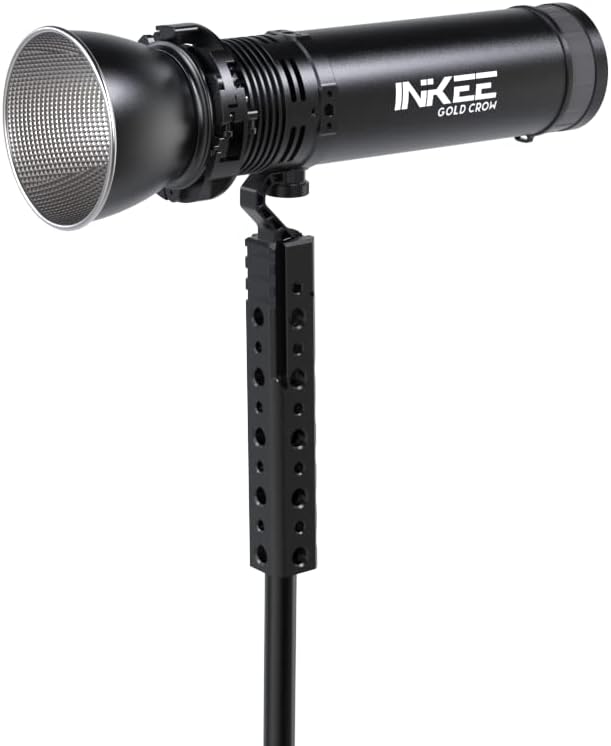
الشكل 2: الجانب view of the INKEE GC60d5 Gold Crow LED Video Light, illustrating its compact design and integrated handle for portability and mounting.
3. الإعداد
3.1 تثبيت حرف Lampshade/Reflector
- محاذاة لampshade with the front of the light unit.
- Gently push and turn clockwise to secure the lampظل.
- لampshade's buckle can be transformed to accommodate Bowens mount accessories. To do this, turn the buckle clockwise to open the bayonet.

Figure 3: Visual guide for attaching the lampshade and converting its buckle to a Bowens mount for compatibility with various light modifiers.
3.2 التشغيل المبدئي
Press and hold the power button (integrated into the control ring) for a few seconds until the display illuminates. The light will power on in its last used setting or default mode.
4. تعليمات التشغيل
The INKEE GC60d5 features a universal control ring for adjusting various parameters.

Figure 4: The universal control ring and integrated display, showing options for brightness, color temperature, and mode adjustments.
4.1 ضبط السطوع
- Rotate the control ring to increase or decrease the light intensity. The dimming range is 0% to 100%.
- The current brightness level will be displayed on the screen.
4.2 Adjusting Color Temperature (Fixed)
The GC60d5 is a daylight-balanced light with a fixed color temperature of 5600K. This setting cannot be adjusted.
4.3 Scene Effects
The light offers several pre-programmed scene effects for creative lighting scenarios:
- وضع الإضاءة الثابتة
- وضع الوميض
- وضع الإضاءة
- وضع التلفاز سيء
- وضع اللمبة السيئ
- وضع SOS
To cycle through these modes, press the mode button (if separate) or rotate the control ring while in mode selection. Refer to the on-screen display for current mode selection.
5. الشحن وإدارة الطاقة
The GC60d5 features a built-in 142Wh (14.8V 9600mAh) Lithium-Ion battery.
5.1 شحن الجهاز
- Connect the provided charging cable to the USB-C port on the light and to a compatible power adapter.
- The GC60d5 supports up to 100W fast charging. A full charge typically takes approximately 2 hours.
- يمكن استخدام الجهاز أثناء الشحن.

Figure 5: The INKEE GC60d5 supports 100W fast charging, significantly reducing charging time. Charging time may vary with different wattagشواحن البريد.
5.2 Power Discharging (Power Bank Function)
The GC60d5 supports up to 100W power discharging, allowing it to charge other electronic devices that support fast charging. This feature intelligently allocates power, enabling you to power other devices even while the light is in operation.
5.3 عمر البطارية
Under full 60W power, the built-in battery provides approximately 2 hours of continuous operation. Actual battery life may vary depending on usage conditions and selected brightness levels.
Important: The 142Wh battery meets civil aviation safety requirements and can be carried on an airplane (not checked baggage). Always verify current airline regulations before travel.
6. الصيانة
6.1 التنظيف
To clean the light, use a soft, dry cloth. Do not use liquid cleaners, solvents, or abrasive materials, as these may damage the finish or internal components. Ensure the device is powered off and disconnected from any power source before cleaning.
6.2 التخزين
When not in use, store the INKEE GC60d5 in a cool, dry place, away from direct sunlight and extreme temperatures. Use the provided storage bag to protect the unit from dust and scratches.
6.3 NTC Intelligent Active Cooling
The integrated NTC chip, turbo negative pressure fan, and graphene radiator actively manage the device's temperature. Ensure that the cooling vents are not obstructed during operation to maintain optimal performance and longevity.
7. استكشاف الأخطاء وإصلاحها
If you encounter issues with your INKEE GC60d5, please refer to the following common troubleshooting steps:
- الضوء لا يضيء: Ensure the battery is charged. Connect the light to a power source and attempt to power on again.
- الضوء لا يشحن: Verify that the charging cable and power adapter are functioning correctly and properly connected. Try a different compatible charger if available.
- عناصر التحكم غير مستجيبة: أوقف تشغيل الجهاز وأعد تشغيله. إذا استمرت المشكلة، فاتصل بدعم العملاء.
- تحذير من ارتفاع درجة الحرارة: Ensure cooling vents are clear. Reduce brightness if operating in a hot environment. The NTC intelligent cooling system should manage temperature effectively under normal conditions.
For persistent issues not resolved by these steps, please contact INKEE customer support.
8. المواصفات
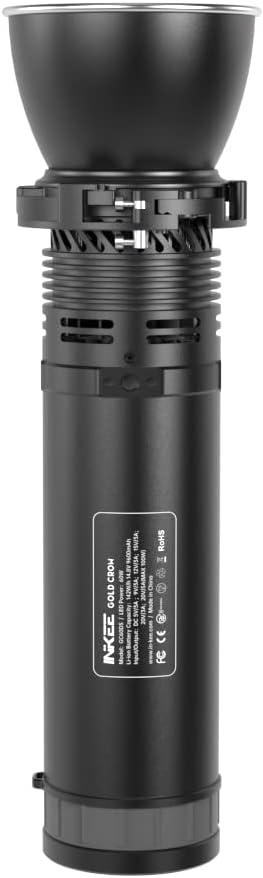
Figure 6: Product label detailing the technical specifications of the INKEE GC60d5 Gold Crow LED Video Light.
| المعلمة | قيمة |
|---|---|
| نموذج | GC60d5 |
| القدرة المقدرة | 60 واط (الحد الأقصى 90 واط) |
| حجم الإدخالtagهـ / الحالية | 5V/1A; 5V/3A; 9V/3A; 15V/3A; 20V/5A |
| سعة البطارية | 142Wh, 14.8V, 9600mAh (Lithium Ion) |
| مؤشر CRI | متوسط 95 |
| تي إل سي آي | متوسط 96 |
| درجة حرارة اللون | 5600 كيلو (ضوء النهار) |
| يعتم المدى | 0%-100% |
| طريقة التحكم | Lamp body control (Universal Control Ring) |
| تأثيرات المشهد | Constant Light, Flashing, Lighting, Bad TV, Bad Bulb, SOS |
| وزن المنتج | تقريبا. 1 كيلوجرام |
| Battery Life (Full Power) | حوالي 2 ساعات |
| مدة الشحن (100 واط) | حوالي 2 ساعات |
| تكنولوجيا الاتصال | USB |
| واجهة الأجهزة | USB |
9. معلومات السلامة
- لا تقم بتفكيك الجهاز أو تعديله. قد تؤدي التعديلات غير المصرح بها إلى إلغاء الضمان وتشكل مخاطر على السلامة.
- Keep the device away from water, moisture, and flammable substances.
- تجنب تعريض الجهاز لدرجات حرارة شديدة أو لأشعة الشمس المباشرة لفترات طويلة.
- Use only the provided charging cable or a certified compatible charger.
- Do not look directly into the LED light when it is operating at high brightness, as this may cause eye strain or damage.
- تأكد من التهوية المناسبة أثناء التشغيل لمنع ارتفاع درجة الحرارة.
10. الضمان والدعم
The INKEE GC60d5 Gold Crow COB LED Video Light typically comes with a 12-month limited warranty from the date of purchase. This warranty covers manufacturing defects under normal use. Please retain your proof of purchase for warranty claims.
The warranty may not cover damage caused by misuse, unauthorized modifications, accidents, or improper maintenance.
For technical support, warranty inquiries, or service, please contact INKEE customer support through their official website or your retailer. Provide your product model (GC60d5) and purchase details when contacting support.
11. محتويات العبوة
- INKEE GC60d5 Video Light x 1
- Lampالظل × 1
- حقيبة تخزين × 1
- كابل شحن × 1