
1. المقدمة
Thank you for choosing the GEYGUY GPSK-4 Pro PA System. This portable, all-in-one sound system is designed to deliver clear and powerful audio for various applications, including karaoke, public speaking, and musical performances. Featuring Bluetooth connectivity, USB/FM playback, DSP digital recording, and a compact design, the GPSK-4 offers versatility and convenience. Please read this manual thoroughly to understand the product's features and ensure proper operation and maintenance.
2. محتويات العبوة
Carefully unpack your GEYGUY GPSK-4 system and ensure all items are present. If any items are missing or damaged, please contact your retailer.
- GEYGUY GPSK-4 PA Speaker Unit
- ميكروفونان لاسلكيان UHF
- جهاز التحكم عن بعد
- كابل شحن USB-C
- كبل الصوت RCA
- محول الطاقة
- دليل المستخدم (هذا المستند)
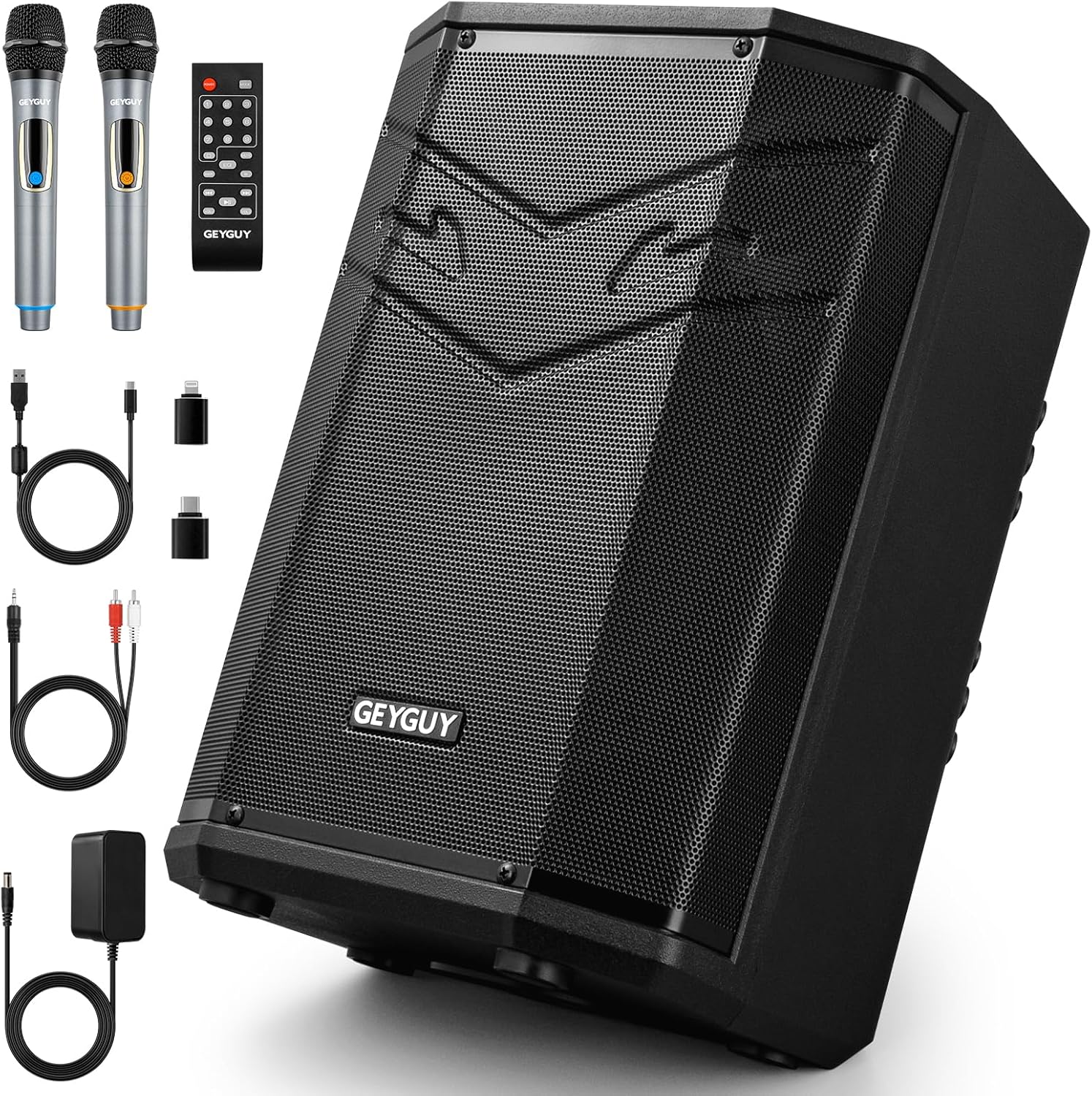
Image 2.1: The GEYGUY GPSK-4 PA System shown with its complete set of accessories, including the main speaker unit, two wireless microphones, a remote control, various cables, and a power adapter.
3. انتهى المنتجview
Familiarize yourself with the main components and controls of your GPSK-4 PA system.
3.1 الأمامي والجانبي View

الصورة 3.1: انفجار view of the GPSK-4 speaker highlighting its internal components such as the 8-inch subwoofer, horn tweeter, and acoustic ventilation hole. It also shows the ergonomic handle for portability and the protective metal dust cover.
- 8-inch Subwoofer: Provides powerful, uncompressed bass.
- مكبر الصوت القرن: Delivers clear high-frequency sounds.
- Acoustic Ventilation Hole: Optimizes sound output and airflow.
- مقبض مريح: Designed for comfortable and easy portability.
- Metal Dust Cover: Protects internal components from dust and physical impact.
3.2 لوحة التحكم والمنافذ

Image 3.2: The rear control panel of the GPSK-4, illustrating the various knobs, buttons, and ports. Key features include sound adjustment controls, volume controls for microphones and speakers, instrument inputs, and digital recording ports.
- ECHO/TREBLE/BASS Controls: Adjust the sound effects for echo, high frequencies, and low frequencies.
- MIC/Speaker Volume Independent Controls: Separate volume adjustments for microphones and the main speaker output.
- Guitar/Electronic Instruments Input: Port for connecting musical instruments.
- Microphone Expand: Additional microphone input.
- Pro FM Antenna: Extendable antenna for enhanced FM signal reception.
- Pro USB Devices Input: USB-A port for playing audio files from USB drives and emergency phone charging.
- Digital USB-C Port for DSP Recording: USB-C port for digital audio recording to compatible devices.
4. الإعداد
4.1 الشحن الأولي
Before first use, fully charge the GPSK-4 PA system. Connect the power adapter to the DC 15V input on the speaker and plug it into a power outlet. The charging indicator will illuminate. A full charge typically takes several hours. The integrated lithium battery provides 3 to 6 hours of playtime depending on usage and volume levels.
4.2 تشغيل/إيقاف التشغيل
Locate the power switch on the control panel. Press and hold to turn the unit ON or OFF.
4.3 إعداد الميكروفون
The system includes two UHF wireless microphones. Ensure the microphones have fresh batteries installed. Turn on each microphone using its power switch. The microphones should automatically pair with the PA system. If not, refer to the troubleshooting section.
5. تعليمات التشغيل
5.1 اقتران بلوتوث
The GPSK-4 features Bluetooth 5.0 for wireless audio streaming.
- Turn on the GPSK-4 PA system.
- قم بتفعيل البلوتوث على هاتفك الذكي أو جهازك اللوحي أو أي جهاز متوافق آخر.
- بحث عن available Bluetooth devices and select "GPSK-4" from the list.
- Once paired, the system will indicate a successful connection, and you can begin streaming audio.

Image 5.1: Visual guide for connecting the GPSK-4 via Bluetooth to mobile devices and computers, and via RCA cables to external audio equipment such as subwoofers or active speakers.
5.2 تشغيل USB
Insert a USB flash drive (up to 512GB) into the Pro USB Devices Input (USB-A port). The system supports high-definition audio formats including WAVE, MP3, WMA, APE, and FLAC. The system will automatically detect and begin playing audio files. Use the remote control or control panel buttons to navigate tracks and adjust volume.
5.3 راديو FM
Extend the Pro FM Antenna for optimal reception. Press the 'MODE' button on the control panel or remote to switch to FM radio mode. Use the scan function to automatically search and save available radio stations. Use the navigation buttons to switch between saved stations.
5.4 Digital Recording (DSP)
The GPSK-4 features a DSP digital recording function via its USB-C port.
- Connect your computer, tablet, laptop, or smartphone to the Digital USB-C Port using a compatible USB-C cable.
- Ensure your device is running iOS 7+, Mac OS 7+, Android 7+, or Windows 7+ for plug-and-play compatibility.
- The system will act as an audio input device. Use your device's recording software to capture audio from the microphones or other inputs connected to the GPSK-4.
5.5 Microphone and Instrument Use
Connect the wireless microphones or external instruments (e.g., guitar) to their respective input ports. Adjust the independent volume controls for microphones and instruments as needed. Use the ECHO, TREBLE, and BASS controls to fine-tune the sound output.
5.6 التحكم عن بعد
The included remote control provides convenient access to various functions from a distance, including power, mode selection, volume, track navigation, and EQ adjustments. Some control access is exclusively available via the remote.
6. Placement and Portability
The GPSK-4's multi-position enclosure allows for flexible placement to suit different environments and sound projection needs.
- مستقيم: For general sound projection.
- ظهر مائل: مثالية لـtage monitoring or directing sound upwards.
- مُركَّبة: A fixed hole allows mounting on a standard speaker bracket for elevated sound coverage.

Image 6.1: Demonstrates the versatile placement options for the GPSK-4, including floor monitoring, upright positioning, and stand mounting. The image also highlights the wide sound coverage angle and battery endurance.
The ergonomic handle and lightweight design (approximately 3.6 kg / 7.9 lbs) make the GPSK-4 easy to transport for various activities such as picnics, travel, live performances, and street performances.

Image 6.2: A visual representation of the GPSK-4's versatility, showcasing its use in outdoor settings like picnics, during travel, for professional live music events, and for casual street performances.
7. الصيانة
- تنظيف: استخدم قطعة قماش ناعمة وجافة لتنظيف الجزء الخارجي من مكبر الصوت. لا تستخدم منظفات أو مذيبات كاشطة.
- تخزين: قم بتخزين الوحدة في مكان بارد وجاف بعيدًا عن أشعة الشمس المباشرة ودرجات الحرارة القصوى.
- العناية بالبطارية: To prolong battery life, avoid fully discharging the battery frequently. Recharge the unit regularly, even if not in use for extended periods.
- حماية الغبار: The metal dust cover provides protection, but avoid exposing the unit to excessive dust or moisture.
8. استكشاف الأخطاء وإصلاحها
| مشكلة | السبب المحتمل | حل |
|---|---|---|
| لا يوجد طاقة | البطارية فارغة؛ مفتاح الطاقة مطفأ؛ محول الطاقة غير موصول. | Charge the unit; Turn on the power switch; Ensure power adapter is securely connected. |
| لا يوجد صوت من السماعة | Volume too low; Incorrect input mode; Device not paired (Bluetooth); USB drive empty/corrupt. | Increase volume; Select correct input mode (Bluetooth, USB, FM); Re-pair Bluetooth device; Check USB drive content. |
| الميكروفون لا يعمل | Microphone off; Batteries low/dead; Microphone volume low; Out of range. | Turn on microphone; Replace batteries; Increase microphone volume; Ensure microphone is within operating range. |
| فشل اقتران البلوتوث | GPSK-4 not in pairing mode; Device too far; Interference. | Ensure GPSK-4 is discoverable; Move device closer; Reduce interference from other wireless devices. |
| استقبال FM ضعيف | الهوائي غير ممتد، منطقة الإشارة ضعيفة. | Fully extend the FM antenna; Try repositioning the unit. |
9. المواصفات
Detailed technical specifications for the GEYGUY GPSK-4 PA System:

Image 9.1: A summary of the GPSK-4's technical data, including audio performance metrics, physical dimensions, and weight.
- رقم الموديل: جي بي إس كيه-4
- ماركة: GEYGUY
- الأبعاد (الطول × العرض × الارتفاع): 27.9 x 24.5 x 35 cm (11 x 9.64 x 13.77 inches)
- وزن: 3.6 كجم تقريبًا (7.9 رطلاً)
- مادة: معدن
- حجم السماعة: 8 بوصة مضخم صوت
- استجابة التردد: شنومكسهز - شنومكسهز
- الحد الأقصى لمستوى ضغط الصوت (SPL): 85 ديسيبل
- معاوقة مكبر الصوت: 4 أوم
- نسبة الإشارة إلى الضوضاء (SNR): 73dBA
- نطاق التغطية: 400 قدم مربع
- زاوية التغطية: 100 درجة × 60 درجة
- تقنية الاتصال: بلوتوث 5.0، يو اس بي
- إجمالي منافذ USB: 1 (USB-A for playback/charging) + 1 (USB-C for digital recording)
- الأجهزة المتوافقة: كمبيوتر محمول، هاتف ذكي، جهاز لوحي، كمبيوتر شخصي
- مصدر الطاقة: Battery Powered (1 Lithium-ion battery included) / AC Adapter
- بطارية قابلة لإعادة الشحن: نعم
- عمر البطارية: 3-6 hours (up to 5 hours as per image) depending on usage
- مدخل الصوت: Dynamic Microphone, Electronic Instrument
- نوع التركيب: Table Mount, Speaker Stand Mount
10. معلومات السلامة
- لا تعرض الجهاز للمطر أو الرطوبة لتجنب نشوب حريق أو التعرض لصدمة كهربائية.
- لا تفتح الصندوقasinز. لا توجد قطع غيار قابلة للصيانة من قِبل المستخدم. يُرجى إحالة جميع أعمال الصيانة إلى فنيين مؤهلين.
- تجنب وضع الوحدة بالقرب من مصادر الحرارة مثل المشعات أو أجهزة التدفئة أو المواقد أو الأجهزة الأخرى (بما في ذلك ampالمُضخِّمات) التي تنتج الحرارة.
- احمِ سلك الطاقة من أن يدوس عليه أحد أو يضغط عليه، وخاصةً عند المقابس ومنافذ التوصيل الكهربائية ونقطة خروجها من الجهاز.
- افصل هذا الجهاز أثناء العواصف الرعدية أو عند عدم استخدامه لفترات طويلة من الزمن.
- لا تقم بسد أي فتحات تهوية. قم بالتركيب وفقًا لتعليمات الشركة المصنعة.
- استخدم فقط المرفقات/الملحقات المحددة من قبل الشركة المصنعة.
11. الضمان والدعم
Specific warranty information for the GEYGUY GPSK-4 PA System is not provided in the product details. For warranty claims, technical support, or service inquiries, please contact your original retailer or the manufacturer directly through their official support channels. Please retain your proof of purchase for any warranty-related requests.