
1. المقدمة
The WORKPRO W159025 is a versatile cordless 3.6V grass and hedge trimmer designed for efficient garden maintenance. This tool features a dual-purpose design, allowing for quick conversion between a grass shear and a hedge trimmer. Its lightweight and compact design, combined with Type-C USB charging, makes it convenient for various trimming tasks around your garden.
This manual provides essential information for the safe and effective use, maintenance, and troubleshooting of your WORKPRO W159025 trimmer. Please read it thoroughly before first use and keep it for future reference.
2. تعليمات السلامة الهامة
اتبع دائمًا احتياطات السلامة الأساسية عند استخدام الأجهزة الكهربائية لتقليل خطر الحريق والصدمة الكهربائية والإصابة الشخصية.
- اقرأ جميع التعليمات: تعرف على عناصر التحكم والاستخدام الصحيح للأداة.
- ارتداء حماية العين: Always wear safety glasses or goggles when operating the trimmer.
- حافظ على المنطقة نظيفة: Ensure the work area is free of debris, children, and pets.
- تجنب التشغيل العرضي: Ensure the safety lock button and operating switch are not engaged unintentionally.
- استخدم الشاحن الصحيح: Only use a 5V/2A adapter for charging. Using a 5V/1A adapter may trigger overvoltage protection and prevent charging.
- فحص الشفرات: Before each use, check blades for damage or wear. Replace if necessary.
- شفرات آمنة: Ensure blades are correctly installed and secured before operation.
- Keep Hands Away: Never touch the blades while the tool is operating or connected to power.
- تخزين آمن: قم بتخزين الأداة في مكان جاف وآمن بعيدًا عن متناول الأطفال.
3. محتويات العبوة
تأكد من وجود جميع العناصر عند فك العبوة:
- WORKPRO W159025 Main Unit
- Grass Shear Blade (75mm cutting width)
- Hedge Trimmer Blade (120mm cutting width, 7.8mm max cutting diameter)
- كابل USB من النوع C (1 متر)
- دليل المستخدم
4. انتهى المنتجview
The WORKPRO W159025 features a compact and ergonomic design for comfortable use. Key components include:
- TPR Handle: يوفر قبضة مريحة وآمنة.
- زر قفل الأمان: يمنع التنشيط العرضي.
- مفتاح التشغيل: يقوم بتفعيل الشفرات.
- زر تحرير الشفرة: لتغيير الشفرات بسرعة وبدون استخدام أدوات.
- منفذ شحن من النوع C: لشحن مريح.
- LED Charging Indicator Light: Displays charging status (Red: Charging, Green: Fully Charged, Yellow: Approx. 50% charged).
- شفرات قابلة للتبديل: Includes both grass shear and hedge trimmer blades.

Figure 1: WORKPRO W159025 Component Diagram
5. الإعداد
5.1. شحن البطارية
The device is powered by a 3.6V rechargeable battery. Before first use, fully charge the battery.
- حدد موقع منفذ الشحن Type-C على الجهاز.
- Connect the provided Type-C USB cable to the charging port.
- قم بتوصيل الطرف الآخر من كابل USB بمحول طاقة USB بقوة 5 فولت/2 أمبير (غير مرفق).
- The LED indicator light will show red during charging. It will turn green when fully charged (approximately 2-3 hours). A yellow light indicates approximately 50% charge.

الشكل 2: شحن من النوع C
5.2. تغيير الشفرات
The WORKPRO W159025 allows for easy, tool-free blade changes between the grass shear and hedge trimmer blades.
- تأكد من إيقاف تشغيل الجهاز وفصله عن أي مصدر للطاقة.
- Push the two blade release buttons on either side of the blade housing.
- Carefully remove the installed blade.
- Align the desired blade (grass shear or hedge trimmer) with the pins on the main unit.
- Press the blade firmly into place until it clicks securely.

Figure 3: Blade Change Mechanism
6. تعليمات التشغيل
6.1. تشغيل / إيقاف التشغيل
The WORKPRO W159025 features a dual safety mechanism to prevent accidental starts.
- To start the tool, simultaneously press the safety lock button (located on the top of the handle) and the operating switch (trigger).
- Once the tool starts, you can release the safety lock button, and the tool will continue to operate as long as the operating switch is pressed.
- To turn off the tool, release the operating switch.

Figure 4: Safety Lock and Operating Switch
6.2. استخدام مقص العشب
Attach the grass shear blade for trimming grass in small areas, around edges, or where larger mowers cannot reach.
- Ensure the grass shear blade is securely attached.
- Hold the tool firmly with both hands, if possible, or one hand if comfortable and safe.
- Activate the tool as described in Section 6.1.
- Move the tool steadily across the grass, maintaining a consistent height. The cutting width is 75mm.
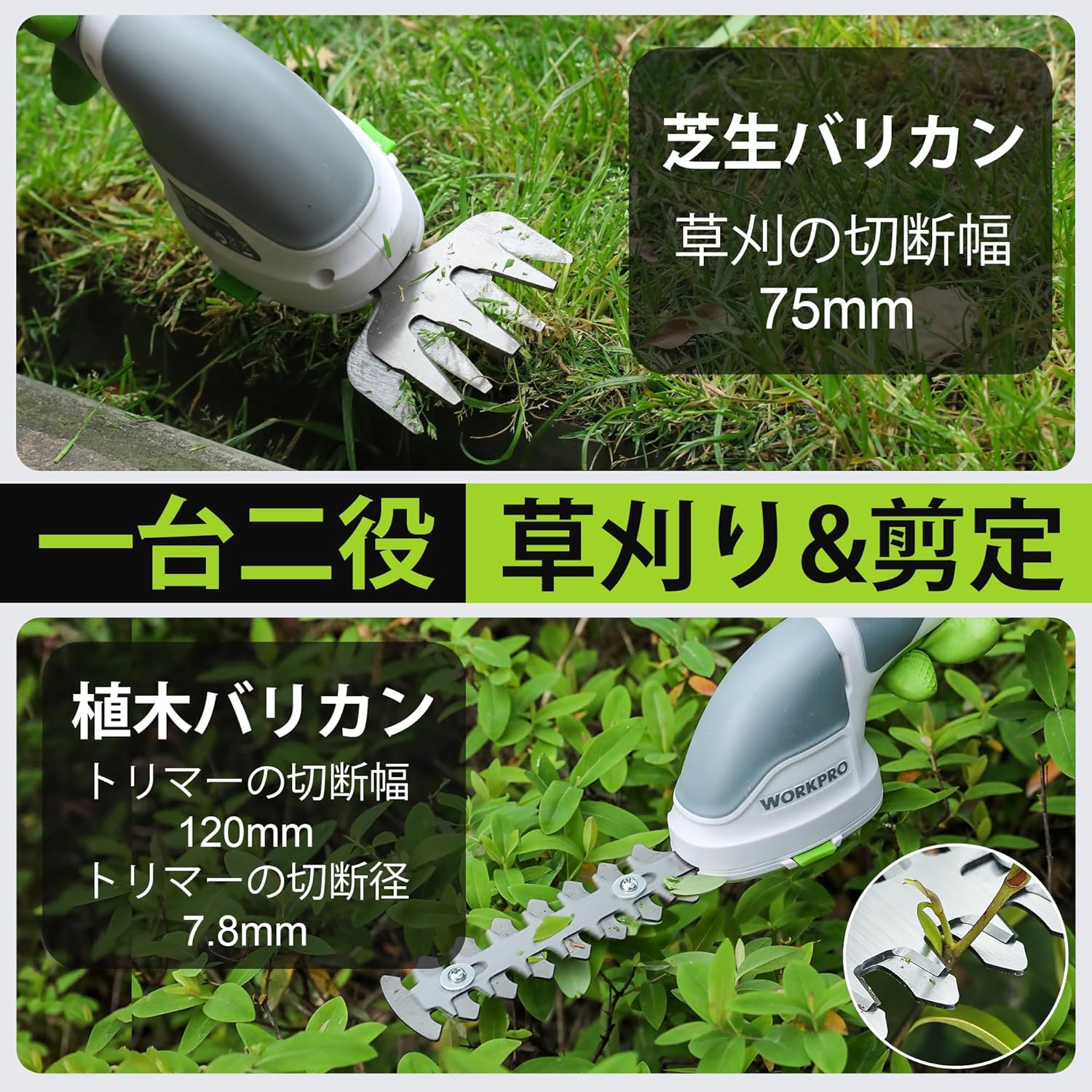
Figure 5: Grass Shearing Operation
6.3. استخدام مقص التحوط
Attach the hedge trimmer blade for shaping shrubs and hedges. The cutting width is 120mm, and the maximum cutting diameter is 7.8mm.
- Ensure the hedge trimmer blade is securely attached.
- Hold the tool firmly, ensuring a stable grip.
- Activate the tool as described in Section 6.1.
- Move the trimmer smoothly along the hedge, cutting small amounts at a time. Avoid forcing the blades through thick branches.
- The handle can rotate 180 degrees for improved ergonomics and access to different angles. To rotate the handle, press the handle rotation button (if present, otherwise manually rotate if designed for it) and adjust to the desired position.

Figure 6: Hedge Trimming Operation
Video 1: Demonstrates the WORKPRO W159025 in action, showing blade changes, safety features, and use as both a grass shear and hedge trimmer. It highlights the 180-degree handle rotation feature.
7. الصيانة
7.1. Cleaning and Blade Care
- Always ensure the tool is switched off and the battery is removed (if applicable) before cleaning or performing maintenance.
- Clean the blades after each use to remove sap, debris, and dirt. Use a stiff brush and a damp cloth. For stubborn residue, a blade cleaner or light oil can be used.
- Periodically apply a thin layer of machine oil to the blades to prevent rust and ensure smooth operation.
- Inspect blades for sharpness and damage. Dull or damaged blades can reduce efficiency and increase strain on the motor. Replace worn blades as needed.
7.2. التخزين
- قم بتخزين الأداة في منطقة جافة وجيدة التهوية، بعيدًا عن أشعة الشمس المباشرة ودرجات الحرارة القصوى.
- تأكد من أن الشفرات نظيفة وجافة ومدهونة بزيت خفيف قبل التخزين.
- احتفظ بالأداة بعيدًا عن متناول الأطفال والأشخاص غير المصرح لهم.
8. استكشاف الأخطاء وإصلاحها
| مشكلة | السبب المحتمل | حل |
|---|---|---|
| الأداة لا تبدأ | البطارية منخفضة أو مستنفدة Safety lock button not pressed simultaneously with operating switch الشفرات محشورة | اشحن البطارية بالكامل Ensure both buttons are pressed together Clear any obstructions from the blades (with tool off) |
| أداء القطع الضعيف | شفرات باهتة أو تالفة Excessive material being cut Blades are dirty or sticky | استبدل الشفرات Cut smaller sections at a time Clean and lubricate blades |
| البطارية لا تشحن | Incorrect power adapter (e.g., 5V/1A) كابل الشحن تالف Charging port is dirty | Use a 5V/2A USB power adapter Try a different Type-C USB cable قم بتنظيف منفذ الشحن |
9. المواصفات
| ميزة | التفاصيل |
|---|---|
| ماركة | ووركبرو |
| رقم الموديل | و159025 |
| مصدر الطاقة | تعمل بالبطارية (3.6 فولت) |
| نوع البطارية | ليثيوم أيون |
| منفذ الشحن | نوع C- أوسب |
| وقت الشحن | Approx. 2-3 hours (with 5V/2A adapter) |
| وقت التشغيل بدون تحميل | حوالي 40 دقيقة |
| معدل الضربة بدون تحميل | 1100 ضربة/دقيقة |
| عرض قص العشب | 75 ملم |
| عرض قطع مقص التحوط | 120 ملم |
| Max Cutting Diameter (Hedge Trimmer) | 7.8 ملم |
| مادة الشفرة | الفولاذ المقاوم للصدأ |
| Product Weight (without blade) | 0.37 كجم |
| رمز المنتج الموحد | 820909687412 |
10. الضمان والدعم
For warranty information, technical support, or replacement parts, please contact WORKPRO customer service or refer to the official WORKPRO webالموقع. احتفظ بإيصال الشراء كإثبات للشراء.
لمزيد من المساعدة، يمكنك زيارة متجر WORKPRO على أمازون.