
مقدمة
This manual provides essential information for the safe and efficient use of your ONN 42-Inch Full HD LED Smart TV, Model 100018254. Please read these instructions thoroughly before operating your television and retain them for future reference.
ماذا يوجد في الصندوق
تأكد من وجود جميع المكونات قبل المتابعة في عملية الإعداد.
- ONN 42-Inch Full HD LED Smart TV
- جهاز التحكم عن بعد
- حامل تلفزيون (قطعتين)
- براغي حامل التلفزيون
- سلك الطاقة
- دليل البدء السريع (غير مدرج في هذا الدليل)

الصورة: الجبهة view of the ONN 42-inch Smart TV displaying the Roku TV home screen with various streaming app icons like Netflix, Disney+, Apple TV, Hulu, Peacock, and Roku Channel. The TV is black with slim bezels and two stand feet.
يثبت
1. تركيب حامل التلفزيون
- قم بوضع شاشة التلفزيون بعناية على سطح ناعم ونظيف لمنع تعرضها للتلف.
- قم بمحاذاة كل قطعة من الحامل مع فتحات البراغي المقابلة لها في الجزء السفلي من التلفزيون.
- ثبّت كل قطعة من قطع الحامل باستخدام البراغي المرفقة. تأكد من إحكام ربطها جيداً.

Image: A diagram illustrating the dimensions of the ONN 42-inch TV, showing its width as 43 inches and height as 37 inches when placed on its stand.
2. التركيب على الحائط (اختياري)
This TV is compatible with VESA standard wall mounts. Refer to your wall mount's instructions for proper installation. Ensure the wall mount can support the weight of the television.

الصورة: الخلفية view of the ONN 42-inch TV, highlighting the VESA mounting screw holes in a square pattern and various input ports on the side and bottom right.
3. توصيل الأجهزة
Connect your external devices such as cable boxes, gaming consoles, or Blu-ray players to the TV's input ports.
- HDMI: For high-definition audio and video. Use an HDMI cable to connect devices like set-top boxes, game consoles, or streaming sticks.
- USB: لتوصيل أجهزة تخزين USB لتشغيل الوسائط files.
- واي فاي: For internet connectivity to access smart TV features and streaming services.
4. معالج التشغيل الأولي والإعداد
- قم بتوصيل سلك الطاقة بالتلفزيون ثم بمقبس الحائط.
- اضغط على زر الطاقة الموجود في جهاز التحكم عن بعد أو في التلفزيون نفسه.
- Follow the on-screen instructions to complete the initial setup, including language selection, network connection (Wi-Fi), channel scanning, and linking to your Roku account (if applicable).
تشغيل التلفزيون
1. التحكم عن بعدview
The remote control allows you to navigate the TV's interface and control various functions.
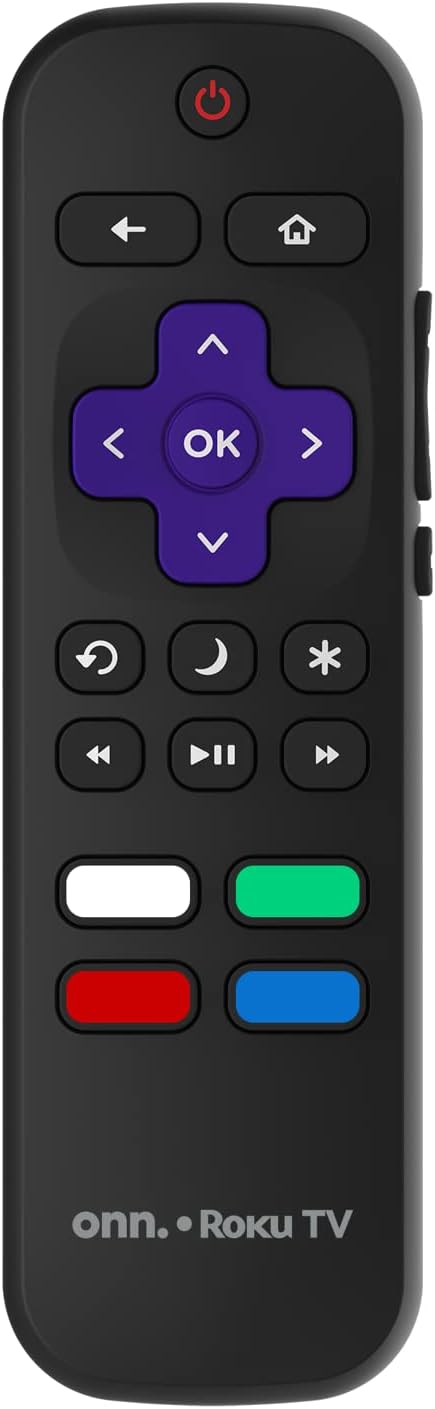
Image: The ONN Roku TV remote control, featuring a power button, directional pad, OK button, home button, back button, volume controls, and dedicated buttons for popular streaming services.
- زر الطاقة: تشغيل التلفزيون أو إيقاف تشغيله.
- Directional Pad (D-Pad) & OK: التنقل عبر القوائم وتأكيد الاختيارات.
- زر الصفحة الرئيسة: العودة إلى الشاشة الرئيسية لجهاز Roku TV.
- زر الرجوع: يعود إلى الشاشة أو القائمة السابقة.
- رفع/خفض الصوت: ضبط مستوى الصوت.
- زر كتم الصوت: كتم الصوت أو إلغاء كتمه.
- القناة لأعلى/لأسفل: Changes channels (for antenna/cable inputs).
- أزرار التطبيقات المخصصة: Quick access to popular streaming services like Netflix, Hulu, etc.
2. ميزات التلفزيون الذكي
Your ONN Smart TV provides access to a wide range of streaming content and smart functionalities.
- خدمات البث: Access pre-installed apps like Netflix, YouTube, and many more through the Roku Channel Store.
- التحكم الصوتي: Compatible with Alexa and Google Assistant for hands-free control (requires a separate compatible voice assistant device).
- تحديثات البرامج التلقائية: The TV will automatically update its software when connected to the internet, ensuring you have the latest features and security.
3. اختيار المدخلات
To switch between connected devices (e.g., cable box, game console), use the مدخل button on your remote or select the desired input from the Roku TV home screen.
4. إعدادات الصورة والصوت
ادخل إلى قائمة إعدادات التلفزيون لتخصيص تفضيلات الصورة والصوت. انتقل إلى Settings > TV picture settings or الإعدادات > الصوت to adjust options like brightness, contrast, color, sound mode, and equalizer settings.
صيانة
1. تنظيف الشاشة
- قم دائمًا بإطفاء التلفزيون وفصله عن الكهرباء قبل التنظيف.
- استخدم قطعة قماش ناعمة وخالية من الوبر، وجففها قليلاً.ampاغسلها بالماء أو بمنظف الشاشة المتخصص.
- لا ترشّ المنظف مباشرةً على الشاشة، بل ضعه على قطعة القماش أولًا.
- تجنب استخدام المنظفات الكاشطة أو الكحول أو البنزين أو المذيبات، لأنها قد تتلف الشاشة.
2. تحديثات البرامج
Ensure your TV is connected to the internet to receive automatic software updates. These updates improve performance, add features, and enhance security. You can manually check for updates in the الإعدادات > النظام > تحديث النظام قائمة طعام.
استكشاف الأخطاء وإصلاحها
إذا واجهت مشكلات مع التلفزيون الخاص بك، فراجع الحلول الشائعة التالية:
لا يوجد طاقة
- تأكد من توصيل سلك الطاقة بشكل آمن بكل من التلفزيون والمأخذ الكهربائي الموجود بالحائط.
- تأكد من أن منفذ الحائط يعمل عن طريق توصيل جهاز آخر.
- حاول الضغط على زر الطاقة الموجود على التلفزيون نفسه، وليس فقط على جهاز التحكم عن بعد.
لا توجد صورة / صورة مشوهة
- تأكد من تحديد مصدر الإدخال الصحيح (على سبيل المثال، HDMI 1، HDMI 2).
- تحقق من جميع توصيلات الكابلات بين التلفزيون والأجهزة الخارجية.
- حاول استخدام كابل HDMI مختلف إذا كان ذلك ممكنا.
- Adjust picture settings (brightness, contrast) in the TV menu.
بدون صوت / صوت منخفض
- Check if the TV is muted or if the volume is turned down.
- Ensure external audio devices (soundbars, receivers) are properly connected and powered on.
- تحقق من إعدادات الصوت في قائمة التلفزيون.
مشاكل اتصال الشبكة
- تأكد من أن جهاز توجيه الواي فاي الخاص بك يعمل بشكل صحيح.
- أعد تشغيل جهاز التوجيه والمودم.
- اذهب الى الإعدادات > الشبكة > التحقق من الاتصال قم بتشغيل التلفزيون لتشخيص المشكلة.
- تأكد من إدخال كلمة مرور Wi-Fi الصحيحة.
تحديد
| ميزة | التفاصيل |
|---|---|
| رقم الموديل | 100018254 |
| حجم الشاشة | 42 بوصة |
| تكنولوجيا العرض | قاد |
| دقة | 1080 بكسل (عالي الدقة بالكامل) |
| معدل التحديث | 60 هرتز |
| الاتصال | يو اس بي، واي فاي |
| خدمات الإنترنت المدعومة | Netflix, YouTube (and others via Roku platform) |
| طريقة التحكم | Voice (via Alexa & Google Assistant compatible devices), Remote Control |
| نوع التركيب | حامل حائط (متوافق مع VESA) |
| لون | أسود |
| رمز المنتج الموحد | 671227025567 |

Image: Energy Guide label for Television Model 100018254, indicating an estimated yearly energy cost of $11 based on 12 cents per kWh and 5 hours use per day.
الضمان والدعم
For warranty information and technical support, please refer to the documentation included with your purchase or visit the official ONN support webموقع. احتفظ بإيصال الشراء الخاص بك لمطالبات الضمان.