
1. المقدمة
Thank you for choosing the Vetroo 1000W Black Power Supply. This power supply unit (PSU) is designed to provide stable and efficient power to your personal computer, especially for high-performance gaming and workstation builds. It features 80 Plus Gold certification for energy efficiency, full modular cabling for easy management, and is compliant with the latest ATX 3.1 and PCIe 5.1 standards. This manual provides essential information for safe installation, operation, and maintenance of your PSU.
2. معلومات السلامة
Please read and understand all safety warnings before installing or operating this product. Failure to follow these instructions may result in electric shock, fire, or serious injury.
- ارتفاع حجمtage: The PSU contains high voltage components. Do not open the PSU casinز. لا توجد أجزاء قابلة للصيانة من قبل المستخدم بالداخل.
- التثبيت الاحترافي: Installation should be performed by qualified personnel. Incorrect installation can damage your system or the PSU.
- انقطاع التيار الكهربائي: Always disconnect the AC power cord from the wall outlet before installing, removing, or cleaning the PSU or any other components in your computer.
- التأريض: Ensure the PSU is properly grounded. Use only the provided power cord.
- بيئة: Operate the PSU in a dry, well-ventilated environment. Avoid exposure to moisture, extreme temperatures, or direct sunlight.
- تهوية: Do not block the ventilation openings of the PSU. Ensure adequate airflow around the unit.
- إدارة الكابلات: Ensure all cables are securely connected and routed to prevent interference with cooling fans or other components.
3. محتويات العبوة
تأكد من وجود جميع العناصر في الحزمة الخاصة بك:
- Vetroo 1000W Black Power Supply Unit
- Modular Cable Set (including 24-pin ATX, 8-pin CPU, PCIe 5.1 12+4-pin, PCIe 6+2-pin, SATA, Molex, FDD cables)
- سلك الطاقة المتردد
- مسامير التثبيت
- أربطة الكابلات/أشرطة الفيلكرو
- دليل المستخدم (هذا المستند)


4. مواصفات المنتج
- حاصل على شهادة 80 بلس الذهبية: Ensures high energy efficiency, reducing power consumption and heat generation.
- Fully Compliant with ATX 3.1 Specifications: Designed to meet the latest power delivery standards for modern PC components.
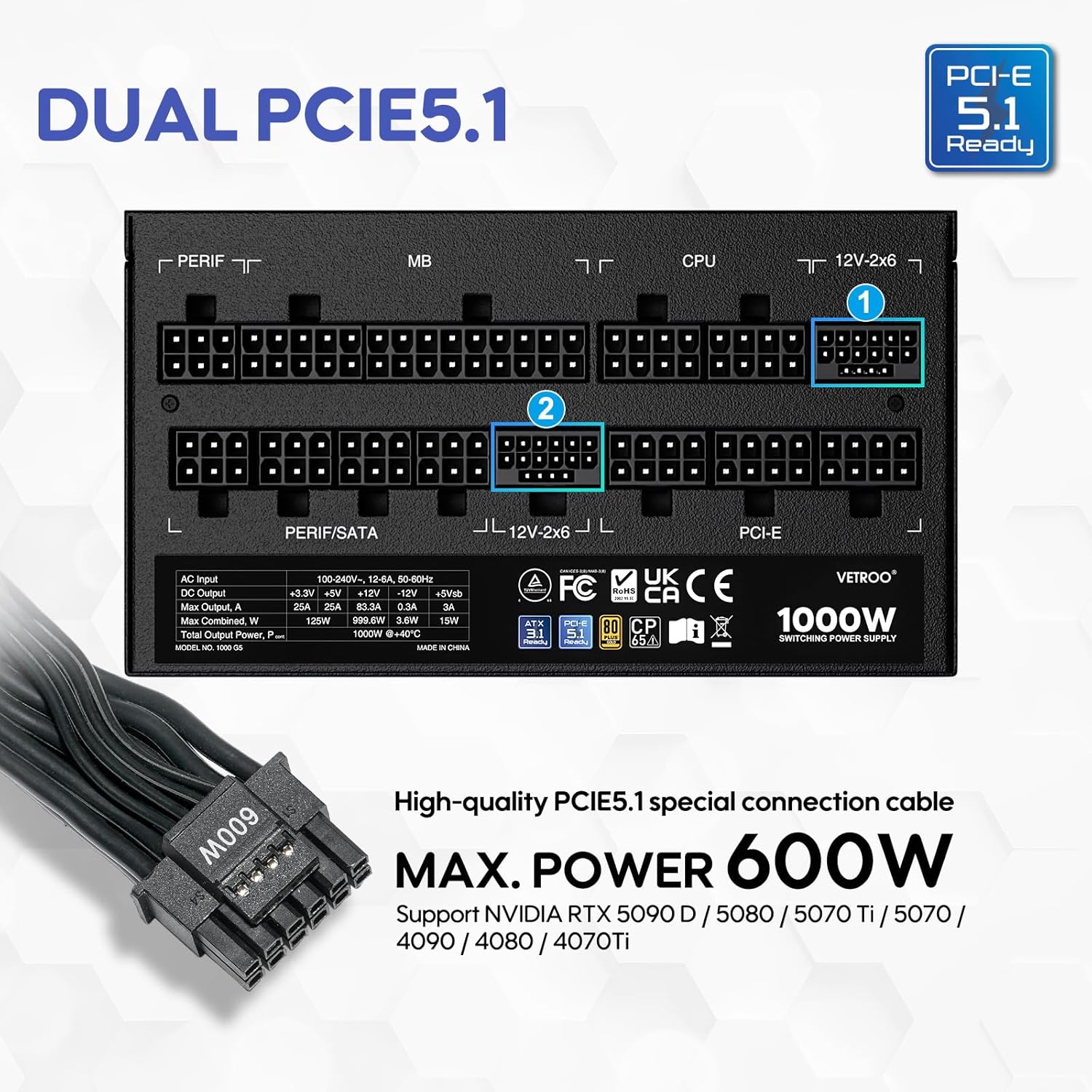
- جاهزية PCIe من الجيل 5.1: Equipped with dedicated 12+4-pin connectors for the latest PCIe 5.1 graphics cards, offering up to 600W power delivery. Also backwards compatible with PCIe 4.0 and 3.0.
- Premium 105° C Capacitors: Utilizes high-quality Japanese capacitors for enhanced stability, reliability, and extended lifespan.
- Full Modular Design: Allows users to connect only the necessary cables, improving airflow and simplifying cable management within the PC case.
- Eco Mode with 120mm FDB Fan: Features a fluid dynamic bearing (FDB) fan that operates silently under low loads, with an Eco Mode switch to stop the fan entirely when power consumption is below 50%.
- الحجم الصغير: Designed to fit comfortably in various PC chassis types.
- الحماية الشاملة: يشمل مستوى الصوت الزائدtagالحماية من الجهد الزائد (OVP)، الحماية من التيار الزائد (OCP)، الحماية من الطاقة الزائدة (OPP)، الحماية من قصر الدائرة (SCP)، انخفاض الجهدtagالحماية الإلكترونية (UVP)، والحماية من ارتفاع درجة الحرارة (OTP).

5. المواصفات
| ميزة | التفاصيل |
|---|---|
| اسم الموديل | 1000ج5 |
| انتاج واتtage | 1000 واط |
| عامل الشكل | ايه تي اكس |
| تصميم مزود الطاقة | وحدات كاملة |
| شهادة الكفاءة | 80 بلس الذهب |
| معيار ATX | ATX 3.1 جاهز |
| معيار PCIe | PCIe 5.1 Ready (Dual) |
| طريقة التبريد | هواء (مروحة FDB مقاس 120 مم) |
| أبعاد المنتج (الطول × العرض × الارتفاع) | 5.9 × 5.5 × 3.4 بوصة |
| وزن العنصر | 5.83 رطل |
| الأجهزة المتوافقة | كمبيوتر شخصي |
| نوع الموصل | ATX & PCIE |

6. الإعداد والتثبيت
Follow these steps to install your Vetroo 1000W Power Supply:
- حضّر نظامك: تأكد من إيقاف تشغيل جهاز الكمبيوتر تمامًا وفصله عن مقبس الحائط. افتح غطاء الكمبيوتر للوصول إلى مكان تثبيت وحدة تزويد الطاقة.
- إزالة وحدة PSU القديمة (إن وجدت): افصل جميع الكابلات من مصدر الطاقة القديم وقم بإزالته من الهيكل.
- تركيب وحدة تزويد الطاقة الجديدة: Carefully slide the Vetroo 1000W PSU into the designated power supply bay in your PC case. Secure it with the provided mounting screws.
- توصيل الكابلات المعيارية: Identify the necessary cables for your motherboard, CPU, graphics card(s), and storage devices. Connect these cables to the corresponding ports on the PSU first, then route them to your components.
- اللوحة الأم: قم بتوصيل كابل ATX ذو 24 سنًا باللوحة الأم.
- وحدة المعالجة المركزية: Connect the 8-pin (or 4+4-pin) CPU power cable(s) to your motherboard.
- بطاقة (بطاقات) الرسومات: For modern GPUs, use the PCIe 5.1 12+4-pin cable. For older or additional GPUs, use the PCIe 6+2-pin cables.
- Storage/Peripherals: Connect SATA power cables to SSDs/HDDs and Molex cables for other peripherals as needed.
- إدارة الكابلات: Use the included cable ties or Velcro straps to organize cables, ensuring optimal airflow and a tidy build.
- التوصيلات النهائية: Close your PC case. Connect the AC power cord to the PSU and then to a wall outlet or surge protector.

7. تعليمات التشغيل
- تشغيل/إيقاف التشغيل: After all connections are secure, flip the main power switch on the back of the PSU to the 'ON' position. Your computer can now be powered on via its front panel button. To power off, shut down your computer normally, then flip the PSU switch to 'OFF' for complete power disconnection.
- نمط الصدى: The Vetroo 1000W PSU features an Eco Mode switch on the rear panel.
- Eco Mode ON: When the Eco Mode switch is in the 'ON' position, the PSU fan will remain off under low to moderate loads (typically below 50% load) for silent operation. The fan will automatically activate when the load increases or internal temperature rises.
- Eco Mode OFF: When the Eco Mode switch is in the 'OFF' position, the PSU fan will spin continuously regardless of the load, providing constant cooling.

8. الصيانة
Proper maintenance ensures the longevity and optimal performance of your PSU:
- تنظيف الغبار: Periodically clean the PSU fan and ventilation grilles to prevent dust buildup, which can hinder cooling performance. Use compressed air to gently blow dust away. Always disconnect power before cleaning.
- فحص الكابلات: Regularly check all modular cable connections to ensure they are secure and free from damage.
- الظروف البيئية: Maintain a clean, dry, and well-ventilated environment for your PC to prevent excessive heat and moisture exposure to the PSU.
9. استكشاف الأخطاء وإصلاحها
If you encounter issues with your Vetroo 1000W Power Supply, try the following steps:
- لا يوجد طاقة:
- تأكد من توصيل سلك طاقة التيار المتردد بشكل آمن بكل من وحدة إمداد الطاقة والمأخذ الكهربائي الموجود بالحائط.
- تأكد من أن مفتاح الطاقة الرئيسي الموجود على وحدة تزويد الطاقة في وضع "التشغيل".
- Check all modular cable connections, especially the 24-pin ATX and 8-pin CPU cables, to ensure they are fully seated.
- اختبر منفذ الحائط بجهاز آخر للتأكد من وجود الطاقة فيه.
- عدم استقرار النظام/الإغلاق العشوائي:
- تأكد من أن مصدر الطاقة الخاص بكtage is sufficient for all your components, especially high-power GPUs.
- تأكد من وجود تهوية مناسبة داخل علبة الكمبيوتر لديك لمنع ارتفاع درجة الحرارة.
- Verify that all PCIe power cables to your graphics card(s) are correctly connected.
- If Eco Mode is enabled, try disabling it to see if continuous fan operation resolves the issue.
- ضوضاء غير عادية:
- If you hear a fan noise, ensure the PSU fan is not obstructed by cables or dust.
- If a 'coil whine' noise is present, it is often harmless but can sometimes indicate a component under stress. Ensure your system is not drawing excessive power.
If problems persist after performing these checks, please contact Vetroo customer support for further assistance.
10. الضمان والدعم
The Vetroo 1000W Black Power Supply comes with a ضمان لمدة سنتين من تاريخ الشراء. يغطي هذا الضمان عيوب المواد والصناعة في ظل الاستخدام العادي.
الضمان لا يشمل:
- الأضرار الناجمة عن الحوادث أو سوء الاستخدام أو سوء الاستخدام أو الفيضانات أو الحرائق أو الزلازل أو غيرها من الأسباب الخارجية.
- Damage caused by operating the product outside the permitted or intended uses described by Vetroo.
- Damage caused by service (including upgrades and expansions) performed by anyone who is not a representative of Vetroo.
- Products or parts that have been modified to alter functionality or capability without the written permission of Vetroo.
For warranty claims or technical support, please visit the official Vetroo website or contact their customer service department with your product model and proof of purchase.