
مقدمة
Welcome to the world of aerial photography and videography with your new Ascend Aeronautics ASC-2600 Premium HD Video Drone. This manual provides essential information for safe operation, setup, maintenance, and troubleshooting to ensure you get the most out of your drone. Please read this manual thoroughly before operating the drone.
معلومات السلامة
Operating a drone requires responsibility and adherence to safety guidelines. Failure to follow these instructions may result in injury, damage to property, or legal consequences.
- متطلبات العمر: هذا المنتج مخصص للمستخدمين الذين تبلغ أعمارهم 14 عامًا فأكثر.
- الاستخدام في الهواء الطلق فقط: Operate the drone in open, clear areas, away from people, animals, and obstacles.
- Maintain Visual Line of Sight: Always keep the drone within your direct line of sight during flight.
- التحقق من اللوائح المحلية: Be aware of and comply with all local, state, and federal regulations regarding drone operation.
- فحص ما قبل الرحلة: Before each flight, ensure all parts are securely attached, batteries are charged, and propellers are free from damage.
- حالة الطقس: Do not fly in strong winds, rain, snow, or other adverse weather conditions.
- سلامة البطارية: Use only the provided charger and battery. Do not overcharge or short-circuit batteries.
- سلامة المروحة: أبقِ يديك ووجهك وملابسك الفضفاضة بعيدة عن المراوح الدوارة.
محتويات الحزمة
Carefully unpack your drone and ensure all items are present:
- Ascend Aeronautics ASC-2600 Drone
- جهاز التحكم عن بعد
- Rechargeable Lithium Battery (for drone)
- كابل شحن USB
- حقيبة الحمل
- مراوح احتياطية (قد تختلف الكمية)
- دليل التعليمات (هذا المستند)

Figure 1: The ASC-2600 drone and its remote controller as seen in the retail packaging. The packaging highlights key features such as the 1080p HD camera, 115° ultra-wide angle lens, 400-foot range, and optical flow technology.
مميزات المنتج
The ASC-2600 drone is equipped with advanced features for an enhanced flight and photography experience:
- Ultra-wide Angle Lens: Provides greater aerial video and photography coverage, capturing more of the scene.
- 1080p HD Camera: Streams directly to your mobile phone for instant video recording and live viewعمل.
- On-board Micro SD Card Recording: Allows for highest resolution video capture directly on the drone (Micro SD card not included).
- Optical Flow Technology: Utilizes advanced sensors for precise longitude and latitude position holding, enhancing stability.
- Auto Start, Hover, and Auto Land Technology: Simplifies flight with push-button controls for effortless take-off, stable hovering, and smooth landing.
- 6-Axis Gyro + Altitude Sensors: Ensures incredibly stable flight performance in various conditions.
- High-efficiency Lithium Rechargeable Battery: Extends drone flight time for longer sessions.
- "Go-Anywhere" Folding Frame: Designed for easy transportation and compact storage.
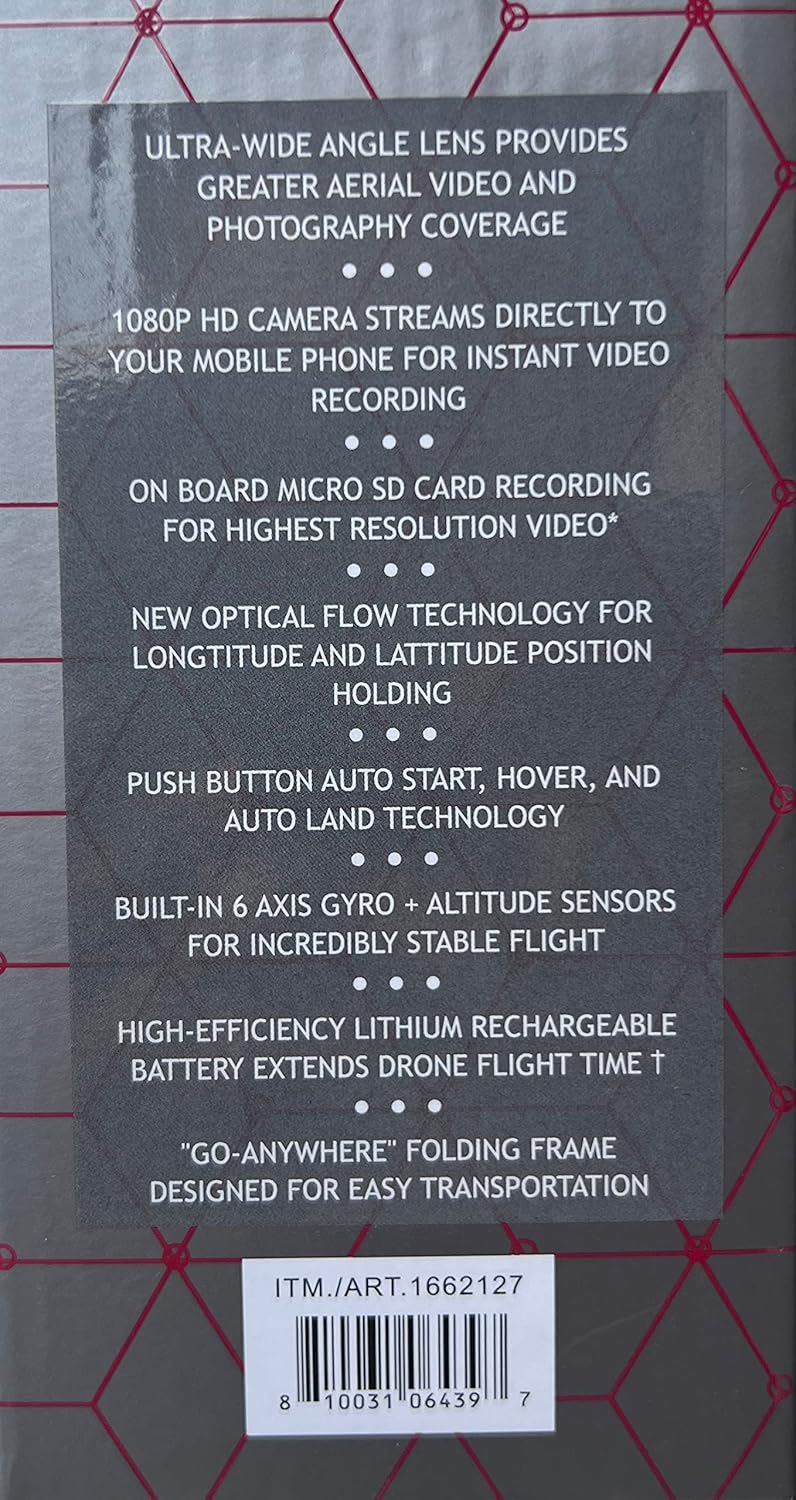
Figure 2: The rear of the drone's packaging, detailing key features such as the ultra-wide angle lens, 1080p HD camera, optical flow technology, and the folding frame design.
يثبت
1. شحن بطارية الطائرة بدون طيار
- Locate the drone's rechargeable Lithium battery.
- Connect the USB charging cable to the battery and a compatible USB power source (e.g., computer USB port, USB wall adapter).
- The charging indicator light will show the charging status (refer to battery or charger for specific light indications).
- Once fully charged, disconnect the battery from the charger. A full charge typically takes 60-90 minutes.
2. Installing Drone Battery
- تأكد من إيقاف تشغيل الطائرة بدون طيار.
- حدد مكان حجرة البطارية على الطائرة بدون طيار.
- Insert the fully charged battery into the compartment, ensuring it clicks securely into place.
3. Installing Controller Batteries
- افتح حجرة البطارية الموجودة في الجزء الخلفي من جهاز التحكم عن بعد.
- Insert 4 x AAA batteries (not included) according to the polarity indicators (+/-).
- أغلق حجرة البطارية بشكل محكم.
4. Propeller Installation/Check
- The drone comes with pre-installed propellers. Ensure they are securely attached and free from damage.
- If replacing, match the propeller type (A or B) to the corresponding motor arm.
5. Folding Frame Deployment
- Gently unfold the drone's arms until they lock into their extended position. Ensure all four arms are fully extended before flight.

Figure 3: The ASC-2600 drone and its ergonomic controller, shown within their protective plastic tray. This view highlights the compact design of the drone when its arms are folded.
تعليمات التشغيل
1. التشغيل والاقتران
- ضع الطائرة بدون طيار على سطح مستوٍ ومستوٍ.
- Press and hold the power button on the drone until the indicator lights begin to flash.
- Turn on the remote controller. The controller's indicator light will also flash.
- Push the left joystick (throttle) all the way up, then all the way down. The drone and controller lights will become solid, indicating successful pairing.
2. Auto Start, Hover, and Auto Land
- بدء التشغيل التلقائي: Press the dedicated Auto Start button (usually marked with an arrow pointing up) on the controller. The drone will automatically take off and hover at a stable altitude.
- تحوم: The drone's 6-axis gyro and altitude sensors, combined with Optical Flow Technology, will maintain a stable hover.
- أرض السيارات: Press the dedicated Auto Land button (usually marked with an arrow pointing down) on the controller. The drone will automatically descend and land gently.
3. أدوات التحكم في الطيران
Familiarize yourself with the remote controller's joysticks and buttons:
- عصا التحكم اليسرى (الخانق/الانحراف):
- أعلى/أسفل: يتحكم في الارتفاع (الصعود/الهبوط).
- Left/Right: Controls yaw (rotates the drone left/right).
- عصا التحكم اليمنى (الميل/الدوران):
- Up/Down: Controls pitch (move forward/backward).
- Left/Right: Controls roll (move left/right sideways).
- أزرار القطع: Use these to fine-tune the drone's stability if it drifts in any direction during hover.
4. Camera Operation and Recording
- اتصال تطبيق الجوال: Download the official Ascend Aeronautics app from your mobile device's app store. Connect your phone to the drone's Wi-Fi network (refer to app instructions for specific steps).
- Live Video Stream: Once connected, the app will display a live 1080p HD video feed from the drone's camera.
- Recording to Mobile Device: Use the app to start/stop video recording or capture photos directly to your phone.
- التسجيل على بطاقة الذاكرة الصغيرة (Micro SD): For highest resolution video, insert a Micro SD card (up to 32GB, Class 10 recommended, not included) into the drone's designated slot. Recordings will be saved directly to the card.

الشكل 4: تفصيلي view of the drone's features as presented on the packaging, including the 1080p HD camera with 115° ultra-wide angle lens, live streaming capability to mobile devices, and ergonomic controller design.
صيانة
- تنظيف: استخدم قطعة قماش ناعمة وجافة لتنظيف الطائرة بدون طيار وجهاز التحكم. تجنب استخدام المواد الكيميائية القاسية أو المذيبات.
- فحص المروحة: Regularly check propellers for cracks, bends, or damage. Replace damaged propellers immediately using the provided spares.
- العناية بالبطارية:
- قم بتخزين البطاريات في مكان بارد وجاف.
- Do not store fully charged or completely depleted batteries for extended periods. Charge to about 50% for long-term storage.
- If the drone will not be used for a long time, remove batteries from both the drone and the controller.
- تخزين: When not in use, fold the drone's arms and store it in its carrying case to protect it from dust and physical damage.
استكشاف الأخطاء وإصلاحها
| مشكلة | السبب المحتمل | حل |
|---|---|---|
| الطائرة بدون طيار لا تعمل. | البطارية غير مشحونة أو غير مُدخلة بشكل صحيح. | Charge the drone battery. Ensure the battery is securely inserted. |
| لا يمكن إقران الطائرة بدون طيار بجهاز التحكم. | Incorrect pairing procedure; low controller batteries. | Repeat pairing steps (power on drone, then controller, then joystick up/down). Replace controller batteries. |
| انجرافات الطائرة بدون طيار أثناء الطيران. | Not calibrated; trim settings incorrect. | Perform a calibration (refer to app or quick start guide for specific steps). Adjust trim buttons on the controller. |
| Poor video quality or no live feed. | Weak Wi-Fi signal; app not connected; Micro SD card issues. | Ensure strong Wi-Fi connection. Reconnect app. Check Micro SD card for proper insertion and format. |
| تتعرض الطائرات بدون طيار للتحطم بشكل متكرر. | Pilot error; strong winds; damaged propellers. | Practice in open areas. Avoid flying in windy conditions. Replace damaged propellers. |
تحديد
| ميزة | التفاصيل |
|---|---|
| اسم الموديل | ايه اس سي-2600 |
| ماركة | تصعد للملاحة الجوية |
| ميزة خاصة | Optical Flow Technology |
| دقة التقاط الفيديو | 1080 بكسل |
| تكنولوجيا الاتصال | بلوتوث ، واي فاي |
| المكونات المضمنة | Carrying Case, Rechargeable Battery |
| مستوى المهارة | الجميع |
| وزن العنصر | 16 أوقية (1 جنيه) |
| تنسيق التقاط الفيديو | إم بي 4 |
| تقنية التحكم عن بعد | بلوتوث |
| نوع التحكم | زر |
| نوع الوسائط | بطاقة مايكرو اس دي |
| مادة | النايلون، البلاستيك |
| تكوين خلية البطارية | الليثيوم |
| تنسيق الصورة المدعومة | JPEG |
| أبعاد المنتج | 14 بوصة طول × 14 بوصة عرض × 14 بوصة ارتفاع |
الضمان والدعم
For warranty information and technical support, please refer to the contact details provided on the product packaging or visit the official Ascend Aeronautics webالموقع. احتفظ بإيصال الشراء الخاص بك كإثبات للشراء في حالة وجود أي مطالبات بالضمان.
رمز المنتج العالمي: 0810031064397